
Knowing which metrics to track means little without systems capturing that data. AEO analytics setup requires configuring existing tools for AI traffic, implementing custom tracking where standard tools fall short, and building dashboards that surface actionable insights. This guide walks through the technical setup process.
AEO vs. GEO: Where Analytics Fits In
Before diving into configuration, it helps to understand how AEO analytics relates to the broader optimization landscape. AEO (Answer Engine Optimization) focuses on getting your content cited by AI answer engines, while GEO (Generative Engine Optimization) targets optimization specifically for generative AI responses. For a deeper dive, see our AEO vs GEO comparison. In practice, the two disciplines overlap significantly. The analytics setup described here serves as the measurement layer spanning both AEO and GEO efforts. Most AEO analytics dashboards also capture the data needed for GEO measurement, making a single well-configured tracking system sufficient for both. If you want to explore generative engine optimization in depth, the same GA4 foundation applies.
Assess Your AEO Readiness Before Setup
Before configuring analytics, evaluate whether your site is ready for AI search visibility. Use this three-pillar self-assessment framework, scoring each pillar from 0 to 5.
Pillar 1: Technical Accessibility. Can AI crawlers reach your content? Check your robots.txt for directives related to GPTBot, ClaudeBot, and PerplexityBot. If these bots are blocked, AI platforms cannot index your pages for citation. Ensure your server responds correctly to these user-agent strings and that crawl paths are unobstructed.
Pillar 2: Content Structure. Is your content in clean, parseable HTML rather than buried in JavaScript rendering, modals, or complex single-page application frameworks? Content retrievability is foundational to AEO. AI systems need to extract text, headings, and structured data for AI search efficiently. Pages that rely heavily on client-side rendering often score poorly here.
Pillar 3: Entity Authority. Do you have consistent structured data markup, topical authority signals, and clear entity associations? This includes schema.org implementation, consistent naming, and a body of interlinked content establishing expertise.
Scoring interpretation: 0-5 total means foundational work is needed before analytics will be meaningful (see our AEO implementation roadmap for getting started). 6-10 means you are ready for basic tracking setup. 11-15 means you are ready for advanced tracking and attribution.
Google Analytics 4 Configuration
GA4 captures AI referral traffic when configured properly.
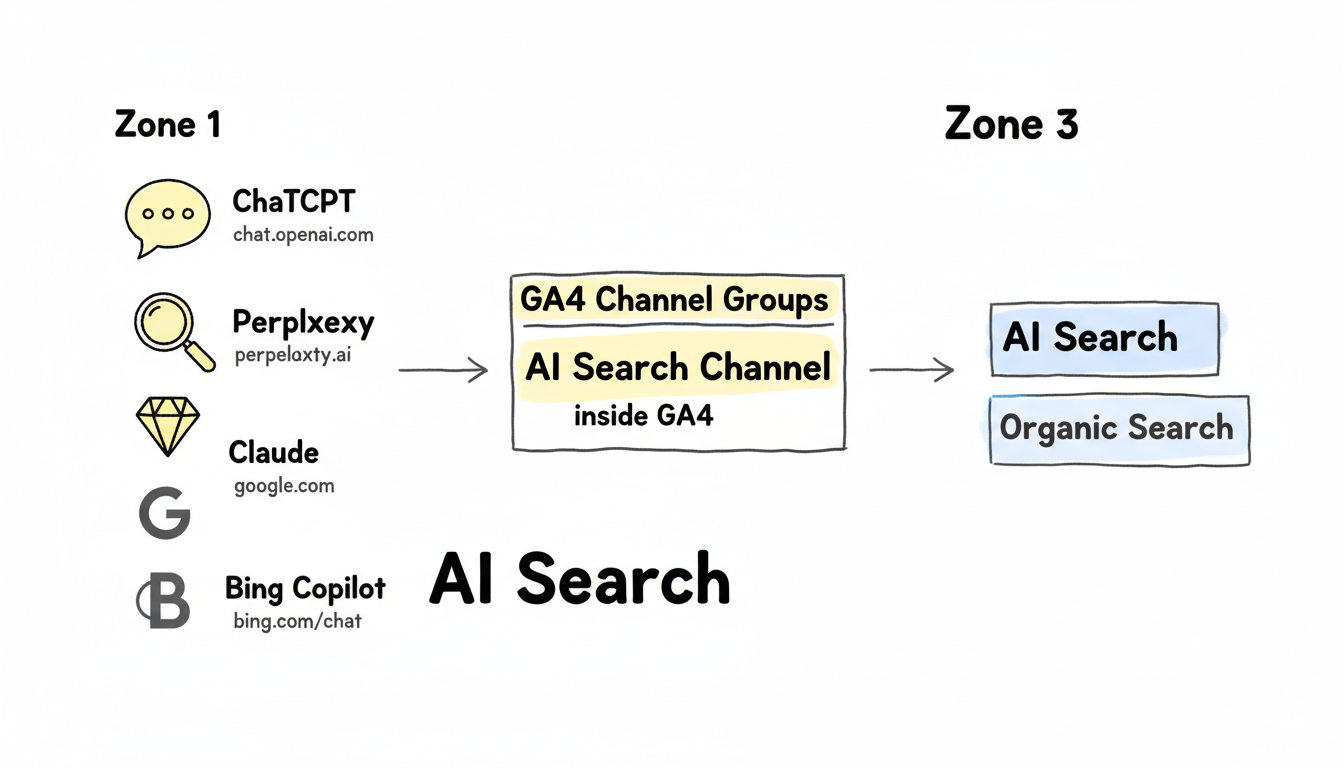
Identify AI Traffic Sources
Configure traffic source recognition for major AI platforms.
Key referral sources to track:
AI Platform | Referral Patterns | How to Identify |
ChatGPT | chat.openai.com, chatgpt.com | Direct referral |
Perplexity | perplexity.ai | Direct referral |
Claude | claude.ai | Direct referral |
Google AI | google.com (with AI parameters) | UTM or behavior patterns |
Bing Copilot | bing.com/chat | Referral path analysis |
Create Custom Channel Groupings
Separate AI traffic from organic search in GA4.
Setup steps:
- Navigate to Admin > Data Display > Channel Groups
- Create new channel group: "AI Search"
- Add source conditions for each AI platform
- Set priority above organic search grouping
Example channel rules:
Channel: AI Search
Conditions (OR):
- Source contains "chat.openai"
- Source contains "perplexity"
- Source contains "claude.ai"
- Source equals "chatgpt.com"
Create reusable segments for ongoing analysis.
Recommended segments:
Segment Name | Definition | Purpose |
All AI Traffic | Combined AI sources | Total AI visibility |
ChatGPT Traffic | chat.openai.com only | Platform-specific analysis |
Perplexity Traffic | perplexity.ai only | Platform comparison |
AI Converters | AI traffic + conversion | ROI measurement |
Custom Event Tracking
Standard GA4 events don't capture AEO-specific interactions.
Track Content Citations
Monitor when AI-optimized content receives visits.
Implementation approach:
- Tag pages with AEO optimization status using dataLayer
- Create custom event for AEO page views
- Compare performance: optimized vs. non-optimized
DataLayer implementation:
// Add to AEO-optimized pages
window.dataLayer = window.dataLayer || [];
dataLayer.push({
  'event': 'aeo_page_view',
  'aeo_status': 'optimized',
  'content_type': 'faq',
  'schema_types': ['FAQPage', 'Article']
});
Track deeper engagement from AI referrals. Understanding AI search ranking factors helps determine which engagement signals matter most for optimization efforts.
Custom events to implement:
Event | Trigger | Value |
aeo_scroll_depth | 75% scroll on AI traffic | Engagement quality |
aeo_time_threshold | 2+ minutes from AI source | Content relevance |
aeo_internal_click | Navigation from AI landing | Journey continuation |
aeo_conversion | Goal completion from AI | Business impact |
Search Console Integration
Connect Search Console data to understand how AI visibility affects traditional search.
Set Up API Access
Pull Search Console data programmatically for correlation analysis.
Required setup:
- Enable Search Console API in Google Cloud Console
- Create service account with appropriate permissions
- Connect to data warehouse or spreadsheet
Track Branded Search Impact
Monitor whether AI citations drive branded search increases.
Correlation tracking approach:
- Pull weekly branded search impressions and clicks
- Compare trends against AI citation frequency
- Calculate correlation coefficients monthly
Zero-Click Search Measurement
Not all AI visibility translates to clicks. In the AI context, zero-click searches occur when users receive answers directly from AI Overviews or chatbot responses without visiting the source page. This represents visibility without traffic, and it requires its own measurement approach.
Use Search Console impression data as a proxy: look for keywords with high impressions but near-zero clicks. These "impression-only" keywords indicate your content is being surfaced by AI systems even when users do not click through. Track these as an AEO-specific KPI alongside traditional click-based metrics. The ratio of impression-only keywords to total tracked keywords provides a zero-click visibility score you can monitor over time.
Monitoring AI Crawler Activity
Understanding which pages AI bots prioritize gives you a leading indicator of future AI citation potential, before you can even measure downstream traffic. Server log analysis reveals crawl patterns that analytics tools cannot capture.
The key AI crawlers to monitor are GPTBot (OpenAI), ClaudeBot (Anthropic), PerplexityBot, Google-Extended (Gemini), and Bytespider (ByteDance). Each uses a distinct user-agent string in HTTP requests to your server.
To filter server logs for AI bot activity, search your access logs for these user-agent strings. For example, in Apache or Nginx logs, filter lines containing "GPTBot" or "ClaudeBot" to isolate AI crawler requests. Track which URLs are crawled most frequently and how crawl patterns change over time.
For log analysis tooling, Screaming Frog Log Analyzer provides a visual interface for parsing large log files and filtering by bot type. GoAccess is a free, open-source alternative for command-line analysis. For more advanced setups, you can fire custom GA4 events via server-side tagging when AI crawlers are detected, feeding this data directly into your AEO dashboard.
Connect crawler data to your analytics by tracking crawl frequency trends as a leading indicator. Pages that see increasing AI bot crawl rates often show improved AI citation visibility within weeks. Add a "Crawler Activity" panel to your AEO dashboard showing weekly crawl counts by bot type alongside your traffic and citation metrics.
Third-Party AEO Tracking Tools
Dedicated tools fill gaps in standard analytics. Platforms like AEO optimization software provide specialized tracking capabilities beyond what general analytics tools offer. For a comprehensive comparison, see our guide to AEO tools and software.
AI Visibility Monitoring Platforms
Several platforms now specialize in tracking AI mentions and citations. Here are the leading options:
- Profound -- AI visibility monitoring with citation tracking across ChatGPT, Perplexity, and Google AI Overviews. Provides automated alerts when your brand is cited or dropped.
- Otterly.AI -- Automated AI search monitoring that tracks brand mentions in LLM responses across multiple platforms with historical trend analysis.
- Semrush AI Toolkit -- AI visibility features integrated within the broader SEO platform, useful for teams already using Semrush for traditional SEO.
- Ahrefs Entity Tracking -- Entity-level monitoring for semantic search presence, tracking how AI systems associate your brand with target topics.
- Peec AI -- AEO audit and optimization scoring tool that grades your content readiness for AI citation and suggests improvements.
For tracking whether AI platforms are actually citing your specific pages, dedicated AI citation tracking tools provide the most granular visibility data.
Tool categories:
Category | Function | Setup Requirement |
Brand monitoring | Track mentions across AI platforms | API integration or manual queries |
Citation tracking | Monitor source attribution | Regular platform queries |
Competitive analysis | Compare visibility vs. competitors | Platform subscription |
Manual Tracking Protocols
When automated tools aren't available, structured manual tracking works.
Weekly manual audit process:
- Query 20-30 priority keywords across ChatGPT, Perplexity, Claude
- Document citation presence (yes/no/partial)
- Record competitor citations for same queries
- Calculate week-over-week changes
Tracking spreadsheet structure:
Keyword | Platform | Cited | Position | Competitors | Date |
[query] | ChatGPT | Yes | 1st source | competitor.com | [date] |
[query] | Perplexity | No | - | other.com | [date] |
Dashboard Construction
Build dashboards that surface actionable AEO insights.
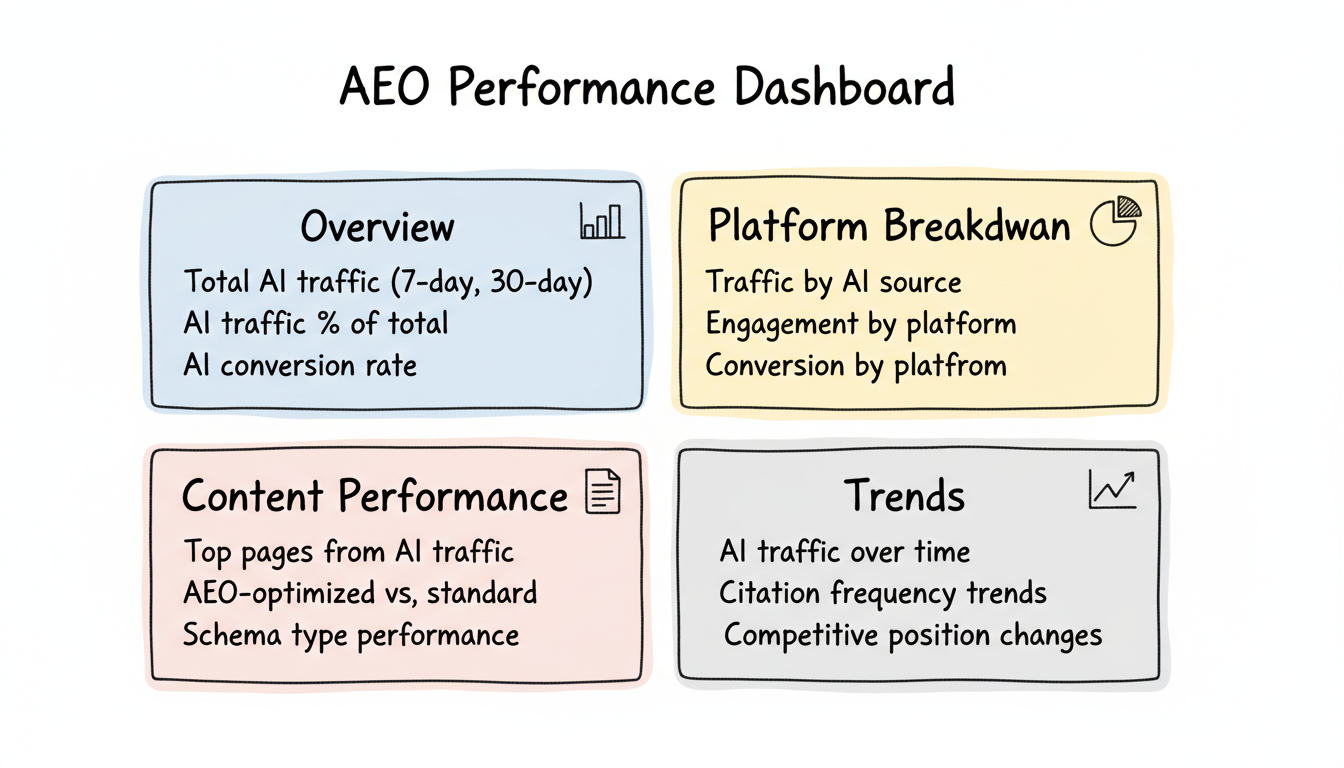 For Perplexity-specific tracking, Perplexity SEO optimization strategies require dedicated dashboard views to monitor citation patterns and traffic quality.
Essential Dashboard Views
Create views answering key questions.
Recommended dashboard structure:
AEO Performance Dashboard
├── Overview
│   ├── Total AI traffic (7-day, 30-day)
│   ├── AI traffic % of total
│   └── AI conversion rate
│
├── Platform Breakdown
│   ├── Traffic by AI source
│   ├── Engagement by platform
│   └── Conversion by platform
│
├── Content Performance
│   ├── Top pages from AI traffic
│   ├── AEO-optimized vs. standard
│   └── Schema type performance
│
└── Trends
    ├── AI traffic over time
    ├── Citation frequency trends
    └── Competitive position changes
Conversion Benchmarks for AI Traffic
When interpreting your dashboard data, context matters. Early data from sites tracking AI referral traffic shows that visitors from AI platforms convert at significantly higher rates than traditional organic traffic, with some case studies reporting 3-6x higher conversion rates. However, AI traffic volumes remain relatively small, typically representing 1-5% of organic traffic, though this share is growing rapidly quarter over quarter. Set baseline KPIs for your dashboard: AI referral sessions, AI-attributed conversions, and branded search lift percentage. These three metrics together give you a clear picture of AEO ROI.
Build custom explorations for AEO analysis.
Setup explorations for:
- AI traffic funnel analysis (landing → engagement → conversion)
- Cohort analysis (AI visitors returning over time)
- Path analysis (AI traffic navigation patterns)
Attribution Setup
Configure attribution to credit AI traffic appropriately.
Multi-Touch Attribution
AI often assists conversions completed through other channels.
Configuration considerations:
- Include AI referrals in attribution models
- Test different attribution windows
- Compare first-touch vs. last-touch for AI traffic
Community Consensus Signals
AI platforms increasingly reference community consensus when generating answers. Track brand mentions across Reddit, forums, and review platforms (such as G2 and Capterra) as leading indicators of AI citation likelihood. When your brand appears consistently in community discussions around target topics, AI systems are more likely to reference you in responses. Include subreddit mention monitoring and forum thread tracking as part of your monthly AEO audit to capture this indirect but influential signal.
Conversion Value Assignment
Assign values to AI-driven conversions for ROI calculation.
Implementation:
- Define conversion values in GA4
- Apply to AI traffic segments
- Calculate cost-per-citation for AEO investment ROI
Testing Your Setup
Verify tracking works before relying on data.
Validation Checklist
Component | Test Method | Expected Result |
AI referral detection | Visit from AI link | Appears in AI channel |
Custom events | Trigger event manually | Event appears in realtime |
Segments | Apply to historical data | Reasonable numbers |
Dashboard | Review all visualizations | Data populates correctly |
Common Setup Errors
Issues to check:
- Filters excluding AI traffic accidentally
- Channel grouping priority incorrect
- Event names inconsistent between implementation and GA4
- Segment definitions too narrow or broad
Maintenance Schedule
Analytics setup requires ongoing maintenance.
Monthly tasks:
- Verify AI source patterns still accurate (platforms add new domains)
- Check custom event firing rates
- Update dashboards with new metrics
Quarterly tasks:
- Review and update channel groupings
- Audit tracking implementation on key pages
- Validate attribution model performance
Frequently Asked Questions
What Kpis Should I Track for AEO Analytics?
The core AEO KPIs are AI referral sessions (traffic from ChatGPT, Perplexity, Claude, and Copilot), AI-attributed conversions, branded search lift percentage, and AI crawler frequency. Track these weekly in your GA4 dashboard using custom channel groupings. Also monitor Search Console impression-to-click ratios for zero-click visibility and content retrievability scores from AEO audit tools.
How Do I Track AI Search Traffic in Google Analytics 4?
Create a custom channel grouping in GA4 that filters referral traffic from AI platform domains including chat.openai.com, perplexity.ai, claude.ai, and copilot.microsoft.com. Set up custom events using the dataLayer to track engagement metrics specific to AI-referred visitors, such as scroll depth and time-on-page thresholds. This gives you a dedicated AI traffic segment for analysis.
What Is the Difference Between AEO Analytics and Traditional SEO Analytics?
Traditional SEO analytics focus on ranking positions, organic click-through rates, and keyword-driven traffic. AEO analytics measure whether AI platforms cite your content in their responses, which involves tracking AI bot crawl activity, referral traffic from chatbots and answer engines, zero-click impressions, and branded search correlation. AEO also requires monitoring content retrievability to ensure AI systems can access your pages.
Which AI Crawlers Should I Monitor in My Server Logs?
Monitor GPTBot (OpenAI), ClaudeBot (Anthropic), PerplexityBot, Google-Extended (Gemini), and Bytespider (ByteDance). These crawlers index your content for use in AI-generated responses. Check your server access logs for their user-agent strings and track crawl frequency trends over time. Increasing crawl rates often precede improvements in AI citation visibility for your content.
Key Takeaways
Set up AEO analytics systematically:
- Configure GA4 first - Create AI channel groupings and segments
- Implement custom events - Track AEO-specific interactions beyond pageviews
- Integrate Search Console - Correlate AI visibility with branded search
- Use specialized tools - Fill gaps with dedicated monitoring platforms
- Build actionable dashboards - Surface insights that drive decisions
- Maintain ongoing - Update tracking as platforms and patterns change
Analytics setup transforms AEO from guesswork to data-driven optimization. Invest time in proper configuration to measure what matters.