
Can'T Generate an AI Overview Right Now: Fixes for the Try Again Later Error
The "can't generate an AI overview right now, try again later" message almost always means a transient Google server-side failure stopped generation mid-query. The fastest fix is to refresh the page or re-run the search after a few minutes; most errors clear on their own without any change to your account or settings.
This is the troubleshooting guide for the specific generation error users see inside the AI Overview panel. If your question is instead "why do I never see AI Overviews at all," that is a visibility problem - covered in our companion post on why Google AI Overviews are not showing up. If you have never had the feature on, start with the activation guide for Google AI Overviews.
TL;DR: Why Google Says It Can'T Generate an AI Overview
- Transient server failure (most common): Google's AI generation backend timed out or hit a capacity limit. Wait two to five minutes and retry the search.
- Query not eligible: Some queries can't safely generate an overview - medical, legal, financial YMYL, or breaking news. Rephrase the query or accept that no overview will appear.
- Network or session issue: A dropped connection or stale cookies can break the panel mid-generation. Reload, clear Google cookies, or try an incognito window.
- Browser extension interference: Ad blockers and "hide AI Overview" extensions strip or block the panel. Disable them and retry.
- Region or rollout gap: AI Overviews are not available in every market. An unsupported region can return the error instead of an overview.
- "Something went wrong, the content wasn't generated": A companion error string with the same root causes and the same fixes.
AI Overview Error Causes and Fixes at a Glance
| Cause | Likelihood | Fix |
|---|---|---|
| Transient server-side generation failure | Very high | Wait 2-5 minutes and re-run the search |
| Query is YMYL, sensitive, or not eligible | High | Rephrase to a broader informational query or accept no overview |
| Ad blocker or "hide AI Overview" extension | Medium | Disable the extension, reload in incognito |
| Stale session or corrupted Google cookies | Medium | Clear google.com cookies, sign back in, retry |
| Unstable or slow connection | Low-medium | Switch networks or reload once the connection stabilizes |
| Region does not support AI Overviews | Low (if you usually see them) | Use a supported region or wait for rollout |
| Google-wide AI Overview outage | Low | Check Google's status page and wait for resolution |
What Does The "Can'T Generate an AI Overview" Error Mean?
The message appears inside the AI Overview panel itself, after Google has already decided to show one. It means the generation step - the part where Google's model synthesizes an answer from retrieved sources - failed or was abandoned. The feature is on and the query was eligible, but the single attempt to produce the summary did not complete. In most cases this is a transient failure on Google's side, not something you did wrong.
A near-identical message, "something went wrong, the content wasn't generated," points to the same failure. Both are generation errors, distinct from the visibility problem of never seeing an AI Overview at all.
Why Does Google Say "Try Again Later"?
"Try again later" is Google's generic retry prompt for a non-permanent failure. The most common driver is capacity or latency on the AI generation backend: when demand spikes, individual generation requests time out and the panel falls back to the retry message instead of an answer. It can also fire when the model could not safely assemble an answer for a borderline query - for example a medical, legal, or rapidly changing news topic where the retrieval step returned conflicting or low-confidence sources.
The wording is deliberately vague because Google does not expose which sub-system failed. Treat it as a signal to retry once, then investigate only if the error repeats for the same query across multiple sessions.
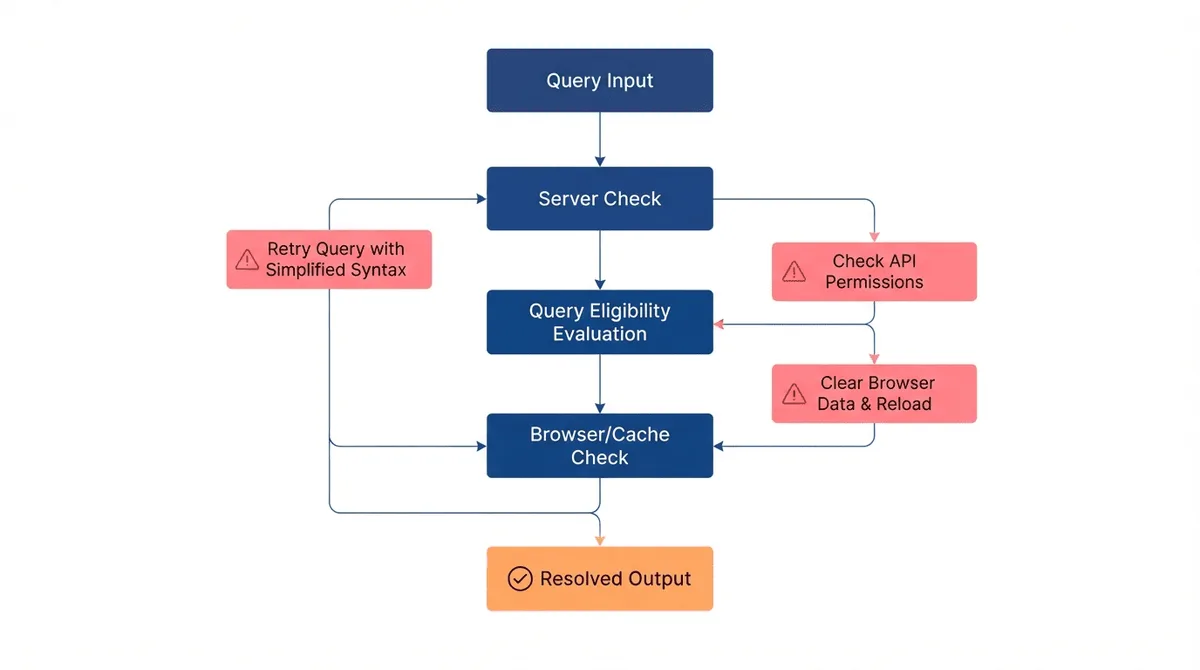
How Do I Fix the AI Overview Generation Error?
Work through these steps in order. Stop at the first one that resolves the error.
- Wait and retry. Wait two to five minutes, then refresh the results page or re-run the search. Transient server failures clear on their own the majority of the time.
- Reload in an incognito or private window. This rules out browser extensions and stale session state in one step. If the overview generates in incognito, an extension or cookie is the culprit.
- Disable ad blockers and AI-overview-hiding extensions. uBlock Origin, AdGuard, privacy extensions, and "hide AI Overview" add-ons can block the scripts that build the panel. Turn them off for google.com and reload.
- Clear your Google cookies and sign back in. Corrupted session cookies can break the panel mid-generation. Clear cookies for google.com, sign in again, and retry.
- Check your connection. A slow or intermittent connection can cause the generation request to time out. Switch to a stable network and reload.
- Rephrase the query. If the same query fails repeatedly but others work, the query itself may be borderline or ineligible. Broaden it to a more general informational phrasing.
- Confirm your region supports AI Overviews. If you are traveling or on a VPN, an unsupported region can return the error. Point your VPN at a supported region or check from a known-supported location.
- Check for a Google-wide outage. If every query fails across devices and accounts, check Google's Workspace status page and Downdetector. Wait for Google to resolve it.
Is the AI Overview Error Permanent?
Almost never. The "can't generate an AI overview right now, try again later" error is designed to be temporary - that is the entire point of the "try again later" phrasing. The vast majority of cases resolve on a retry within minutes. An error that persists for the same query across days usually means that specific query is ineligible for an AI Overview (often a YMYL or sensitive topic), not that the feature is broken for you.
If AI Overviews have stopped appearing for every query, that is a different problem - read our guide on why Google AI Overviews are not showing up.
Does the Error Mean My Site Isn'T Being Cited?
No. The error describes a failure to generate an overview for the searcher, not a judgment about your site. Citation eligibility depends on your content, schema, and authority signals - not on whether a single generation attempt happened to fail. If overviews generate for other queries and your pages meet Google's quality bar, your site can still be cited when generation succeeds.
If you want to improve the odds of being cited once generation works, focus on the fundamentals in our AI Overviews activation guide and the visibility troubleshooting linked above.
Frequently Asked Questions
What Does "Can'T Generate an AI Overview Right Now, Try Again Later" Mean?
It means Google's AI generation step failed for that specific search, usually because of a transient server-side error or capacity limit. The overview feature is still on; the single generation attempt just did not complete. Retrying after a few minutes resolves it most of the time.
How Long Should I Wait Before Retrying the AI Overview?
Wait two to five minutes first. If the error persists after a second retry, clear your Google cookies, disable ad-blocking extensions, and try an incognito window. Errors that last longer than an hour usually point to a regional or query-eligibility limit, not a temporary outage.
Does "Something Went Wrong, the Content Wasn'T Generated" Mean the Same Thing?
Yes. "Something went wrong, the content wasn't generated" is a companion error string for the same failure - Google could not safely produce an AI Overview for that query. The causes and fixes are identical: retry, simplify the query, and rule out extensions or connection issues.
Can a Browser Extension Cause the AI Overview Error?
It can. Ad blockers, privacy extensions, and "hide AI Overview" add-ons can block the scripts that build the panel, which surfaces as a generation error or a missing overview. Disable them, reload in an incognito window, and retry to confirm.
Does This Error Mean My Website Is Not Being Cited in AI Overviews?
No. The error is about Google failing to generate an overview for the searcher, not about your site being excluded. If generation succeeds for other queries and your pages are eligible, your site can still be cited. See our guide on AI Overviews not showing up for visibility troubleshooting.
Key Takeaways
- The "can't generate an AI overview right now, try again later" message is almost always a transient Google server-side failure - retry first.
- If retry fails, rule out extensions, stale cookies, and connection issues using incognito mode.
- A query that fails repeatedly is usually ineligible (YMYL, sensitive, or breaking news), not broken.
- "Something went wrong, the content wasn't generated" is the same error with the same fixes.
- The error is about generation failing for the searcher, not about your site being excluded from citations.