
AI-powered search is transforming customer support from a cost center into a competitive advantage. When customers can find answers instantly—without waiting for agent responses—satisfaction increases while support costs decrease.
According to HeroHunt's industry analysis, 80% of customer service interactions are expected to be handled by AI by 2025, with that percentage continuing to climb in 2026. The question isn't whether to implement AI search in customer support—it's how to do it effectively.
This guide covers the leading AI search platforms for help desks, implementation strategies, and how to measure ROI.
What Is AI Search for Customer Support?
AI search for customer support goes beyond keyword matching. It uses natural language processing (NLP) and machine learning to understand customer intent, search knowledge bases semantically, and deliver accurate answers—even when customers phrase questions in unexpected ways.
It is important to distinguish AI search assistants from AI search engines. AI search assistants are internal, knowledge-base-connected, and action-capable tools deployed within support workflows. AI search engines—such as Perplexity or Google AI Overview—are public-facing web search tools designed for general information retrieval. Before AI search, support automation relied on RPA for repetitive tasks and rigid IVR phone trees, both limited by rule-based logic that could not adapt to natural language. The stakes are high: Forbes estimates that poor customer support costs businesses $75 billion annually in the U.S. alone.
Core capabilities include:
- Semantic search: Understanding meaning rather than matching exact keywords
- Intent detection: Recognizing what customers actually need versus what they literally type
- Knowledge base integration: Pulling answers from documentation, FAQs, and past tickets
- Conversational responses: Delivering answers in natural language rather than link lists
According to Knowmax's 2026 analysis, the most effective AI customer service implementations combine help desk software with AI knowledge management—creating systems that both find and deliver the right information at the right time. The way AI retrieves and surfaces knowledge is closely tied to how structured data for AI search enables machines to parse and understand content. These capabilities are central to how AI SEO works in understanding user intent and delivering relevant content.
Top AI Search Platforms for Help Desks
The customer support software market has rapidly integrated AI capabilities. Here's how the leading platforms compare, including options for teams evaluating AI search tools and software.
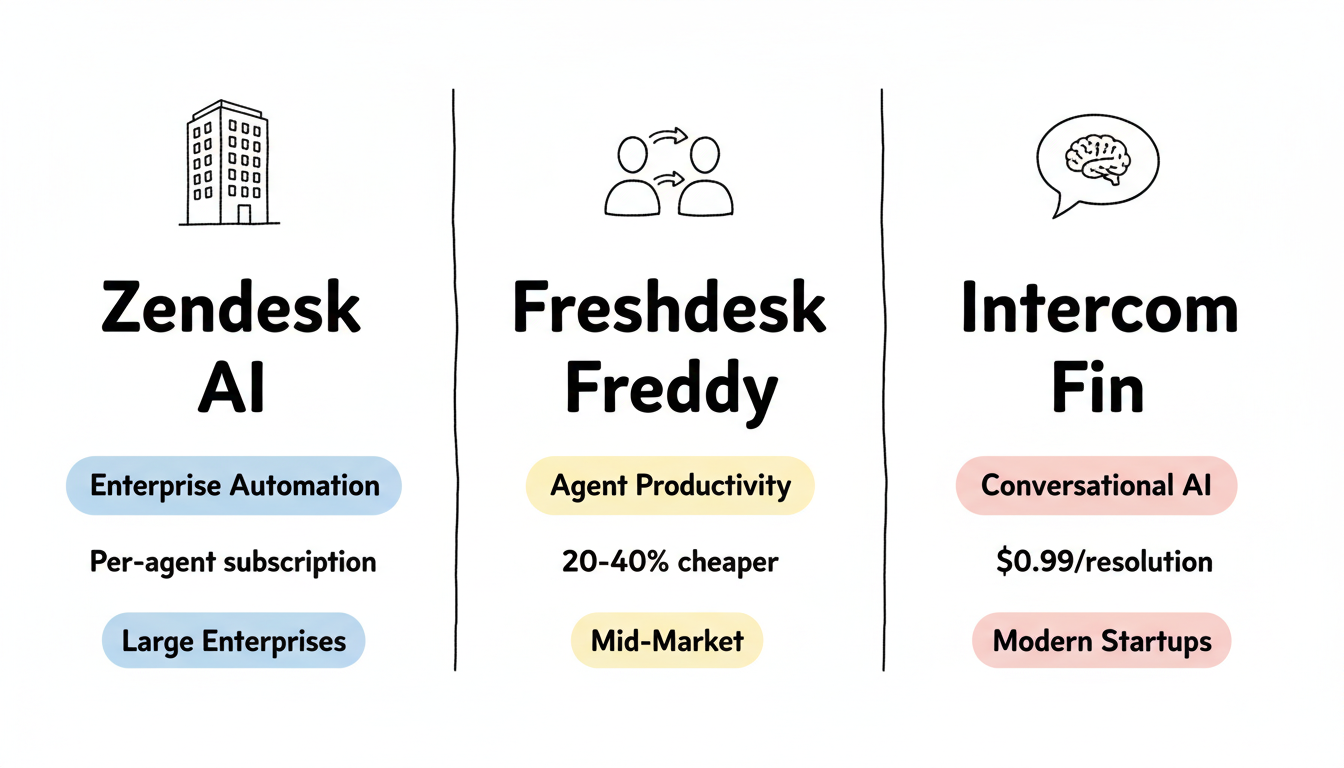
Zendesk AI
Zendesk's AI features focus on enterprise scalability and intelligent routing.
Key features:
- Answer Bot for automated responses
- AI-powered intent detection and ticket routing
- Knowledge base suggestions for agents
- Advanced analytics and reporting
According to SmartRole's help desk comparison, Zendesk excels at handling high-volume enterprise support with sophisticated automation rules.
Best for: Large enterprises with complex support workflows and existing Zendesk investments.
Freshdesk with Freddy AI
Freshdesk offers Freddy AI as its intelligent assistant across the support workflow.
According to HiverHQ's platform analysis, Freshdesk is 20-40% cheaper than Zendesk while offering comparable AI capabilities for small to mid-sized teams.
Key features:
- Freddy AI for ticket suggestions and canned responses
- Auto-triage and priority assignment
- Agent assist with response recommendations
- Self-service portal with AI search
Best for: Small to mid-sized companies wanting enterprise-level AI at lower costs.
Intercom Fin
Intercom Fin represents the new generation of AI-native support agents.
According to DevRev's platform comparison, Intercom Fin is powered by GPT-4 and offers resolution-based pricing at $0.99 per resolution, with base plans starting at $39/seat/month. This reflects broader trends in generative AI SEO optimization where advanced language models are being deployed for specialized search applications.
Key features:
- GPT-4 powered conversational AI
- Automatic knowledge base training
- Seamless human handoff
- Pay-per-resolution pricing model
Best for: Companies wanting cutting-edge conversational AI with predictable per-resolution costs.
Salesforce Agentforce and Service Cloud
Salesforce Agentforce is the market-leading AI customer support platform, combining the depth of Service Cloud with autonomous AI agents that go beyond simple chatbot interactions. Agentforce enables end-to-end service workflows where AI agents handle complete customer requests—from initial query through resolution—without human intervention.
Key capabilities include Einstein Bots for front-line deflection, which handle common questions and route complex issues intelligently. Agentforce takes this further with autonomous multi-step resolution: it can look up orders, process returns, update account details, and escalate edge cases—all within a single conversation. Salesforce's case classification engine auto-routes tickets by topic, urgency, and language, ensuring the right query reaches the right resource instantly.
The results are significant. Salesforce reports that 85% of queries are handled without human intervention and response times drop by 65% in mature deployments. The platform's deep CRM integration gives AI agents access to customer 360 data—purchase history, account tier, prior interactions—enabling highly personalized responses that generic knowledge base lookups cannot match.
Agentforce embodies the "digital labor" concept: AI agents that function as scalable, always-on team members rather than simple deflection tools. For enterprises already in the Salesforce ecosystem, the integration advantage is substantial. Teams evaluating alternatives outside the big three helpdesks should also consider Ada, Sierra, Kore.ai, and Forethought as dedicated AI-first platforms.
Best for: Enterprises in the Salesforce ecosystem needing deep CRM integration and autonomous AI workflows.
Platform Comparison
Platform | AI Capability | Pricing Model | Best For |
Zendesk AI | Enterprise automation | Per-agent subscription | Large enterprises |
Freshdesk Freddy | Agent productivity | Per-agent (20-40% cheaper) | Mid-market |
Intercom Fin | Conversational AI | $0.99/resolution + $39/seat | Modern startups |
Salesforce Agentforce | Autonomous AI + CRM | Per-org subscription | Salesforce enterprises |
Beyond Answers: AI Actions and Task Execution
The most significant evolution in AI customer support is the shift from systems that only retrieve answers to systems that execute tasks. Modern AI search platforms can perform order lookups, update account details, process subscription changes, and initiate refunds—all through API integrations triggered directly within the customer conversation. This eliminates the handoff to a human agent for routine transactional requests.
Equally important is the rise of self-learning AI that trains continuously from resolved tickets. Rather than remaining static after initial deployment, these systems analyze patterns in successfully closed tickets to auto-suggest resolutions for similar future queries. Platforms like eesel AI and Helply use past ticket data to identify recurring issues and surface proven answers before agents even open a case.
Context-aware response generation takes this further. Instead of returning generic knowledge base results, modern AI search factors in customer history, product ownership, account tier, and prior interactions. A premium customer asking about a billing discrepancy receives a different—and more informed—response than a new trial user with the same question. The AI draws from CRM data, order history, and interaction logs to personalize every answer.
These action-capable, self-learning, context-aware systems significantly reduce the need for agent handoffs. When AI can resolve multi-step requests end-to-end—verifying identity, looking up order status, processing a return, and confirming the refund—the support interaction is complete without ever reaching a human queue.
Omni-Channel AI Search: Unifying Voice, Chat, Email, and Social
Customers expect consistent support whether they reach out via live chat, email, phone, WhatsApp, Facebook Messenger, SMS, or social media. Omni-channel AI search ensures the same knowledge base and AI capabilities power every channel, eliminating the frustration of getting different answers depending on how a customer contacts support.
Voice AI is modernizing legacy IVR systems. Instead of rigid phone trees that force callers through numbered menus, AI-powered voice understands natural speech and resolves or routes queries using the same knowledge base as chat and email. This represents a fundamental shift in how businesses approach voice search optimization strategies—applied not just to web search but to customer service phone systems.
Sentiment analysis serves as an omni-channel triage layer. AI detects frustration, urgency, or confusion in both text and voice interactions and escalates high-emotion tickets to human agents automatically. A customer typing in all caps with exclamation marks, or a caller whose voice pitch and pace signal distress, gets routed to a live agent rather than cycling through automated responses.
Multilingual support is a critical omni-channel requirement. Natural language understanding (NLU) and named entity recognition (NER) enable AI bots to serve customers in 30+ languages without maintaining separate knowledge bases per locale. A single knowledge base powers responses in English, Spanish, Japanese, and dozens of other languages, with the AI handling translation and cultural context. Salesforce Service Cloud, Zendesk, and Intercom all offer omni-channel AI routing as a core feature in their enterprise tiers.
Implementing AI Search in Customer Support
Successful AI search implementation requires more than software installation. Follow this framework to maximize results.
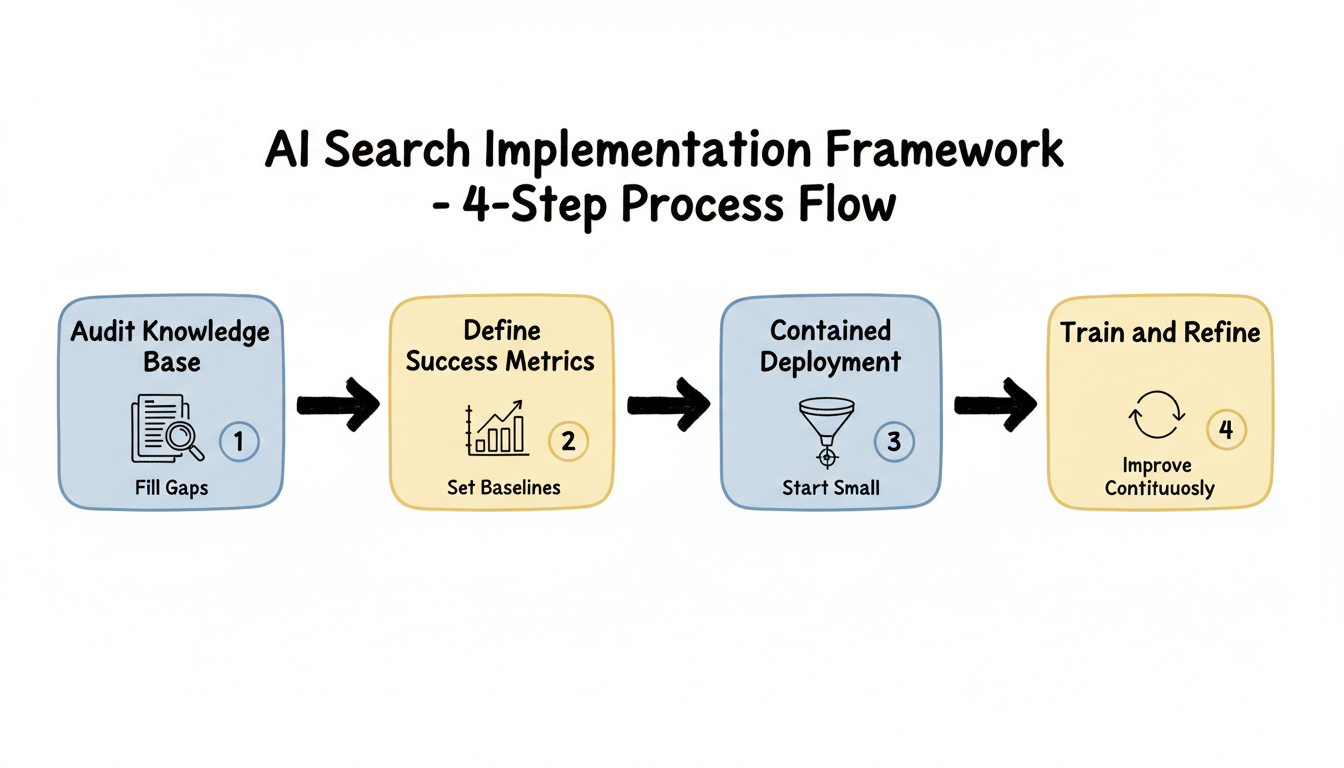
Step 1: Audit Your Knowledge Base
AI search is only as good as the knowledge it can access. Before implementation:
- Document coverage gaps: Which customer questions lack documented answers?
- Update outdated content: AI will confidently serve wrong answers from stale docs
- Standardize formatting: Consistent structure helps AI extract information
- Remove duplicates: Conflicting information confuses AI systems
Step 2: Define Success Metrics
Establish baseline metrics before implementation:
Metric | Pre-AI Baseline | Target |
First response time | Measure current | 50-70% reduction |
Self-service resolution rate | Measure current | 30-50% improvement |
Customer satisfaction (CSAT) | Measure current | Maintain or improve |
Cost per ticket | Calculate current | 20-40% reduction |
Step 3: Start with Contained Deployment
Don't enable AI across all channels immediately:
- Begin with self-service: Let AI power your help center search first
- Add chat gradually: Enable AI chat on select pages
- Keep human oversight: Require agent review of AI suggestions initially
- Expand based on accuracy: Only scale what's working
Step 4: Train and Refine
AI search improves through feedback:
- Review failed searches: What queries returned poor results?
- Analyze escalations: When did AI fail to resolve issues?
- Update knowledge base: Add content addressing gaps
- Tune confidence thresholds: Adjust when AI should escalate to humans
ROI: What to Expect from AI Search
According to Gartner, 70% of customers prefer self-service for support inquiries, yet only 9% successfully resolve issues through traditional self-service portals. AI search closes this gap by making self-service actually work—understanding natural language queries and delivering precise answers rather than forcing customers through rigid FAQ structures.
AI search investments deliver measurable returns when implemented correctly. Consider the economics: a 25-person support team averaging $15–$21 per ticket that achieves 50–70% deflection through AI search can save $375K–$525K annually. These are not theoretical projections—they follow the ServiceTarget ROI model validated across mid-market deployments. Tracking these savings alongside broader marketing effectiveness metrics, such as those used in AI citation tracking tools, helps teams measure the full impact of AI search on customer experience.
Klarna Case Study
According to HeroHunt's analysis, Klarna's AI assistant handles the equivalent of 700 full-time human agents' workload. This represents massive cost savings while maintaining customer satisfaction.
Typical ROI Metrics
Investment Area | Expected Return |
Self-service deflection | 30-50% ticket reduction |
Agent productivity | 20-30% more tickets handled |
First response time | 50-70% faster |
Cost per resolution | 20-40% lower |
When ROI Takes Longer
Certain conditions delay returns:
- Poor knowledge base: AI can't find answers that don't exist
- Complex products: Some queries genuinely require human expertise
- Legacy system integration: Technical debt slows implementation
- Change management: Agent adoption resistance limits productivity gains
Common Implementation Mistakes
Avoid these pitfalls when deploying AI search.
Mistake 1: Skipping Knowledge Base Preparation
AI amplifies existing content quality—good and bad. Teams that launch AI search without auditing their knowledge base often see worse customer satisfaction as AI confidently delivers outdated or incorrect information. This is similar to challenges in landing page optimization for AI search where content quality directly impacts results.
Mistake 2: Over-Automating Too Fast
According to Pylon's 2026 guide, legacy support tools have "bolted-on AI" that feels disconnected from customer experience. Gradual rollout with human oversight prevents negative customer experiences from immature AI responses.
Mistake 3: Ignoring Agent Training
AI search changes agent workflows. Without proper training:
- Agents duplicate AI work instead of complementing it
- AI suggestions get ignored despite being accurate
- Escalation paths become unclear
Mistake 4: Wrong Metrics Focus
Measuring only cost reduction misses the point. Customer satisfaction and resolution quality matter as much as ticket deflection rates.
Mistake 5: Big-Bang Rollout
Attempting to deploy AI search across all channels and teams simultaneously is a recipe for failure. ServiceTarget recommends a 4-phase, 12-week implementation: (1) knowledge audit and preparation, (2) contained pilot on one channel, (3) expansion to additional channels, and (4) optimization based on analytics. This phased approach lets teams identify issues early, build internal confidence, and adjust configuration before full-scale deployment.
Choosing the Right Platform
Select based on your specific situation:
Choose Zendesk AI if:
- You already use Zendesk products
- Enterprise-scale support volume
- Complex routing and automation needs
- Budget supports premium pricing
Choose Freshdesk Freddy if:
- Mid-sized team (10-100 agents)
- Cost sensitivity is a factor
- Need solid AI without cutting-edge features
- Value simple implementation
Choose Intercom Fin if:
- Want latest conversational AI technology
- Prefer pay-per-resolution pricing model
- Customer base expects chat-first support
- Comfortable with newer platforms
Whichever platform you choose, prioritize knowledge gap detection—the ability for AI to identify questions it cannot answer and flag missing documentation for content teams to fill. Platforms like GrooveHQ (Knowledge Bridge) and ServiceTarget offer search analytics dashboards that surface content gaps, failed queries, and trending topics. These insights enable continuous improvement of the knowledge base and ensure AI search accuracy improves over time rather than stagnating. Applying AEO optimization best practices to your knowledge base further ensures content is structured for AI discoverability.
Key Takeaways
AI search transforms customer support economics when implemented thoughtfully:
- Knowledge base quality determines AI quality: Audit and update before deploying AI search
- Start contained, expand based on results: Self-service first, then chat, then full automation
- Platform choice matters less than implementation: All major platforms offer capable AI—execution determines success
- Resolution-based pricing changes economics: Intercom Fin's $0.99/resolution model offers predictable costs for variable volumes
- Human oversight remains essential: Even the best AI needs escalation paths and agent review
The 80% AI-handled interaction future is arriving. Companies implementing AI search effectively now will have significant advantages over those waiting on the sidelines.
Frequently Asked Questions About AI Search for Customer Support
Can AI Fully Replace Human Customer Support Agents?
No — AI augments rather than replaces agents. Current best-in-class systems handle 50–85% of routine queries autonomously, but complex issues, emotional situations, and edge cases still require human judgment. The most effective deployments use sentiment analysis to route high-emotion tickets to humans automatically, ensuring customers who need empathy and nuanced problem-solving always reach a live agent.
Which AI Platform Is Best for Customer Service?
It depends on your stack and scale. Salesforce Agentforce suits enterprises in the Salesforce ecosystem with its deep CRM integration. Zendesk AI and Intercom Fin are strong choices for mid-market teams prioritizing automation and conversational AI respectively. For startups, Freshdesk Freddy AI offers competitive features at lower cost. Ada, Sierra, and Forethought are dedicated AI-first alternatives worth evaluating for teams that want best-of-breed AI without committing to a full helpdesk suite.
What Is the Typical Ticket Deflection Rate with AI Search?
Most organizations achieve 50–70% ticket deflection within 6 months of deploying AI search. For a 25-person support team averaging $15–$21 per ticket, this translates to $375K–$525K in annual savings. However, deflection rates depend heavily on knowledge base quality—teams that skip the content audit phase typically see 20–30% lower results. Starting with a thorough knowledge audit is the single biggest factor in achieving top-tier deflection rates.
How Does AI Search Differ from Traditional Chatbots?
Traditional chatbots follow scripted decision trees and fail when customers deviate from expected inputs. AI search uses natural language understanding (NLU) to interpret intent, retrieves answers semantically from knowledge bases, and can execute actions like order lookups or account updates through API integrations. It also learns from past tickets to improve over time, whereas traditional chatbots remain static unless manually reprogrammed.