
LinkedIn offers multiple ad formats optimized for lead generation, but not all perform equally. Lead Gen Forms consistently outperform website landing pages with conversion rates of 15-20% compared to 4-9% for traditional forms. This guide compares the best LinkedIn ad formats for B2B lead generation and shows you how to maximize results in 2026.
Top LinkedIn Ad Formats for Lead Generation
Each ad format has strengths for different lead generation scenarios. Here's how they compare.
1. Lead Gen Forms (Best Overall)
Lead Gen Forms capture leads directly within LinkedIn—no landing page required. The form auto-fills with the user's profile data, reducing friction dramatically.
Why they convert better:
- Pre-populated fields from LinkedIn profiles
- No redirect to external landing pages
- Mobile-optimized native experience
- Trust factor of staying on LinkedIn
Performance benchmarks:
Metric | Lead Gen Forms | Landing Pages |
Conversion rate | 15-20% | 4-9% |
Mobile completion | 90%+ | 40-60% |
Data accuracy | High (auto-filled) | Variable |
According to LinkedIn Marketing Solutions, LinkedIn lead gen forms generate 2-3x more leads at lower CPLs than campaigns driving to external landing pages.
Best practices:
- Limit to 3-4 form fields maximum
- Use custom questions sparingly
- Include a compelling offer in the form headline
- Set up CRM integration for real-time lead routing
2. Document Ads (Best for Educational Offers)
Document Ads let users preview and download content (PDFs, whitepapers, ebooks) directly in their feed. They combine content engagement with lead capture.
Why they work:
- Users can preview content before submitting info
- Higher quality leads (demonstrated interest)
- Native document viewer increases engagement
- Works well for educational content
Performance characteristics: Document Ads often deliver the lowest cost per lead for content-driven campaigns because users self-qualify by engaging with the preview.
Best content types:
- Industry reports and benchmarks
- How-to guides and playbooks
- Case studies with specific metrics
- Research findings and original data
Best practices:
- Use compelling cover pages that hook readers
- Front-load value in the first 3-5 pages (preview length)
- Gate after providing enough value to build interest
- Match document topic to your target audience's pain points
3. Single Image Ads with Lead Gen Forms
The classic combination—a single image ad connected to a Lead Gen Form. Simple, effective, and reliable.
Why they work:
- Fast to create and test
- Clear, focused messaging
- Works for direct offers (demos, consultations)
- Easy A/B testing of visuals and copy
When to use:
- Direct response offers (demo requests, free trials)
- Event registrations
- Newsletter signups
- Simple content downloads
Best practices:
- Use 1200 x 627 pixel images (1.91:1 ratio)
- Include faces when relevant—ads with people perform 20-30% better
- Keep headlines under 70 characters
- Front-load your value proposition in the first 150 characters
4. Conversation Ads (Best for High-Value Leads)
Conversation Ads deliver personalized messages to LinkedIn inboxes with multiple CTA options. They create interactive, choose-your-own-adventure experiences.
Why they work:
- Personal, 1:1 feel
- Multiple pathways based on user interest
- Higher engagement than email
- Self-qualification through choices
Performance data: According to LinkedIn's advertising research, Conversation Ads achieve open rates above 50% and click rates 3x higher than traditional email marketing.
Best practices:
- Limit to 3-4 response options per message
- Create logical conversation flows
- Personalize with recipient's name and company
- Reserve for high-value offers (enterprise demos, strategy calls)
5. Carousel Ads (Best for Multi-Feature Products)
Carousel ads display multiple cards that users swipe through. Each card can have its own headline, image, and destination URL.
Why they work:
- Tell a visual story across cards
- Showcase multiple features or benefits
- Higher engagement through interaction
- Multiple entry points to conversion
When to use:
- Products with multiple features
- Multi-step processes or methodologies
- Portfolio or case study showcases
- Sequential storytelling
Best practices:
- Use 3-5 cards (more causes drop-off)
- Create visual continuity across cards
- Place strongest CTA on final card
- Use 1080 x 1080 pixel images for each card
Comparing Ad Formats for Lead Generation
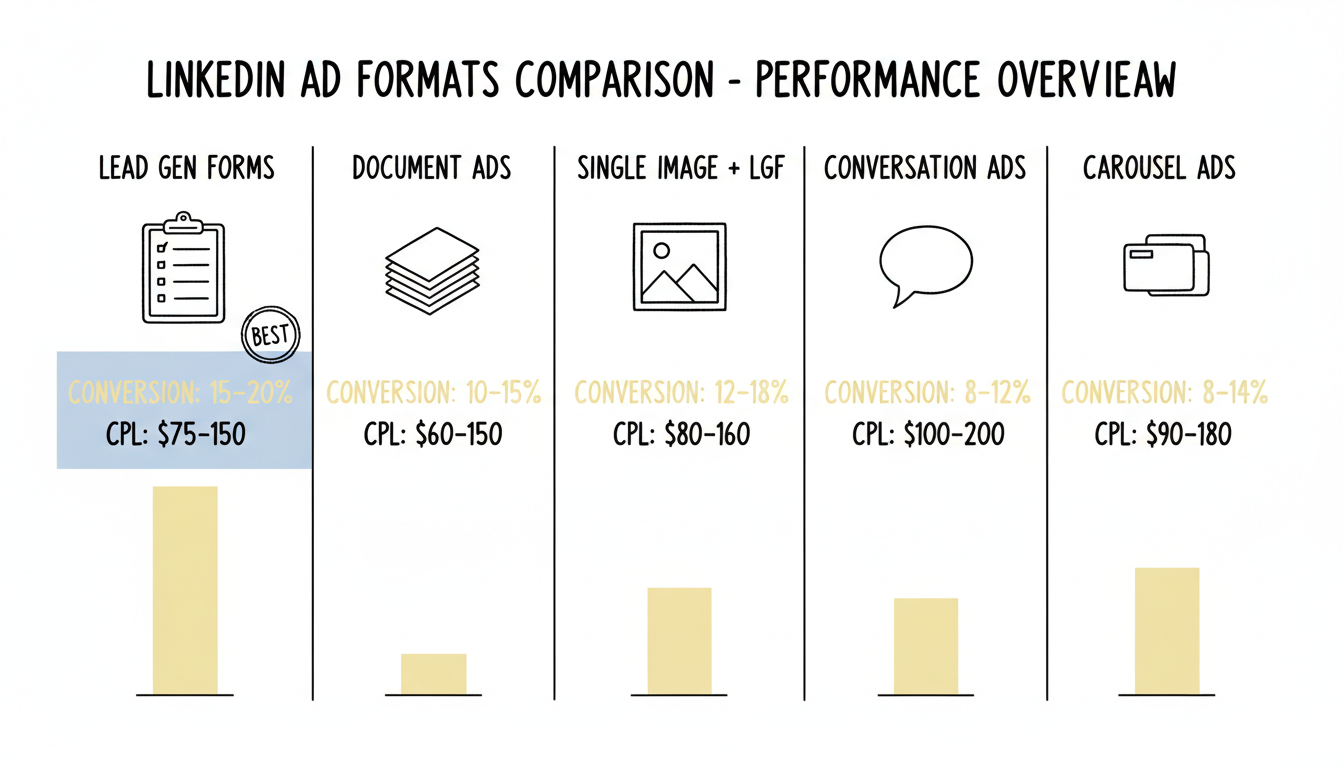
Format | Best For | Typical CPL | Conversion Rate |
Lead Gen Forms | Direct offers | $75-150 | 15-20% |
Document Ads | Educational content | $60-120 | 10-15% |
Single Image + LGF | Simple CTAs | $80-160 | 12-18% |
Conversation Ads | High-value leads | $100-200 | 8-12% (higher quality) |
Carousel Ads | Multi-feature | $90-180 | 8-14% |
CPL benchmarks vary significantly by industry, targeting, and offer. Enterprise SaaS targeting C-suite executives will pay more than SMB-focused campaigns.
Lead Generation Strategy by Funnel Stage
Match your ad format to where prospects are in their journey.
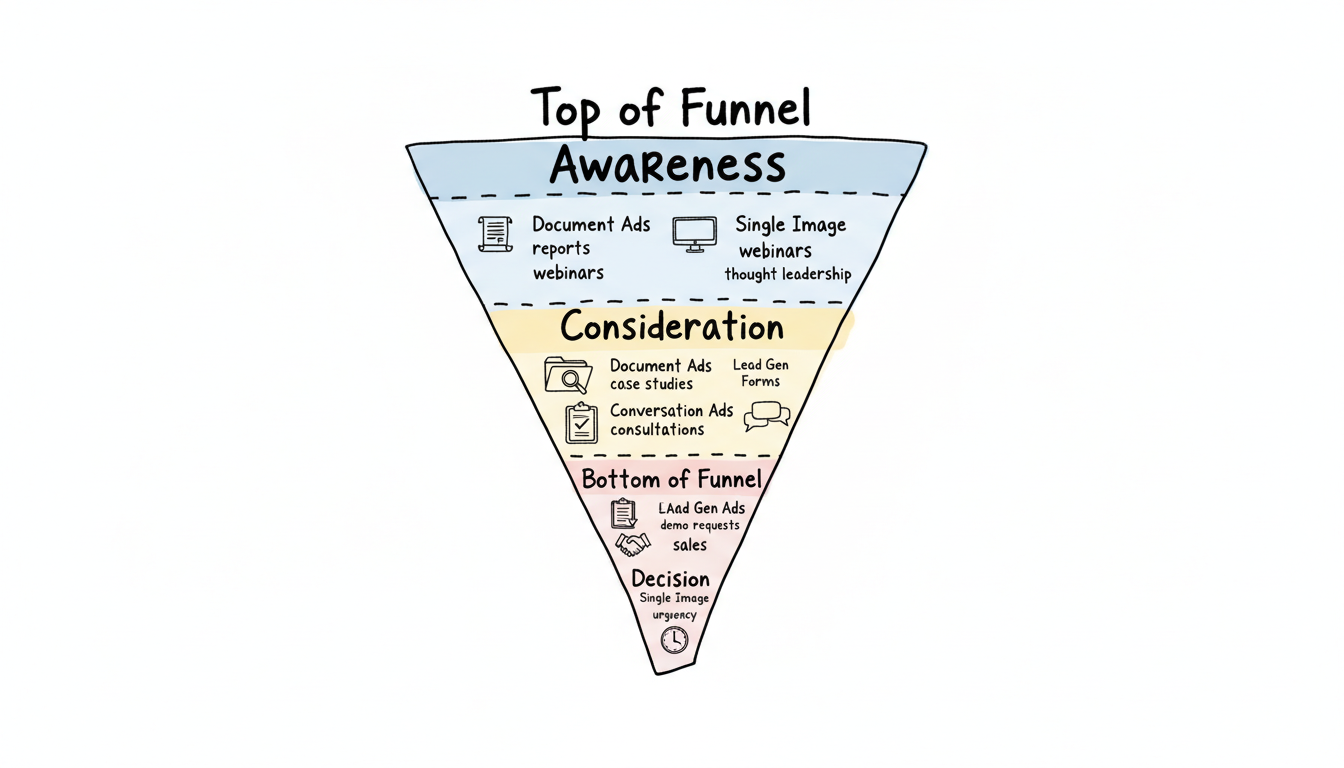
Top of Funnel (Awareness)
Goal: Capture early-stage interest with educational content
Best formats:
- Document Ads with industry reports
- Single Image Ads promoting webinars
- Carousel Ads with thought leadership
Typical offer: Ebook, guide, webinar registration
Middle of Funnel (Consideration)
Goal: Nurture interest with solution-focused content
Best formats:
- Document Ads with case studies
- Lead Gen Forms for demos/trials
- Conversation Ads for consultations
Typical offer: Case study, product demo, free assessment
Bottom of Funnel (Decision)
Goal: Convert high-intent prospects
Best formats:
- Lead Gen Forms for demo requests
- Conversation Ads for sales conversations
- Single Image Ads with urgency messaging
Typical offer: Demo, consultation, free trial
How to Set Up LinkedIn Lead Gen Forms
Setting up Lead Gen Forms in LinkedIn Campaign Manager involves a few key steps. Follow this walkthrough to create your first lead gen form campaign.
Step 1: Install the LinkedIn Insight Tag
Before creating any campaign, install the LinkedIn Insight Tag on your website. This JavaScript pixel enables conversion tracking, retargeting, and audience building. In LinkedIn Campaign Manager, navigate to Analyze > Insight Tag and copy the code snippet into your site's global header. The Insight Tag must fire on all pages where you want to track post-click behavior.
Step 2: Create a New Campaign in Campaign Manager
Open LinkedIn Campaign Manager and click "Create Campaign." Select "Lead Generation" as your campaign objective. This objective unlocks Lead Gen Form attachments for your ads. You can also try LinkedIn Accelerate, LinkedIn's AI-powered campaign builder, which automates targeting and bid optimization for lead gen campaigns.
Step 3: Configure Targeting
Define your audience using LinkedIn's targeting options: job title, seniority, company size, industry, and skills. Use LinkedIn Matched Audiences to upload account lists or retarget website visitors tracked by the Insight Tag. Layer 2-3 targeting criteria for precision without over-narrowing your audience.
Step 4: Build the Lead Gen Form
Under ad creation, select "Lead Gen Form" as the CTA destination. Configure the form with these fields:
- Form headline: A clear value proposition (e.g., "Get Your Free B2B Marketing Audit")
- Form description: 1-2 sentences explaining what the user receives
- Profile fields: First name, last name, email, company name (auto-filled from LinkedIn profiles)
- Custom questions: Add 1-2 qualifying questions (e.g., company size, budget range)
- Privacy policy URL: Required for compliance
- Thank you message: Confirmation text with a link to your resource or next step
LinkedIn Lead Gen Form specs: forms support up to 12 fields total (3 standard + 9 custom). Keep forms short—3-4 fields deliver the highest conversion rates. Custom questions can be single-line text, multiple choice, or checkboxes.
Step 5: Set Up Conversion Tracking
Configure conversion tracking in Campaign Manager under Analyze > Conversion Tracking. You can track conversions via the Insight Tag (page loads or events) or by using the LinkedIn Conversions API for server-side tracking. The Conversions API provides more reliable attribution data, especially for offline conversions and CRM-confirmed leads, since it does not rely on browser cookies.
Step 6: Launch and Monitor
Set your budget and bid strategy, then launch. Monitor form completion rates in Campaign Manager. If completion rates drop below 10%, reduce the number of form fields or strengthen your offer headline.
LinkedIn Lead Gen Form Examples by Industry
Different industries use Lead Gen Forms in distinct ways. Here are proven examples that drive high-quality leads across verticals.
SaaS: Free Trial and Demo Requests
A B2B SaaS company running a Lead Gen Form for demo requests typically uses 3-4 fields: name, work email, company name, and a custom dropdown for company size. The form headline leads with a specific outcome ("See How Teams Cut Reporting Time by 60%") rather than a generic "Request a Demo." The thank you page links directly to a calendar booking tool. SaaS companies often see 15-18% conversion rates with this lean form structure.
Consulting and Professional Services: Free Assessments
Consulting firms use Lead Gen Forms to offer free strategy assessments or audits. A typical form includes name, email, company name, and a custom question about the prospect's primary challenge (multiple choice). The form headline frames the offer as high-value: "Get a Personalized Growth Roadmap for Your Business." These forms convert well at 12-16% because the perceived value of a custom assessment justifies sharing contact information.
Events and Webinars: Registration
Event marketers use Lead Gen Forms to maximize webinar registrations. The form includes name, email, and job title—minimal friction for a time-sensitive offer. The headline emphasizes urgency and the speaker lineup: "Register: CMO Panel on 2026 B2B Trends (500 Seats)." Webinar registration forms often achieve the highest conversion rates (18-22%) because the commitment is low and the value is immediate.
Financial Services: Whitepapers and Reports
Financial services firms pair Document Ads with Lead Gen Forms to gate industry reports. A form for a market outlook report might include name, email, company, and a custom field for assets under management (range selector). The gated preview in the Document Ad lets prospects read the first 3-5 pages before deciding to share their information, which pre-qualifies leads and results in higher engagement from form submitters.
CRM Integrations and Lead Routing
Capturing leads is only half the equation—routing them to your sales team in real time determines whether they convert. LinkedIn Lead Gen Forms integrate with major CRMs and automation platforms natively and through third-party connectors.
Native CRM Integrations
LinkedIn Campaign Manager offers direct integrations with several CRM and marketing automation platforms:
- HubSpot: Sync leads directly into HubSpot contacts with mapped fields. Leads appear in real time, triggering enrollment in HubSpot workflows for automated follow-up sequences.
- Salesforce: Push leads into Salesforce as new leads or contacts. Map LinkedIn form fields to Salesforce fields and assign leads to reps based on territory or account ownership rules.
- Marketo: Route leads into Marketo programs for scoring, nurturing, and segmentation. The integration supports custom field mapping and program membership assignment.
- Microsoft Dynamics 365: Sync leads into Dynamics 365 with field mapping and automated lead assignment.
Zapier and Third-Party Connectors
For CRMs without native LinkedIn integrations, Zapier bridges the gap. A Zapier workflow ("Zap") triggers when a new lead arrives in LinkedIn and pushes it to your destination platform:
- Zapier to Google Sheets: Log every lead in a shared spreadsheet for teams without a CRM
- Zapier to Pipedrive: Create new deals automatically from LinkedIn leads
- Zapier to ActiveCampaign: Add leads to email nurture sequences
- Zapier to Slack: Send real-time lead notifications to your sales channel
Zapier's multi-step Zaps can enrich lead data, assign scores, and route to different CRM pipelines based on form responses.
LinkedIn Conversions API for Attribution
The LinkedIn Conversions API (CAPI) enables server-side conversion tracking independent of browser cookies. Connect your CRM to CAPI to send conversion events—like "qualified lead" or "closed deal"—back to LinkedIn Campaign Manager. This closes the attribution loop and lets LinkedIn's algorithm optimize for downstream outcomes, not just form fills. CAPI is especially valuable for long B2B sales cycles where the conversion happens weeks after the initial ad click.
Lead Routing Best Practices
- Route leads within 5 minutes—response time correlates directly with conversion rates
- Use hidden fields or UTM parameters to track which campaign generated each lead
- Set up deduplication rules to avoid creating duplicate CRM records
- Configure lead scoring in your CRM to prioritize high-intent form submissions
- Test your integration end-to-end before launching campaigns to ensure no leads are lost
Optimizing Lead Quality
More leads isn't always better. Focus on quality through these tactics.
Targeting Refinements
- Layer job title + seniority + company size
- Use matched audiences for ABM campaigns
- Exclude current customers and competitors
- Test lookalike audiences from best customers
Form Optimization
- Add qualifying questions (budget, timeline)
- Use progressive profiling for repeat visitors
- Require business email addresses
- Include a "how did you hear about us" field
Lead Scoring
Set up scoring based on:
- Job title and seniority
- Company size and industry
- Engagement level (document pages viewed)
- Form field responses
Frequently Asked Questions
What LinkedIn Ad Format Generates the Most Leads?
Lead Gen Forms consistently generate the most leads due to their frictionless experience. Forms auto-populate with LinkedIn profile data, reducing completion time and increasing conversion rates to 15-20%. For content-driven campaigns, Document Ads often deliver the lowest CPL by letting users preview content before submitting their information.
How Much Do LinkedIn Lead Generation Ads Cost?
LinkedIn lead generation typically costs $75-200 per lead for B2B campaigns, depending on targeting and industry. Enterprise targeting (C-suite, large companies) costs more than SMB targeting. Lead Gen Forms often deliver lower CPLs than campaigns driving to external landing pages because of higher conversion rates.
Should I Use Lead Gen Forms or Landing Pages for LinkedIn Ads?
Use Lead Gen Forms for most lead generation campaigns—they convert 2-3x better than landing pages. Use landing pages when you need: extensive form fields, complex qualification logic, or when your landing page experience is central to the buyer journey. Test both if unsure.
What Are LinkedIn Lead Gen Form Specs?
LinkedIn Lead Gen Forms support up to 12 fields: 3 standard profile fields (pre-filled from the member's profile) and up to 9 custom questions. Custom question types include single-line text, multiple choice, and checkboxes. The form headline has a 60-character limit, the form description allows 160 characters, and the thank you message supports 300 characters plus a landing page URL. Forms must include a privacy policy link.
Do LinkedIn Lead Gen Ads Work?
Yes. LinkedIn lead gen ads are particularly effective for B2B because of LinkedIn's professional targeting data. Lead Gen Forms convert at 15-20% on average—2-3x higher than external landing pages. The key factors are accurate auto-filled data (reducing fake submissions), precise job title and company targeting, and the trust factor of staying within the LinkedIn platform. Companies with clear offers, strong targeting, and fast follow-up routinely generate qualified pipeline from LinkedIn lead gen campaigns.
How Do I Integrate LinkedIn Lead Gen Forms with My CRM?
LinkedIn Campaign Manager offers native integrations with HubSpot, Salesforce, Marketo, and Microsoft Dynamics 365. For other platforms like Pipedrive, ActiveCampaign, or Google Sheets, use Zapier to create automated workflows that push leads to your CRM in real time. Set up field mapping to ensure LinkedIn form data lands in the correct CRM fields, and test the integration before launching your campaign.