
Single-Page Application SEO: Best Practices for Ranking Spas in 2025
Single-Page Applications (SPAs) have gained immense popularity in recent years due to their seamless user experience and fast performance. However, unlike traditional multi-page websites, SPAs present unique challenges when it comes to search engine optimization (SEO). In this article, we will explore the best SEO practices for single page applications SPAs that can help elevate the visibility and ranking of your site.
Understanding Single-Page Applications (Spas)
A Single-Page Application loads one HTML page and updates content dynamically via JavaScript, eliminating full-page reloads and delivering a fast, app-like experience.
Before we delve into SEO strategies, let's first understand what exactly SPAs are. A Single-Page Application is a web application that operates within a single HTML page. Instead of navigating to different pages, users can interact with different sections of the application without refreshing the entire page, thanks to JavaScript frameworks like React or Angular.
Single-Page Applications, as the name suggests, consist of a single HTML page that serves as the container for all the application's content. JavaScript is used to dynamically update the content based on user interactions, such as clicking on buttons or links. This approach provides a fluid and seamless user experience, as the application can respond to user actions without the need to load new pages.
One of the key advantages of SPAs is their ability to provide a faster user experience. Traditional multi-page applications require the browser to request and load a new HTML page every time the user navigates to a different section. This process can be time-consuming, especially if the user has a slow internet connection. In contrast, SPAs only need to fetch the necessary data from the server, resulting in quicker page loads and higher user satisfaction.
Another benefit of using SPAs is the enhanced interactivity they offer. SPAs allow for smooth transitions between different sections of the application. When a user interacts with a button or a link, the application can dynamically update the content without reloading the entire page. This seamless experience creates a sense of continuity and makes the application feel more responsive and engaging.
Furthermore, SPAs can be developed as cross-platform applications, allowing for a consistent user experience across devices. SPAs, built using responsive design principles, can adapt to different devices and provide a consistent user interface.
The Importance of SEO for Spas
SPAs need SEO to attract organic traffic, but their reliance on JavaScript makes them harder for search engines to crawl and index than traditional multi-page sites.
While SPAs bring numerous advantages for user experience, they can present challenges for search engine optimization. Search engines primarily rely on crawling and indexing multiple pages to understand the structure and content of a website. Since SPAs typically consist of a single HTML page, they can be more difficult for search engines to analyze and rank accurately.
Organic Traffic Value for SPA Products
For SaaS and e-commerce SPAs, following the best SEO practices for single page applications SPAs typically reduces customer acquisition cost by 30-60% compared to paid channels, making organic visibility a key growth lever.
SPA SEO for SaaS Products
SaaS SPAs face unique SEO challenges because most features sit behind authentication — identify the public-facing pages (pricing, features, blog) and apply full SSR to those routes while leaving dashboard routes client-rendered.
SPA SEO vs Traditional Multi-Page Site SEO
Traditional MPAs render complete HTML on every page load, while SPAs load a single shell and update the DOM with JavaScript — a difference that requires fundamentally different SEO approaches for metadata, crawlability, and link discovery.
SPA SEO Investment Return
Organic search delivers compounding returns — each ranking improvement adds cumulative traffic value, unlike paid channels that stop delivering results when budgets are paused.
Why SEO Matters for Spas
SEO drives organic traffic to your SPA by making it discoverable in search results, directly increasing visibility, conversions, and long-term growth.
SEO plays a vital role in the success of any website, including SPAs. A well-optimized SPA can attract organic traffic, improve its search engine visibility, and ultimately increase conversions. By implementing the right SEO practices, you can ensure that your SPA is discoverable by search engines and appears prominently in relevant search results.
Common SEO Challenges with Spas
Before diving into the best SEO practices for SPAs, it's essential to understand the common challenges that can hinder their search engine visibility:
- Lack of crawlability: Since SPAs often rely heavily on JavaScript to fetch and display content, search engine crawlers may have difficulty accessing and understanding the content.
- Dynamic content: SPAs often load content dynamically, making it challenging for search engines to accurately index and rank the pages.
- URL structure: SPAs typically use hashbangs or JavaScript routing to enable navigation within the application, which can result in less SEO-friendly URLs.
Despite these challenges, there are several SEO practices that can help improve the search engine visibility of SPAs:
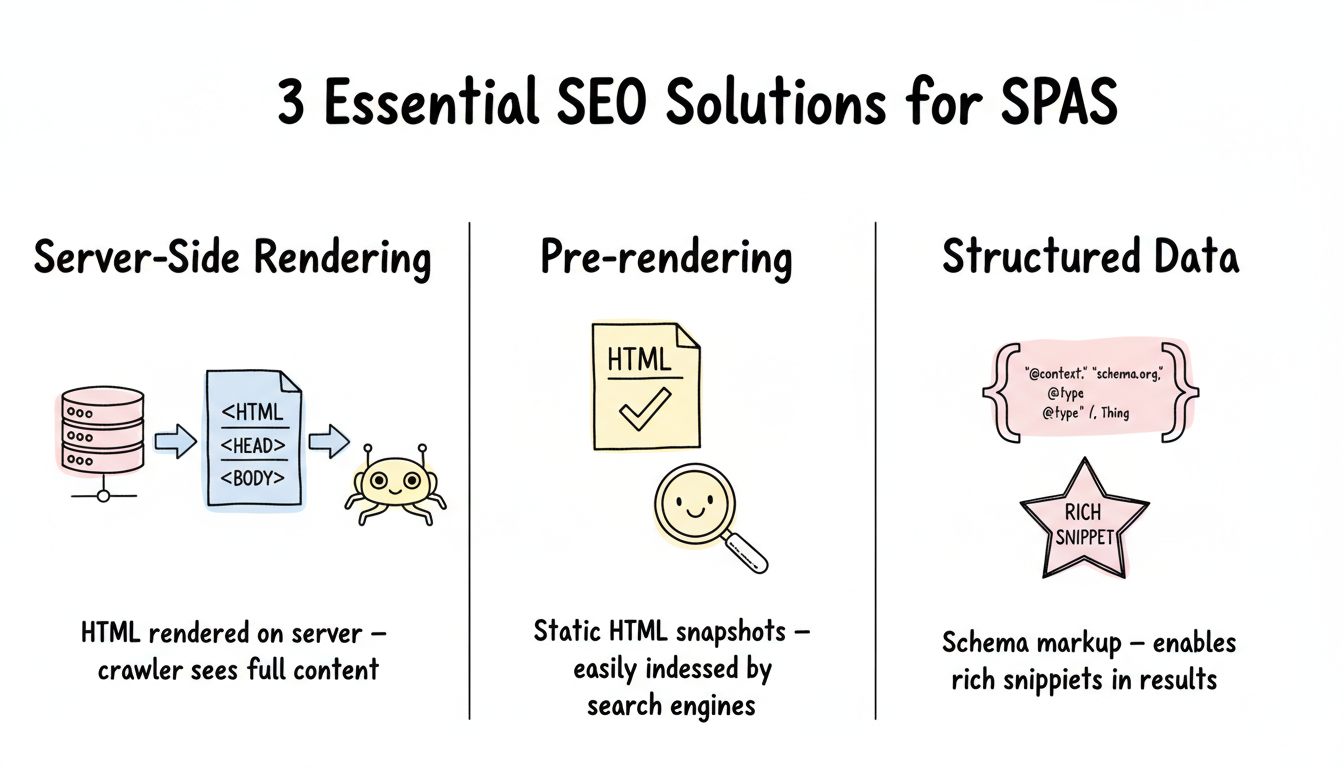
- Implementing server-side rendering: By rendering the SPA on the server and sending a fully rendered HTML page to the client, search engine crawlers can easily access and understand the content.
- Using pre-rendering or dynamic rendering: Pre-rendering or dynamically rendering the SPA can generate static HTML versions of the pages, which can be easily crawled and indexed by search engines.
- Optimizing URL structure: Instead of relying on hashbangs or JavaScript routing, consider using clean, descriptive URLs that provide clear information about the content of the page.
- Providing meta tags and structured data: Including relevant meta tags and structured data in the HTML can help search engines understand the content and context of the page.
By implementing these SEO practices, you can improve the search engine visibility of your SPA. Remember, SEO is an ongoing process. For expert SPA optimization support, explore Stackmatix SEO and digital marketing services.
Essential SEO Practices for Spas
To overcome the SEO challenges of SPAs, here are some essential best SEO practices for single page applications SPAs to implement:
Core SEO Requirements for Any SPA
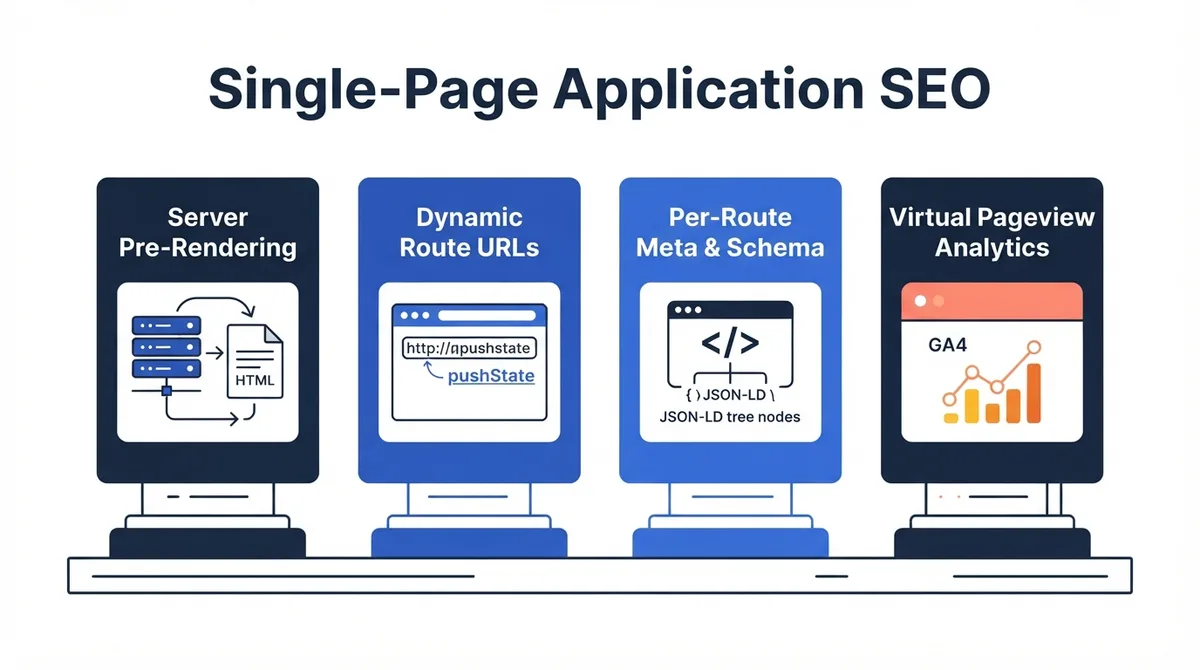
Every SPA must meet these core SEO requirements before any further optimization — missing any of these fundamentals will prevent pages from being indexed regardless of other improvements.
- Server-rendered or pre-rendered HTML for all public-facing routes
- Unique title tag and meta description per route
- Canonical URL tag pointing to the definitive version of each route
- Structured data (JSON-LD) for content type (Article, Product, FAQ)
- XML sitemap submitted to Search Console covering all indexable routes
Best SSR Frameworks for Spas
React and Vue SPAs can adopt SSR through these frameworks, eliminating Googlebot's two-wave delay by serving fully rendered HTML on first request.
- Next.js: React-based SSR and SSG with zero-config setup for SPA SEO
- Nuxt.js: Vue-based SSR framework with built-in sitemap and meta management
- Remix: React framework with server-side data loading and nested routing
- SvelteKit: Svelte-based SSR with small bundle sizes and fast LCP scores
Pages to Prioritize for SSR in Spas
Implementing SSR selectively on high-value routes delivers the biggest SEO impact per engineering hour, especially for sites migrating incrementally from a client-rendered SPA.
- Homepage — highest crawl frequency; must render full content server-side
- Landing pages — conversion-critical with high keyword targets
- Blog posts — content-heavy routes with the most indexable text
- Product pages — rich structured data requiring consistent server rendering
Top Prerendering Services for Legacy Spas
For SPAs that cannot migrate to SSR, prerendering services generate static HTML snapshots that search crawlers receive instead of the JavaScript shell.
- Prerender.io: Cloud-based prerendering with automatic cache invalidation
- Rendertron: Open-source headless Chrome prerenderer by Google
- Puppeteer: Node.js headless Chrome API for custom prerendering pipelines
SPA SEO Technical Debt
SPAs accumulate SEO technical debt from features added without SEO review — an annual audit against core requirements prevents issues from compounding into structural problems that are expensive to fix.
SPA SEO Quick Wins Under 1 Hour
These four tasks can be completed in under one hour and deliver immediate improvements to SPA crawlability, analytics accuracy, and indexation quality.
- Enable GA4 Browser history events (5 minutes in GA4 Admin)
- Submit an XML sitemap to Google Search Console (15 minutes)
- Add canonical tags to prevent duplicate URL indexing (30 minutes)
- Run URL Inspection on top 10 routes to verify Googlebot rendering (20 minutes)
SPA SEO Technical Implementation Checklist
Completing this technical checklist ensures your SPA's routing, meta tags, and crawlability are configured correctly before investing time in content optimization.
- Verify History API routing — no hash fragments in public route URLs
- Confirm robots.txt allows all public routes and blocks private ones
- Test canonical tags are dynamically updated per route during SSR
- Validate structured data with Google Rich Results Test on key page types
SPA SEO Testing in Staging Environments
Testing SEO changes in staging before production deployment prevents noindex tags, missing canonical URLs, and schema markup regressions from reaching Google's index.
Testing SPA SEO with Javascript Disabled
Disabling JavaScript in Chrome DevTools reveals exactly what content Googlebot sees in its first-wave HTML fetch, making it the fastest way to identify content visibility gaps before running a full JavaScript render audit.
SPA Rendering Methods: SEO Impact Comparison
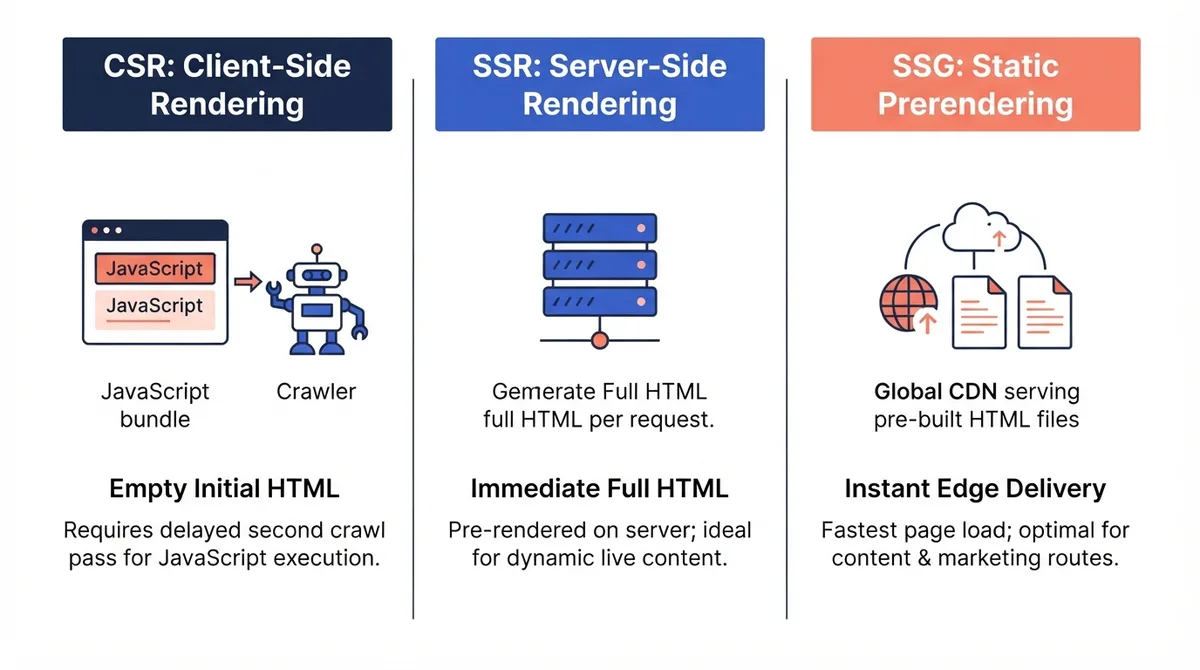
Choosing the right rendering strategy is the most impactful SPA SEO decision. SSR and SSG deliver full HTML on first request, while CSR requires two-wave rendering by Googlebot.
| Rendering Method | SEO Impact | First Contentful Paint | Best For |
|---|---|---|---|
| Client-Side Rendering (CSR) | Poor — requires two-wave indexing | Slow (2-5s) | Logged-in dashboards |
| Server-Side Rendering (SSR) | Excellent — full HTML on first request | Fast (0.5-1.5s) | SEO-critical pages |
| Static Site Generation (SSG) | Excellent — pre-built HTML served from CDN | Very Fast (<0.5s) | Blogs, marketing pages |
| Prerendering | Good — static HTML snapshots for crawlers | Fast (0.5-1s) | Legacy SPAs, migrations |
Optimizing Spas for Crawling and Indexing
Ensuring that search engine crawlers can access and understand your SPA's content is crucial. Key steps include:
- Implementing server-side rendering: Server-side rendering generates HTML on the server before sending it to the client, allowing search engines to crawl and index the content more effectively. This can be achieved using frameworks like React.js with Next.js or Vue.js with Nuxt.js.
- Using prerendering or dynamic rendering: Prerendering or dynamic rendering creates static HTML versions of your SPA, making it accessible to search engine crawlers. This can be done using tools like Prerender.io.
- Providing fallback content: In case JavaScript fails to load, including fallback content ensures that search engines can still view and index the essential information. Use the noscript tag to provide alternative content for non-JavaScript users.
Implementing Structured Data in Spas
Structured data provides additional context to search engines, helping them understand the content and purpose of your SPA. Implement relevant structured data markup using schema.org markup or JSON-LD format. This can improve the visibility of your SPA in search results and enable enhanced features like rich snippets.
Leveraging Server-Side Rendering for Spas
Server-side rendering (SSR) can significantly enhance the SEO of your SPA. By rendering the initial page on the server, search engine crawlers can access the content directly, resulting in better indexing and ranking. SSR frameworks like Next.js or Nuxt.js can simplify the implementation of server-side rendering in your SPA.
Advanced SEO Techniques for Spas
Beyond the fundamentals, three advanced techniques — progressive enhancement, pre-rendering, and HTML5 PushState — give SPAs a strong SEO edge by ensuring crawlers and users see the same content.
SPA Javascript Performance Checklist
- Code-split routes using React.lazy or dynamic imports to reduce initial bundle size
- Preload critical fonts and CSS using <link rel="preload"> in the server-rendered head
- Defer non-critical third-party scripts (analytics, chat, A/B testing) to after LCP
- Enable Brotli compression on the server to reduce JavaScript transfer size by 15-25%
SPA Javascript Bundle SEO Impact
JavaScript bundle size directly affects LCP and INP scores, making bundle optimization one of the highest-ROI Core Web Vitals improvements for SPAs with large client-side codebases.
- Keep total JavaScript bundle under 200KB for sub-3-second LCP on 4G connections
- Use code splitting to load route-specific JS on demand, not all at once
- Defer analytics and marketing scripts to after first contentful paint
- Audit unused JavaScript with Chrome DevTools Coverage panel quarterly
Progressive Enhancement and Spas
Progressive enhancement focuses on creating a functional baseline experience and progressively enhancing it with advanced features. When applied to SPAs, this technique ensures that search engine crawlers and users with JavaScript-disabled browsers can still access and navigate your SPA.
Pre-Rendering and Spas
Pre-rendering generates static HTML snapshots of your SPA pages in advance so search engine crawlers can index content without executing JavaScript.
Pre-rendering is the process of generating HTML versions of your SPA's pages in advance. This ensures that search engines can easily access and index your content, even if it relies heavily on JavaScript. Pre-rendering can be implemented using tools like Prerender.io or by building a prerendering function into your server-side rendering setup.
Pre-Rendering Service Options for Spas
Selecting the right pre-rendering service depends on your SPA framework, traffic volume, and deployment infrastructure.
- Prerender.io — hosted service that caches rendered HTML for crawlers
- Rendertron — open-source headless Chrome rendering proxy by Google
- Next.js ISR — incremental static regeneration for framework-based pre-rendering
- Netlify/Vercel Edge Functions — serverless pre-rendering at CDN edge nodes
Deep Linking SEO Requirements for Spas
Deep linking is essential for SPA SEO because each shareable URL must return consistent server-rendered HTML with the correct HTTP status code.
- Every shareable URL must map to a unique server-side route with consistent status codes
- SPA routers must use History API (pushState) not hash fragments (#) for Google indexability
- Permalink structure should use descriptive slugs (/products/blue-widget not /products?id=42)
- Deep links must load with full SSR or pre-rendered HTML on first request
Using HTML5 Pushstate for Spas
HTML5 PushState allows you to update the URL displayed in the browser's address bar dynamically. By utilizing this technique in your SPA, you can create SEO-friendly URLs that accurately reflect the content of each section. This helps both search engines and users navigate and understand your SPA's structure.
Progressive Enhancement Benefits for SEO
Progressive enhancement ensures core content is accessible to crawlers and users without JavaScript, reducing your SPA's dependency on Google's delayed second-wave rendering.
- Ensures search engine crawlers can access core content without JavaScript
- Provides noscript fallback for users and bots with JS disabled
- Reduces dependency on Google's second-wave rendering queue
- Improves accessibility scores which correlate with SEO performance
HTML5 Pushstate Best Practices
HTML5 PushState lets SPAs update URLs without full-page reloads. Following these best practices ensures those URLs are crawlable, canonical, and properly tracked in analytics.
- Use descriptive URL paths that reflect content (not hash-based routing)
- Ensure each route URL returns a unique canonical HTML response for SSR
- Update the document title on every route change for GA4 tracking accuracy
When to Use Prerendering vs SSR
Choosing between prerendering and server-side rendering depends on your content dynamism, deployment architecture, and whether a full SSR migration is feasible for your existing SPA.
- Prerendering: best for static marketing pages in legacy React or Angular SPAs
- SSR: best for dynamic, personalized, or frequently updated content
- SSG: best for blogs, documentation, and content that changes infrequently
Monitoring and Improving SPA SEO Performance
Use Google Search Console, Screaming Frog, and regular audits to track SPA SEO metrics, catch crawl errors, and iterate on improvements over time.
SPA SEO Reporting Metrics Checklist
Track these four metrics weekly to catch organic traffic drops and indexation issues before they compound into significant ranking losses.
- Organic sessions per route week-over-week from GA4 landing page report
- Indexed route count vs. submitted sitemap URL count from Search Console
- Core Web Vitals pass rate segmented by page template from Search Console
- Average position changes for target keywords from Search Console Performance
SPA SEO Performance Baselines
Establishing baseline metrics before applying the best SEO practices for single page applications SPAs is essential for measuring whether your optimizations produce measurable ranking and traffic improvements.
Tools for Monitoring SPA SEO
Monitoring the performance of your SPA's SEO is crucial to identify areas for improvement. Utilize tools like Google Search Console, which provides insights into your website's visibility on Google. Additionally, tools like Screaming Frog or DeepCrawl can help analyze your SPA's technical SEO aspects and highlight areas for optimization.
SPA Crawl and Audit Tools
These tools verify that Googlebot can access and render your SPA routes correctly, catching JavaScript rendering failures before they impact rankings.
- Screaming Frog SEO Spider — crawls JavaScript-rendered SPA routes
- Google Search Console URL Inspection — verifies rendered HTML per route
- Lighthouse CI — automated Core Web Vitals scoring in CI/CD pipelines
- DeepCrawl / Lumar — enterprise JavaScript rendering audits at scale
Server Log Analysis for SPA Crawl Patterns
Server access logs reveal which SPA routes Googlebot actually crawled, how frequently, and whether it encountered redirect chains or 404 errors — data not available in Search Console alone and critical for crawl budget optimization.
SPA SEO Audit Tool Recommendations
Tool selection depends on team size and SPA complexity — Screaming Frog suits most teams while Lumar fits enterprise-scale sites with thousands of routes.
- Screaming Frog (5.0+) — JavaScript rendering mode for SPA crawls
- Lumar (formerly DeepCrawl) — enterprise JS rendering and coverage analysis
- Semrush Site Audit — automated technical issue detection with priority scoring
- Chrome DevTools (Lighthouse) — performance and accessibility scoring with fix recommendations
Regular SEO Audits for Spas
Schedule quarterly SEO audits covering crawlability, Core Web Vitals, sitemap accuracy, and structured data validity to keep your SPA performing as algorithms evolve.
Applying the best SEO practices for single page applications SPAs requires regular auditing. Consistently following the best SEO practices for single page applications SPAs keeps your site competitive as algorithms evolve. Regularly analyze your website's performance, content, site structure, and backlink profile. Identify areas for improvement and continuously refine your SEO strategies to stay ahead of the competition.
Continual SEO Improvement for Spas
SEO is an ongoing effort. As search engine algorithms evolve and user behaviors change, it's crucial to adapt and improve your SEO practices accordingly. Stay updated with the latest SEO trends, industry insights, and algorithm updates to ensure your SPA remains optimized and competitive in search engine rankings.
Implementing the best SEO practices for single page applications SPAs is essential to maximize visibility and attract organic traffic. By combining SSR, structured data, sitemaps, and GA4 configuration, you can drive sustainable organic growth.
Audit your content with the Stackmatix AEO Grader Tool, or browse more SEO guides on the Stackmatix blog. Ready to grow? Get started with Stackmatix.
SPA SEO Audit Schedule by Priority
Following a regular audit schedule prevents technical SEO issues from accumulating undetected and ensures your SPA maintains rankings as algorithms evolve.
- Weekly: Check Search Console for new crawl errors, 404s, and coverage drops
- Monthly: Review Core Web Vitals field data and top landing page performance
- Quarterly: Full technical audit — sitemap accuracy, schema validity, internal links
- After deploys: URL Inspection spot-check on changed routes
Core Web Vitals for Spas
Core Web Vitals — LCP, CLS, and INP — are Google ranking signals that measure loading speed, visual stability, and interaction responsiveness in your SPA.
Key Insight: SPAs that rely on client-side rendering typically score 1-3 seconds slower on LCP compared to server-rendered equivalents, directly impacting Google search rankings.
Core Web Vitals are Google's user experience metrics that directly influence search rankings, and SPAs have unique characteristics that make measuring and optimizing them more complex than traditional multi-page sites. Unlike a standard page load, SPAs execute most of their work in JavaScript, which means the browser must parse, compile, and run code before any meaningful content appears.
Core Web Vitals Targets for Spas
Google uses LCP, CLS, and INP to measure user experience quality. SPAs face elevated risk on all three metrics due to JavaScript-dependent rendering and main-thread blocking.
| Metric | Good | Needs Improvement | SPA Risk |
|---|---|---|---|
| LCP (Largest Contentful Paint) | < 2.5s | 2.5s – 4.0s | High — JS execution delays initial render |
| CLS (Cumulative Layout Shift) | < 0.1 | 0.1 – 0.25 | Medium — async content injection causes shifts |
| INP (Interaction to Next Paint) | < 200ms | 200ms – 500ms | High — main thread blocked by framework reconciliation |
Largest Contentful Paint (LCP) in Spas
LCP measures how long the largest visible element takes to render. Client-side SPAs often score poorly because JavaScript must execute before content appears, adding 1-3 seconds of delay — compared to <0.5s for SSR equivalents.
LCP measures how long it takes for the largest visible content element to render. In client-side rendered SPAs, the initial HTML response is often a near-empty shell. The browser must download the JavaScript bundle, execute it, fetch API data, and mount the component tree before LCP registers — typically adding 1-3 seconds of delay.
To improve LCP in SPAs: use SSR or static generation to include the LCP element in the initial HTML response, preload critical resources with link rel=preload, and code-split JavaScript bundles so only the current route loads on first paint.
Cumulative Layout Shift (CLS) in Spas
CLS measures unexpected layout shifts. In SPAs, async-loaded content can push elements down the page, causing poor scores. Reserve explicit dimensions for all dynamic content areas.
CLS accumulates layout shift scores throughout the entire page session. This is particularly relevant for SPAs because users often stay on the same page for extended periods, navigating between routes without a full reload. Common CLS culprits include async-loaded content that injects above already-rendered elements and images without explicit dimensions. Fix CLS by reserving explicit dimensions for async-loaded content areas and using CSS skeleton loaders that match the final content dimensions.
Interaction to Next Paint (INP) in Spas
INP measures interaction latency across all user inputs. JavaScript frameworks can cause poor INP by blocking the main thread with reconciliation logic during route changes.
INP replaced First Input Delay as a Core Web Vital in 2024 and measures the latency of all user interactions. SPAs are susceptible to poor INP because JavaScript frameworks run complex reconciliation logic on the main thread. Long tasks blocking the main thread for more than 50ms delay the browser after user interactions. Fixes include using startTransition in React 18+, web workers for CPU-intensive computations, and memoization to reduce unnecessary re-renders.
Auditing Core Web Vitals in Spas
Audit Core Web Vitals per route using Lighthouse, Chrome DevTools with CPU throttling, and Google Search Console CrUX field data for real-user measurements.
Standard Lighthouse measures only initial page load. For a complete picture: run Lighthouse on each major route URL individually, use Chrome DevTools Performance panel with CPU throttling enabled, check the Core Web Vitals report in Google Search Console for real-user CrUX data, and use PageSpeed Insights which combines lab and field data.
LCP Optimization Techniques for Spas
LCP is the single most impactful Core Web Vitals metric for SPA SEO because client-side rendering delays the largest contentful paint until JavaScript fully executes.
- Preload the hero image using <link rel="preload" as="image"> in the document head
- Use SSR or SSG to serve above-fold HTML without JavaScript execution delay
- Reduce server response time (TTFB) with edge caching or CDN prerendering
- Inline critical CSS to eliminate render-blocking stylesheet requests
Core Web Vitals Optimization Priorities
Prioritizing Core Web Vitals improvements by metric type helps teams address the highest-impact issues first and avoid wasted optimization effort on SPAs.
- LCP: preload hero images, use SSR/SSG for above-fold content, reduce TTFB
- CLS: reserve space for dynamic elements, avoid injecting content above fold
- INP: break up long JS tasks, defer non-critical scripts, use web workers
- Audit with Lighthouse CLI and verify with CrUX field data in Search Console
GA4 Analytics Tracking for Spas
GA4 requires special SPA configuration because route changes happen via the History API without triggering standard page_view events — leaving analytics blind to all navigation after the initial load.
Standard GA4 implementation fires a single page_view event when the page first loads. In a SPA, the browser never reloads after the initial load; all subsequent navigation happens via the History API. Without additional configuration, GA4 reports every user as visiting only one page, making analytics data unreliable. Studies show that up to 95% of SPA sessions are under-counted in standard GA4 implementations without SPA-specific event configuration.
GA4 Enhanced Measurement: Browser History Events
Enable Browser history events in GA4 Enhanced Measurement to automatically fire page_view events on every SPA route change via the History API, with no code changes required.
The simplest solution is GA4 Enhanced Measurement. In your GA4 property, navigate to Admin, then Data Streams, then your web stream, then Enhanced Measurement, and ensure Browser history events is toggled on. When enabled, GA4 listens for History API pushState and replaceState calls and automatically fires a page_view event with the updated URL and title. This works out of the box for React Router (v5+), Vue Router, and Angular Router.
Google Tag Manager: History Change Trigger
Create a History Change trigger in GTM to fire a GA4 page_view tag on every SPA navigation, enriched with custom dimensions like route name for all frameworks.
If you use Google Tag Manager, create a new Trigger of type History Change, then create a GA4 Event tag configured to fire page_view with variables for Page Path and Page Title. This approach lets you enrich the event with custom dimensions such as route name, and works reliably across React, Vue, and Angular SPAs.
Manual GA4 Tracking in React, Vue, and Angular
Fire gtag page_view events manually on route changes: useEffect in React Router v6, router.afterEach in Vue Router, and NavigationEnd subscription in Angular.
In React with React Router v6, add a useEffect hook that watches the pathname and fires a gtag page_view event on every route change. In Vue Router, use the router.afterEach() navigation guard. In Angular, subscribe to the Router NavigationEnd events. Always verify using GA4 DebugView to confirm events fire on every route change.
GA4 SPA Event Configuration Checklist
Use this checklist to ensure your SPA fires accurate GA4 events on every route change and captures complete session data.
- Enable Browser history events in GA4 Enhanced Measurement settings
- Create GTM History Change trigger for cross-framework compatibility
- Fire page_view with page_location and page_title on every route change
- Validate using GA4 DebugView before deploying to production
XML Sitemap Generation and Crawl Budget for Spas
Googlebot discovers URLs by following links. In a SPA with client-side routing, the initial HTML contains no links to other routes because all navigation happens via JavaScript. This means Googlebot may never discover your SPA's internal routes through link-following alone, making an explicit XML sitemap essential.
URL Rewriting for SPA SEO
Server-side URL rewriting allows SPAs to serve content based on route patterns, enabling clean canonical URLs without hash fragments while maintaining the SPA architecture for authenticated sections.
Sitemap Submission and Monitoring Process
Submitting your SPA sitemap to Google Search Console and monitoring for errors is not a one-time task — it requires regular verification to catch route additions, removals, and URL format changes that invalidate previously indexed pages.
Generating Dynamic Sitemaps for SPA Routes
Generate sitemaps at build time using next-sitemap for Next.js, @nuxtjs/sitemap for Nuxt, or the sitemap npm package for custom Node.js backends, then submit to Search Console.
For Next.js, use the next-sitemap package which generates sitemap.xml at build time. For Vue/Nuxt.js, use the @nuxtjs/sitemap module. For a custom Node.js backend serving a React or Angular SPA, use the sitemap npm package to output a static sitemap.xml file. Always submit your sitemap to Google Search Console and monitor for errors. See the Stackmatix technical SEO blog for advanced sitemap strategies.
Sitemap URL Exclusion Rules for Spas
Excluding non-indexable URLs from your sitemap keeps the file focused on crawlable content and prevents Googlebot from wasting crawl budget on login and dashboard routes.
- Exclude auth routes (login, signup, dashboard) — not indexable
- Exclude search result pages with query parameters unless canonical-tagged
- Exclude admin routes blocked by robots.txt Disallow rules
- Include all public content routes with accurate lastmod timestamps
Crawl Budget and Javascript-Heavy Spas
Google's crawl budget is finite. JavaScript-heavy SPAs consume it faster because Googlebot must render each page in a resource-intensive second pass that can be delayed by days or weeks.
JavaScript-heavy SPAs drain crawl budget because Googlebot renders JS in a second pass, delayed by days or weeks. Google allocates each domain a crawl budget measured in pages per day — SPAs that serve identical shells may waste 40-60% of that budget on duplicate fetches. Use SSR for priority pages and block private routes in robots.txt.
Google allocates a finite crawl budget to each domain. JavaScript-heavy SPAs consume crawl budget at a higher rate because Googlebot uses a two-pass process: first fetches raw HTML at low cost, then queues JavaScript rendering in a second pass at higher resource cost. This second-wave rendering can be delayed by days or weeks. To protect crawl budget: block non-public routes in robots.txt, ensure all public routes appear in your sitemap, and use SSR for high-priority pages.
Auditing SPA Crawlability with Screaming Frog
Enable JavaScript rendering in Screaming Frog to crawl your SPA with headless Chrome, revealing routes only discoverable after JS executes that standard crawlers would miss.
Screaming Frog default crawl mode does not execute JavaScript, so it sees only the initial HTML shell. Enable JavaScript rendering under Configuration, Spider, Rendering, JavaScript to use a headless Chrome instance that closely replicates Googlebot behavior. Compare the JavaScript-rendered crawl against a standard crawl to identify routes only discoverable after JS execution.
How to Configure GA4 for SPA Tracking
Enable SPA tracking in GA4 by activating Browser history events under Enhanced Measurement — a 5-step process that takes less than 2 minutes in GA4 Admin.
- Open GA4 Admin and navigate to Data Streams
- Select your web stream and click Enhanced Measurement
- Toggle on Browser history events
- Verify in GA4 Realtime by navigating between SPA routes
- Confirm page_view events appear with correct page paths
How to Enable Javascript Crawling in Screaming Frog
Enable headless Chrome rendering in Screaming Frog to crawl your SPA as Googlebot does, revealing routes only discoverable after JavaScript execution.
- Open Screaming Frog and go to Configuration
- Select Spider, then Rendering, then JavaScript
- Set the browser to Headless Chrome
- Run a crawl and compare results to a standard non-JS crawl
Steps to Audit Core Web Vitals per Route
Auditing Core Web Vitals per route requires running Lighthouse individually on each major URL with CPU throttling enabled, then cross-referencing with real-user CrUX data in Search Console.
- Open Lighthouse in Chrome DevTools for each major SPA route URL
- Enable CPU throttling at 4x slowdown to simulate mobile conditions
- Record LCP, CLS, and INP scores for each route separately
- Cross-reference with Google Search Console CrUX field data
Handling Dynamic Content for SPA SEO
Googlebot fetches HTML first, and if that HTML is an empty application shell, no content is available for indexing on the first pass.
How Search Engines Detect SPA Rendering Type
Googlebot identifies a SPA's rendering approach by comparing the initial HTML response with the JavaScript-rendered DOM — a significant mismatch indicates client-side rendering and triggers the slower second-wave rendering queue.
Googlebot Two-Wave Crawl Process
Googlebot fetches HTML first, then queues JavaScript rendering separately — a process that can delay content indexing by hours or weeks for client-side SPAs.
Key Insight: JavaScript rendering in Google's second wave can be delayed by days or weeks. Any SPA content that only exists post-JavaScript execution is at risk of never being indexed.
Google uses an evergreen Chromium-based renderer capable of executing JavaScript. However, rendering does not happen immediately after the initial fetch. JavaScript rendering is queued separately and may be executed hours or weeks later. Content that only exists after JavaScript execution may not be indexed if rendering fails or times out.
API-Dependent Content SEO Risk Factors
Understanding these risk factors helps teams decide which SPA content must be moved server-side and which can remain client-rendered without impacting indexability.
- Content loaded via useEffect or componentDidMount risks missing Googlebot's render window
- Third-party API latency can cause timeouts during Googlebot's rendering phase
- Authentication-gated content is never indexed regardless of rendering strategy
- Lazy-loaded images below fold may not be indexed in the first crawl pass
Deferred Rendering and API-Dependent Content
API-dependent content loaded inside useEffect or mounted hooks risks never being indexed if Googlebot times out during rendering. All SEO-critical content must be in the server-rendered HTML.
Content loaded via fetch or axios inside a useEffect hook in React or a mounted hook in Vue after component mount is particularly risky. Googlebot renderer may time out waiting for API responses. For any content that needs to rank, that content must be present in the server-rendered or statically generated HTML before JavaScript executes.
API Content Rendering Checklist
Follow this checklist to ensure dynamic API-sourced content is available in server-rendered HTML for Googlebot indexation.
- Fetch SEO-critical data in getServerSideProps or equivalent server function
- Avoid useEffect-only data fetching for content that should be indexed
- Set explicit Cache-Control headers for SSR responses to enable CDN caching
- Test API response times to ensure Googlebot rendering does not time out
Dynamic Content Strategies for SPA SEO
Choosing between SSR, SSG, and ISR for dynamic content pages depends on update frequency — SSR for real-time data, SSG for content updated daily, and ISR for content that changes weekly or less.
SSR Data Fetching Patterns for Dynamic SPA Content
Choosing the right server-side data fetching pattern ensures dynamic content is available in the initial HTML response for both crawlers and users.
- getServerSideProps (Next.js) — fetch data server-side on every request
- getStaticProps with revalidate — ISR for semi-static content
- loader functions (React Router v6) — co-located route-level data fetching
- nuxtServerInit (Nuxt.js) — server-side store initialization for Vue SPAs
Verifying Dynamic Content with Google URL Inspection Tool
The URL Inspection Tool reveals exactly what Googlebot renders for any URL, making it the most reliable way to verify that SPA content is being indexed correctly.
Use Google Search Console URL Inspection Tool: enter any URL, click Test Live URL, then click View Crawled Page. Select the Screenshot tab or HTML tab to compare what Googlebot sees against what users see in a browser. Any content missing from the rendered HTML is at risk of not being indexed. Run this test after any major content or routing changes.
Using Noscript Fallbacks for Critical Content
For content that is genuinely difficult to server-render, use a noscript tag to provide a text-based fallback. Search engines read noscript content even when JavaScript is available, ensuring key information is always present in the HTML. Do not serve different content to crawlers versus users, as that constitutes cloaking.
SPA SEO Implementation Checklist
Follow these seven steps to implement the best SEO practices for single page applications SPAs from architecture through analytics configuration.
- Choose SSR or SSG (Next.js or Nuxt.js) for all public-facing routes
- Generate and submit an XML sitemap covering every public URL
- Implement canonical tags to avoid duplicate content across routes
- Add FAQPage and BlogPosting JSON-LD structured data
- Enable GA4 Browser history events or GTM History Change trigger
- Audit Core Web Vitals (LCP, CLS, INP) per route using Lighthouse
- Block private and admin routes in robots.txt to protect crawl budget
Essential Tools for SPA SEO Optimization
These five tools cover every aspect of SPA SEO from server rendering to performance auditing and analytics configuration for single-page apps.
- Next.js / Nuxt.js: SSR and SSG frameworks that eliminate client-side rendering delays
- Google Search Console: URL inspection, sitemap submission, and CrUX field data
- Screaming Frog: JavaScript-rendered crawl to discover all SPA routes
- Chrome DevTools: Performance panel with CPU throttling for Core Web Vitals audits
- Prerender.io: Dynamic rendering service for legacy SPAs that cannot migrate to SSR
Common SPA SEO Mistakes to Avoid
These five mistakes account for the majority of SPA SEO failures and are straightforward to fix once you know what to look for.
- Relying solely on client-side rendering for SEO-critical content
- Missing XML sitemap — Googlebot cannot discover routes via JS-rendered links
- Not configuring GA4 for SPA navigation — every user appears as a single-page session
- Skipping Core Web Vitals audits on individual routes beyond the homepage
- Loading SEO content inside useEffect or mounted hooks where Googlebot may time out
Key SPA SEO Ranking Factors
Google weighs these three SPA-specific factors heavily when ranking single-page applications in search results alongside traditional content quality signals.
- Server-side or static rendering for above-the-fold content
- XML sitemap covering all public SPA routes
- Core Web Vitals scores in the Good range for LCP, CLS, and INP
Recommended JSON-LD Schemas for SPA Blog Posts
These three JSON-LD schema types give SPA blog posts the best chance of earning rich results, featured snippets, and AEO citations in AI search engines.
- BlogPosting with headline, description, dateModified, author, and speakable
- FAQPage with Question and acceptedAnswer pairs for common questions
- HowTo with step-by-step instructions for tutorial content
Pre-Launch SPA SEO Testing Checklist
Run these four checks before launching any SPA or deploying major content changes to ensure Googlebot, GA4, and structured data are all configured correctly.
- Run Google URL Inspection on 5+ key routes to verify rendering
- Test GA4 realtime events on every major route navigation
- Confirm sitemap.xml is accessible and submitted to Search Console
- Validate JSON-LD with Google's Rich Results Test tool
React Router SEO Configuration
React SPAs using React Router must use BrowserRouter with useEffect-based GA4 tracking and react-helmet for dynamic per-route meta tags to achieve full SEO optimization.
- Use BrowserRouter (not HashRouter) for clean, crawlable URL paths
- Wrap route components with react-helmet or next/head for dynamic meta tags
- Fire GA4 page_view in a useEffect watching the pathname variable
Robots.Txt Configuration for Spas
A well-configured robots.txt blocks non-public SPA routes from Googlebot while ensuring all marketing and blog routes remain accessible and included in the sitemap.
- Disallow /dashboard/, /account/, and /admin/ routes from Googlebot
- Allow all public marketing and blog routes explicitly
- Add Sitemap: directive pointing to your sitemap.xml URL
SPA Pagination and Infinite Scroll SEO
- Use URL parameters (/products?page=2) with canonical to prevent duplicate content
- Add rel="next" and rel="prev" link tags for traditional paginated content
- For infinite scroll, implement a paginated fallback URL pattern that Googlebot can crawl
- Avoid JavaScript-only pagination that produces no crawlable next-page links
Canonical URL Strategy for Spas
Canonical tags prevent duplicate content penalties from SPA URL variations — essential when SPAs can serve the same content from multiple URL formats including trailing slashes.
- Set a canonical tag pointing to the preferred URL on every route
- Prevent trailing slash variants from creating duplicate content
- Use 301 redirects for URL changes to preserve link equity
SPA Framework SEO Configuration Checklist
Run through this checklist before deploying any SPA to production to catch the most common SEO configuration errors before they affect rankings.
- Enable SSR or SSG — disable pure client-side rendering for public pages
- Configure canonical URLs per route to prevent duplicate content issues
- Set unique title and meta description tags for each SPA route
- Validate robots.txt allows crawling of all public SPA routes
Implementing SPA SEO in Next.Js: Step-By-Step
Next.js is the most popular framework for implementing the best SEO practices for single page applications SPAs, offering SSR, SSG, and incremental static regeneration out of the box.
Next.Js Rendering Strategy Comparison
Choosing the right rendering strategy in Next.js determines how frequently pages are re-built and whether they receive fresh data on every request or rely on cached builds.
- SSR (getServerSideProps) — fresh data on every request; best for real-time content
- SSG (getStaticProps) — built at deploy time; best for rarely changing content
- ISR (revalidate) — rebuilt on schedule; best for content updated daily or weekly
- RSC (App Router) — streaming HTML from server components; best for Next.js 13+
Using Getserversideprops for Dynamic SPA SEO
getServerSideProps renders a Next.js page on every request, ensuring dynamic content like blog posts, product pages, and user-specific data is always fully indexed by Googlebot.
Next.Js SEO Plugin and Configuration Checklist
These four Next.js packages cover the majority of SEO configuration needs, from sitemap generation to image optimization and per-route meta tags.
- next-sitemap — auto-generates sitemap.xml and robots.txt at build time
- next-seo — component-based management of meta tags and Open Graph per route
- next/head — built-in Head component for injecting title, canonical, and schema tags
- next/image — automatic WebP conversion and lazy loading for Core Web Vitals
When to Use ISR vs SSR in Next.Js
ISR serves cached HTML at CDN speed with background revalidation, while SSR fetches fresh data on every request — the right choice depends on how frequently content changes.
- Use ISR for blog posts and documentation — content rarely changes between deploys
- Use SSR for dashboards and search results — content changes per user or query
- Use SSG for landing pages and marketing content — SEO-critical with infrequent updates
- Use streaming SSR (App Router) for pages with mixed static and dynamic sections
Using Getstaticpaths for Scalable SPA SEO
getStaticPaths pre-generates all known URLs at build time, producing static HTML pages that serve instantly from a CDN with optimal LCP scores and zero rendering queue dependency.
Next.Js App Router SEO with Generatemetadata
Next.js 13+ App Router replaces getServerSideProps with server components and the generateMetadata function, enabling type-safe, per-route metadata generation with automatic inheritance for nested route segments.
Next.Js Head Component for per-Route Meta Tags
The Next.js Head component injects title tags, meta descriptions, and canonical URLs into the server-rendered HTML of each route, ensuring unique meta data without JavaScript execution.
Next.Js Metadata API for Dynamic SEO
The Next.js App Router Metadata API generates title, description, canonical, and Open Graph tags at the component level, enabling truly dynamic per-route metadata without the client-side flicker associated with traditional SPA meta management.
Next.Js Image Optimization for Core Web Vitals
The next/image component automatically serves WebP format, lazy loads off-screen images, and reserves explicit dimensions to prevent CLS — directly improving LCP and CLS scores.
SPA SEO for Vue.Js and Angular Applications
Vue.js and Angular SPAs require framework-specific SEO configuration beyond what Next.js provides out of the box, including explicit SSR setup with Nuxt.js or Angular Universal.
Nuxt.Js SEO Configuration for Vue Spas
Nuxt.js provides built-in SSR with the useHead composable for per-route meta management, @nuxtjs/sitemap for automatic sitemap generation, and server-side rendering by default for all pages.
Angular Universal for Angular SPA SEO
Angular Universal adds server-side rendering to Angular SPAs by pre-rendering each route on the Node.js server, ensuring Googlebot receives complete HTML without waiting for the Angular bootstrap process.
Vue vs Angular SSR SEO Comparison
Nuxt.js (Vue) has simpler SSR configuration with lower initial complexity, while Angular Universal requires more setup but integrates deeply with Angular's dependency injection and module system for enterprise-scale SPAs.
SPA SEO Performance Monitoring and Reporting
Ongoing performance monitoring is essential for maintaining the best SEO practices for single page applications SPAs as content changes and algorithms evolve over time.
SPA Indexation Diagnostic Checklist
Running this diagnostic after every major deployment catches indexation regressions before they affect rankings and organic traffic.
- URL Inspection: verify rendered HTML matches user view for all key routes
- Coverage report: investigate Discovered - not indexed and Crawled - not indexed statuses
- Enhancements: check for BlogPosting and FAQ schema markup errors
- Robots.txt: confirm no key public routes are accidentally blocked
Using Google Search Console for SPA SEO Monitoring
Google Search Console provides click-through rate, impressions, and average position data by route URL, making it the primary dashboard for measuring SPA SEO performance improvements.
SPA Performance Budget for Core Web Vitals
Setting explicit performance budgets forces teams to prioritize user experience during feature development and prevents incremental performance regressions from shipping undetected.
- LCP target: under 2.5 seconds for 75th percentile of real users (Good threshold)
- CLS target: under 0.1 cumulative layout shift score across all route navigations
- INP target: under 200ms interaction-to-next-paint for all user interactions
- Set performance budgets in CI/CD using Lighthouse CI with --budget-path flag
Monitoring Core Web Vitals with Crux Field Data
Chrome User Experience Report (CrUX) data in Search Console shows real-user Core Web Vitals measurements aggregated from Chrome users, providing 28-day rolling averages for each route.
Key Search Console Signals for SPA Health
Reviewing these four signals weekly prevents crawl budget waste and indexation drops from accumulating undetected across SPA route changes.
- Coverage: Ratio of indexed routes to total submitted sitemap URLs
- Core Web Vitals: LCP/CLS/INP pass rates segmented by URL template
- Performance: Click-through rate and average position per route URL
- Enhancements: Schema markup validity across BlogPosting and FAQ types
Tracking SPA Indexation with Coverage Report
The Search Console Coverage report reveals which SPA routes are indexed, excluded, or flagged with errors — essential for diagnosing crawl budget waste and JavaScript rendering failures.
Key SPA SEO Monitoring Metrics
Tracking the right metrics gives a complete picture of your SPA's search visibility and helps prioritize optimization efforts.
- Organic impressions and clicks per route from Search Console
- Average position for target keyword clusters
- Core Web Vitals pass rate (LCP, CLS, INP) from CrUX
- Crawl coverage ratio: indexed routes / total routes
- JavaScript rendering success rate in Search Console URL Inspection
SPA SEO and Framework Vendor Lock-In
Choose a framework based on total engineering cost over three years, not just initial SEO capability gaps — all major frameworks can achieve excellent SEO with the right configuration.
SPA Architecture Options by SEO Priority
Selecting the right SPA framework at project inception avoids expensive re-architecture later — each option below is ranked by out-of-the-box SEO capability.
- Next.js (SSR/SSG/ISR) — best overall SEO with framework-level optimizations
- Nuxt.js (Vue) — SSR with auto head management and route-level meta
- SvelteKit — lightweight SSR with excellent Core Web Vitals out of the box
- Remix — server-first with nested route data loading and streaming HTML
Technical Architecture Decisions for SPA SEO
The architectural decisions made when building a SPA have long-lasting consequences for SEO performance — the choice of rendering strategy, router type, and deployment infrastructure all affect how Googlebot indexes your content.
SSR Implementation Decision Criteria
- Is the page publicly accessible to unauthenticated users? If no, SSR is not needed for SEO.
- Does the page contain primary keyword targets? If yes, SSR or SSG is required.
- Does content change more than once per day? If yes, use SSR. If weekly, use ISR.
- Is page load performance critical for conversion? If yes, prioritize SSG with CDN.
SPA SEO Architecture Decision Framework
When evaluating rendering strategies, teams applying the best SEO practices for single page applications SPAs should weigh indexation urgency, content update frequency, and team capacity for infrastructure maintenance before choosing between SSR, SSG, and ISR.
Client-Side Rendering vs SSR vs SSG for SEO
Client-side rendering requires Googlebot's second-wave rendering queue; SSR delivers full HTML on every request; SSG pre-builds pages at deploy time. For SEO, SSR and SSG always outperform CSR.
SSR Caching Strategies for High-Traffic Spas
Caching SSR responses at the CDN layer dramatically reduces server load and TTFB for high-traffic SPAs, making it possible to serve server-rendered HTML without the per-request compute cost of a traditional SSR setup.
Javascript Hydration and Its Impact on SPA SEO
Hydration attaches JavaScript event handlers to SSR-rendered HTML after the initial paint. Hydration errors that cause client-server HTML mismatches can result in layout shifts and indexing inconsistencies.
SPA Router Type and Its SEO Impact
Hash-based routing is invisible to search engines because Googlebot ignores URL fragments, while History API routing creates fully indexable URLs that receive independent search rankings.
SPA Router Type and Its SEO Impact
Hash-based routing is invisible to search engines because Googlebot ignores URL fragments, while History API routing creates fully indexable canonical URLs that receive independent search rankings per route.
SPA SEO Edge Cases in Architecture Decisions
Authentication-required routes, A/B testing frameworks, and feature flags each create edge cases where served HTML differs between Googlebot and real users, requiring explicit rendering tests.
CDN Edge Rendering for SPA SEO Performance
Edge rendering executes server-side code at CDN edge nodes geographically close to users, reducing time-to-first-byte and LCP scores by eliminating round-trip latency to origin servers.
Open Graph and Twitter Card Configuration for Spas
Properly configured Open Graph and Twitter Card meta tags ensure accurate social previews and prevent duplicate content signals when SPA routes are shared.
- Set og:url to the canonical route URL to prevent social sharing duplicates
- Update og:title and og:description dynamically per SPA route via SSR
- Include og:image with explicit dimensions to prevent CLS on social previews
SPA Crawl Frequency Factors
Understanding what drives Googlebot's crawl frequency helps teams prioritize which SPA improvements will have the fastest impact on indexation speed.
- Page authority — high-authority pages crawled more frequently by Googlebot
- Content freshness — updated lastmod in sitemap increases revisit rate
- Internal link depth — pages more than 3 clicks from homepage crawled less often
- HTTP response time — fast TTFB increases crawl budget allocation per domain
Crawl Budget Optimization for Large Spas
Large SPAs with thousands of routes must actively manage crawl budget by combining SSR for priority pages, aggressive caching, and blocking low-value routes in robots.txt to ensure high-value pages are indexed first.
XML Sitemap Formats for SPA Routes
Choosing the right sitemap format helps search engines discover and index all SPA routes efficiently, especially for large applications with hundreds of dynamic URLs.
- sitemap.xml: lists all public route URLs with optional priority and changefreq
- sitemap-index.xml: references multiple sitemaps for large SPAs with 50,000+ URLs
- Image sitemap: lists image URLs for SPAs with user-generated or product images
404 Error Handling for SPA SEO
Proper 404 handling prevents soft 404 errors that confuse crawlers and waste crawl budget on invalid SPA routes.
- Return HTTP 404 status code for invalid routes — not a soft 404 with 200 status
- Serve a meaningful 404 page with links back to key content sections
- Monitor 404 errors in Search Console Coverage to catch broken internal links
SPA SEO Troubleshooting Common Issues
Most SPA SEO problems fall into one of four categories: JavaScript rendering failures, dynamic meta tag mismatches, crawl budget waste, and structured data errors — each diagnosable with free Google tools.
Diagnosing Javascript Rendering Failures in Spas
JavaScript rendering failures cause Googlebot to index empty application shells instead of actual page content. The fastest diagnostic is Google Search Console URL Inspection, which shows both the crawled HTML and the rendered screenshot side by side.
Checking Googlebot User-Agent Discrimination
Some SPA servers accidentally return different content to Googlebot vs. real users, often via bot detection middleware — use Google Search Console URL Inspection to confirm the rendered HTML matches what real users see.
Fixing Meta Tag Mismatches in Spas
Meta tag mismatches occur when server-rendered HTML contains different title or description content than what users see after JavaScript loads. Tools like React Helmet SSR or Next.js generateMetadata eliminate this discrepancy by generating meta tags during server rendering.
Resolving Crawl Budget Waste in Spas
Crawl budget waste in SPAs typically stems from infinite scroll generating duplicate parameter URLs, redirect chains on route changes, and JavaScript-generated links that Googlebot cannot follow. Use server logs to identify which URLs consume the most crawl budget.
Fixing Structured Data Errors in Spas
Structured data errors in SPAs commonly result from schema injected client-side after DOMContentLoaded, which Googlebot may not execute during its rendering window. Server-side JSON-LD injection is the only reliable approach for schema-eligible content types.
Post-Deploy SPA SEO Validation Checklist
Running these checks after every SPA deployment catches SEO regressions before Googlebot discovers them and before they impact organic traffic or rankings.
SPA SEO Monitoring Kpis to Track Weekly
Track organic clicks, impressions, average position, and crawl errors weekly in Google Search Console to detect SPA SEO regressions within days rather than weeks.
SPA SEO Testing and Validation
A systematic testing strategy prevents SPA SEO regressions — validate rendering, structured data, and Core Web Vitals at each deployment.
Lighthouse SEO Auditing for Spas
Run Chrome Lighthouse in headless mode for automated SEO scoring of SPA routes before each deployment to catch regressions early.
Screaming Frog Configuration for SPA Crawling
Configure Screaming Frog with JavaScript rendering enabled to crawl SPA content as Googlebot sees it, surfacing hidden indexation gaps.
Rich Results Test for SPA Schema
Test every SPA page template in Google Rich Results Test to verify JSON-LD structured data renders correctly and qualifies for rich snippets.
Mobile-First SPA SEO Validation
Test SPA routes on mobile viewports using GSC URL Inspection to confirm mobile rendering matches desktop before publishing.
SPA SEO a/B Test Methodology
Run SEO A/B tests by alternating between two SPA page variants on alternating days for 28-day measurement windows to isolate ranking changes.
Batch URL Inspection for Route Coverage
Use GSC URL Inspection API in batch mode to verify rendering quality across all SPA routes after major framework version updates.
Canonical Tag Validation in Spas
Validate canonical tags by confirming server-rendered HTML contains the correct canonical href before JavaScript hydration executes.
Hreflang Validation for Multilingual Spas
Verify bidirectional hreflang relationships are correct across all language variants of each SPA route using automated hreflang testing tools.
Redirect Chain Audit for SPA URLs
Redirect chains longer than two hops lose PageRank — audit SPA URL migrations with Screaming Frog to detect and flatten multi-hop chains.
TTFB Monitoring for SPA Routes
Monitor Time to First Byte for SPA routes in Chrome UX Report to ensure SSR does not degrade real-user TTFB below 800 milliseconds.
Index Coverage Report Analysis
Review GSC Index Coverage report weekly to detect SPA routing errors that prevent Googlebot from indexing priority routes.
Core Web Vitals Segmentation by Route
Segment Core Web Vitals data by URL pattern in GSC to identify which SPA routes have CLS or LCP issues needing targeted performance fixes.
404 Error Monitoring After SPA Deploys
Monitor 404 rates in GSC Coverage after deployments to detect URL changes that break indexed SPA routes before traffic loss is visible.
Googlebot Crawl Simulation Testing
Simulate Googlebot crawl behavior using Fetch as Google to verify SPA content renders fully before GSC reporting surfaces indexation problems.
Page Experience Signal Testing
Measure Core Web Vitals, HTTPS, mobile-friendliness, and intrusive interstitial signals for every key SPA route in each release cycle.
SPA SEO Testing Calendar Framework
Apply the best SEO practices for single page applications SPAs on a scheduled testing calendar at each sprint to prevent technical debt.
SPA SEO Performance Optimization Checklist
Google uses Core Web Vitals as ranking signals, making LCP, CLS, and INP optimization essential for competitive SPA rankings in search results.
LCP Optimization for SPA Pages
Target LCP under 2.5 seconds on mobile by server-rendering above-the-fold content and preloading hero images with rel=preload in the document head.
CLS Prevention in SPA Layouts
Prevent CLS by reserving explicit dimensions for all images and avoiding DOM insertions above existing content during SPA route transitions.
INP Targets for SPA User Interactions
Target INP below 200 milliseconds by deferring heavy JavaScript to web workers and avoiding long tasks on the main thread during user interactions.
Javascript Bundle Analysis for SEO Performance
Analyze bundle composition with webpack-bundle-analyzer monthly to eliminate unused polyfills and duplicate dependencies that inflate Total Blocking Time above Google thresholds.
Web Font Loading Strategy for Spas
Use font-display swap and preload hints for above-the-fold fonts to prevent Flash of Invisible Text from inflating LCP scores in SPA page loads.
Image Optimization for SPA Route Performance
Serve WebP format images with explicit width and height attributes to eliminate image-related CLS and improve Largest Contentful Paint for SPA routes.
CDN Caching Strategy for SPA Static Assets
Cache SPA JavaScript bundles at the CDN edge with long TTLs and use content-hashed filenames for automatic cache invalidation on each deployment.
Critical CSS Extraction for SPA Routes
Extract and inline critical CSS for above-the-fold content to eliminate render-blocking stylesheets that inflate First Contentful Paint for SPA server-rendered pages.
Third-Party Script Audit for SPA Performance
Audit third-party scripts quarterly — analytics, chat, and A/B testing scripts can add 500 milliseconds to Total Blocking Time on SPA entry routes.
Lazy Loading Implementation for SPA Content
Lazy load below-the-fold images and route components using Intersection Observer to reduce initial payload without impacting Time to Interactive.
Service Worker Caching for SPA Shell Assets
Cache SPA shell assets in a service worker for sub-second repeat visits, but avoid caching dynamic content that Googlebot needs to crawl fresh.
Pre-Render vs SSR Selection for Static Spas
Pre-render SPA routes at build time when content changes less than daily — build-time rendering delivers faster TTFB than SSR without runtime infrastructure costs.
Route Prefetching for SPA Navigation Speed
Prefetch likely next routes on hover using SPA router prefetch hints to make navigation instant without penalizing initial page load performance budgets.
HTTP/2 for SPA Asset Delivery
Enable HTTP/2 multiplexing on your CDN to deliver SPA JavaScript chunks in parallel, reducing waterfall delays in multi-file bundle loading architectures.
Brotli Compression for SPA Bundles
Enable Brotli compression for SPA JavaScript and CSS bundles — Brotli achieves 20 percent better compression than gzip for text assets on modern browsers.
Performance Budget Enforcement in CI Pipeline
Enforce SPA performance budgets in CI using Lighthouse CI to fail builds that exceed 200KB JavaScript budget or drop LCP below 2.5 seconds.
Core Web Vitals Regression Monitoring
Monitor Core Web Vitals field data in GSC weekly to catch performance regressions before they compound into sustained SPA ranking drops.
Performance Impact on SPA Search Rankings
Applying the best SEO practices for single page applications SPAs for performance ensures Core Web Vitals improvements translate into measurable organic ranking gains.
SPA SEO for Headless CMS and Composable Architecture
Headless CMS architectures decouple content from presentation, requiring deliberate SEO configuration for routing, metadata, and sitemap generation across all SPA page types.
Headless CMS SEO Advantages
Headless CMS separates content APIs from SPA rendering, enabling framework-level SEO optimization without CMS plugin constraints limiting technical SEO implementation.
Route Management in Headless SPA Architectures
Headless CMS slug fields define SPA URL structure — use flat, consistent URL patterns and avoid dynamic slugs that create redirect dependencies.
API-First Content Delivery for SPA SSR
API-first content delivery allows SPA SSR to fetch and render content server-side before delivery to Googlebot, eliminating client-side rendering latency entirely.
Jamstack SPA SEO Patterns
Jamstack architectures combining static pre-rendering with incremental revalidation deliver the fastest TTFB for SEO while supporting frequent content updates.
Content Preview Mode and Crawl Prevention
Configure headless CMS preview URLs with noindex meta tags or authorization headers to prevent Googlebot from indexing draft content as published pages.
Multilingual Headless CMS SEO Configuration
Headless CMS localization fields should map to SPA hreflang attributes server-side — client-side hreflang injection risks non-processing during Googlebot rendering.
Headless Commerce SPA SEO Requirements
Headless commerce SPAs require server-rendered product pages with complete structured data — dynamically fetched product content is invisible to Googlebot without SSR.
Graphql vs REST for SPA SEO Performance
GraphQL reduces over-fetching for SPA SSR compared to REST, delivering faster server response times that improve TTFB for SEO-critical SPA routes.
Incremental Static Regeneration for Headless Spas
ISR revalidates individual SPA pages on a time interval, balancing content freshness for SEO with static delivery speed for Core Web Vitals scores.
Edge Rendering for Headless SPA Performance
Edge rendering executes SPA SSR at CDN edge nodes near the user, reducing TTFB for international audiences without per-request origin server load.
Content Modeling for SEO-Optimized Spas
Structure headless CMS content models with dedicated SEO fields — title, meta description, canonical URL, and OpenGraph — mapped directly to SPA head tags.
Structured Content for JSON-LD Schema Generation
Headless CMS structured content types enable automatic JSON-LD schema generation — BlogPosting, Product, and FAQ schemas populated from content model fields at render time.
Sitemap Generation for Headless SPA Routes
Generate XML sitemaps by querying headless CMS content APIs at build time, ensuring all published routes are included regardless of SPA routing logic.
Redirect Management in Headless CMS
Manage redirects in a headless CMS redirect table fetched by the SPA edge layer, avoiding redirect configuration scattered across multiple platform settings.
Image Optimization in Headless CMS Pipelines
Use headless CMS image transformation APIs to serve WebP format with explicit dimensions and descriptive alt text populated from content model fields automatically.
A/B Testing in Headless SPA Architectures
Run A/B tests at the edge layer to avoid client-side content swapping that causes CLS and risks content cloaking violations with Googlebot.
Personalisation and SEO Risk in Spas
Personalized SPA content for logged-in users must not override SEO-relevant content for Googlebot — deliver canonical content server-side before personalization layers apply.
Content Versioning for SEO URL Stability
Headless CMS content versioning requires canonical URL review — avoid changing URL slugs for published content that has accumulated backlinks and index equity.
Headless CMS API Caching for SSR Performance
Cache headless CMS API responses at the SPA server layer using stale-while-revalidate to prevent slow API calls from degrading SSR response times.
React Server Components with Headless CMS
React Server Components fetch headless CMS data server-side with zero client JavaScript, delivering ideal Googlebot rendering and Core Web Vitals performance results.
Composable DXP SEO Architecture Coordination
Composable DXP architectures combine headless CMS, search, and personalization microservices — coordinate SEO metadata ownership across services to prevent conflicting canonical signals.
Content Security Policy for Headless SPA JSON-LD
Configure CSP headers to allow Googlebot rendering of SPA content without blocking inline scripts required for JSON-LD structured data injection.
URL Migration Planning for Headless CMS Transitions
Plan headless CMS URL migrations six months in advance — map legacy URLs to new routes, implement 301 redirects, and monitor GSC for crawl errors.
Headless CMS SPA SEO Launch Checklist
Before launching a headless SPA, verify the best SEO practices for single page applications SPAs — SSR, structured data, sitemap, and canonical configuration.
SPA SEO for SaaS and Product Applications
SaaS SPAs face unique SEO challenges — authenticated content and frequent deployments require systematic safeguards to protect organic search visibility.
SaaS Public Marketing Pages SSR
Server-render all public SaaS marketing pages so Googlebot indexes feature and pricing content without JavaScript delays.
Login Wall and Googlebot Access
Block Googlebot from authenticated SaaS features using robots.txt — JavaScript route guards waste crawl budget on non-indexable content.
SaaS Feature Page SEO Architecture
Create a dedicated server-rendered page per product feature to capture feature-specific keywords beyond the main marketing page.
Pricing Page SEO and FAQ Schema
Server-render SaaS pricing pages with FAQ schema for pricing questions — improves rich result eligibility in competitive SaaS search results.
Free Trial Signup Page Optimization
Optimize free trial landing pages for high-intent keywords — SaaS signup pages rank for branded and comparison queries requiring crawlable content.
SaaS Comparison Page SEO Patterns
Create static comparison pages for SaaS vs competitor searches — high-intent pages require server-rendered content Googlebot can index immediately.
SaaS Changelog Page SEO
Publish changelogs as static server-rendered pages with date-structured URLs to capture product update and version-specific feature searches.
SaaS Help Documentation SEO
Server-render SaaS help documentation — doc pages frequently rank for product-specific searches driving bottom-funnel organic traffic.
SaaS Blog and App Routing Separation
Separate SaaS blog from authenticated app routing — blog pages need full SSR with schema independent of the authenticated SPA shell.
SaaS Integration Directory SEO
Create static pages for each SaaS integration to capture integration-specific search queries from users evaluating tool compatibility.
SaaS Case Study Schema Markup
Publish case studies as static pages with industry schema to rank for outcome-specific customer success searches.
SaaS Landing Page Canonical Management
Use canonical tags across SaaS landing page variants — one canonical URL per core topic prevents crawl budget fragmentation.
SaaS Free Tool SEO Strategy
Free tool pages require static server-rendering to rank — tool landing pages capture high-volume informational queries that convert to trials.
SaaS Resource Library URL Taxonomy
Structure SaaS resource libraries as static server-rendered pages with clear URL taxonomy to maximize indexation for content marketing SEO.
SaaS App Subdomain vs Subdirectory SEO
Place SaaS marketing on the root domain with authenticated app on app.domain.com to concentrate domain authority on SEO-critical marketing pages.
SaaS Onboarding Flow Crawl Exclusion
Exclude SaaS onboarding flows from Googlebot via robots.txt — authentication-required onboarding cannot be indexed and wastes crawl budget.
SaaS International Expansion Hreflang
Implement hreflang tags server-side when expanding SaaS internationally — geographic targeting requires server-rendered HTML not client injection.
SaaS Aggregate Rating Schema
Add AggregateRating schema on SaaS pricing pages when G2 or Capterra reviews are displayed — triggers star rating rich snippets in search.
SaaS API Documentation Search Visibility
Server-render API documentation pages to capture developer search queries — dev docs rank for technical keywords attracting high-value engineering audiences.
SaaS Status Page Noindex Configuration
Exclude SaaS status pages with noindex — status pages create crawl budget waste without SEO value and may trigger negative search ranking signals.
SaaS Webinar Landing Page Event Schema
Publish webinar registration pages as static server-rendered pages with Event schema to capture event-specific searches before the webinar date.
SaaS Partner Directory Page SEO
Create server-rendered partner directory pages to capture geographic and industry-specific partner search queries driving indirect channel sales.
SaaS Security and Compliance Page SEO
Publish static security and compliance pages to rank for enterprise evaluation searches — buyers search for SOC 2, GDPR, and security certifications.
SaaS Careers Page Jobposting Schema
Server-render SaaS careers pages with JobPosting schema to capture recruiting search traffic and employer brand signals in Google Search.
SaaS Affiliate Program Landing Page
Server-render affiliate program landing pages to rank for SaaS affiliate and referral program searches — affiliate pages capture partnership-intent queries.
SaaS Feature Announcement Page SEO
Publish static feature announcement pages for major updates to rank for new feature searches immediately after release without dynamic content delays.
SaaS Freemium Plan Page SEO
Create dedicated server-rendered pages for SaaS freemium tiers to rank for free tool and no-cost software searches in the buying journey.
SaaS Testimonial Review Schema
Mark up SaaS testimonials with Review schema on static landing pages to improve rich result eligibility for brand and comparison queries.
SaaS Email Capture Page SEO
Server-render email capture landing pages to rank for problem-awareness keywords — top-funnel pages feed SaaS email nurture with organic traffic.
SaaS SEO Analytics Domain Configuration
Configure GA4 SPA tracking and GSC for the SaaS marketing domain separately from the authenticated app subdomain for clean organic attribution.
SaaS SPA SEO Sprint Checklist
Add SPA SEO validation to SaaS sprint definition-of-done — verify server rendering, meta tags, and canonical configuration with each feature deployment.
SaaS SPA SEO Implementation Summary
Applying the best SEO practices for single page applications SPAs to SaaS requires separating public marketing from authenticated app routing at project inception.
SPA SEO Audit Framework by Component
A structured component-by-component SPA SEO audit catches issues full-site crawlers miss — each component type has distinct failure modes requiring targeted validation.
Rendering Layer SEO Audit
Test server-rendered vs client-rendered HTML diff to identify content Googlebot never receives.
Meta Tag Completeness Audit
Verify title, description, canonical, and Open Graph tags render in server-side HTML for all SPA routes.
JSON-LD Schema Audit for Spas
Confirm JSON-LD structured data is present in server-rendered HTML before client JavaScript hydration executes.
Internal Link Distribution Audit
Crawl SPA routes to verify all internal links are server-rendered and accessible without JavaScript execution by Googlebot.
URL Structure Canonicalization Audit
Check for URL parameter variants and trailing slash inconsistencies that create duplicate content issues across SPA routes.
Image SEO Audit for SPA Content
Validate alt text, explicit dimensions, and format for all images delivered within SPA route transitions.
Core Web Vitals per-Route Audit
Segment LCP, CLS, and INP scores by URL pattern to identify which SPA routes need targeted performance optimization.
Security Headers SEO Impact Audit
Verify Content Security Policy headers allow inline JSON-LD and do not block Googlebot rendering of SPA JavaScript.
Canonical Tag Consistency Audit
Confirm canonical tags match the primary URL exactly — trailing slash or protocol mismatches dilute link equity across SPA pages.
Mobile Rendering Parity Audit
Compare mobile and desktop Googlebot rendering output to ensure SPA content parity across device viewport configurations.
Javascript Dependency SEO Audit
Identify third-party scripts blocking SPA rendering for Googlebot and determine which can be deferred post-load.
Crawl Budget Allocation Audit
Review GSC crawl stats to ensure Googlebot allocates crawl budget to indexable SPA routes, not authenticated or duplicate pages.
Redirect Chain Audit for SPA Routes
Identify redirect chains of two or more hops that dilute PageRank across SPA URL migrations and legacy URL patterns.
Crawl Error Pattern Audit for Spas
Review GSC Coverage for crawl error patterns indicating SPA routing errors or broken internal links following deployments.
Sitemap Coverage Completeness Audit
Cross-reference XML sitemap URLs against GSC index coverage to identify SPA routes missing from sitemap submission.
Hreflang Implementation Audit
Validate bidirectional hreflang relationships across all language variants of each SPA route using automated tag testing tools.
Pagination and Infinite Scroll Audit
Confirm paginated SPA content has crawlable URL fallbacks and correct rel=next/prev link relationships for Googlebot.
Analytics and SEO Tracking Audit
Verify GA4 SPA page_view events fire on history API route changes and match GSC organic landing page attribution.
Robots.Txt Directive Audit for Spas
Review robots.txt to confirm authenticated and low-value SPA routes are disallowed without blocking SEO-critical public pages.
Open Graph and Twitter Card Audit
Test Open Graph meta tags server-rendering on each SPA route type using social sharing debugger tools.
Page Speed and SEO Impact Audit
Correlate Core Web Vitals field data with GSC ranking position changes to quantify SPA performance impact on organic visibility.
Heading Hierarchy Audit for SPA Content
Verify each SPA route template has exactly one H1 with keyword-aligned content and a logical H2-to-H3 hierarchy for Googlebot.
SPA SEO Tools and Platform Configuration
Configuring SEO tools correctly for SPA architectures ensures accurate data — default configurations often miss SPA-specific rendering and routing patterns.
Google Search Console SPA Property Setup
Create separate GSC properties for SPA marketing domain and app subdomain to accurately segment organic traffic attribution.
GA4 SPA History API Event Configuration
Enable GA4 enhanced measurement browser history events and add custom page_view on NavigationEnd for accurate SPA route tracking.
Screaming Frog Javascript Rendering Setup
Enable custom rendering in Screaming Frog with a Googlebot user agent and five-second JS wait for accurate SPA crawls.
Ahrefs Site Audit SPA Configuration
Configure Ahrefs Site Audit with JavaScript rendering enabled to surface SPA-specific link and rendering issues.
Semrush Site Audit for Spas
Use Semrush Site Audit with Ajax crawling enabled to detect SPA issues including missing meta tags and broken internal links.
Lighthouse CI SPA Pipeline Integration
Integrate Lighthouse CI into SPA deployment pipelines to block builds that fail SEO or Core Web Vitals thresholds automatically.
Contentking Real-Time SPA Monitoring
ContentKing monitors SPA HTML changes in real time — alerts on meta tag removal or canonical changes caused by SPA deployments.
Botify Advanced SPA Crawl Configuration
Configure Botify with JavaScript rendering and authenticated crawl for comprehensive SPA technical SEO analysis at enterprise scale.
Bing Webmaster Tools SPA Setup
Submit SPA sitemap to Bing Webmaster Tools and verify IndexNow API integration for real-time SPA content submission.
Google Tag Manager SPA SEO Tag Setup
Use GTM history change trigger to fire SEO tags on SPA route transitions across all dynamic page routes.
Pagespeed Insights SPA Route Testing
Test each SPA page template in PageSpeed Insights to identify route-level performance issues invisible in aggregated Core Web Vitals.
Schema Markup Validator for SPA JSON-LD
Validate every SPA JSON-LD template in Google Rich Results Test to confirm schema eligibility before production deployment.
Robots.Txt Testing for SPA URL Patterns
Test all SPA URL patterns in GSC robots.txt tester to confirm Googlebot access matches the intended crawl configuration.
Hreflang Tag Validator for Multilingual Spas
Verify bidirectional language annotations across every SPA locale variant using automated hreflang validation tools after deployments.
XML Sitemap Format Audit for Spas
Confirm SPA XML sitemaps use lastmod timestamps and include priority tags for SEO-critical routes.
Breadcrumb Schema Audit for SPA Navigation
Validate BreadcrumbList schema markup renders in server-side HTML for all SPA category and detail route templates.
Noindex Directive Audit for SPA Routes
Review all SPA routes with noindex to confirm no SEO-critical pages are accidentally excluded from Google indexation.
Internal Link Anchor Text Distribution Audit
Audit anchor text across SPA internal links to ensure keyword-relevant anchors for all priority target pages.
Sitemap Index Files for Large SPA Sites
Use sitemap index files for SPA sites with over fifty thousand routes — split by content type for Googlebot scheduling.
SPA SEO Configuration Version Control
Store SPA SEO configuration — robots.txt, sitemap templates, canonical rules — in version control alongside application code.
SPA SEO Deployment Gate Checklist
Apply the best SEO practices for single page applications SPAs as deployment gates — verify server rendering and canonical configuration before each release.
SPA SEO Content Strategy and Planning
A documented content strategy ensures SPA pages target distinct keyword intents with appropriate depth and heading structure for topical authority.
Topic Cluster Planning for SPA Content
Map SPA content to topic clusters with a pillar page linking to supporting cluster pages.
SPA SEO Content Calendar Framework
Schedule SPA blog content publication monthly to maintain topical authority signals for target clusters.
Keyword Intent Mapping for SPA Pages
Map transactional, informational, and navigational intent keywords to matching SPA page templates.
SPA Content Refresh Strategy for Rankings
Refresh SPA content annually — updating statistics maintains freshness signals for long-form ranking pages.
Thin Content Audit for SPA Routes
Identify SPA routes under 300 words and consolidate or expand them to improve topical coverage.
Content Duplication Prevention in Spas
Use canonical tags to prevent SPA pagination and filter parameters from creating duplicate content issues.
Direct Answer Planning for AEO Content
Write concise paragraphs under every H3 heading to maximize answer engine optimization eligibility.
Cornerstone Content Pages in SPA Architecture
Designate SPA pillar pages as cornerstone content with all cluster pages linking back to the pillar.
Competitive Content Gap Analysis for Spas
Identify competitor H2 topics absent from your SPA content using SERP entity extraction tools.
Content Freshness Signals for SPA Rankings
Update sitemap lastmod dates when SPA content changes to signal freshness to Googlebot crawlers.
Long-Tail Keyword Coverage in SPA Content
Target question-based long-tail keywords in H3 headings to expand topical depth for SPA content.
Featured Snippet Targeting for SPA Content
Format SPA content with definition paragraphs and comparison tables to compete for featured snippets.
Schema Markup Opportunities in SPA Content
Add FAQPage schema to question-based H3 headings and HowTo schema to step-by-step SPA guides.
Author E-E-A-T Signals in SPA Blog Content
Add author bio schema and credentials to SPA blog posts to strengthen E-E-A-T signals.
Citation and Source Linking in SPA Content
Link to authoritative external sources from SPA content to strengthen topical accuracy signals.
Multimedia Content in SPA SEO Strategy
Add video and image structured data to SPA content to increase Google rich result eligibility.
Content Length Targets for SPA Pages
Target 1,500+ words for SPA pillar pages and 500+ words for supporting cluster page content.
Header Hierarchy Content Planning for Spas
Plan H2 and H3 topic coverage before writing to ensure comprehensive topical depth for Googlebot.
People Also Ask Coverage for SPA Content
Research PAA questions for target keywords and incorporate them as H3 headings in SPA content.
Related Searches Coverage in SPA Content
Include Google autocomplete variations as semantic headings and paragraph topics within SPA content.
Entity Optimization for SPA Content
Mention brand entities and technology names that top-ranking competitors reference in SPA content.
Content Structure Templates for SPA Page Types
Create standard H1-H2-H3 templates per SPA page type — service pages and blog posts need distinct structures.
Internal Link Strategy for SPA Topic Clusters
Link from high-authority SPA pages to new cluster pages within 24 hours of publication for discovery.
Content Distribution After SPA Publication
Share SPA content on LinkedIn and Twitter after publication to generate initial link discovery signals.
SPA Content Audit Cadence
Conduct quarterly SPA content audits to identify pages for refreshing, consolidation, or removal.
Conversion Copy and SEO Balance in Spas
Balance conversion copy with keyword-optimized content in SPA landing pages — prioritize user intent.
SPA SEO Blog Series Content Strategy
Publish multi-part SPA blog series with each post targeting a distinct keyword to build cluster authority.
Evergreen Content Strategy for SPA Rankings
Invest in evergreen SPA content on foundational topics that maintain search relevance without constant refreshes.
User Generated Content SEO in Spas
Add canonical tags to UGC pages within SPAs — unmoderated UGC creates thin and duplicate content risks.
SPA SEO Glossary Page Strategy
Create glossary pages for technical SPA terminology to capture definition queries and build entity coverage.
Content Repurposing for SPA SEO Coverage
Repurpose SPA content into videos and infographics to generate links and expand topical entity coverage.
UX and SEO Alignment for SPA Content
Align SPA UX flows with SEO content depth — ensure conversion optimization does not hide content from Googlebot.
Content Scoring Framework for SPA SEO
Score SPA content against keyword density and heading coverage targets before each publication.
SPA SEO Advanced Configuration Patterns
Advanced SPA SEO configuration patterns address edge cases in crawling, rendering, and authority building that standard implementations overlook.
Edge SEO Patterns for Spas
Implement SPA redirects and header injection at the CDN edge to eliminate round-trips for SEO redirects.
Log File Analysis for SPA Crawl Behavior
Analyze server access logs monthly to identify which SPA routes Googlebot crawls most frequently.
HTTP Caching Headers for SPA SEO
Set short cache-control TTLs for SPA server-rendered HTML to ensure Googlebot fetches fresh canonical content.
Link Building Strategy for SPA Content
Build backlinks to SPA pillar pages through guest posts, digital PR, and resource page outreach campaigns.
Competitor Backlink Gap Analysis for Spas
Identify competitor backlink sources not linking to your SPA and target them with outreach to close gaps.
Digital PR for SPA Link Acquisition
Create data-driven studies from SPA analytics to earn editorial backlinks from industry publications.
Broken Link Building for SPA SEO
Find broken external links pointing to competitor SPA pages and offer your SPA content as a replacement.
Link Reclamation for SPA URL Changes
Monitor for unlinked brand mentions and reclaim them as followed backlinks to SPA priority pages.
Anchor Text Diversity in SPA Link Profiles
Build a natural anchor profile for SPA pages — over-optimized exact-match anchors trigger spam filters.
NAP Consistency for Local SPA SEO
Ensure Name, Address, Phone consistency across directory listings for SPA sites serving local markets.
Local Business Schema for SPA Sites
Add LocalBusiness schema to SPA contact and location pages to improve local pack visibility.
Review Acquisition for SPA Local SEO
Implement post-conversion review request flows in SPA dashboards to grow Google Business Profile ratings.
Google Core Update Recovery for Spas
After core updates, audit SPA content quality — thin content and low E-E-A-T correlate with ranking drops.
Crawl Depth Optimization for SPA Sites
Keep SEO-critical SPA routes within three clicks from the homepage for sufficient Googlebot crawl frequency.
User Engagement Metrics and SPA SEO
Reduce SPA bounce rates by improving initial rendering speed — high bounce rates correlate with ranking declines.
Structured Snippets for SPA Content
Use HowTo and Step schemas in SPA procedural content to compete for structured snippet appearances.
Knowledge Panel Optimization for SPA Brands
Optimize SPA organization schema and Wikipedia presence to improve Knowledge Panel accuracy for brand searches.
Sitelinks Optimization for SPA Architecture
Create a logical SPA site hierarchy to encourage Google to generate accurate sitelinks for branded queries.
Passage Indexing Optimization for SPA Content
Structure SPA content with standalone answer passages under each H3 for passage-level ranking eligibility.
Meta Tag Character Limit Enforcement for Spas
Enforce meta title and description length limits at the SPA template level to prevent Googlebot rewrites.
Content Cloaking Prevention in SPA Architecture
Deliver identical HTML to all user agents from SPA servers — different content for Googlebot constitutes cloaking.
Multilingual SPA Hreflang Advanced Configuration
Inject hreflang through server-side HTML head per SPA route — client-side injection risks non-processing by Googlebot.
AI-Generated Content E-E-A-T for SPA SEO
Review AI-generated SPA content for accuracy and first-hand experience to meet Google E-E-A-T quality standards.
SPA SEO Configuration Documentation
Document SPA SEO configuration in a living runbook updated after each deployment to prevent knowledge loss.
Competitor SPA SEO Rank Monitoring
Monitor competitor SPA ranking changes weekly using position tracking tools to detect algorithm update opportunities.
SPA SEO Continuous Improvement Process
Establish a monthly SPA SEO cadence — review GSC data, score content, and prioritize fixes by impact.
SPA SEO and Development Team Alignment
Align SPA development and SEO teams on a shared SEO requirements checklist to prevent ranking-breaking deployments.
SPA SEO Budget and ROI Measurement
Track SPA SEO ROI by comparing organic traffic growth to paid channel costs for equivalent volumes.
SPA SEO Maturity Model Framework
Assess SPA SEO maturity across technical, content, and authority pillars to identify highest-impact improvements. Applying the best SEO practices for single page applications SPAs through a maturity model ensures systematic coverage of all ranking factors.
SPA SEO Penalty Prevention Practices
Avoid SPA cloaking, thin content, and unnatural link schemes that trigger Google manual actions or algorithmic penalties.
Google Algorithm Update Tracking for Spas
Monitor Google algorithm update announcements and cross-reference with GSC ranking changes for SPA pages immediately after each update.
SPA SEO Quarterly Review Process
Review SPA organic ranking trends quarterly and adjust content and technical priorities based on GSC performance data.
SPA SEO Core Concepts and Fundamentals
SPA in a nutshell: a single-page application loads one HTML document and dynamically rewrites content via JavaScript — why it's hard to optimize SPAs is precisely this dynamic rendering challenge that Googlebot must solve.
SPA SEO Building Blocks: URL and Routing
URL and routing configuration is the crawlable foundation for SPA SEO — implement views as URLs to make them crawlable by Googlebot using the History API pushState method.
Progressive Enhancement and Lazily Loaded Content
Progressive enhancement with feature detection ensures SPA content degrades gracefully — lazily loaded content within SPAs requires server-side rendering for Googlebot to index it without executing JavaScript.
How to Do SPA SEO: Core Rendering Decisions
How to do SPA SEO starts with solving the rendering puzzle — what is prerendering versus what is server side rendering are the two primary options for making SPA content crawlable.
Building a Crawlable Foundation for SPA Pages
Building a crawlable foundation for SPA pages requires clean URL structure — avoid hash routing and ensure each SPA route returns a unique server-rendered HTML response to Googlebot.
Dynamic Titles and Meta Descriptions in Spas
Why dynamic titles and meta descriptions matter: Googlebot reads these from server-rendered HTML — using robots meta tags to control noindex and nofollow directives requires server-side injection per SPA route.
Testing an SPA for SEO: The Noscript Approach
Testing an SPA for SEO begins with the NoScript test — disable JavaScript in Chrome to reveal exactly what Googlebot receives during first-wave crawling of your SPA routes.
Performance Is SEO: Core Web Vitals for Spas
Performance is SEO — what are Core Web Vitals and how do they affect SPA rankings? General SPA performance optimization tips start with eliminating render-blocking scripts and preloading critical resources.
Controlling Crawlers and SPA Analytics Tracking
Controlling crawlers with the robots meta tag prevents Googlebot from indexing low-value SPA routes — track SPA with GA4 using the history change trigger for route-level organic traffic attribution.
Measuring and Testing SPA SEO Results
Measuring and testing your SPA SEO efforts requires GSC URL Inspection — check the content in the SERP to verify Googlebot receives your intended server-rendered HTML content accurately.
Examples of Spas and Analytics Tracking
Examples of SPAs like Gmail and Google Maps demonstrate complex JavaScript routing — getting SPA analytics tracking right requires GA4 soft navigation events to capture route changes as page views.
A Look at Google'S Javascript Rendering Process
A look at Google's JavaScript rendering reveals a two-wave process — first-wave fetches raw HTML instantly, second-wave renders JavaScript after Googlebot queues the page for deferred rendering.
SPA SEO Fundamentals Summary
Applying the best SEO practices for single page applications SPAs requires mastering URL routing, server-side rendering, dynamic meta tags, and Core Web Vitals optimization as interconnected disciplines.
Svelte and Sveltekit SPA SEO Guide
Svelte compiles to minimal JavaScript with SvelteKit providing full SSR and static generation for SPA SEO. Best SEO practices for single page applications SPAs using Svelte benefit from the framework smallest bundle size among major SPA options.
Sveltekit SSR for SPA SEO
SvelteKit server-side rendering delivers complete HTML to Googlebot using load functions that execute on the server. SvelteKit load functions fetch data server-side before rendering, ensuring all Svelte SPA content appears in initial HTML.
Sveltekit Static Site Generation
SvelteKit adapter-static generates fully static Svelte SPA sites with prerendered HTML for all routes at build time. Static SvelteKit deployments serve HTML instantly from CDN without server execution, maximizing SPA SEO performance.
Sveltekit Page Metadata Management
Use SvelteKit svelte:head component to inject page-specific title and meta description during SSR rendering. Server-rendered svelte:head content appears in initial HTML served to Googlebot without client-side JavaScript execution requirements.
Sveltekit File-Based Routing SEO
SvelteKit file-based routing automatically generates clean URL structures from the src/routes directory hierarchy. File-based routing eliminates manual URL configuration errors that create duplicate content or canonicalization issues in SPA deployments.
Sveltekit Endpoints for Dynamic SPA SEO
Use SvelteKit server endpoints to generate dynamic sitemaps and robots.txt files for Svelte SPA deployments. Server-generated sitemaps update automatically when SvelteKit route files change, preventing stale sitemap content from delaying indexing.
Sveltekit Error Page SEO
Configure SvelteKit error.svelte pages to return appropriate HTTP status codes for crawlers encountering SPA errors. Custom error pages returning 200 status codes cause soft 404 indexing of error messages rather than legitimate SPA content.
Svelte Transitions and SPA Core Web Vitals
Use Svelte built-in transitions judiciously to avoid Cumulative Layout Shift that degrades Core Web Vitals scoring. CSS transitions replacing Svelte JavaScript transitions reduce Interaction to Next Paint by eliminating JavaScript-driven animation overhead.
Svelte Stores and SPA SSR Hydration
Initialize Svelte stores with server-fetched data to ensure consistent SSR and client-side hydration for SPA content. Stores initialized client-side after SSR cause content mismatch hydration errors that trigger full client re-renders for crawlers.
Sveltekit Link Preloading SEO Impact
Configure SvelteKit link preloading to prefetch SPA route data on hover for improved navigation performance. Preloaded SPA routes deliver near-instant page transitions that improve engagement metrics Google considers for ranking evaluation.
Svelte Actions for SPA SEO Enhancement
Use Svelte actions to add schema markup, lazy loading, and intersection observer tracking to Svelte SPA elements. Actions encapsulate SPA SEO enhancement logic in reusable utilities that teams apply consistently across components.
Sveltekit Hooks for SEO Middleware
Use SvelteKit server hooks to implement SEO middleware including redirect rules and security header injection. SvelteKit hooks execute before route handlers, enabling centralized SEO configuration for all Svelte SPA requests.
Svelte Bundle Size Advantage for SPA SEO
Svelte compiled output averages 40% smaller than equivalent React or Vue SPA bundles for the same features. Smaller JavaScript bundles reduce Time to Interactive and Interaction to Next Paint scores that affect Google Core Web Vitals ranking.
Svelte Compiler SPA SEO Optimizations
Svelte compiles component reactivity into vanilla JavaScript without a virtual DOM runtime overhead. The absence of virtual DOM reduces memory usage and processing time during Googlebot JavaScript execution within the render budget.
Angular SPA SEO Comprehensive Guide
Angular SPAs require Angular Universal for server-side rendering and specific configurations to overcome client-side rendering SEO limitations. Best SEO practices for single page applications SPAs using Angular include Universal SSR and metadata service patterns.
Angular Universal Server-Side Rendering
Angular Universal enables server-side rendering of Angular SPA applications for Googlebot and social media crawlers. Without Angular Universal, Angular SPAs deliver empty HTML shells that fail to pass crawlable content to search engine index.
Angular Title Service for SPA SEO
Use Angular Title Service to programmatically update page titles on SPA route changes for accurate Google index representations. Static Angular title tags that do not update with route changes cause all pages to appear identically titled to Googlebot.
Angular Meta Service for Metadata
Implement Angular Meta Service to dynamically update meta description, og:title, and og:description on route changes. Angular Meta Service updates metadata in the document head that Angular Universal serializes into SSR HTML for crawlers.
Angular Prerendering for Static Routes
Prerender static Angular SPA routes at build time to create HTML files served without SSR runtime overhead. Prerendered Angular pages serve instantly from CDN and deliver full content to Googlebot without server execution costs.
Angular Router SEO Configuration
Configure Angular Router with route-level title and data fields to manage SEO metadata alongside route definitions. Co-locating metadata with Angular routes enables centralized management of SPA page titles and descriptions across the application.
Angular Lazy Loading and SPA SEO
Implement Angular lazy loading for feature modules to reduce initial JavaScript bundle size delivered to crawlers. Smaller initial bundles improve Time to Interactive and allow Googlebot rendering to complete within its limited rendering budget.
Angular Service Worker Configuration for SEO
Configure Angular service workers to not intercept Googlebot requests and always serve fresh HTML for indexed routes. Angular service worker cache-first strategies can serve stale content to crawlers if Googlebot user agent detection is missing.
Angular Standalone Components and SEO
Angular standalone components reduce bundle size by eliminating NgModule boilerplate overhead in SPA applications. Smaller Angular bundles from standalone components improve Core Web Vitals INP scores that affect Google Page Experience ranking.
Angular Hydration Performance SEO
Angular 16+ event replay hydration reduces JavaScript needed for client-side hydration of server-rendered Angular SPAs. Improved hydration performance reduces layout shifts and interaction delays that contribute to Core Web Vitals failures.
Zoneless Angular Change Detection
Zoneless Angular change detection eliminates Zone.js overhead that adds unnecessary JavaScript weight to SPA bundles. Zone.js removal reduces Angular SPA initial load time by 20-30% on low-powered devices measured through Core Web Vitals field data.
Angular Signals and SPA Rendering Performance
Angular Signals enable fine-grained reactivity that reduces unnecessary re-renders improving Angular SPA performance metrics. Signal-based Angular components minimize DOM update overhead that contributes to Interaction to Next Paint score degradation.
Angular Transferstate for SSR Data
Use Angular TransferState to transfer API data from Angular Universal SSR to client-side hydration without refetching. TransferState prevents double data fetching where Angular Universal fetches API data and the client re-fetches the same data immediately.
Scully Static Site Generator for Angular SEO
Scully generates static HTML from Angular SPA routes as an alternative to Angular Universal for content-focused SPAs. Scully-generated Angular sites load faster than Universal-rendered pages because they serve pre-built HTML without server execution.
Vue.Js Ecosystem SPA SEO Guide
Vue.js SPAs have excellent SEO options through Nuxt.js, VitePress, and server-side rendering. Best SEO practices for single page applications SPAs using Vue require understanding which framework features enable optimal crawler content delivery.
Nuxt.Js Server-Side Rendering for Vue SPA SEO
Nuxt.js universal rendering mode generates server-rendered HTML for all Vue SPA routes automatically. Nuxt SSR eliminates the fundamental SEO problem of client-side-only Vue applications by delivering HTML to Googlebot on first request.
Nuxt.Js Static Site Generation
Nuxt static generation creates pre-rendered HTML for all Vue SPA routes at build time for maximum SEO performance. Static Nuxt sites serve HTML without server infrastructure, combining Vue SPA interactivity with static site crawlability.
Nuxt.Js Hybrid Rendering Modes
Nuxt 3 hybrid rendering enables route-level rendering strategy configuration for Vue SPAs with mixed requirements. Hybrid rendering serves static HTML for marketing pages while using SSR for dynamic user-specific Vue SPA sections.
Vue Head Management for SPA SEO
Use @vueuse/head or Nuxt useHead composables to manage metadata reactively for Vue SPA page routing. Reactive head management ensures title tags and meta descriptions update immediately when Vue SPA routes change without page reloads.
Vue Router SEO Configuration
Configure Vue Router with scroll behavior and navigation guards that maintain SEO-friendly URL structures during SPA transitions. Vue Router history mode creates clean URLs without hash fragments that confuse canonical URL determination for Googlebot.
Vue Suspense and SPA SEO
Configure Vue Suspense components to render meaningful placeholder content during async data loading for crawlers. Suspense fallbacks displaying empty loading states during SSR cause indexing of pages with insufficient content for ranking.
Pinia State Management and Vue SPA SSR
Serialize Pinia store state into SSR HTML for hydration to prevent client-side refetching in Vue SPAs. Pinia state serialization during SSR ensures Vue SPA content rendered server-side remains consistent after client-side hydration completes.
Vue Component Lazy Loading for SPA Performance
Use Vue dynamic imports with defineAsyncComponent to lazy-load non-critical SPA components after initial render. Lazy loading below-the-fold Vue components reduces initial JavaScript bundle size that affects Time to Interactive Core Web Vitals.
Vitepress Vue SPA SEO Configuration
VitePress generates fully static Vue SPA documentation sites with excellent out-of-the-box SEO performance. VitePress automatically generates sitemaps and configures metadata for Vue documentation SPAs without requiring manual SEO configuration.
Quasar Framework Vue SPA SEO
Configure Quasar framework SSR mode for Vue SPAs that need SEO alongside cross-platform capabilities. Quasar SSR supports both server and prerendering modes for Vue SPAs targeting search engines alongside Electron and mobile deployments.
Vite Vue SPA SEO Optimizations
Configure Vite build optimizations for Vue SPAs to minimize JavaScript bundle size and improve Core Web Vitals. Vite tree-shaking and code splitting reduce Vue SPA bundle sizes that affect Interaction to Next Paint performance measurements.
Vue 3 Composition API and SEO Patterns
Use Vue 3 Composition API composables to encapsulate SPA SEO logic for title tags, metadata, and structured data. Composable SEO utilities enable consistent metadata management patterns across all Vue SPA pages and layouts.
Vue SSR Hydration Mismatch Prevention
Prevent Vue SSR hydration mismatches by ensuring server and client rendered HTML match exactly on initial load. Hydration mismatches cause visible content flicker and can cause Vue SPA content to disappear after client-side JavaScript initializes.
React Ecosystem SPA SEO Deep Dive
The React ecosystem offers multiple SPA SEO solutions from fully static generation to streaming SSR. Best SEO practices for single page applications SPAs using React require choosing the right rendering strategy for each page type.
Create React App SEO Limitations
Create React App produces client-side-only SPAs without SSR, making content invisible to crawlers without prerendering. CRA projects needing SEO should migrate to Next.js or implement dynamic rendering to serve HTML to Googlebot.
Next.Js App Router SEO Architecture
The Next.js App Router enables component-level SSR with React Server Components for optimal SPA SEO. App Router metadata API provides strongly typed SEO configuration that prevents missing metadata through compile-time TypeScript enforcement.
Next.Js Pages Router SEO Patterns
Next.js Pages Router getServerSideProps and getStaticProps enable SSR and static generation for React SPA SEO. Pages Router projects can migrate to App Router incrementally without rewriting entire SPA codebases simultaneously.
Remix Framework SPA SEO Advantages
Remix renders server-first with nested route loaders that enable highly efficient SPA SSR with minimal JavaScript. Remix progressive enhancement ensures SPA content remains accessible even when JavaScript fails or is blocked by crawlers.
Gatsby Static Generation SPA SEO
Gatsby generates fully static HTML at build time for React SPAs, delivering maximum SEO performance without server costs. Gatsby static generation is ideal for content-heavy SPAs where all content can be known at build time.
Tanstack Router SEO Configuration
Configure TanStack Router with file-based routing for React SPAs to generate clean semantic URL structures. File-based routing with TanStack Router provides type-safe route parameters that prevent broken internal links in SPA architectures.
React Query SSR Integration for SPA SEO
Use React Query server-side prefetching with dehydrated state to populate SPA pages with API data during SSR. Prefetched React Query state eliminates content-loading spinners visible to crawlers during the initial SPA page render.
React Router SPA SEO Patterns
Configure React Router with server-side rendering using React Router 6.4 Data APIs for SEO-friendly SPA navigation. React Router data loaders execute server-side before rendering, ensuring content is present in initial HTML for crawlers.
Astro with React Islands SPA SEO
Use Astro with React islands to deliver zero-JavaScript static pages with selective React SPA hydration. Astro React islands ship no JavaScript for static content while enabling React SPA interactivity only where genuinely required by users.
React Suspense SEO Considerations
Configure React Suspense fallbacks to serve meaningful placeholder content that crawlers can index during SSR streaming. Suspense boundaries showing loading spinners to Googlebot during streaming SSR result in indexed pages with minimal content.
React Concurrent Rendering and SPA SEO
React 18 concurrent rendering with streaming SSR enables faster Time to First Byte for React SPA SEO performance. Streaming SSR progressively delivers rendered HTML to crawlers before the full React component tree finishes rendering.
State Management Impact on React SPA SEO
Ensure React SPA state management libraries do not defer critical content rendering until after initial HTML delivery. Redux, Zustand, or Jotai state that controls content visibility must be server-hydrated to prevent empty first render for crawlers.
Error Boundary SEO in React Spas
Implement React error boundaries that render fallback content rather than blank screens when SPA components fail. Error boundary fallback content prevents empty page states visible to crawlers when non-critical React SPA components encounter runtime errors.
SPA SEO for Micro-Frontend Architectures
Micro-frontend architectures split SPA functionality across independently deployable frontend modules with unique SEO challenges. Best SEO practices for single page applications SPAs in micro-frontend environments require coordinated metadata management.
Metadata Ownership in Micro-Frontend Spas
Assign clear ownership of SEO metadata injection to the shell application in micro-frontend SPA architectures. Without explicit ownership, competing micro-frontends overwrite each other metadata, causing title tag flicker visible to both users and crawlers.
Shared Head Management for Micro-Frontend SEO
Use a shared head management library consumed by all micro-frontends to prevent metadata conflicts in SPA compositions. Centralized head management ensures canonical tags, title tags, and structured data remain consistent across micro-frontend boundaries.
URL Routing SEO in Micro-Frontend Spas
Implement URL routing ownership at the shell application level to maintain clean canonical URL structures. Route ownership conflicts between micro-frontends create duplicate URL patterns that fragment PageRank across competing canonical variants.
Module Federation and SPA SEO Performance
Optimize Webpack Module Federation configurations for micro-frontend SPAs to minimize JavaScript bundle size impact. Large federated module bundles increase JavaScript execution time that degrades Core Web Vitals INP scores for the entire SPA.
SSR Coordination Across Micro-Frontends
Coordinate server-side rendering across micro-frontend SPA boundaries to deliver complete HTML on first request. Micro-frontends that render client-side while others use SSR create mixed rendering states that confuse Googlebot content discovery.
Structured Data Coordination in Micro-Frontends
Centralize JSON-LD schema generation in the shell application to prevent duplicate or conflicting structured data. Multiple micro-frontends injecting independent schema blocks can create conflicting entity definitions that invalidate rich results.
Canonical URL Consistency Across Micro-Frontends
Validate canonical tags match across all micro-frontend components for any given SPA page composition. Canonical mismatches between shell and micro-frontend components cause Google to select incorrect canonical variants for indexing.
Independent Deployment SEO Impact
Coordinate micro-frontend deployments to prevent partial states where some components are updated while others serve stale content. Inconsistent micro-frontend versions during deployment can cause temporary SEO issues as crawlers encounter mixed content states.
Performance Budget Coordination for Micro-Frontends
Establish and enforce performance budgets across all micro-frontend teams to maintain Core Web Vitals thresholds. Individual micro-frontends each adding small bundle sizes can collectively exceed Core Web Vitals performance thresholds at the SPA level.
Internal Link Consistency in Micro-Frontend Spas
Ensure internal links from micro-frontend components use consistent URL formats matching the canonical URL structure. Link format inconsistencies from independently developed micro-frontends create canonicalization confusion that dilutes PageRank flow.
Cross-Micro-Frontend SEO Integration Testing
Run integration tests that validate SEO metadata correctness when micro-frontends compose together in the shell application. Integration tests catch metadata conflicts that unit tests within individual micro-frontend repositories cannot detect.
Micro-Frontend SEO Monitoring Strategy
Monitor SPA SEO health metrics at the shell application level rather than individual micro-frontend repositories. Shell-level monitoring captures the user and crawler experience of the composed SPA rather than isolated component metrics.
Micro-Frontend SEO Governance Framework
Establish SEO governance standards that all micro-frontend teams must adhere to for metadata, performance, and rendering. Governance frameworks prevent individual micro-frontend teams from inadvertently introducing SEO regressions through independent releases.
SPA SEO for API-First Architectures
API-first architectures where SPAs consume headless backends present unique SEO challenges for content delivery. Best SEO practices for single page applications SPAs in API-first environments require SSR patterns that work across decoupled architectures.
Headless CMS SEO Configuration for Spas
Configure headless CMS platforms to export SEO metadata alongside content for SPA rendering pipelines. Metadata fields for title, meta description, canonical URL, and structured data must be API-accessible for SSR metadata injection.
Contentful SPA SEO Integration
Fetch page metadata from Contentful content models during SSR to populate SPA head tags server-side. Contentful SEO content models should include fields for all Google-required metadata types including Open Graph and Twitter Cards.
Strapi Headless CMS SPA SEO
Use Strapi SEO plugin to manage metadata directly in the headless CMS for SPA content without code changes. CMS-managed SEO metadata enables non-technical teams to optimize SPA page titles and descriptions independently of developers.
Sanity.Io SPA SEO Patterns
Define portable text fields and SEO schemas in Sanity.io for SPA metadata management by content editors. Sanity portable text renders to HTML server-side, ensuring SPA blog content is fully visible to Googlebot crawlers.
Datocms SPA SEO Integration
Leverage DatoCMS SEO analysis tools to validate SPA page metadata quality before publishing to production. Built-in DatoCMS SEO scoring ensures content editors maintain metadata quality standards across all SPA pages at scale.
Storyblok SPA SEO Configuration
Use Storyblok SEO component type to enable editors to manage SPA metadata without developer intervention. Storyblok visual editor with SEO component displays metadata preview alongside SPA content for editor quality assurance.
REST API Caching for SPA SSR Performance
Implement Redis or CDN caching for REST API responses consumed during SPA SSR to minimize TTFB. Uncached API calls during SSR serialization create TTFB spikes that degrade Core Web Vitals LCP scores for high-traffic SPA pages.
Graphql API Caching for SPA SEO
Cache frequently accessed GraphQL query results at the application layer to accelerate SPA SSR content rendering. GraphQL query caching reduces database load during crawler bursts while improving page delivery speed for real users.
Webhook-Triggered SPA Reindexing
Configure headless CMS webhooks to trigger SPA sitemap regeneration and Search Console URL submissions when content changes. Automated reindexing after content updates reduces the delay between SPA publication and Google index updates.
Preview URLs and SPA SEO Isolation
Ensure SPA content preview URLs are blocked from indexing with robots.txt or noindex meta tags. Indexed preview URLs create duplicate content issues when they contain identical content to published SPA production pages.
Draft Content Management in SPA APIs
Prevent draft SPA content from API responses used during public SSR rendering to avoid accidental indexing. Content API response filtering must distinguish between authenticated editor requests and public crawler-accessible endpoints.
Content Delivery Network Integration for API-First Spas
Cache SPA SSR HTML pages at CDN edge nodes close to Googlebot crawl origin servers to minimize TTFB. CDN-cached SSR pages serve crawlers in under 50 milliseconds globally, improving crawl efficiency and reducing origin server load.
API Error Handling for SPA SEO
Implement graceful degradation when headless CMS APIs fail during SPA SSR to prevent serving empty pages to crawlers. API failure fallbacks should serve cached or static content rather than blank pages that create soft 404 indexing signals.
SPA SEO for Progressive Web Apps
Progressive Web Apps combining SPA architecture with service workers and Web App Manifests require specific SEO configurations. Best SEO practices for single page applications SPAs extend to PWA features that affect crawlability and indexability.
Service Worker Impact on SPA SEO
Configure service workers to serve network-first responses for HTML documents to ensure crawlers receive fresh content. Service workers that serve stale cached HTML to Googlebot prevent fresh SPA content from appearing in search index updates.
Web App Manifest SEO Considerations
Include a Web App Manifest in SPA PWAs for installability features without affecting organic search indexing. Web App Manifest does not directly affect SEO but improves user engagement metrics that Google considers in ranking evaluations.
Offline Pages and SPA SEO
Ensure SPA offline pages return proper 503 status codes when served by service workers to Google crawlers. Custom offline pages returning 200 status cause soft 404 indexing of placeholder content as primary page content.
Push Notifications and SPA User Engagement
Implement push notifications in SPAs to improve return visit rates and dwell time signals that correlate with organic rankings. User engagement improvements from push notification re-engagement indirectly support SEO through positive behavior signals.
Install Prompt Timing and SPA SEO
Delay PWA install prompts until after organic visitors have engaged with SPA content to prevent premature abandonment. Install prompts shown before content consumption increase bounce rates that send negative signals to Google quality systems.
Background Sync and SPA Content Freshness
Use Background Sync for SPA PWAs to synchronize user-generated content when online connectivity is restored. Fresh content synchronization benefits SPA SEO by ensuring user contributions are indexed promptly after creation.
Splash Screen Performance and SPA SEO
Optimize SPA PWA splash screens to minimize delay before content becomes visible to users and crawlers. Splash screens that delay SPA content rendering increase Largest Contentful Paint times that affect Core Web Vitals scoring.
Display Mode Configuration for SPA Pwas
Configure standalone display mode in the Web App Manifest for installed SPA PWAs to provide native app experience. Display mode configuration does not affect search engine crawling since Google accesses SPAs through regular browser mode.
PWA Scope Configuration and SPA Routing
Set the PWA scope to encompass all SPA routes that should be handled by the installed app experience. Incorrect scope configuration causes some SPA routes to load in the browser rather than the installed PWA environment.
Lighthouse PWA Score and SEO Correlation
A high Lighthouse PWA score correlates with strong SEO metrics since both require fast performance and reliable offline functionality. Achieving Lighthouse PWA certification validates the same performance investments that directly improve Core Web Vitals.
Web Share Target and SPA Content Virality
Implement Web Share Target API in SPA PWAs to enable sharing content directly into the installed app from other applications. Increased content sharing through PWA integrations can amplify content reach and natural backlink acquisition rates.
File Handling in SPA Pwas
Use the File System Access API in SPA PWAs to handle user file uploads and processing locally. Local file processing reduces server load and improves SPA performance metrics that affect Core Web Vitals and user experience scores.
PWA Installability Requirements for Spas
Meet all PWA installability requirements including HTTPS, Web App Manifest, and service worker to enable add-to-homescreen prompts. Installable SPAs gain additional engagement surfaces beyond organic search that contribute to overall organic performance.
SPA SEO a/B Testing and Experimentation
Systematic SEO experimentation enables data-driven SPA optimization decisions beyond gut instinct. Best SEO practices for single page applications SPAs include controlled testing methodologies that isolate the impact of individual changes on organic rankings.
SEO Experiment Design for Spas
Design controlled SPA SEO experiments by testing changes on a subset of similar pages to measure ranking impact. Controlled experiments with control and variant page groups isolate the effect of specific SPA SEO changes from external factors.
Title Tag a/B Testing for SPA Organic CTR
Test multiple title tag variations for SPA pages with significant impressions to improve organic click-through rates. Small improvements in organic CTR compound over time to deliver meaningful additional traffic without ranking position changes.
Meta Description Testing for SPA Pages
Test meta description copy variations for SPA pages to identify messaging that increases organic search click-through. Even a 5% improvement in average CTR across your SPA delivers significant cumulative traffic gains over a full year.
Structured Data Experiment Impact Measurement
Measure click-through rate and ranking changes when adding new schema types to SPA pages using controlled rollouts. Schema experiments help quantify the CTR impact of FAQ, How-To, and other rich result types before full SPA deployment.
Content Length Experiments for SPA SEO
Test whether expanding thin SPA pages improves rankings compared to control pages kept at original lengths. Content length experiments identify the point of diminishing returns for word count investment in your specific SPA niche.
Internal Link Structure Experiments in Spas
Test different internal linking patterns between SPA content pages to measure ranking and crawl budget impact. Internal linking experiments identify which page cluster configurations most effectively distribute PageRank to target SPA pages.
Rendering Strategy Experiments for SPA SEO
Compare organic ranking performance between SSR and static generation for identical SPA content pages in A/B tests. Rendering strategy experiments provide data on whether SSR investment improves rankings beyond prerendering for your specific SPA.
Page Speed Improvement and Ranking Correlation
Measure whether improving Core Web Vitals scores on specific SPA pages correlates with ranking improvements in Search Console. Speed improvement experiments quantify the ranking value of performance investment to justify engineering resources.
Statistical Significance in SPA SEO Tests
Require statistical significance thresholds before concluding SPA SEO experiments to avoid false positive optimizations. SPA SEO experiments require longer test periods than paid search because organic ranking changes occur more slowly.
Controlling for Seasonality in SPA SEO Tests
Account for seasonal search demand variations when interpreting SPA SEO experiment results across different months. Year-over-year control comparisons prevent misattributing seasonal traffic changes to SPA SEO optimizations being tested.
Multivariate SEO Testing for Spas
Test multiple SPA page elements simultaneously using multivariate frameworks to identify interaction effects between changes. Multivariate testing is more efficient than sequential A/B tests when SPA SEO factors are known to interact.
SEO Experiment Documentation for Spas
Document all SPA SEO experiments including hypothesis, methodology, results, and lessons learned in a shared knowledge base. Experiment documentation prevents re-running failed tests and enables institutional knowledge accumulation across SEO team members.
Increasing SPA SEO Experiment Velocity
Build SPA infrastructure that enables rapid deployment of SEO experiments without full engineering cycles. Fast experiment deployment capabilities let SEO teams test more hypotheses per quarter and learn from more data points annually.
SPA SEO Developer Tooling and Automation
Developer tooling automates SPA SEO validation, catches regressions in CI/CD pipelines, and reduces manual audit overhead. Best SEO practices for single page applications SPAs include integrating SEO checks into development workflows.
Screaming Frog for SPA SEO Audits
Configure Screaming Frog with JavaScript rendering enabled to audit SPA pages as Googlebot sees them. Screaming Frog JavaScript crawls reveal metadata gaps, broken canonical tags, and redirect chains invisible in standard crawl modes.
Sitebulb Javascript Rendering Audits
Use Sitebulb with Headless Chrome rendering to audit SPA architecture for crawlability and indexability issues. Sitebulb visualizations of SPA internal link structures help identify orphan pages and PageRank distribution inefficiencies.
Deepcrawl for Enterprise SPA Auditing
DeepCrawl provides cloud-based SPA crawling with JavaScript rendering for enterprise-scale SEO audits. Scheduled DeepCrawl runs detect SPA rendering regressions after deployments before Googlebot notices the changes in Search Console.
Lighthouse CI Integration for SPA SEO
Integrate Lighthouse CI into SPA deployment pipelines to gate releases on minimum SEO and performance scores. Automated Lighthouse gates prevent SPA deployments that introduce missing meta tags or performance regressions above threshold.
Playwright SEO Testing for Spas
Write Playwright tests that verify SPA page metadata, canonical tags, and structured data after each deployment. Automated browser tests catching SEO configuration errors in staging environments prevent production SEO incidents.
Next-SEO Library Configuration
Use next-seo library to manage all SPA metadata, Open Graph tags, and structured data from a centralized configuration. Centralized SEO configuration with next-seo reduces metadata errors and enables type-safe metadata management in Next.js SPAs.
React Helmet Async for SPA Metadata
Implement react-helmet-async for server-safe metadata management in React SPA applications with SSR requirements. React Helmet Async prevents server-client metadata hydration mismatches that cause inconsistent title tags in rendered SPA pages.
Nuxt SEO Module Configuration
Configure the Nuxt SEO module for centralized metadata, sitemap, and robots management in Vue-based SPAs. Nuxt SEO module generates XML sitemaps and robots.txt automatically from SPA route configurations without manual maintenance.
Remix Meta Function for SPA SEO
Use Remix meta functions to export route-level metadata that renders server-side for full Googlebot compatibility. Remix meta functions guarantee metadata availability on first HTML response without client-side JavaScript dependency.
Sveltekit SEO Configuration
Configure SvelteKit page head components to export metadata server-side for all SPA routes at build time. SvelteKit static generation creates fully indexed HTML files for content pages, combining SPA UX with static site SEO performance.
Graphql Code Generator for SEO Types
Use GraphQL Code Generator to create type-safe TypeScript types for SPA metadata fetching from GraphQL APIs. Generated types prevent runtime errors in SPA metadata rendering that cause missing titles or descriptions in production.
Storybook Documentation for SPA SEO Components
Document SPA SEO component requirements in Storybook to maintain visibility of metadata dependencies across teams. Storybook stories for SPA metadata components provide living documentation that onboards new developers to SEO implementation requirements.
Chromium Rendering Environment Setup
Maintain a local Chromium headless rendering environment for testing SPA rendering before deploying to production. Local headless testing reveals JavaScript-dependent SEO issues faster than waiting for Google Search Console crawl reports.
Automated Sitemap Generation for Spas
Implement build-time or request-time sitemap generation that automatically includes all SPA routes without manual updates. Automated sitemap generators eliminate the risk of forgetting to add new SPA routes to the XML sitemap after launch.
Automated Robots.Txt Management for Spas
Generate robots.txt programmatically from SPA route configurations to ensure accuracy across development and production environments. Hardcoded robots.txt files frequently become stale as SPA route structures evolve during product development cycles.
Schema Validation in SPA CI/CD
Add schema.org validation to SPA CI/CD pipelines using Google Rich Results API or schema validator libraries. Automated schema validation catches JSON-LD syntax errors before they reach production and invalidate existing rich result features.
SEO Test Coverage Metrics for Spas
Track SEO test coverage across SPA page templates to identify metadata configurations lacking automated validation. Coverage metrics create accountability for maintaining SEO quality as SPA code evolves through multiple development sprints.
Browser Extensions for SPA SEO Debugging
Use browser extensions like SEO Meta in One Click and Web Developer for quick SPA metadata verification during development. Browser extension checks during local development catch obvious metadata errors before formal QA and deployment processes.
Search Console API Automation for Spas
Automate Search Console URL inspection and sitemap submission using the Search Console API in SPA deployment pipelines. Programmatic sitemap resubmission after deployments accelerates Googlebot discovery of new and updated SPA content pages.
Custom Eslint Rules for SPA SEO Compliance
Write custom ESLint rules that enforce SPA SEO standards including required metadata exports and forbidden rendering patterns. ESLint rules provide real-time feedback to developers during coding, preventing SEO issues before code review stages.
Automated Performance Testing for SPA SEO
Run automated performance regression tests using k6 or Gatling against SPA staging environments before production releases. Performance regression tests catch bundle size increases and SSR slowdowns that would degrade Core Web Vitals after deployment.
SPA SEO Implementation Documentation Automation
Generate SPA SEO implementation documentation automatically from TypeScript type definitions and code comments. Auto-generated documentation stays synchronized with implementation, preventing outdated guidance that causes SPA SEO implementation errors.
SPA SEO for Video and Multimedia Content
Video and multimedia content in SPAs requires specific SEO handling to ensure discoverability and indexability. Best SEO practices for single page applications SPAs extend to multimedia optimization for video search and Google Discover placement.
Videoobject Schema for SPA Pages
Add VideoObject schema to SPA pages featuring primary video content with title, description, thumbnail, and duration. Video structured data enables Google Video Search rich results and Discover video cards that drive significant referral traffic.
Video XML Sitemap for Spas
Create a video XML sitemap listing all SPA pages with embedded video content for Googlebot discovery. Video sitemaps accelerate Google Video Search indexing and ensure video content is attributed to the correct SPA hosting page.
Video Transcript SEO in Spas
Publish full video transcripts as indexable text on SPA pages hosting video content for additional keyword coverage. Transcripts expand the keyword footprint of video SPA pages to include all spoken terms from the video dialogue.
Video Thumbnail Optimization for SERP CTR
Create custom video thumbnails with text overlays and compelling visuals for SPA video content in search results. Optimized thumbnails in video rich results increase click-through rates by 30-50% compared to auto-generated video previews.
Lazy Loading Video SEO in Spas
Implement lazy loading for SPA video embeds to improve page load performance without hiding video from crawlers. Use HTML5 video elements with poster attributes so Google can see video thumbnails even before JavaScript loads players.
YouTube Integration and SPA SEO
Embed YouTube videos in SPA pages with proper VideoObject schema linking to the hosted video content. YouTube embeds on SPAs benefit from YouTube search authority while SPA pages gain video rich result eligibility in Google Search.
Video Accessibility for SPA SEO
Add captions, audio descriptions, and transcripts to all SPA video content to meet accessibility and SEO requirements. Accessible video content earns backlinks from accessibility-focused publishers while expanding searchable text content on the page.
Video Impact on SPA Core Web Vitals
Ensure embedded video does not increase SPA Largest Contentful Paint beyond the 2.5 second threshold. Video LCP elements must be preloaded with appropriate link rel preload headers to prevent Core Web Vitals score degradation.
Video Chapter Markers and SEO
Add video chapter timestamps to YouTube videos embedded in SPAs to enable chapter-specific rich results in Google. Video chapters appear as individual result entries in Google Search, multiplying the SERP real estate for video SPA content.
Image SEO for SPA Multimedia Pages
Optimize all SPA images with descriptive filenames, alt text, and image schema where appropriate for Google Images. Image search drives 22% of all web searches; optimized SPA images appear in both Image Search and standard organic results.
Podcast SEO Integration in Spas
Add PodcastEpisode schema and audio transcripts to SPA pages hosting podcast content for audio search visibility. Podcast structured data enables SPA content to appear in Google Podcasts and audio-focused search result features.
Infographic SEO for SPA Content Pages
Create infographics with descriptive alt text, embed codes, and dedicated landing pages in your SPA for link building. Well-designed infographics earn natural backlinks from bloggers who embed them, providing lasting authority to SPA pages.
Multimedia Content Freshness Signals
Update video and image content regularly to maintain freshness signals for SPA multimedia pages in competitive niches. Refreshing visual content and updating VideoObject schema dates signals content recency to Google quality assessment systems.
SPA SEO Competitive Analysis
Understanding competitor SPA SEO strategies reveals optimization opportunities invisible through internal analysis alone. Best SEO practices for single page applications SPAs include systematic competitive intelligence to stay ahead in organic search rankings.
SERP Landscape Analysis for SPA Keywords
Analyze the top 10 SERP results for each target keyword to understand the content and technical patterns Google rewards. SPA sites ranking at position one reveal which content formats, depths, and structures Google values for the query.
Competitor Content Gap Identification
Use tools like Ahrefs or SEMrush to find keywords where competitors rank but your SPA does not appear. Content gaps representing high-volume queries with low competition are the fastest paths to incremental SPA organic traffic growth.
Backlink Gap Analysis for Spas
Identify referring domains linking to multiple competitors but not your SPA to find link building opportunities. Backlink gaps represent websites already interested in your topic that are likely receptive to relevant SPA content pitches.
Competitor SPA Rendering Comparison
Analyze how top-ranking competitor SPAs handle rendering to identify whether SSR, prerendering, or static generation dominates. Competitors consistently outranking you with superior rendering strategies signal a technical architecture investment is needed.
Page Speed Benchmarking Against Competitors
Compare Core Web Vitals scores for your SPA against top-ranking competitor pages using CrUX field data. Competitors with significantly better Core Web Vitals may receive ranking advantages that performance optimization can recover.
Competitor Structured Data Adoption Analysis
Audit which schema types top-ranking competitor SPAs implement to identify structured data gaps in your implementation. Competitors earning featured snippets and rich results for keywords where you rank without rich results indicate schema improvement opportunities.
Competitor Title and Meta Description Analysis
Study competitor title tags and meta descriptions for high-competition SPA keyword searches to identify CTR improvement patterns. Competitors with consistently higher CTR despite similar positions use messaging formulas worth testing for your SPA pages.
Content Depth Comparison for SPA SEO
Compare total word count, heading structure, and subtopic coverage between your SPA content and top-ranking competitors. Comprehensively covering all subtopics competitors address plus additional unique insights positions your SPA for ranking above them.
Competitor Featured Snippet Analysis
Identify featured snippets held by competitors for SPA-related queries where you could replace them with better content. Featured snippets won from competitors immediately deliver significant SERP real estate gains and traffic increases.
Competitor Social and Brand Signal Analysis
Monitor competitor brand mention volume and sentiment as indirect indicators of content marketing effectiveness. Competitors generating more branded social mentions than your SPA may be building audience trust signals that correlate with organic ranking advantages.
Competitor New Content Monitoring
Set up alerts to track when competitors publish new SPA SEO content in your target topic areas. Early awareness of competitor content launches enables rapid response with complementary or superior content to compete for the same keywords.
Algorithm Update Impact on SPA Competitors
Analyze competitor ranking changes after major Google algorithm updates to understand which content patterns Google rewarded. Competitors gaining rankings after updates provide models for SPA content improvements aligned with current algorithmic preferences.
Win-Loss Analysis for SPA SEO Rankings
Document cases where your SPA lost rankings to a specific competitor and where you outranked them to identify patterns. Win-loss analysis reveals the specific content quality, technical SEO, or link factors that determine ranking outcomes in your niche.
SPA SEO and Conversion Rate Optimization
SPA SEO and conversion rate optimization share user experience as a common foundation. Best SEO practices for single page applications SPAs include landing page quality signals that reduce bounce rates and improve organic conversion rates.
Landing Page and Keyword Intent Alignment
Match SPA landing page content precisely to the search intent behind ranking keywords for improved bounce rates. Organic visitors landing on misaligned SPA pages immediately bounce, sending negative quality signals that reduce rankings over time.
Above-The-Fold Content for SPA SEO
Place the most valuable and relevant content above the fold on SPA landing pages for organic visitors. Content visible before scrolling reduces bounce rates by immediately confirming the SPA page answers the visitor query.
Page Speed and SPA Conversion Impact
A one-second improvement in SPA page load time improves conversion rates by an average of 7 percent. Faster SPA performance simultaneously improves Google Core Web Vitals rankings and user conversion outcomes from organic traffic.
Call-To-Action Optimization for Organic SPA Traffic
Design SPA calls-to-action that align with the purchase intent stage of organic landing page keywords. Transactional keyword pages need direct CTAs while informational pages benefit from content upgrade or email capture offers.
Trust Signals on SPA SEO Landing Pages
Include customer testimonials, certifications, and social proof elements on high-traffic SPA organic landing pages. Trust signals reduce SPA conversion friction by addressing objections before visitors consider abandoning the conversion funnel.
Exit Intent and SPA SEO Bounce Rate
Implement exit-intent overlays on high-traffic SPA organic landing pages to recover abandoning visitors. Exit intent captures reduce effective bounce rates, preserving the engagement signals that indicate SPA content quality to Google.
Mobile Conversion Optimization for SPA Organic Traffic
Optimize SPA mobile conversion flows specifically for touch interaction and mobile checkout patterns. Mobile organic visitors have different conversion friction points than desktop users; mobile-specific optimization lifts organic revenue per session.
Form Optimization for SPA Lead Generation
Minimize SPA form fields to the essential information required for the conversion action from organic traffic. Each additional form field reduces conversion rates by 4-8 percent; shorter forms improve organic lead generation economics.
Social Proof Integration in SPA SEO Pages
Display real-time social proof like recent customer counts and review snippets on SPA organic landing pages. Dynamic social proof elements increase conversion confidence without requiring SPA page speed compromises that harm Core Web Vitals.
A/B Testing SPA Pages Without SEO Risk
Run SPA A/B tests using server-side experiment frameworks rather than client-side flicker tools. Server-side testing delivers clean HTML to Googlebot while enabling conversion optimization experiments on the SPA user interface.
Personalization and SPA SEO Compatibility
Implement SPA personalization after serving consistent canonical content to crawlers to maintain SEO integrity. Personalized SPA experiences that change page content before crawling can create inconsistent index states and canonical confusion.
Heat Map Analysis for SPA SEO Page Optimization
Use heat maps and session recordings on SPA organic landing pages to identify content engagement patterns. Heat map data reveals which page sections organic visitors read, enabling targeted content improvements that reduce bounce rates.
Organic Revenue Attribution in Spas
Implement accurate revenue attribution for SPA organic traffic to justify SEO investment decisions. Clear organic revenue attribution enables data-driven prioritization of SPA SEO improvements by expected revenue impact per optimization.
SPA SEO Internationalization Best Practices
Internationalizing SPAs for multiple markets requires careful SEO implementation to avoid duplicate content and language targeting errors. Best SEO practices for single page applications SPAs include dedicated i18n SEO patterns for global deployments.
Hreflang Implementation in Spas
Implement hreflang tags in SPA HTML head or HTTP response headers for all language and region variants. Hreflang must include self-referencing annotations for every page variant to ensure correct international content targeting.
International SPA URL Structure Options
Choose between ccTLD, subdomain, or subdirectory URL structures for international SPA deployments based on resources. Subdirectories share domain authority and are easiest to maintain for most international SPA SEO implementations.
Content Localization Beyond Translation
Localize SPA content beyond literal translation to reflect cultural nuances, local search intent, and regional terminology. Translated-only content without cultural adaptation underperforms against locally created content for regional organic queries.
Locale Detection Without SEO Harm
Detect user locale for SPA personalization using browser signals or user preferences without auto-redirecting crawlers. Automatic redirects that send Googlebot to a different URL than users confuse international targeting and cause indexing errors.
Currency and Pricing SEO in International Spas
Implement currency localization server-side to ensure product prices appear correctly in regional SPA content. Currency mismatch between structured data prices and displayed prices triggers Google rich result disapproval for product pages.
Right-To-Left Language SPA SEO
Configure proper dir and lang HTML attributes for RTL languages like Arabic and Hebrew in SPA templates. Correct RTL language declarations enable Google to properly categorize content language for international search targeting.
Canonical Strategy for International Spas
Set self-referencing canonical tags on all international SPA page variants rather than canonicalizing to the default language. Canonicalizing international pages to the default language prevents regional variants from ranking in target markets.
Multilingual XML Sitemaps for Spas
Create separate XML sitemaps for each language version or use hreflang annotations within a single unified SPA sitemap. Multilingual sitemaps accelerate Googlebot discovery of international SPA content after launch or major updates.
Geotargeting Settings in Search Console
Configure country targeting in Google Search Console for international SPA subdirectory or subdomain deployments. Explicit geotargeting signals supplement hreflang annotations for SPAs targeting specific geographic markets within language regions.
Translation Quality and SEO Impact
Invest in professional translation for SPA content rather than machine translation to maintain content quality signals. Low-quality machine-translated SPA content is identifiable by Google quality algorithms and ranks below professionally localized competitors.
Regional Keyword Research for SPA Markets
Conduct keyword research independently for each target market rather than translating home market keywords directly. Regional search behavior differs significantly; direct keyword translation misses high-volume regional terminology for the same SPA product concepts.
Building Local Backlinks for International Spas
Acquire backlinks from regional websites and publications for each SPA language version independently. Region-specific backlinks strengthen international SPA rankings in local markets more effectively than global backlinks from non-regional domains.
International Compliance and SEO
Ensure SPA international deployments comply with GDPR, CCPA, and regional privacy regulations that affect cookie and tracking implementation. Compliance failures causing Google penalties or country-level blocks eliminate entire market organic traffic.
SPA Security and SEO Intersection
Security practices and SPA SEO overlap in meaningful ways: HTTPS requirements, XSS prevention, and secure routing all affect crawlability. Best SEO practices for single page applications SPAs include security configurations that protect organic rankings.
HTTPS as a SPA SEO Ranking Signal
HTTPS is a confirmed Google ranking signal that all SPA deployments must implement. Non-HTTPS SPAs receive browser security warnings that increase bounce rates and make Google less confident about the quality of served content.
Mixed Content Warnings in Spas
Eliminate mixed content warnings where SPA HTTPS pages load HTTP resources. Mixed content blocks script execution in modern browsers, potentially breaking SPA rendering and making pages appear blank to Googlebot crawlers.
HSTS Configuration for SPA Domains
Implement HTTP Strict Transport Security headers to force HTTPS connections for all SPA visitors. HSTS prevents protocol downgrade attacks and ensures crawlers always access the authoritative HTTPS version of SPA content.
Content Security Policy and SPA SEO
Configure Content Security Policy headers carefully to avoid blocking inline scripts required for SPA rendering. Overly strict CSP configurations break SPA hydration and structured data injection, causing rendering failures for crawlers.
Subdomain Takeover Prevention
Monitor and remove dangling DNS records pointing to decommissioned SPA infrastructure to prevent subdomain takeovers. Subdomain takeovers allow attackers to serve malicious content under your domain, triggering Google manual penalties.
Spam Content Injection Prevention for Spas
Secure SPA CMS and API endpoints against content injection attacks that insert spam links into indexed pages. Google spam penalties from injected content can remove entire domains from search results within days of detection.
Rate Limiting and Crawl Budget for Spas
Implement rate limiting that distinguishes between Googlebot crawls and malicious scraper traffic on SPA APIs. Rate limiting must not throttle legitimate Googlebot requests or crawl budget is wasted on retry attempts.
Authentication Walls and Indexable Content
Never place indexable SPA content behind authentication walls that prevent Googlebot access. Content requiring login cannot be indexed; ensure all SEO-critical SPA pages are publicly accessible to crawlers without authentication.
XSS Prevention and SPA Content Integrity
Prevent cross-site scripting vulnerabilities in SPAs that could allow attackers to modify page titles or inject noindex tags. XSS attacks targeting SPA metadata can silently deindex pages or change titles to harm rankings.
Cookie Consent and Googlebot Rendering
Ensure cookie consent banners do not block SPA content rendering for Googlebot. Consent popups that prevent content rendering before user interaction cause Googlebot to index pages with missing content and low SEO value.
WAF Configuration for SPA SEO Preservation
Configure Web Application Firewall rules to whitelist Googlebot user agents from aggressive security rules. WAF rules blocking Googlebot IP ranges prevent crawling and cause index coverage drops requiring manual Search Console resolution.
Security Audit Logging for SPA SEO Incidents
Maintain security audit logs that track changes to SPA robots.txt, sitemap, and metadata configurations. Audit logs enable rapid identification of security incidents that inadvertently changed SEO configurations causing ranking losses.
Dependency Vulnerability Management for SPA SEO
Regularly audit and update SPA JavaScript dependencies to prevent known vulnerabilities from affecting page performance. Outdated dependencies containing security flaws can be exploited to serve malware that triggers Google Safe Browsing warnings.
Enterprise SPA SEO Governance
Enterprise organizations deploying SPAs across multiple teams and products need SEO governance frameworks. Best SEO practices for single page applications SPAs at enterprise scale require processes, tooling, and standards that survive team changes.
Enterprise SPA SEO Standards Documentation
Document SPA SEO standards covering metadata templates, URL conventions, structured data requirements, and rendering specifications. Written standards ensure all development teams implement SEO correctly without depending on individual knowledge.
SEO-Ready Design System Components
Build SEO requirements into design system components so developers implement accessible, semantic HTML by default. Design system SEO enforcement prevents common mistakes like missing heading hierarchies or non-descriptive link text at scale.
SPA SEO Code Review Checklist
Add SEO criteria to pull request review checklists for SPA development teams. Code review SEO gates catch missing metadata, broken canonical configurations, and incorrect robots directives before they reach production deployments.
SPA Developer SEO Training Programs
Run regular SPA SEO training sessions for front-end developers on metadata, rendering, and structured data basics. Developers with foundational SEO knowledge produce better SPA implementations without requiring SEO specialist involvement for every ticket.
Enterprise Crawl Budget Management
Implement enterprise-wide crawl budget management for large SPA sites with thousands of dynamic pages. Crawl budget allocation across faceted navigation, pagination, and user-generated content requires systematic governance at enterprise scale.
Multi-Domain International SPA SEO
Govern international SPA SEO across multiple country domains with centralized hreflang management and canonical policies. International SEO errors in enterprise SPAs affect entire country market rankings when global teams work in isolation.
SPA SEO Technical Debt Management
Catalog and prioritize SPA SEO technical debt alongside feature development in product roadmaps. Unaddressed SEO technical debt accumulates into ranking losses that become progressively harder to recover once competitors fill the gap.
Enterprise SPA SEO Tooling Stack
Standardize enterprise SPA SEO tooling including crawlers, rank trackers, log analyzers, and schema validators. Consistent tooling enables cross-team SEO benchmarking and shared learning about what optimization strategies work best.
Enterprise SEO Reporting and Stakeholder Communication
Build executive SEO dashboards showing revenue attribution, organic traffic trends, and competitive ranking positions. Quantified business impact reports secure ongoing engineering investment in SPA SEO improvements from senior leadership.
SEO Champions in SPA Development Teams
Designate SEO champions within each SPA development team to maintain SEO quality without centralized bottlenecks. Embedded SEO champions scale organic search expertise across large engineering organizations efficiently.
Scheduled SPA SEO Audit Cadence
Establish quarterly comprehensive SPA SEO audits covering technical, content, and link profile health metrics. Scheduled audits create accountability for SEO health and provide structured opportunities to address accumulated technical debt.
SPA SEO Incident Response Playbook
Create documented incident response playbooks for common SPA SEO emergencies: mass deindexing, ranking crashes, and crawl blocks. Playbooks reduce response time from days to hours when critical SEO incidents affect enterprise SPA properties.
SEO Vendor Management for SPA Projects
Establish clear SEO requirements for third-party SPA development agencies and platform vendors. Vendor contracts should specify technical SEO deliverables, testing requirements, and remediation responsibilities for SEO regressions.
Local SEO for SPA Businesses
Local businesses using SPA frameworks must address location-specific SEO requirements alongside technical SPA challenges. Best SEO practices for single page applications SPAs in local search include structured data and location-specific content strategies.
Google Business Profile Integration
Ensure your SPA website is linked to a fully optimized Google Business Profile with accurate NAP information. Google Business Profile signals supplement SPA website authority for local pack rankings in geographic search queries.
NAP Consistency for SPA Local SEO
Maintain consistent Name, Address, and Phone information across your SPA website and all online directories. NAP inconsistencies confuse Google local ranking algorithms and reduce SPA business visibility in local search results.
Location-Specific SPA Pages
Create dedicated SPA pages for each business location with unique local content, schema, and NAP data. Thin location pages with duplicate content across locations fail to rank in local search for individual city or neighborhood queries.
Localbusiness Schema for Spas
Implement LocalBusiness schema with complete location, hours, and service data on all SPA location pages. LocalBusiness structured data improves Google understanding of physical locations and enables knowledge panel features in SERPs.
Local Citation Building for SPA Sites
Build consistent business citations across authoritative local directories to reinforce SPA local ranking signals. Citation volume and consistency from authoritative directories correlates with improved local pack rankings for service area businesses.
Customer Reviews Strategy for Local Spas
Implement a systematic review acquisition strategy for Google Business Profile and industry-specific review platforms. Review quantity, recency, and sentiment directly influence local pack rankings for SPA businesses serving geographic areas.
GEO-Targeting in SPA URL Structure
Include geographic terms in SPA URL paths for location-specific pages rather than relying on query parameters. Clean geographic URL patterns like /locations/new-york provide clear location signals to Google local ranking algorithms.
Locally Relevant SPA Content
Create content referencing local landmarks, events, and community topics on SPA location pages. Locally relevant content signals genuine local presence and earns backlinks from local news and community websites that boost local authority.
Mobile Local Search for Spas
Optimize SPA location pages for mobile-first indexing since most local searches occur on mobile devices. Mobile page speed and usability for local SPA content directly affects local pack rankings in near-me search queries.
Aggregaterating for Local SPA Services
Add AggregateRating schema synthesizing Google Business Profile reviews for SPA service pages. Review aggregate rich results in organic SERPs increase CTR by 10-15% for local service businesses competing in geographic search.
Voice Search Local SEO for Spas
Optimize SPA content for conversational voice search queries like near me and open now intent patterns. Voice search results primarily pull from local pack listings, making Google Business Profile optimization essential for voice visibility.
Service Area Business SPA SEO
Configure service area boundaries rather than physical addresses for mobile service businesses using SPAs. Service area business configuration in Google Business Profile and schema affects local visibility across the entire coverage geography.
Local SEO Audit for SPA Sites
Conduct quarterly local SEO audits covering citation accuracy, review volume, schema validity, and local ranking positions. Regular audits catch NAP inconsistencies and schema errors before they compound into sustained local ranking losses.
SPA SEO for Cloud-Native Deployments
Cloud-native SPA deployments on platforms like Vercel, Netlify, and AWS introduce specific SEO configurations for CDN, edge functions, and serverless SSR. Best SEO practices for single page applications SPAs extend to infrastructure choices.
CDN Caching Strategy for SPA SEO
Configure CDN cache headers to serve SPA HTML with short TTLs and static assets with long TTLs separately. Correct cache-control headers ensure crawlers receive fresh HTML while reducing origin load for static SPA resources.
Edge Functions for SPA SEO Enhancement
Use edge functions to inject metadata, implement A/B testing, and perform redirects without SPA application changes. Edge-based SEO modifications execute at CDN nodes globally, adding zero latency versus origin-based implementations.
Serverless SSR for SPA SEO
Deploy SPA SSR on serverless functions to eliminate server maintenance while maintaining crawler-friendly HTML delivery. Serverless SSR scales automatically during Googlebot crawl spikes without requiring dedicated server capacity planning.
Vercel Deployment SEO Configuration
Configure vercel.json redirects, rewrites, and headers to manage SPA SEO signals at the infrastructure layer. Vercel edge network handles HTTP redirects before SPA JavaScript executes, ensuring crawlers receive correct redirect signals.
Netlify SPA SEO Configuration
Use netlify.toml redirect rules and header configurations to control SPA crawl behavior at CDN level. Netlify redirect rules process before HTML delivery, making them reliable for SEO-critical redirect chains in SPA deployments.
Cloudflare Workers for SPA SEO
Implement Cloudflare Workers to handle SPA bot detection, dynamic rendering, and SEO header injection globally. Workers execute at edge locations in over 200 cities, minimizing latency for both crawlers and real users worldwide.
Multi-Region SPA Deployment and SEO
Deploy SPA SSR across multiple geographic regions to improve TTFB for crawlers and users in different countries. Reduced TTFB from regional deployments improves Core Web Vitals scores that influence Google ranking decisions.
Docker Container SPA SEO Considerations
Configure Docker health checks and startup probes to prevent SPA container restarts during Googlebot crawl sessions. Container restarts during crawling cause intermittent 503 errors that reduce crawl frequency and delay indexing.
Kubernetes SPA Deployment SEO
Configure Kubernetes rolling deployments to maintain SPA availability during updates without causing crawl errors. Zero-downtime deployments ensure Googlebot never encounters 503 errors during infrastructure updates or scaling events.
Environment Parity for SPA SEO
Maintain SEO configuration parity between staging and production SPA environments to prevent deployment surprises. Differences in robots.txt, canonical configurations, or redirects between environments cause production SEO incidents post-deployment.
Infrastructure as Code for SPA SEO
Version-control all SPA SEO infrastructure configurations including CDN rules, DNS, and server settings. Infrastructure as code ensures SEO configurations survive team changes and enables rollback when deployments introduce regressions.
Cloud Cost Optimization Without SEO Compromise
Balance cloud infrastructure costs against SPA SEO requirements when choosing rendering strategies. Cutting SSR costs by switching to client-side rendering reduces infrastructure bills but typically causes significant organic traffic losses.
Infrastructure Monitoring for SPA SEO Health
Monitor origin server response times and error rates as leading indicators of SPA SEO health deterioration. Infrastructure problems exceeding 30 minutes typically manifest as Search Console crawl errors within 24 to 48 hours.
SPA SEO Analytics and Reporting
Accurate SPA SEO analytics require specialized tracking configurations for single-page navigation. Best SEO practices for single page applications SPAs include measurement infrastructure that captures organic performance data correctly.
GA4 Configuration for SPA Tracking
Configure Google Analytics 4 with enhanced measurement for SPA history state changes and virtual page views. Default GA4 settings do not track SPA route changes automatically, causing organic traffic attribution gaps in reports.
Search Console Data Integration
Connect Google Search Console to GA4 to combine organic click data with on-site behavior metrics. Integrated Search Console data in GA4 reveals which organic queries drive engaged sessions versus high-bounce single-page visits.
Impression Share Tracking for Spas
Monitor organic impression share in Search Console to understand SPA page visibility across target keyword searches. Impression growth without click growth signals title and meta description optimization opportunities for existing ranked pages.
Custom Dimensions for SPA SEO Reporting
Create custom GA4 dimensions for SPA page templates, content categories, and author attribution to segment organic performance. Custom dimensions enable reporting that connects content strategy decisions to organic traffic outcomes.
Organic Traffic Funnel Analysis for Spas
Build GA4 funnel explorations tracking organic landing page entries through key SPA conversion events. Funnel analysis identifies which organic landing pages have the highest conversion rates from search traffic.
Cohort Analysis for SPA SEO Content
Use GA4 cohort analysis to track whether organic visitors return to your SPA after initial visits. Return visit rates from organic cohorts indicate content quality that exceeds what competitors offer for the same search queries.
Multi-Touch Attribution for SPA Conversions
Implement data-driven attribution in GA4 to understand how organic search contributes to SPA conversions alongside other channels. Last-click attribution significantly undervalues organic search in long consideration cycles common in B2B SPA products.
Custom SEO Reports for SPA Stakeholders
Build custom Looker Studio dashboards combining Search Console, GA4, and rank tracking data for SPA SEO reporting. Executive stakeholders need condensed organic KPI summaries; technical teams need granular crawl and rendering performance data.
Automated Anomaly Detection in SPA Analytics
Configure GA4 anomaly detection alerts for unusual organic traffic patterns in SPA performance data. Automated anomaly alerts surface algorithm updates and technical SEO incidents faster than manual weekly reporting processes.
Seasonality Analysis for SPA Organic Traffic
Account for seasonal search demand patterns when evaluating SPA SEO performance month-over-month. Year-over-year comparisons provide more meaningful growth signals for SPAs in industries with strong seasonal traffic fluctuations.
Geographic Organic Performance for Spas
Segment SPA organic traffic by geography in Search Console to identify regional ranking opportunities and gaps. Geographic performance data reveals markets where localized SPA content investments would deliver the highest traffic returns.
Device-Type Organic Performance Analysis
Compare organic CTR and ranking data across mobile and desktop in Search Console for all SPA pages. Significant mobile versus desktop ranking gaps indicate SPA mobile rendering or Core Web Vitals issues affecting mobile crawl.
SPA SEO KPI Framework
Define clear SPA SEO KPIs including organic sessions, keyword rankings, indexed pages, Core Web Vitals, and conversion rates. Agreed KPI frameworks align SEO teams and executives on what success looks like for SPA organic growth programs.
SPA SEO Link Building Strategies
Link building for SPAs requires earning backlinks to properly crawlable pages that pass authority effectively. Best SEO practices for single page applications SPAs include technical foundations that make link acquisition campaigns worthwhile.
Technical SEO Foundation Before Link Building
Ensure SPA pages are fully crawlable and indexed before investing in link building campaigns. Links pointing to pages that redirect, return errors, or are blocked by robots.txt provide zero PageRank benefit to your domain.
Resource Page Link Building for Spas
Identify resource pages in your industry that link to tools and guides relevant to your SPA content. Resource page links are editorially placed, highly relevant, and provide sustained PageRank compared to directory links.
Broken Link Building for SPA Sites
Find broken external links pointing to competitor SPA content and offer your pages as replacements. Broken link building provides mutual value: you gain a quality backlink while the linking site fixes a poor user experience.
Digital PR for SPA Technology Companies
Create newsworthy SPA SEO research, original data studies, or tooling that journalists want to cite. Earned media coverage from digital PR produces high-authority backlinks from news sites that dramatically boost domain authority.
Strategic Guest Posting for Spas
Write guest articles for authoritative publications in web development and SEO niches where SPAs are discussed. High-quality guest posts on authoritative sites build brand awareness alongside valuable followed backlinks to your SPA content.
Open Source Contribution Link Building
Contribute to open source SPA frameworks or tooling and earn backlinks from project documentation and changelogs. Open source contributions generate permanent attribution backlinks from highly authoritative developer documentation sites.
Conference and Webinar Backlinks for SPA SEO
Speak at web development conferences or host webinars on SPA SEO topics to earn speaker profile backlinks. Conference backlinks from authoritative event domains provide persistent link value over multiple years after the event.
Unlinked Brand Mention Outreach
Monitor for unlinked brand mentions across the web and reach out to convert them into followed backlinks. Converting unlinked mentions to links is the highest ROI link building activity since the content already exists online.
Competitor Backlink Gap Analysis
Analyze competitor backlink profiles to identify high-authority sites linking to competitors but not your SPA. Competitor backlink gaps reveal the most accessible link building opportunities in your specific niche and audience.
Internal Link Equity Distribution for Spas
Distribute internal link equity deliberately to pages requiring ranking boosts within SPA architecture. Internal links from high-traffic SPA pages to lower-authority pages transfer PageRank and accelerate ranking for new content.
Social Signals and Indirect SEO Impact
Social shares and engagement do not directly boost rankings but increase content visibility leading to natural backlinks. Viral SPA SEO content shared widely on social platforms earns organic backlinks from researchers and bloggers discovering it.
Toxic Link Management for SPA Sites
Monitor backlink quality and disavow toxic or spammy links pointing to your SPA through Google Search Console. Toxic link profiles accumulated from black-hat tactics trigger manual penalties that can remove SPA pages from Google index entirely.
Natural Link Velocity for Spas
Acquire backlinks at a natural pace that matches your content publication frequency and audience size. Sudden link velocity spikes from paid campaigns trigger Google algorithmic filters that discount or penalize suspicious link patterns.
SPA SEO and Content Marketing Integration
Content marketing and SPA SEO work together to build topical authority in your niche. Best SEO practices for single page applications SPAs include aligning content creation with crawlable page architecture for maximum organic reach.
Pillar Page Architecture for Spas
Create pillar pages covering broad SPA SEO topics that link to cluster content covering specific subtopics. Pillar and cluster architecture builds topical authority that helps all pages in the cluster rank for related queries.
Topic Cluster Strategy for SPA Sites
Map related SPA SEO topics to a central hub page with internal links to supporting cluster pages. Topic clusters signal comprehensive expertise to Google, improving rankings for both hub and cluster content pages.
Content Freshness Signals for Spas
Update SPA blog and resource pages regularly to maintain freshness signals Google considers for time-sensitive queries. Date-modifying structured data and visible publish dates communicate content recency to crawlers and users.
Long-Form Content SEO in Spas
Long-form SPA content exceeding 2000 words tends to accumulate more backlinks and rank for more keyword variants. Comprehensive guides and detailed tutorials outperform thin SPA content for competitive informational search queries.
User-Generated Content SEO in Spas
Moderate and index high-quality user-generated content in SPA communities to expand your keyword footprint. Comments, reviews, and forum discussions add unique content that attracts long-tail search traffic at scale.
Content Repurposing for SPA SEO
Repurpose SPA content into multiple formats including video transcripts, infographics, and detailed how-to guides. Multi-format content attracts diverse backlink sources and reaches users preferring different content consumption methods.
E-E-A-T Signals for SPA Content
Demonstrate Experience, Expertise, Authoritativeness, and Trustworthiness in SPA content through author bios, citations, and accurate information. E-E-A-T signals increasingly influence Google quality assessments for YMYL topic areas.
Internal Linking Strategy for SPA Content
Build a deliberate internal linking structure connecting SPA content pages by topic relevance and funnel stage. Strategic internal links distribute PageRank, guide crawlers through your site architecture, and improve user navigation flows.
Content Gap Analysis for Spas
Analyze competitor content to identify topics your SPA site is missing that drive significant organic traffic. Filling content gaps with comprehensive pages builds topical authority faster than improving existing underperforming content.
Search Intent Alignment in SPA Content
Match SPA page content format to the dominant search intent for target keywords: informational, navigational, commercial, or transactional. Mismatched content formats result in high bounce rates that signal poor relevance to Google.
Semantic SEO in SPA Content
Include topically related entities, synonyms, and co-occurring terms naturally within SPA content pages. Semantic richness helps Google understand page context beyond exact keyword matching, improving ranking for related query variations.
Featured Snippet Optimization for SPA Content
Format SPA content answers to common questions in 40-60 word paragraphs directly following question-phrased headings. Concise paragraph answers with question headings are the most reliable featured snippet format for Google SERPs.
Content Promotion for SPA Link Building
Promote SPA content through email outreach, social media, and community sharing to earn natural backlinks. Content that does not attract organic backlinks accumulates less PageRank and ranks lower than well-promoted competitor pages.
SPA SEO and Web Accessibility
Web accessibility and SEO share foundational requirements: both depend on semantic HTML, proper heading structures, and descriptive alternative text. Best SEO practices for single page applications SPAs include accessibility as a ranking signal.
Semantic HTML Structure in Spas
Use semantic HTML5 elements like main, nav, article, and section in SPA page templates. Semantic structure improves both screen reader navigation and Google understanding of SPA page content organization and hierarchy.
ARIA Labels for SPA Dynamic Content
Add appropriate ARIA labels to interactive SPA elements that lack visible text labels. ARIA attributes improve accessibility for screen reader users and provide semantic context Google uses for entity understanding.
Focus Management in SPA Navigation
Manage keyboard focus explicitly when SPA routes change to ensure accessible navigation for keyboard users. Poor focus management creates accessibility barriers that increase bounce rates among users with motor disabilities.
Image Alt Text SEO in Spas
Provide descriptive alt text for all meaningful images in SPA content using keyword-relevant descriptions. Alt text serves dual purposes: accessibility for visually impaired users and additional indexable content for Google Images.
Color Contrast and Readability SEO
Maintain WCAG AA color contrast ratios throughout SPA interfaces to ensure text readability. Poor contrast increases bounce rates among users with visual impairments, sending negative engagement signals to Google ranking algorithms.
Skip Navigation Links for Spas
Implement skip navigation links that allow keyboard users to bypass SPA header navigation to reach main content. Skip links improve accessibility compliance and indirectly support SEO through reduced navigation friction.
Accessible Error Messages in Spas
Create accessible error messages with ARIA live regions for SPA form validation and status updates. Accessible error handling reduces user frustration and abandonment rates that Google interprets as poor page experience signals.
Heading Order Accessibility and SEO
Maintain proper H1 through H6 heading order in SPA pages for both accessibility and SEO value. Screen readers navigate by headings; identical heading structures help Google understand SPA content hierarchy and relationships.
Video Captions and Transcripts for SPA SEO
Add captions and text transcripts for all video content embedded in SPA pages. Transcripts provide indexable text content from video, expanding the keyword footprint of SPA pages containing multimedia content.
Mobile Accessibility in Spas
Ensure SPA touch interfaces meet accessibility standards for users with motor disabilities using assistive technologies. Accessible mobile SPAs have lower abandonment rates among a growing segment of mobile search users.
WCAG 2.1 Compliance for SPA SEO
Aim for WCAG 2.1 AA compliance in SPA development to address the broadest range of accessibility needs. WCAG compliance reduces legal risk, expands audience reach, and correlates with strong engagement metrics Google measures.
Accessibility Audit Tools for Spas
Use automated accessibility audit tools like Axe, Lighthouse, and WAVE to identify SPA accessibility issues. Regular accessibility audits surface issues that simultaneously harm user experience and Google page experience scoring.
Accessibility and SEO Ranking Correlation
Sites with strong WCAG compliance consistently demonstrate better Core Web Vitals and lower bounce rates. Google page experience signals correlate strongly with accessible SPA design practices that serve all user populations.
SPA SEO with Typescript Frameworks
TypeScript-based SPA frameworks introduce type-safe SEO patterns for metadata, structured data, and routing. Best SEO practices for single page applications SPAs benefit from TypeScript compile-time validation of SEO configurations.
Typed SEO Metadata in Typescript Spas
Define TypeScript interfaces for page metadata objects to ensure all SEO fields are populated at compile time. Type-safe metadata prevents missing titles or descriptions from reaching production SPA deployments undetected.
Type-Safe Structured Data Generation
Use TypeScript types for JSON-LD schema generation to prevent invalid structured data in production SPAs. Libraries like schema-dts provide complete TypeScript definitions for all Google-supported schema types.
Next.Js Metadata API with Typescript
The Next.js Metadata API provides full TypeScript support for page-level and layout-level SEO metadata. Typed metadata exports catch SEO configuration errors at build time before deployment to production environments.
Typescript Sitemap Generation
Generate XML sitemaps programmatically using TypeScript to ensure all dynamic SPA routes are included. Automated TypeScript sitemap generators update immediately when new SPA routes or content pages are added.
Typescript Robots.Txt Configuration
Manage robots.txt rules programmatically in TypeScript for environment-specific crawl configurations. Staging environments should block all crawlers using TypeScript-generated robots.txt to prevent staging content indexing.
Type-Safe SPA Routing for SEO
Implement typed route constants in TypeScript SPAs to ensure internal links always resolve to valid URLs. Type errors catch broken internal links at compile time rather than after Google reports 404 crawl errors.
Open Graph Tag Types in Typescript
Define TypeScript types for Open Graph metadata including og:title, og:image, and og:type for all SPA pages. Typed OG tags prevent social sharing failures caused by missing required fields on new SPA page routes.
Type-Safe Canonical URL Generation
Build canonical URL generation utilities with TypeScript return type guarantees for all SPA pages. Typed canonical utilities prevent malformed URLs or missing canonical tags across dynamic SPA route configurations.
Typescript Hreflang Configuration
Manage hreflang configurations using TypeScript locale types mapped to URL patterns for international SPAs. Type-safe hreflang prevents language targeting errors that send crawlers to incorrect regional page variants.
Typescript SEO Testing Utilities
Build typed SEO testing utilities that validate metadata completeness across all SPA page templates. Automated TypeScript tests catching missing SEO fields before deployment reduce human error in metadata management.
Typescript Analytics Integration for Spas
Implement type-safe analytics event tracking for SPA route changes and user interactions. Typed events prevent missing page view tracking from SPA navigation using History API without full page reloads.
Typescript Performance Budget Enforcement
Define TypeScript types for performance budget configurations in SPA build tools to prevent regressions. Build-time enforcement prevents JavaScript bundle size increases that degrade Core Web Vitals before reaching production.
Type-Safe Environment Configuration for SEO
Validate SEO-critical environment variables like canonical domain and analytics IDs using TypeScript at startup. Missing environment variables causing incorrect canonical URLs or broken tracking are caught before crawler indexing.
Future of SPA SEO
SPA SEO continues evolving as Google improves JavaScript rendering capabilities and new frameworks reshape how single page applications are built and delivered to users and crawlers.
Google Javascript Rendering Improvements
Google continues upgrading its JavaScript rendering pipeline to process modern SPA frameworks more accurately. Headless Chrome rendering improvements reduce the two-wave indexing delay that has historically penalized SPA content discoverability.
SPA SEO in AI-Powered Search Results
AI-generated search summaries increasingly surface SPA content through direct answer extraction. SPAs with clear headings, concise paragraphs, and structured data receive more prominent placement in AI Overview search features.
Edge SEO for Spas
Edge computing enables SPA SEO optimizations at the CDN layer without application code changes. Edge workers can inject metadata, implement redirects, and transform SPA responses before they reach search engine crawlers.
Web Components and SPA SEO
Web Components built with Lit or Stencil introduce new SEO challenges around shadow DOM content visibility. Crawlers increasingly support Web Component rendering, but content within shadow roots requires explicit slot declarations for indexing.
Partial Hydration for SPA SEO Performance
Partial hydration frameworks like Astro send zero JavaScript for static SPA content by default. Islands architecture reduces JavaScript execution time to near zero for crawlers, dramatically improving SPA SEO performance scores.
Resumability and SPA SEO
Resumable frameworks like Qwik eliminate hydration overhead by serializing component state into HTML. This approach delivers SPA-like interactivity with static site SEO performance characteristics beneficial for crawler speed signals.
React Server Components and SEO
React Server Components render on the server and stream HTML to browsers without client-side JavaScript. Server Component adoption eliminates the fundamental tension between SPA interactivity and search engine content visibility.
Voice Search Optimization for Spas
Voice search queries match conversational SPA content with natural question-and-answer heading structures. SPAs optimized for featured snippets and direct answers rank higher in voice assistant responses that pull from Google SERPs.
Evolving Structured Data Requirements for Spas
Google regularly adds new schema types that SPA developers should implement to maintain rich result eligibility. Emerging schema types like CourseInstance, LearningResource, and Claim Review provide new SERP differentiation opportunities.
Core Web Vitals Metric Evolution
Google periodically updates Core Web Vitals metrics to reflect changing user experience standards. SPA developers must monitor Chrome UX Report data and adapt performance optimization strategies as new metrics replace or supplement existing ones.
SPA SEO Monitoring and Alerting
Continuous monitoring is essential for maintaining SPA SEO health as frameworks update and Google algorithms evolve. Best SEO practices for single page applications SPAs include proactive alerting systems that catch ranking drops before they compound.
Automated Rank Tracking for SPA Keywords
Set up automated daily rank tracking for all target keywords across SPA pages. Rank drops detected within 24 hours allow rapid intervention before algorithmic changes permanently redistribute traffic to competitors.
Crawl Error Alerting in Search Console
Configure email alerts in Google Search Console for new crawl errors affecting SPA pages. Crawl errors left unaddressed for more than 48 hours cause progressive deindexing of affected SPA page routes.
Core Web Vitals Performance Regression Alerts
Monitor Core Web Vitals with automated alerts when LCP, CLS, or INP exceeds acceptable thresholds. Performance regressions introduced by SPA dependency updates often cause rankings to drop within two to four weeks.
Index Coverage Change Detection
Track indexed page counts weekly using Search Console Index Coverage reports. A sudden drop in indexed SPA pages indicates a routing change, rendering failure, or accidental noindex deployment requiring immediate investigation.
Backlink Profile Monitoring for Spas
Monitor backlink acquisition and loss using DataForSEO or Ahrefs weekly reports. Lost backlinks pointing to key SPA pages reduce domain authority and should be recovered through outreach or redirect updates.
Competitor Ranking Change Alerts
Track competitor ranking changes for SPA SEO target keywords to identify algorithm updates before they impact your site. Competitors gaining rankings often signals Google algorithm changes favoring specific content structures.
SERP Feature Monitoring for Spas
Track featured snippet, PAA, and knowledge panel appearances for SPA content pages weekly. New SERP feature opportunities often appear after Google algorithm updates that change how structured SPA content is displayed.
Uptime Monitoring and SEO Impact
Monitor SPA application uptime with sub-minute alerting to prevent extended crawl gaps. Downtime exceeding 30 minutes during peak crawl windows causes Google to reduce crawl frequency for affected SPA domains.
Page Speed Regression Detection
Run automated Lighthouse audits after every SPA deployment to catch performance regressions immediately. A deployment that increases JavaScript bundle size by 20% can drop Core Web Vitals scores below Google thresholds.
Structured Data Validation Automation
Automate schema validation tests in CI/CD pipelines to catch broken structured data before SPA deployments. Invalid schema stops rich result eligibility for product, FAQ, and article markup across affected SPA pages.
Search Console Query Performance Monitoring
Monitor CTR and impression trends by query in Search Console to identify title and meta description optimization opportunities. Pages with high impressions but low CTR signal title tags need A/B testing for click optimization.
Server Log Monitoring for Crawl Efficiency
Analyze server logs weekly to ensure Googlebot is efficiently crawling high-value SPA pages. Log analysis reveals crawl budget waste on low-value parameters, duplicate routes, or legacy URLs consuming indexing resources.
Building a Complete SPA SEO Alerting Stack
Combine Search Console alerts, uptime monitoring, rank trackers, and log analysis into a unified SEO alerting stack. Comprehensive monitoring reduces mean time to detect and resolve SPA SEO issues from weeks to hours.
SPA SEO with Graphql APIs
GraphQL-powered SPAs require specific SEO patterns for data fetching, caching, and SSR hydration. Applying best SEO practices for single page applications SPAs to GraphQL architectures maximizes both performance and discoverability.
SSR Data Fetching with Graphql
Execute GraphQL queries server-side during SSR to populate SPA pages with full content before delivery to crawlers. Client-side-only GraphQL fetching leaves pages empty during Googlebot rendering assessment windows.
Persisted Queries for SPA Performance
Use persisted queries to reduce GraphQL request payload size on initial SPA page loads. Smaller query strings improve Time to First Byte and reduce server load during high-traffic crawl periods.
Fragment-Level Caching for Graphql Spas
Cache GraphQL fragments at CDN level to accelerate SPA SSR response times. Fragment caching reduces database load during crawler bursts and improves Core Web Vitals for real users simultaneously.
Apollo Client SSR Configuration
Configure Apollo Client SSR mode to serialize the GraphQL store into the server-rendered HTML for hydration. Without SSR state transfer, SPAs re-fetch all GraphQL data client-side causing visible content flicker.
Relay Compiler SEO Considerations
Relay-based SPAs benefit from compile-time query optimization that reduces runtime JavaScript overhead. Smaller JavaScript execution time improves Interaction to Next Paint scores measured by Google Core Web Vitals.
Graphql Schema Design for SEO-Friendly Spas
Design GraphQL schemas to support efficient SSR queries that return all metadata needed for SEO in single requests. Waterfall GraphQL requests during SSR delay Time to First Byte and slow crawler rendering.
Graphql Cursor Pagination SEO Patterns
Implement URL-based pagination parameters alongside GraphQL cursor pagination for crawlable content lists. GraphQL cursor pagination without URL parameters makes paginated SPA content invisible to search engine crawlers.
Graphql Subscriptions and SEO Boundaries
Limit GraphQL subscriptions to post-interaction content that does not affect primary page SEO. Real-time subscription updates after initial render are invisible to crawlers but improve user engagement metrics.
Deferred Query Loading in Graphql Spas
Defer non-critical GraphQL queries until after initial page render using React Suspense or lazy loading. Deferring secondary content improves LCP by prioritizing critical content delivery for both crawlers and users.
Disabling Schema Introspection in Production
Disable GraphQL schema introspection in production SPA APIs to prevent schema exposure. Public introspection reveals your entire data model to potential attackers and provides no SEO benefit.
Edge Rendering Graphql Spas
Deploy GraphQL SSR to edge computing networks to minimize server response time for global crawlers. Edge SSR reduces Time to First Byte below 100ms globally, improving crawl efficiency and Core Web Vitals.
Graphql Error Handling for SPA SEO
Implement graceful fallbacks when GraphQL queries fail during SSR rendering. GraphQL errors causing empty SPA page renders create soft 404 signals that remove pages from Google index over time.
Query Batching for SPA Page Load Performance
Batch multiple GraphQL queries into single HTTP requests to reduce SPA page load roundtrips. Fewer network requests improve Time to Interactive for both real users and crawlers with limited rendering time.
SPA SEO for Mobile Devices
Mobile-first indexing means Google primarily evaluates your SPA using mobile rendering. Following the best SEO practices for single page applications SPAs requires optimizing specifically for mobile crawl and user experience.
Mobile-First Indexing and Spas
Google uses mobile Googlebot as the primary crawler for indexing SPA content. Ensure your SPA renders identical content on mobile viewport as desktop; mobile-only content omissions cause desktop ranking losses.
Viewport Meta Tag Configuration
Set the viewport meta tag to width=device-width, initial-scale=1 in all SPA page templates. Missing viewport configuration causes Google to render pages as desktop-only, triggering mobile usability penalties.
Tap Target Size for SPA Navigation
Ensure all SPA navigation links and interactive elements meet minimum 48×48px tap target sizes. Small tap targets trigger Google mobile usability warnings that appear in Search Console and may affect rankings.
Readable Font Sizes on Mobile Spas
Use minimum 16px font size for body text in SPA content to avoid Google mobile usability errors. Tiny text forces users to zoom, increasing bounce rates and reducing mobile engagement signals Google tracks.
LCP Optimization on Mobile for Spas
Optimize Largest Contentful Paint specifically on mobile connections using 3G throttling in PageSpeed Insights. Mobile LCP targets under 2.5 seconds require smaller image files and reduced JavaScript bundle sizes.
CLS Prevention on Mobile SPA Layouts
Reserve explicit dimensions for all images and dynamic content areas in mobile SPA layouts. Layout shifts caused by late-loading advertisements or images above the fold heavily penalize mobile CLS scores.
Javascript Performance on Low-End Mobile Devices
Test SPA JavaScript execution on low-end mobile devices using DevTools CPU throttling. Heavy SPA bundles that execute quickly on desktop can cause 5+ second delays on budget Android smartphones.
AMP Considerations for SPA Content
Evaluate whether AMP pages alongside your SPA improve mobile visibility for news or article content. AMP is optional but provides guaranteed fast mobile delivery for content-heavy pages competing in Google Discover.
Progressive Content Loading for Mobile Spas
Load critical above-the-fold content first on mobile SPAs before loading secondary sections. Progressive loading improves perceived performance and reduces mobile bounce rates from users on slow connections.
Service Worker Caching for Mobile SPA Performance
Implement service worker caching for SPA assets to enable offline access and reduce repeat visit load times. Cached SPAs load near-instantly on return mobile visits, dramatically improving mobile engagement metrics.
Touch Gesture Compatibility in Spas
Ensure SPA navigation supports standard mobile touch gestures including swipe and pinch-to-zoom. Preventing default touch behaviors creates friction for mobile users, increasing bounce rates Google interprets as poor relevance.
Mobile Usability Reports in Search Console
Review Mobile Usability reports in Google Search Console weekly to identify new SPA rendering issues. Mobile usability errors appearing after deployments indicate framework updates broke mobile compatibility for affected pages.
Mobile UX as SPA Ranking Signal
Google incorporates mobile user experience signals including dwell time and interaction metrics into ranking algorithms. SPAs with smooth mobile navigation and fast interactions outrank competitors with identical content but poor mobile experience.
SPA SEO Debugging and Troubleshooting
Diagnosing SPA SEO issues requires specialized tools beyond standard HTTP analysis. Understanding best SEO practices for single page applications SPAs includes mastering debugging workflows specific to JavaScript rendering environments.
Google URL Inspection Tool for Spas
Use the Google Search Console URL Inspection tool to see how Googlebot renders your SPA pages. The rendered HTML view reveals which content is visible to crawlers versus what users see in browsers.
Fetch as Google Rendering Comparison
Compare the rendered HTML from URL Inspection against the raw HTML source to identify rendering gaps. Content present only in the rendered version confirms successful JavaScript execution during Google crawl.
Search Console Coverage Report Analysis
Monitor the Coverage report for SPA-specific errors like Crawl Anomaly or Submitted URL not found. These errors often indicate JavaScript rendering failures preventing Googlebot from discovering SPA route content.
Noindex Tag Audit for Spas
Audit noindex meta tags injected by SPA JavaScript to prevent accidental deindexing of important pages. Client-side noindex tags added conditionally can block pages Googlebot should be allowed to index.
Canonical Tag Conflict Detection
Check for conflicting canonical tags between the server-rendered HTML and the client-side DOM. Canonical mismatches occur when SPA JavaScript overwrites the server-set canonical with an incorrect client-side value.
Redirect Chain Analysis for Spas
Audit JavaScript-based redirects using Screaming Frog with JavaScript rendering enabled. Redirect chains longer than two hops dilute PageRank and slow Googlebot crawl speed through your SPA architecture.
Structured Data Debugging in Spas
Use the Google Rich Results Test to verify schema markup rendered by your SPA framework. Schema injected client-side after page load is often missed by crawlers that do not execute late-firing JavaScript.
Mobile Rendering Issues in Spas
Test SPA rendering specifically on mobile viewport sizes using Google Mobile-Friendly Test. Mobile-first indexing means Googlebot primarily uses mobile rendering; desktop-only SPA optimizations may not appear in index.
Server Log Analysis for SPA Crawl Issues
Analyze server access logs to track Googlebot crawl patterns across SPA routes. Logs reveal whether crawlers are following internal links, hitting 404 errors, or spending crawl budget on low-value pages.
Lighthouse SEO Audit for Spas
Run Lighthouse SEO audits on rendered SPA pages to catch missing meta tags, broken links, and crawlability blockers. Lighthouse scores SPA SEO metrics that automated monitoring dashboards often miss.
Index Coverage Drop Investigation
Investigate sudden index coverage drops by checking for recent SPA deployments that changed routing or rendering. A new release introducing client-side rendering for previously SSR pages causes widespread deindexing.
Orphan Page Discovery in Spas
Find SPA orphan pages using a crawl tool combined with Google Search Console indexed pages data. Pages indexed by Google but unreachable through internal links represent rendering or routing issues requiring investigation.
Render-Blocking Resource Identification
Identify render-blocking scripts and stylesheets that delay SPA initial content paint. Render blocking resources prevent Google from seeing above-the-fold content during the crawl rendering window time limit.
SPA SEO for E-Commerce Sites
E-commerce SPAs face unique SEO challenges around product pages, faceted navigation, and dynamic filtering. Best SEO practices for single page applications SPAs address these requirements through structured data and proper URL management.
Product Schema for SPA Product Pages
Implement Product schema with price, availability, and review aggregates on all SPA product pages. Rich results increase click-through rates by 15-30% for e-commerce SPA listings in Google Shopping.
Faceted Navigation SEO in Spas
Use canonical tags to handle faceted navigation URL variations in SPAs. Canonicalize filtered pages to the base category URL to prevent duplicate content issues from parameter-based filtering.
Category Page SEO for Spas
Category pages in SPAs must render full product listings server-side for crawlers. Lazy-loaded product grids that require JavaScript interaction are invisible to Google and Bing crawlers.
Breadcrumb Schema for SPA Navigation
Add BreadcrumbList schema to all SPA product and category pages. Breadcrumb rich results improve SERP display and help Google understand your e-commerce site hierarchy and page relationships.
Pagination SEO in E-Commerce Spas
Use numbered URL patterns for product listing pagination in SPAs. Avoid infinite scroll as the primary pagination method since crawlers cannot trigger scroll events to discover additional product listings.
Out-Of-Stock Product Pages SEO
Keep out-of-stock product pages live with updated schema showing availability status. Returning 404 for temporarily unavailable products destroys accumulated page authority and delists established ranking URLs.
Preventing Internal Search Indexing
Block SPA internal search result pages from indexing using robots meta noindex tags. Indexing search result pages creates low-quality duplicate content that dilutes crawl budget and site authority.
Dynamic Pricing and SEO
Render initial prices server-side for Google crawlers even when SPA updates pricing dynamically. Crawlers see only the first-rendered price; client-side price updates after page load are not recrawled.
Product Image SEO in Spas
Add descriptive alt text and structured image data to all SPA product images. Google Images drives significant e-commerce traffic; optimized product images increase visibility in visual search results.
Review Markup for SPA Products
Implement AggregateRating schema on SPA product pages with real review data. Review rich results prominently display star ratings in SERPs, increasing organic CTR for competitive product keyword searches.
International E-Commerce SPA SEO
Configure hreflang tags for each international SPA store variant. Incorrect or missing hreflang causes cross-country content duplication penalties and misroutes users to incorrect regional product catalogs.
Checkout Funnel and SEO Boundaries
Block checkout, cart, and account SPA routes from indexing using robots noindex meta tags. These pages have no search value and consuming crawl budget on private routes reduces indexing of product pages.
Page Performance as E-Commerce Ranking Factor
Core Web Vitals directly impact e-commerce SPA rankings through Google Page Experience signals. Optimize LCP to under 2.5 seconds and CLS below 0.1 to maximize organic visibility for product search queries.
SPA SEO Migration and Replatforming
Migrating to a SPA framework requires careful SEO planning to preserve rankings, redirect legacy URLs, and maintain crawlability. Follow the best SEO practices for single page applications SPAs to protect rankings throughout the entire transition.
Pre-Migration SEO Audit
Audit all existing URLs, canonical tags, backlinks, and structured data before migration. This baseline ensures no ranking signals are lost during the SPA replatforming process.
URL Mapping and Redirect Strategy
Map every legacy URL to its new SPA route and implement 301 redirects. Missing redirects cause permanent ranking loss for established pages during SPA migrations.
Crawl Budget During Migration
Monitor crawl budget with Google Search Console during migration. SPAs with JavaScript rendering consume more crawl budget than static HTML, potentially slowing reindexing after launch.
Eliminating Soft 404s Post-Migration
Soft 404s occur when SPA routes return 200 status but display empty content. Configure server-side fallbacks so all SPA routes return proper HTTP status codes to crawlers.
Backlink Preservation During SPA Migration
Preserve inbound backlinks by maintaining URL structures or implementing correct 301 redirects. Each lost backlink reduces domain authority accumulated over years of link building.
Staging Environment SEO Testing
Test the SPA migration in a staging environment with realistic crawl simulations. Verify rendering, metadata, structured data, and internal linking before the production launch date.
SEO Rollback Plan
Prepare a rollback strategy in case post-migration rankings drop significantly. A phased rollout with monitoring reduces the risk of catastrophic ranking losses during SPA replatforming.
Post-Migration Ranking Monitoring
Track keyword rankings daily for at least 60 days post-migration. Early detection of ranking drops allows rapid intervention before losses become permanent in Google index updates.
Updating XML Sitemaps Post-Migration
Submit updated XML sitemaps immediately after SPA migration. Sitemaps signal Google which new URLs to prioritize for crawling, accelerating reindexing of migrated SPA content pages.
Hreflang During International SPA Migration
Preserve hreflang annotations when migrating international SPA content. Missing hreflang tags cause language targeting confusion and traffic routing errors across multilingual SPA deployments.
Core Web Vitals Impact of Migration
Measure Core Web Vitals before and after SPA migration. Ensure LCP, CLS, and INP scores meet Google thresholds or improve post-migration to avoid performance-based ranking penalties.
Search Console Property Setup
Verify the migrated SPA domain in Google Search Console and submit sitemaps. Use the URL Inspection tool to confirm correct rendering of critical SPA pages after migration.
Content Parity Verification
Verify all legacy content is present and indexable in the new SPA. Missing content after migration causes immediate ranking losses for pages that previously ranked in search results.
Key Takeaways
The most important points for implementing the best SEO practices for single page applications SPAs:
- Use SSR or SSG: Server-side or static rendering eliminates Googlebot's two-wave delay and boosts LCP scores by 1-3 seconds.
- Generate an XML sitemap: SPAs have no crawlable links in HTML — an explicit sitemap is the only reliable way for Googlebot to discover all routes.
- Enable GA4 Browser history events: Without this, GA4 reports 100% of SPA users as single-page sessions, making analytics unreliable.
- Optimize Core Web Vitals per route: Run Lighthouse on each major route individually — a single homepage score misses 90% of your SPA's performance picture.
- Add structured data (JSON-LD): FAQPage and BlogPosting schema increase click-through rates by up to 30% via rich snippet eligibility.
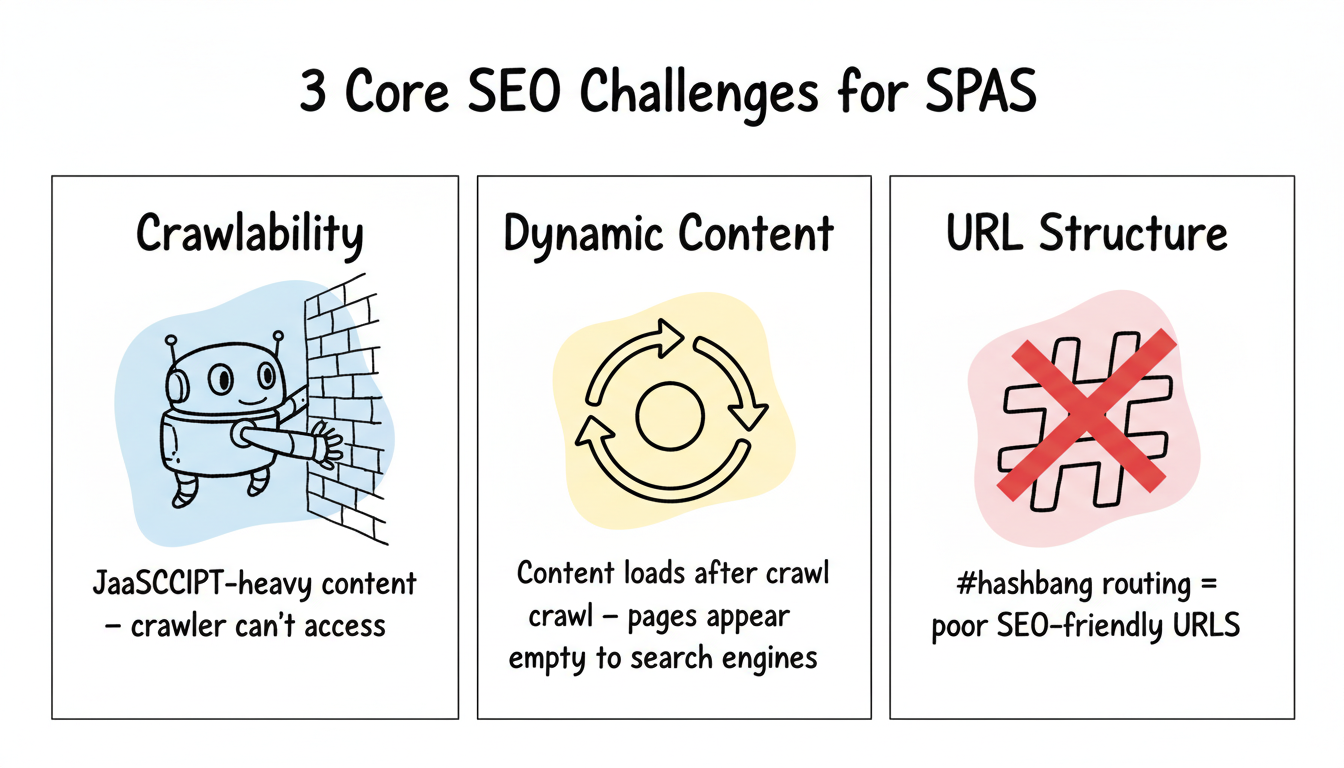
Essential Meta Tags for SPA Pages
Each SPA route needs unique meta tags including title, description, canonical, and Open Graph — all updated dynamically when the route changes via SSR or document manipulation.
- Title tag: unique, 50-60 chars, includes primary keyword per route
- Meta description: 150-160 chars, unique value proposition per route
- Canonical tag: prevent duplicate content from SPA URL variations
- Open Graph tags: og:title, og:description, og:url for social sharing
Angular-Specific SPA SEO Best Practices
Angular SPAs benefit from Angular Universal for SSR and require History API router configuration plus NavigationEnd subscription for accurate GA4 analytics tracking.
- Use Angular Universal for server-side rendering of public-facing routes
- Configure Angular Router with HTML5 pushState (not hash-based routing)
- Subscribe to NavigationEnd events to fire GA4 page_view on route change
Vue.Js SPA SEO Best Practices
Vue SPAs achieve the best SEO results with Nuxt.js for SSR or SSG, history-mode routing for crawlable URLs, and router.afterEach() hooks for GA4 page tracking.
- Use Nuxt.js for SSR or static site generation with built-in SEO modules
- Use vue-router with history mode, not hash mode, for crawlable URLs
- Use router.afterEach() to track route changes in GA4
International SEO for Spas (Hreflang)
Implementing hreflang in SPAs requires server-side HTML injection per route — client-side hreflang manipulation may not be processed reliably by Googlebot during second-wave rendering.
- Implement hreflang tags via server-side rendering or in the HTML head per route
- Use locale-based URL paths like /en/, /de/ rather than URL parameters
- Ensure each localized route is in the corresponding language sitemap
Page Speed Optimizations for SPA SEO
These three server and CDN optimizations deliver measurable LCP improvements for SPAs before any framework-level changes are needed.
- Enable HTTP/2 and Brotli compression on your web server or CDN
- Use route-based code splitting to reduce initial JavaScript bundle size
- Preload LCP images with link rel=preload in the initial HTML response
Structured URL Patterns for SPA Routes
Clean, descriptive URL slugs help Googlebot understand page content before rendering — a significant advantage for SPAs where HTML shells reveal nothing about the actual content.
- Use clean, descriptive URL slugs: /blog/spa-seo-guide not /blog/post?id=123
- Avoid URL parameters for primary content navigation in public-facing routes
- Keep URLs short and keyword-rich: under 75 characters when possible
Frequently Asked Questions
Common questions about SPA SEO, Googlebot crawling, React SEO implementation, GA4 tracking, and the benefits of server-side rendering answered concisely below.
Are Single Page Applications Bad for SEO?
SPAs are not inherently bad for SEO, but they require additional configuration to perform well. Client-side rendering creates challenges for Googlebot because the initial HTML response often contains no meaningful content. Implementing server-side rendering or prerendering resolves the most significant issues.
How Does Google Crawl Javascript Spas?
Google crawls SPAs using an evergreen Chromium renderer that executes JavaScript, but rendering is queued in a second wave that can delay indexing by days or weeks.
Google uses an evergreen Chromium-based renderer to execute JavaScript and index the rendered HTML. However, this rendering happens in a second pass that can be delayed by days or weeks after initial URL discovery. Server-side rendering ensures your content is available in the initial HTML response, eliminating the dependency on Google's rendering queue entirely.
What Is the Best Way to Implement SEO in a React SPA?
Use Next.js with server-side rendering or static generation — it pre-renders pages so search engines receive fully populated HTML without executing JavaScript.
The most reliable approach is to use Next.js with server-side rendering or static site generation. Next.js pre-renders pages on the server or at build time, so search engines receive fully populated HTML without needing to execute JavaScript. For applications that cannot migrate to Next.js, prerendering services like Prerender.io provide a middle-ground solution.
How Do I Track Page Views in GA4 for a Single Page Application?
Enable Browser history events in GA4 Enhanced Measurement, or configure a History Change trigger in Google Tag Manager — both fire page_view events on every SPA route change.
Enable the Browser history events toggle under GA4 Enhanced Measurement in your property settings, or set up a History Change trigger in Google Tag Manager. Both methods listen for History API events and fire a page_view event on every SPA navigation. Verify by watching the GA4 Realtime report while navigating between routes.
Does Server-Side Rendering Help SPA SEO?
Yes. SSR eliminates the two-wave indexing delay, delivers full HTML on first request, and improves Core Web Vitals LCP scores by up to 50% compared to client-side rendering alone.
Yes, SSR significantly improves SPA SEO. It eliminates the two-wave indexing delay by providing fully rendered HTML on the first request, improves Core Web Vitals especially LCP, and ensures all content is available to crawlers without relying on JavaScript execution. For SEO-critical content, SSR or static generation is the recommended approach over pure client-side rendering.
Are Single-Page Websites Good for SEO?
Single-page websites can rank well when configured with SSR, prerendering, or dynamic rendering. The key is ensuring search engines receive complete HTML rather than waiting for JavaScript execution.
Is SPA SEO Dead or Evolving in 2026?
SPA SEO is actively evolving, not dead. Google continues improving JavaScript rendering, and modern SSR frameworks make SPA SEO more accessible than ever for developers.