
Bing Ads Strategy Advanced Tactics: 2026 Best Practices
Once you've mastered the basics of Microsoft Advertising, it's time to leverage the platform's unique capabilities that many advertisers overlook. From exclusive LinkedIn targeting to Performance Max optimization, these Bing Ads strategy advanced tactics separate profitable campaigns from mediocre ones.
This guide covers Bing Ads strategy advanced tactics for experienced advertisers ready to scale performance in 2026. Each section maps to a distinct Bing Ads strategy advanced tactics area, so you can prioritize based on your account's biggest gaps.
Key Takeaways
These are the highest-impact strategies to implement first across your Microsoft Advertising account. For hands-on implementation, our Microsoft Advertising management services cover the full setup.
- LinkedIn profile targeting is Microsoft Advertising’s most powerful differentiator—unavailable on any other search platform.
- Performance Max campaigns now support 50 search themes per campaign, giving advertisers stronger automation control.
- Microsoft Ads CPCs run 20–35% lower than Google Ads equivalents across most verticals.
- Automated bidding outperforms manual once you have 30+ conversions per month.
- UET enhanced conversions improve attribution accuracy when cookies are blocked or users switch devices.
Beyond Basics: What Advanced Strategy Requires
Moving from beginner to advanced Microsoft Advertising requires shifting from reactive management to proactive optimization. The platform's AI-driven tools reward advertisers who provide better signals. Mastering Bing Ads strategy advanced tactics is how you provide those signals systematically.
The Signal-Driven Approach
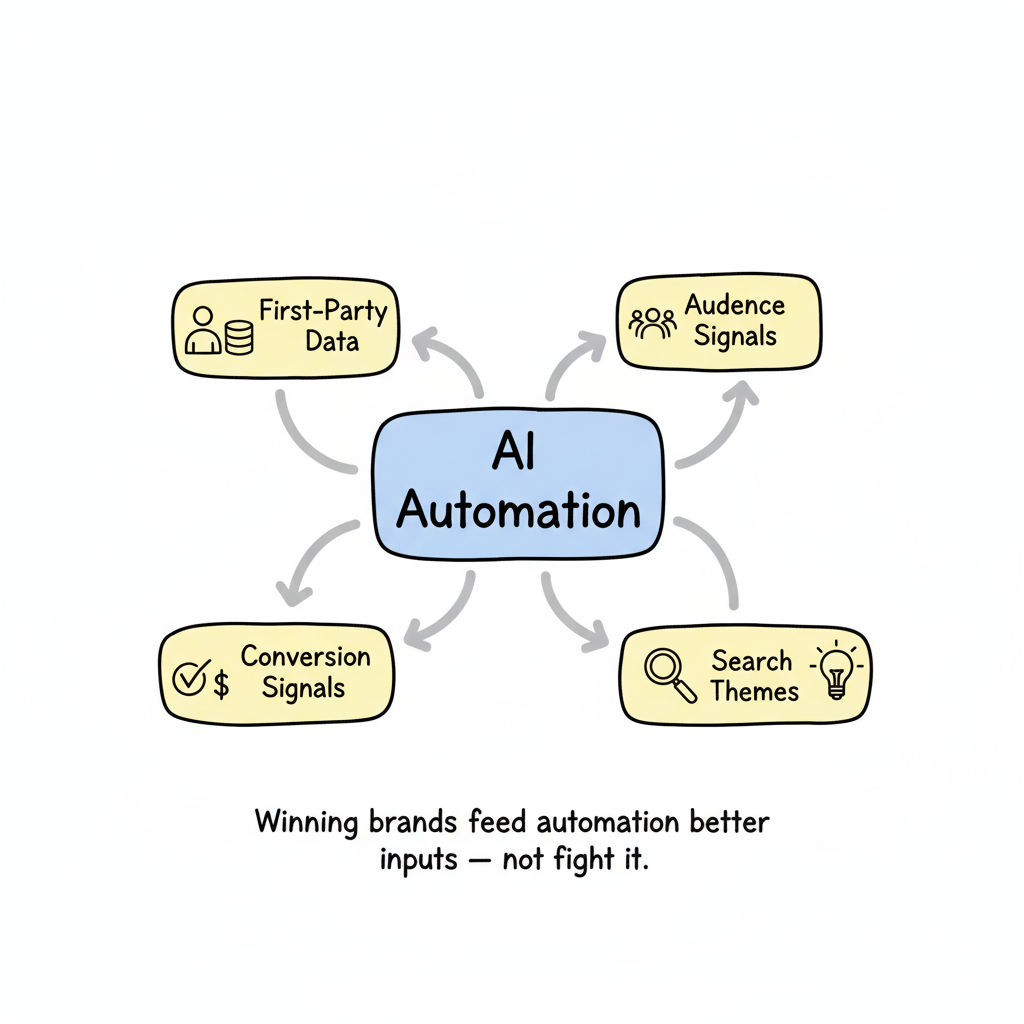
According to PPC trends in 2026, successful campaigns depend on the quality of data you feed into automation systems:
- First-party data: Your customer lists and website visitor data
- Audience signals: Professional attributes, in-market segments, remarketing lists
- Conversion signals: Revenue values, lead quality scores, offline conversions
- Search themes: Intent patterns that guide automation toward valuable queries
The brands winning in 2026 aren't fighting automation—they're feeding it better inputs.
Platform Advantages to Leverage
Microsoft Advertising offers unique capabilities unavailable elsewhere:
- LinkedIn profile targeting: The only search platform with professional attribute targeting
- Lower CPCs: 20-30% less than Google for equivalent keywords
- Performance Max with search themes: Up to 50 themes per campaign
- Copilot integration: AI-assisted optimization and insights
- Third-party data partnerships: Epsilon integration for audience-led search
- Microsoft Advertising network reach: Your ads appear across Bing, DuckDuckGo, Yahoo, AOL, MSN, and Outlook.com—extending visibility to search partners that Google cannot access
LinkedIn Targeting Strategies
LinkedIn profile targeting overlays professional attributes on keyword intent—targeting users by company, industry, or job function across the Microsoft Advertising network.
LinkedIn targeting is Microsoft's most powerful differentiator—and most underutilized feature. When approached thoughtfully, it applies professional understanding to intent-driven inventory without breaking the bank.
Understanding LinkedIn Targeting Mechanics
LinkedIn profile targeting overlays professional attributes on top of keyword targeting. You can target by:
Dimension | Coverage | Example Use |
Company | 80,000+ companies | Target specific accounts (ABM) |
Industry | 148 industries | Reach entire vertical markets |
Job function | 26 functions | Target decision-makers |
Best Practices for LinkedIn in Search
Start with keywords that already convert, then layer LinkedIn targeting:
1. Choose one professional dimension first
Don't target by company AND industry AND job function simultaneously. If someone works for a company in an industry you're also targeting, you bid on them twice—compounding bid adjustments unnecessarily.
2. Begin with observation mode
Use LinkedIn targeting in observation mode before applying delivery constraints. This reveals which professional segments naturally engage with your ads without restricting reach.
3. Apply incremental bid adjustments
Start with 10-15% bid increases on proven keywords where search terms demonstrate business value. Increase more aggressively only if impression share lost to rank is high.
4. Align creative with professional context
When targeting specific industries or job functions, ensure ad copy speaks directly to their challenges. Generic messaging wastes the targeting precision. If you're unsure how to advertise on Bing with industry-specific messaging, start with industry-tailored headlines that address job-specific pain points.
LinkedIn in Audience Ads
LinkedIn Professional Demographics work as both targeting and observation layers in Audience Ads—bringing professional context to native, display, and video formats.
Aggregated reporting breaks down by company, industry, and job function, showing how different professional segments contribute to performance across campaigns. Find this in Reporting > Professional demographics.
Use the professional demographics report to identify which company sizes, industries, or job functions over-index on conversions relative to their impression share. A segment that represents 8% of impressions but drives 18% of conversions deserves a dedicated bid adjustment—and potentially its own ad group with tailored creative that speaks to that specific audience’s challenges and goals. This data-driven segmentation is what separates accounts with 3-5x higher conversion rates from accounts that treat all audiences identically.
LinkedIn in Performance Max
LinkedIn profile targeting functions as an audience signal within Performance Max campaigns, guiding budget allocation toward professional profiles with high profit potential.
Select signals reflecting your most valuable customers and ensure conversion metrics align with your goals.
Audience Segmentation
Beyond LinkedIn, strategic audience segmentation improves targeting precision across all campaign types.
In-Market Audiences
Microsoft's in-market audiences identify users actively researching products or services. Layer these onto search campaigns:
- Use observation first: See which in-market segments engage before restricting delivery
- Bid adjustments by segment: Increase bids for segments showing high conversion rates
- Negative audiences: Exclude segments that click but don't convert
Demographic Targeting
Microsoft Advertising supports demographic targeting by age, gender, and location—refine who sees your ads based on audience composition data.
Combine demographic bid adjustments with device targeting to prioritize mobile or desktop users in segments that convert best. For example, if your B2B product converts primarily among desktop users aged 35-54, increase bids for that intersection while reducing spend on underperforming demographics.
Remarketing Strategies
Impression-based remarketing captures users who saw your ads without clicking—a massive pool for follow-up targeting.
Build remarketing lists strategically:
- Site visitors (all)
- Product/service page visitors (high intent)
- Cart abandoners (highest intent for ecommerce)
- Converters (for exclusion or upsell)
- Time-based segments (recent vs. stale visitors)
Custom Audiences
Upload first-party customer data to create custom audiences:
- Past purchasers for loyalty campaigns
- High-value customers for lookalike modeling
- Lead lists for exclusion (don't advertise to existing leads)
- Offline converters for better attribution
Similar Audiences
Once custom audiences have sufficient size, Microsoft generates similar audiences—users who share characteristics with your best customers. These expand reach while maintaining quality.
Set a minimum audience size of 1,000 users before enabling similar audiences to ensure Microsoft has enough signal to generate a high-quality lookalike pool. Smaller seed audiences produce lower-quality matches and higher CPAs.
Advanced Audience Layering
Most advertisers use a single audience signal per campaign. Advanced practitioners layer multiple audience types simultaneously to create compound targeting precision that improves both efficiency and conversion quality.
The core principle: each audience layer narrows the pool toward your ideal buyer. A B2B software company might combine an in-market audience for "Business Software" with LinkedIn targeting for IT decision-makers and a remarketing list of past visitors to their pricing page. Each layer acts as a filter, so by the time an ad serves, the user is demonstrably in-market, in the right professional role, and already familiar with your product.
Recommended Layering Sequence
Apply audience layers in this order to avoid compounding bid adjustments before you have data:
- Start with observation only: Add all audience layers in observation mode. Let campaigns run for two to four weeks to collect segment-level performance data without restricting delivery.
- Identify high-value segments: Review the audience performance report. Look for segments with conversion rates above your campaign average or cost per acquisition below your target.
- Apply bid adjustments to winners: Promote high-performing segments from observation to targeting with bid adjustments. Start at +15% to +25% for proven segments. Avoid exceeding +50% on any single dimension until you understand compounding effects.
- Exclude underperformers: Set negative bid adjustments (-30% to -90%) for segments that consistently miss efficiency targets. For extreme underperformers, add them as negative audiences to exclude delivery entirely.
- Introduce lookalike expansion: Once your custom audiences are well-defined, add Microsoft-generated similar audiences to expand reach while maintaining quality. Monitor closely in the first two weeks to verify conversion rates hold.
This layering approach reduces wasted impressions while improving the quality of traffic that does reach your landing pages. Campaigns using three or more aligned audience layers typically see 15-35% lower cost per acquisition than campaigns using a single audience signal.
For Performance Max campaigns, apply this same layering logic through audience signals rather than campaign-level bid adjustments. The more precisely you define who your ideal customers are in the signal configuration, the faster the campaign's machine learning identifies similar patterns in new audiences.
Bid Optimization
In 2026's AI-driven landscape, manual bidding has limited utility. But understanding how to optimize automated strategies remains essential.
Choosing the Right Bid Strategy
Choose your bidding strategy based on campaign maturity and available conversion data.
Strategy | Best For | Requirements |
Manual CPC | Learning new campaigns | Time for daily management |
Enhanced CPC | Hybrid control | Some conversion history |
Maximize conversions | Volume focus | 30+ conversions/month |
Target CPA | Cost efficiency | Stable conversion rates |
Target ROAS | Revenue optimization | Revenue tracking enabled |
Maximize conversion value | Revenue focus | Value data available |
Quality Score Optimization
Quality score directly impacts your ad rank and cost per click. Microsoft calculates quality score from three components: expected click-through rate, ad relevance, and landing page experience. To improve each factor:
- Expected CTR: Write responsive search ads with multiple headline and description variations so Microsoft can serve the best combination per query. Aim for at least 8 headlines and 4 descriptions per ad group.
- Ad relevance: Align ad copy tightly with keyword themes. Group keywords by intent so each ad group speaks to a specific need rather than a broad category.
- Landing page experience: Ensure fast load times, mobile responsiveness, and content that matches the ad's promise. Use UTM parameters to track which ad variations drive the best on-page engagement.
Bid Adjustments That Compound
Microsoft allows bid adjustments across multiple dimensions. Understand that adjustments compound:
Example:
- Device adjustment: +20% mobile
- LinkedIn industry adjustment: +15%
- In-market audience adjustment: +10%
- Schedule adjustment: +10% business hours
A user matching all criteria receives: 1.20 × 1.15 × 1.10 × 1.10 = 1.67x your base bid
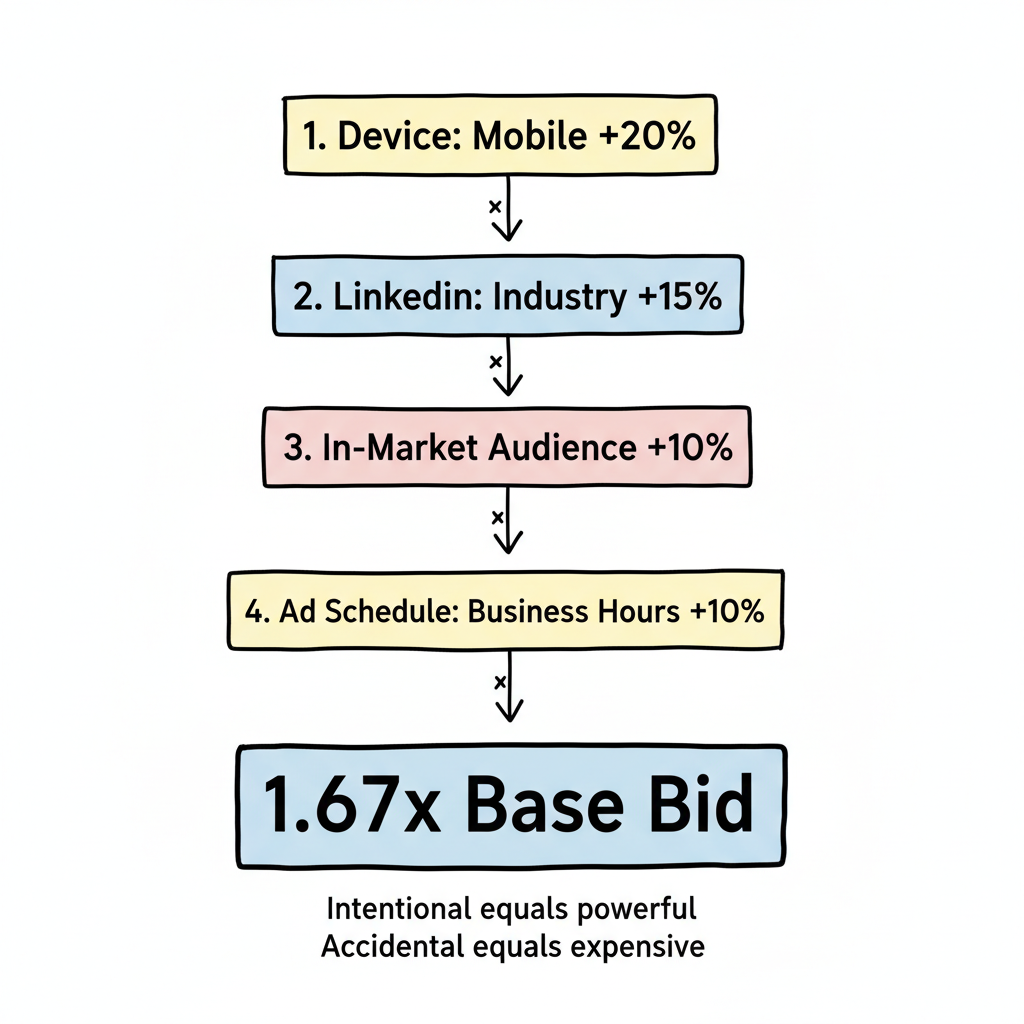
This compounding is powerful when intentional—and expensive when accidental. Advanced PPC advertising management best practices emphasize monitoring these multipliers to avoid runaway CPCs.
Value-Based Bidding
Move beyond counting conversions to prioritizing conversion quality:
- Assign values to different conversion actions (demo request vs. content download)
- Pass lead quality scores to Microsoft via enhanced conversions
- Use CRM data to inform offline conversion values
- Let automation optimize toward business impact, not just volume
Portfolio Bid Strategies
For accounts with multiple campaigns targeting similar goals, portfolio bid strategies optimize across the entire portfolio—allowing budget to flow toward the best opportunities regardless of campaign structure. This shared optimization pool is especially powerful during seasonal peaks when one campaign type consistently outperforms others.
Ad Extensions for Advanced Campaigns
Ad extensions increase your ad's real estate on the results page, improve click-through rate, and contribute to quality score. Microsoft Advertising supports a full suite of extensions that advanced advertisers should deploy across every campaign.
Sitelink Extensions
Sitelinks add additional links below your main ad, directing users to specific pages on your site. For advanced campaigns, use sitelinks strategically:
- Create campaign-level and ad-group-level sitelinks so messaging aligns with keyword intent
- Include 6-10 sitelinks per campaign to give Microsoft flexibility in rotation
- Add descriptions to every sitelink—ads with described sitelinks earn higher CTR
- Rotate sitelinks seasonally (e.g., link to case studies for Q1 budget season, pricing pages for end-of-quarter)
Callout and Structured Snippet Extensions
Callout extensions highlight key differentiators (e.g., "Free Consultation," "24/7 Support," "No Long-Term Contract"). Structured snippets let you list values under predefined headers such as "Services," "Brands," or "Types." Both extensions increase ad visibility without additional click cost.
Best practices for callouts:
- Keep each callout under 25 characters for full display
- Use at least 4 callouts per campaign
- Focus on value propositions competitors lack
Price and Promotion Extensions
Price extensions display your products or services with costs directly in the ad unit—ideal for ecommerce and SaaS companies. Promotion extensions highlight seasonal offers, discount codes, or limited-time deals. Both extensions qualify your traffic before the click, reducing wasted spend on users outside your price range.
Location Extensions
For businesses with physical locations, location extensions display your address, phone number, and a map link alongside your ad. These are especially effective for local service campaigns and drive measurable foot traffic when paired with store visit conversion tracking.
Conversion Tracking and UET Setup
Accurate conversion tracking is the foundation of every optimization strategy. Without reliable data flowing back to Microsoft Advertising, automated bidding cannot function correctly and you're effectively flying blind.
Universal Event Tracking (UET) Tag
The UET tag is Microsoft's tracking pixel that must be installed on every page of your website. It enables conversion tracking, remarketing list building, and automated bidding optimization. Implementation steps:
- Install the UET base tag site-wide via Google Tag Manager or directly in your site header
- Verify the tag fires correctly using the UET Tag Helper browser extension
- Create conversion goals for each valuable action: form submissions, purchases, phone calls, and page visits
- Set appropriate conversion windows (default is 30 days; adjust based on your sales cycle length)
Enhanced Conversions
Enhanced conversions improve attribution accuracy by sending hashed first-party data (email addresses, phone numbers) alongside conversion events. This bridges the gap when cookies are blocked or users switch devices. Enable enhanced conversions in your UET tag settings and ensure your privacy policy covers the data usage.
Offline Conversion Tracking
For B2B and high-consideration purchases, the conversion often happens offline—a signed contract, a closed deal, or an in-store visit. Import offline conversions via:
- Manual CSV upload from your CRM
- Automated API integration with Salesforce, HubSpot, or custom pipelines
- Microsoft Click ID (MSCLKID) parameter appended to your URLs for attribution matching
Feeding offline conversion data back to Microsoft enables value-based bidding strategies that optimize toward actual revenue rather than proxy metrics like form fills.
Negative Keyword Strategy
A rigorous negative keyword strategy prevents wasted spend on irrelevant queries and improves overall campaign efficiency. Advanced tactics include:
- Build shared negative keyword lists at the account level and apply them across all campaigns
- Review search term reports weekly to catch new irrelevant queries before they drain budget
- Use tiered negatives: campaign-level for broad exclusions, ad-group-level for intent refinement
- Cross-reference your Microsoft Keyword Planner research with actual search terms to proactively block low-intent variations
- Add competitor brand names as negatives (unless running a conquesting strategy)
Campaign Types Beyond Search
Advanced Microsoft advertisers diversify beyond standard search campaigns to capture demand across the full funnel.
Dynamic Search Ads
Dynamic search ads (DSAs) automatically generate headlines and landing pages based on your website content. They're ideal for large sites with extensive product catalogs or frequently changing inventory. Use DSAs to:
- Capture long-tail queries you haven't explicitly targeted with keywords
- Fill coverage gaps in your keyword strategy
- Discover new converting search terms to add to manual campaigns
Set DSA campaigns with tight negative keyword lists to prevent overlap with your core search campaigns.
Microsoft Shopping Ads
For ecommerce advertisers, Microsoft Shopping Ads (powered by the Microsoft Merchant Center) display product images, prices, and merchant names directly in search results. Shopping ads typically achieve higher click-through rates than text ads for product queries. Key setup requirements:
- Submit a product feed via Microsoft Merchant Center with accurate titles, descriptions, prices, and availability
- Use custom labels to segment products by margin, seasonality, or performance tier
- Enable automatic item updates to keep pricing in sync
- Combine Shopping campaigns with negative keywords to prevent cannibalizing your branded search traffic
Microsoft Ads Benchmarks 2026
Understanding platform benchmarks helps you set realistic targets and identify underperforming campaigns. Below are average Microsoft Advertising performance metrics across key industries in 2026:
Industry | Avg. CPC | Avg. CTR | Avg. Conv. Rate |
B2B / SaaS | $3.80 | 2.8% | 3.2% |
Ecommerce | $1.40 | 3.5% | 2.8% |
Finance | $5.20 | 2.3% | 4.1% |
Healthcare | $3.10 | 2.6% | 3.5% |
Legal | $6.50 | 2.1% | 3.8% |
Real Estate | $2.40 | 3.1% | 2.5% |
Education | $2.80 | 3.3% | 3.0% |
Microsoft Advertising CPCs run 20-35% lower than Google Ads equivalents across most verticals, while click-through rates are often comparable or slightly higher due to less ad saturation. Use these benchmarks to evaluate your campaigns: if your CTR falls significantly below your industry average, focus on ad copy testing and extension coverage before adjusting bids.
Performance Max Optimization
Microsoft expanded Performance Max search themes to 50 per campaign in January 2026—giving advertisers stronger control over automation. Applying these Bing Ads strategy advanced tactics to Performance Max campaigns accelerates the learning phase.
Search Themes Strategy
Search themes function as strategic signals guiding Performance Max toward queries and intent patterns you care about. Unlike traditional keywords, themes don't restrict reach—they influence learning.
Best practices:
- Start with proven converters: Use search terms that already convert in search campaigns
- Group by intent category: Create themes around problem awareness, solution research, and purchase intent
- Partner with audience signals: Combine search themes with LinkedIn targeting to focus on high-value customers
- Use all 50: More themes give the algorithm more guidance—use the full capacity
Asset Quality
Performance Max campaigns achieve 4.2x more conversions when integrated with strong assets and data:
- Provide complete creative across all formats (images, video, headlines, descriptions)
- Refresh creative every 4-6 weeks to combat fatigue
- Use high-quality product feeds for ecommerce
- Test different asset combinations systematically
Audience Signals in Performance Max
Audience signals tell Performance Max who your ideal customers look like:
- Customer Match lists (most valuable signal)
- Website visitors and converters
- LinkedIn profile attributes
- In-market audiences relevant to your offering
The more specific your signals, the faster the campaign learns. For specialized verticals, consider working with a SaaS PPC agency to refine audience signals based on customer LTV data.
Scaling Tactics
Once campaigns are profitable, scale systematically rather than simply increasing budgets.
Horizontal Scaling
Expand reach without increasing keyword competition:
- Add new product/service campaigns
- Expand to additional geographic markets
- Test new audience segments
- Launch Audience Ads to complement search
Vertical Scaling
Deepen investment in what's working. Combining Bing Ads strategy advanced tactics across LinkedIn targeting, Performance Max themes, and value-based bidding creates compound returns that single-lever optimization cannot match.
- Increase budgets on top-performing campaigns gradually (20-30% increments)
- Expand match types from exact to phrase to broad
- Add more search themes to Performance Max
- Increase bid adjustments on proven audience segments
Cross-Platform Integration
Leading brands diversify their media mix rather than relying on a single channel. Understanding display advertising vs paid search helps you allocate budgets across complementary channels without cannibalizing performance.
- Coordinate Microsoft Ads with Google Ads strategy
- Use Microsoft for audiences Google can't reach
- Align messaging across search and social
- Share learnings between platforms
Measurement and Attribution
As you scale, measurement must evolve:
- Implement enhanced conversions for better attribution
- Track view-through conversions for display impact
- Use multi-touch attribution models
- Connect CRM data to platform reporting
Key Metrics and Common Mistakes
Effective Bing Ads campaign management requires tracking the right metrics and avoiding the pitfalls that drain budget before you ever hit your targets.
Core Metrics to Track
Monitor these four KPIs across all campaigns:
- Click-Through Rate (CTR): The percentage of impressions that convert to clicks. Microsoft Ads industry averages range from 2.1%–3.5%.
- Cost Per Acquisition (CPA): Total spend divided by conversions. Once stable, switch to Target CPA bidding for automated cost optimization.
- Profit on Ad Spend (POAS): Ad-generated revenue minus ad costs, divided by ad spend—a truer profitability measure than ROAS alone.
- Cost Per Click (CPC): Microsoft Ads CPCs run 20–35% below Google equivalents, making it a key Bing Ads cost advantage for budget efficiency.
Common Mistakes to Avoid
These recurring errors cost advertisers budget and attribution accuracy every month.
- Ignoring Microsoft Consent Mode: Not paying attention to Microsoft Consent Mode causes measurement gaps in privacy-regulated markets. Implement consent management in Microsoft Advertising through your tag manager before launching campaigns in GDPR or CCPA regions.
- Skipping server-side tracking: Browser-based UET alone misses cookie-blocked conversions. Try Microsoft Ads server-side tracking to close attribution gaps that client-side tags cannot capture.
- Leaving import mismatches unfixed: Campaigns imported from Google Ads often carry mismatching issues—bid strategies, match types, and audience definitions that need manual review before activation.
- No negative keywords list: Always use a negative keywords list from launch. Build a shared account-level list and apply it across every campaign to prevent irrelevant queries from draining spend.
Platform Reach and Targeting Advantages
Microsoft Advertising commands significant market share with desktop users, a segment with higher purchasing authority in B2B and enterprise categories.
The platform’s B2B targeting option through LinkedIn integration makes it uniquely suited for professional audience reach. Diverse ad placements across Bing, Yahoo, DuckDuckGo, and MSN deliver inventory Google cannot provide.
As you scale, track offline conversions from CRM imports to measure true campaign ROI beyond last-click attribution. The Bing Ads strategy advanced tactics in this guide give you the edge to maximize ROI on every campaign type.
Measuring Bing Ads Success
A personalized campaign strategy requires transparent reporting across every funnel stage. Before setting up a Microsoft Ads campaign, define which metrics matter: CTR benchmarks by industry, cost per acquisition targets, and revenue goals tied to ROAS or POAS.
Set up consistent ad performance tracking across search, Shopping, Performance Max, and Audience Ads. Use AI-driven bidding and automation to optimize toward your highest-value conversions. As Bing Ads campaign volume scales, control bid amounts and budget allocation through portfolio strategies that move spend toward top performers automatically.
Microsoft Advertising strategies that consistently outperform rely on Bing Ads examples from your own account history: winning ad copy, top-converting segments, and search themes driving qualified traffic. Measuring Bing Ads success through CRM-matched offline conversions reveals which campaigns generate actual business value in Microsoft Advertising.
Frequently Asked Questions
Answers to the most common questions about advanced Microsoft Advertising strategy and campaign setup.
What Is the Best Bidding Strategy for Microsoft Ads in 2026?
For most advertisers, automated strategies outperform manual bidding once you have sufficient conversion data (30+ conversions per month). Start with Target CPA if you have a cost goal, or Maximize Conversions if you want to scale volume. Use value-based bidding if you can pass revenue or lead quality data.
How Do I Use LinkedIn Targeting Effectively in Microsoft Ads?
Start by adding LinkedIn audiences in observation mode to learn which professional segments engage naturally. Then apply one dimension at a time (company, industry, OR job function—not all three). Use incremental bid adjustments of 10-15% initially and scale based on performance data.
How Many Search Themes Should I Use in Performance Max?
Use all 50 search themes now available per campaign. More themes give Microsoft's automation better guidance. Start with search terms that already convert in other campaigns, group by intent category, and combine with LinkedIn targeting for maximum precision.
What Ad Extensions Should I Use in Microsoft Ads?
Deploy all available ad extensions: sitelinks, callouts, structured snippets, price extensions, and location extensions.
Extensions improve click-through rate and quality score at no additional cost per click. Include at least 6 sitelinks with descriptions and 4 callout extensions highlighting key differentiators per campaign.
How Do I Set Up Conversion Tracking with the UET Tag?
Install the Universal Event Tracking (UET) base tag on every page via Google Tag Manager, then verify it fires with the UET Tag Helper extension.
Create conversion goals for each valuable action. Enable enhanced conversions to improve attribution accuracy when cookies are blocked, and import offline conversions from your CRM to optimize toward actual revenue.
What Are Good Benchmarks for Microsoft Ads Performance?
Average click-through rates on Microsoft Ads range from 2.1%–3.5% by industry, with CPCs running 20–35% lower than Google Ads equivalents.
B2B and SaaS advertisers typically see CTRs around 2.8% with conversion rates near 3.2%, while ecommerce averages 3.5% CTR with 2.8% conversion rate. If metrics fall below these averages, prioritize ad copy testing and extension coverage before adjusting bids.