
Bing paid search advertising offers a compelling opportunity for businesses looking to expand beyond Google Ads. With over 100 million users searching on Bing daily and CPCs averaging 30-40% lower than Google, Microsoft Advertising deserves a place in your paid search strategy. This guide walks you through why Bing matters, how to set up your first campaign, and best practices for success.
Why Bing Paid Search Matters
Many advertisers overlook Bing, focusing exclusively on Google. That's a mistake that leaves opportunity on the table.
Significant Market Reach
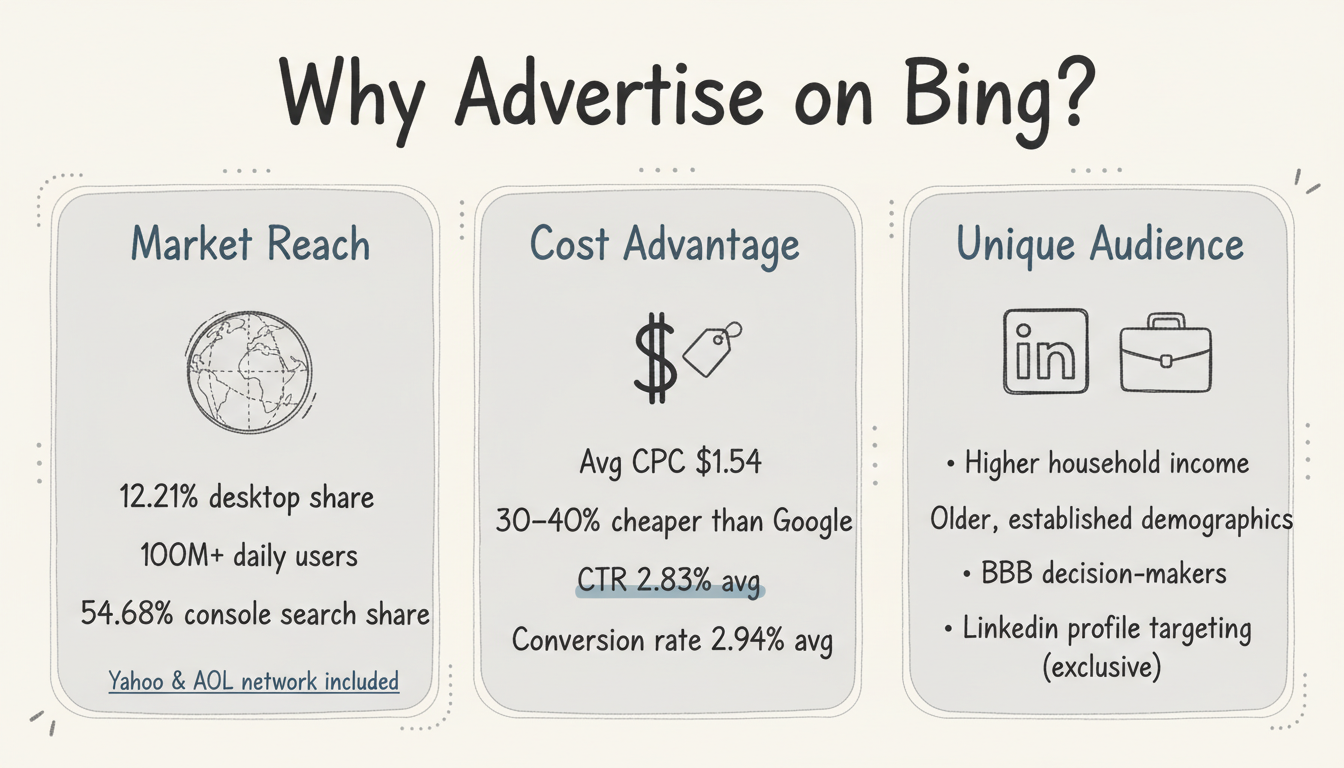
Despite Google's dominance, Bing commands meaningful market share:
- 12.21% of desktop search engine market share globally
- Over 100 million daily active searchers
- 54.68% of console users conduct searches through Bing
- Access to Yahoo and AOL through the Microsoft Search Network
For advertisers, this translates to millions of potential customers your Google-only competitors miss entirely. When comparing Microsoft Ads vs Google Ads, market reach is just one of several factors to consider.
Lower Costs, Better ROI
The economics of Bing advertising often favor advertisers:
- Average CPC of $1.54, approximately 40% lower than Google Ads
- Average CTR of 2.83% across all industries
- Average conversion rate of 2.94%
- Less competition for keywords means lower bid prices
According to Landingi, Microsoft Ads generally cost 30-40% less than Google Ads, with CPCs falling between $1.50 and $2.80. This cost advantage addresses many of the common disadvantages of paid search advertising by improving ROI and reducing budget pressure.
Unique Audience Demographics
Bing users tend to differ from Google users in valuable ways:
- Higher average household income
- Older, more established demographics
- Stronger B2B decision-maker representation
- Higher purchasing power on average
These demographics often translate to higher conversion values, making the lower CPCs even more attractive.
LinkedIn Integration
Microsoft is the only search platform offering LinkedIn profile targeting. This exclusive feature enables B2B advertisers to target users by:
- Company name
- Job function
- Industry
- Seniority level
No other search advertising platform offers this capability.
Getting Started with Microsoft Advertising
Setting up your first Bing paid search campaign is straightforward, especially if you already run Google Ads.
Step 1: Create Your Account
- Visit ads.microsoft.com
- Sign in with a Microsoft account or create one
- Complete your business information
- Add payment details
Step 2: Import or Build Campaigns
You have two options for getting started:
Import from Google Ads: Microsoft Advertising allows you to import campaigns directly from Google Ads. This is the fastest path if you have established Google campaigns.
Build Native Campaigns: For better optimization, consider building campaigns specifically for the Microsoft platform. According to Aureate Labs, simply replicating Google campaigns often yields suboptimal results because audience behavior differs.
Step 3: Set Up Conversion Tracking
Install the Universal Event Tag (UET) on your website to track:
- Form submissions
- Purchases
- Phone calls
- Other valuable actions
Accurate conversion tracking is essential for optimizing your campaigns and measuring ROI.
Step 4: Define Your Budget
Start with a modest daily budget to test performance. Microsoft Ads don't require large budgets to get started - even $10-20 per day provides meaningful data for initial optimization.
Campaign Setup Essentials
Proper campaign structure sets the foundation for success, whether you manage campaigns in-house or outsource PPC management to specialized agencies.
Account Structure
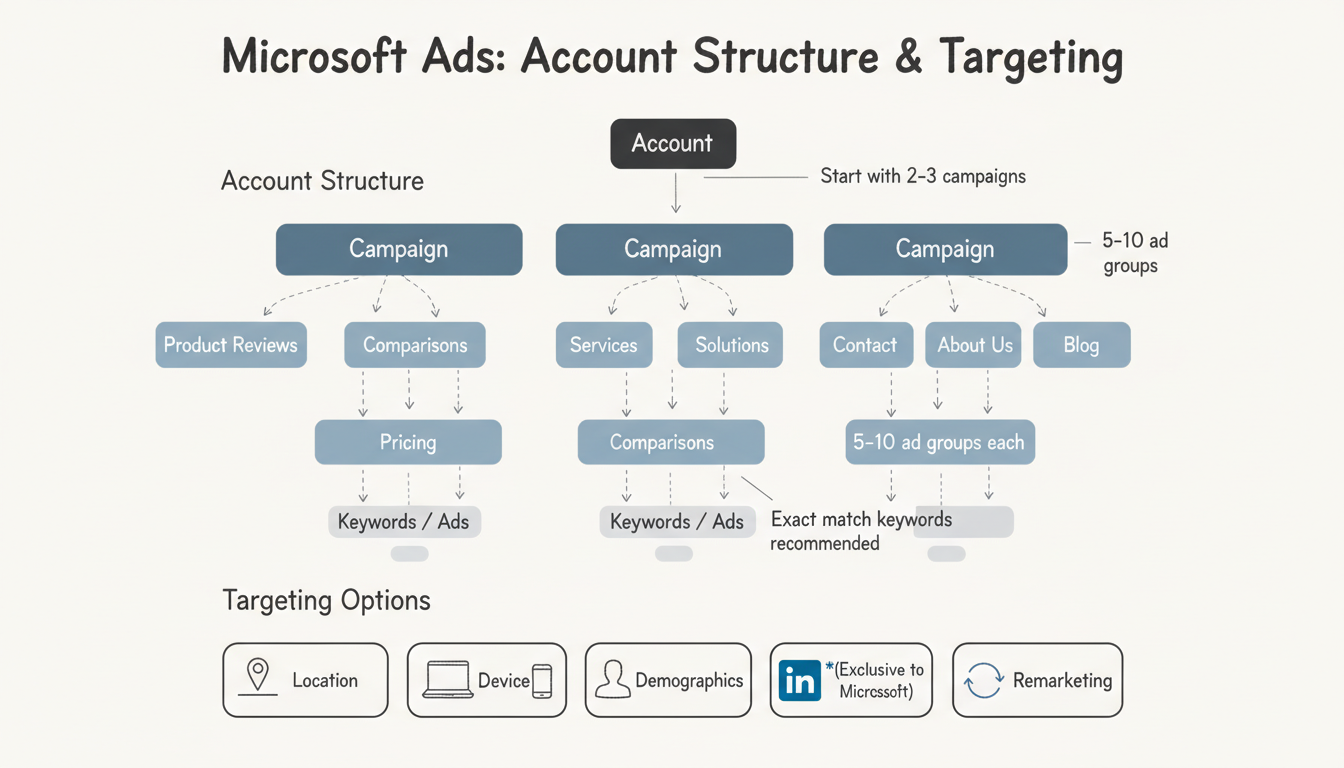
Organize your Microsoft Advertising account following this hierarchy:
Account to Campaigns to Ad Groups to Keywords/Ads
Best practices from Digital Position recommend:
- Limit to 2-3 campaigns maximum when starting
- 5-10 ad groups per campaign
- Themed ad groups (e.g., "product reviews," "pricing," "comparisons")
- Exact match keywords only for tighter control
Keyword Strategy
While keyword targeting on Microsoft Ads is similar to Google Ads, important differences exist:
- Match types behave slightly differently
- Negative keyword handling varies
- Search network reach differs
Focus on high-intent commercial keywords that indicate buying readiness. Start narrow and expand based on performance data.
Ad Copy Creation
Write compelling ads that include:
- Primary keyword in headlines
- Clear value proposition
- Strong call-to-action
- All available ad extensions (sitelinks, callouts, structured snippets)
Microsoft Ads supports similar ad formats to Google, including responsive search ads with multiple headline and description options.
Targeting Options
Refine your audience with Microsoft's targeting capabilities:
- Location targeting: Geographic areas where you do business
- Device targeting: Desktop, mobile, tablet adjustments
- Demographics: Age, gender, household income
- LinkedIn targeting: Company, industry, job function (unique to Microsoft)
- Remarketing: Target previous website visitors
Best Practices for Bing Paid Search
Apply these strategies to maximize your Microsoft Advertising performance.
Start with Manual Bidding
Begin with manual CPC bidding to maintain control while you learn the platform. Once you have sufficient conversion data (typically 30+ conversions per month), consider testing automated bidding strategies.
Don'T Just Copy Google Campaigns
While importing from Google Ads is convenient, audience behavior differs between platforms. Review and adjust:
- Bid amounts (often can be lower on Bing)
- Ad copy (test platform-specific messaging)
- Keyword lists (some terms perform differently)
- Targeting settings
Leverage LinkedIn Targeting for B2B
If you're targeting business audiences, LinkedIn integration is your competitive advantage. Layer LinkedIn targeting on top of keyword targeting to reach decision-makers at specific companies or in particular roles.
Monitor Search Terms Regularly
Review the search terms report weekly to:
- Identify high-performing queries to add as keywords
- Find irrelevant searches to add as negative keywords
- Understand how your audience actually searches
Test Audience Ads
Beyond search, Microsoft offers Audience Ads that appear on MSN, Outlook, and partner sites. These image-based ads can expand your reach beyond search results.
Next Steps After Launch
Once your campaigns are running, focus on continuous improvement.
Week 1-2: Data Collection
Allow campaigns to gather sufficient data before making major changes. Monitor for any issues but avoid over-optimizing too early.
Week 3-4: Initial Optimization
Review performance and make adjustments:
- Pause underperforming keywords
- Increase bids on high-converting terms
- Add negative keywords
- Test new ad variations
Month 2+: Scale What Works
With initial optimization complete:
- Increase budget on profitable campaigns
- Expand keyword coverage
- Test automated bidding strategies
- Consider adding audience campaigns
Common Bing Campaign Mistakes
The first mistake is importing Google campaigns without review. Bing's audience and match behavior differ, so a direct import can mis-target and over-spend, so audit the import and adjust bids and negatives before scaling. The platform rewards the setup that fits it, not the one copied from elsewhere.
The second is ignoring the Microsoft ecosystem. Bing ads extend into Outlook and the audience network, so a campaign that treats Bing as only a search box misses the cheaper reach. Read the full surface and allocate to where the intent actually lives for your buyer.
Getting Started Efficiently
Start with a tight campaign on your best-converting keywords, because a small, clean launch teaches the auction faster than a broad import. Set the tracking before spend, so the first dollars produce a measurable baseline you can improve, rather than a bill you cannot explain.
Use the import as a draft, not a deployment. Bring the structure over, then prune what does not fit and set Bing-specific bids, because the efficiency comes from the edit, not the copy. The disciplined start is what makes Bing a contributor instead of a cost.
Next Steps After Launch
Review search terms weekly and add negatives, because Bing's broader match behavior can pull irrelevant queries that waste spend. The negative list is the quiet lever that protects ROI, and the habit of pruning is what separates a profitable account from a leaky one.
Test the audience network once the core is stable, because the expansion earns reach the search box alone cannot. Add it as a separate test with its own metric, so you can see the contribution without confusing it with search performance. The staged expansion is the safe way to grow.
Frequently Asked Questions
How Much Does Bing Paid Search Advertising Cost?
Bing paid search advertising costs vary by industry, but average CPC is approximately $1.54 - about 40% lower than Google Ads. You can start with any budget; even $300-500 per month provides meaningful data for small businesses.
Is Bing Advertising Worth It?
Yes, for most businesses. Lower costs, less competition, and unique audience demographics make Microsoft Advertising a valuable complement to Google Ads. The LinkedIn targeting feature alone makes it essential for B2B advertisers.
Can I Import My Google Ads Campaigns to Bing?
Yes. Microsoft Advertising offers direct import from Google Ads, making it easy to get started. However, you should review and adjust imported campaigns rather than running them unchanged, as audience behavior differs between platforms.