
Last Updated: January 2026
Microsoft Copilot integration across Microsoft 365 - particularly within Teams - creates new visibility opportunities for B2B brands. When enterprise users ask Copilot questions, the AI pulls from both web sources and organizational data through Microsoft Graph.
This guide covers how to optimize your content for visibility when Copilot assists Microsoft Teams users with research, recommendations, and decision-making.
How Microsoft Copilot Works in Teams
Microsoft 365 Copilot operates as an AI-powered universal search experience optimized for organizational contexts. Unlike consumer AI assistants, Copilot grounds its responses in Microsoft Graph data - documents, emails, calendars, Teams conversations, and SharePoint content.
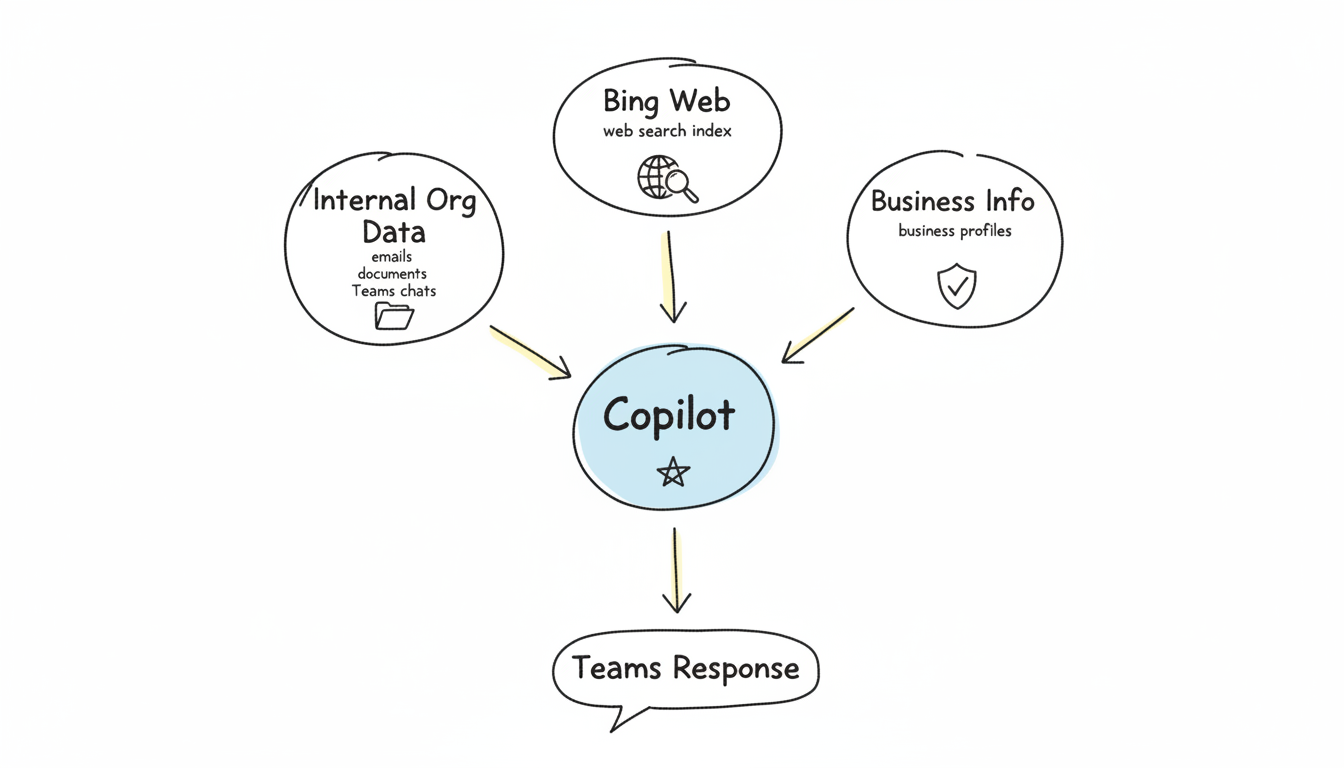
When Teams users query Copilot about vendors, solutions, or industry topics, the AI combines:
- Internal organizational data (emails, documents, past conversations)
- Web search results (powered by Bing's index)
- Microsoft-verified business information
This hybrid approach means B2B visibility requires optimization across both web presence and how your content integrates with enterprise workflows. Understanding generative AI search optimization principles helps you adapt to these new visibility channels.
Why Teams Visibility Matters for B2B
Enterprise buyers increasingly use Copilot within Teams to:
- Research potential vendors during procurement discussions
- Summarize competitive information from shared documents
- Answer colleague questions about solutions and providers
- Generate briefings before vendor meetings
When your brand appears in these Copilot-assisted workflows, you reach decision-makers at critical moments - often before they've even visited your website.
Bing Optimization as the Foundation
Microsoft Copilot's web knowledge comes from Bing. Strong Bing visibility directly influences Copilot citations. Unlike Google-focused SEO, Bing optimization requires specific attention.
Bing Webmaster Tools Setup
Register your site with Bing Webmaster Tools to:
- Submit sitemaps directly to Bing's index
- Monitor crawl status and indexing issues
- Identify content Bing can't properly parse
- Track search performance separately from Google
Bing crawls less frequently than Google. Ensuring clean technical SEO and explicit sitemap submission helps your content get indexed faster.
Bing Ranking Factors
Bing emphasizes factors that influence Copilot visibility:
Clear Authorship Bing values explicit author attribution. Include author names, credentials, and author pages that establish expertise. This signals E-E-A-T (Experience, Expertise, Authoritativeness, Trustworthiness) to both Bing and Copilot.
Page Quality Signals Bing evaluates content quality through:
- Domain age and history
- Backlink quality and relevance
- Content freshness and update frequency
- User engagement metrics
Exact Match Relevance Bing weighs keyword matching more heavily than Google. Include exact-match keywords naturally within your content, particularly in headings and early paragraphs. While many marketers focus on ai-seo-best-practices-2026 for Google, Bing requires additional consideration of exact-match signals.
Technical Requirements
Ensure your site meets Bing's technical expectations:
- Fast page load times (Bing penalizes slow sites more than Google)
- Mobile-responsive design
- Clean URL structures
- Properly configured robots.txt allowing Bingbot
- Valid SSL certificates
Content Optimization for Copilot
Copilot extracts and synthesizes information differently than traditional search engines. Structure content to maximize extraction value.
Enterprise-Focused Content
Copilot serves business users. Content that addresses enterprise concerns performs better:
Decision-Support Content
- Comparison guides (your solution vs. alternatives)
- ROI calculators and business case frameworks
- Implementation timelines and requirements
- Security and compliance documentation
Procurement-Ready Information
- Clear pricing structures or pricing request requests
- Integration capabilities with Microsoft ecosystem
- Customer references and case studies
- Service level agreements and support options
Structured Data for Business Context
Implement schema markup that helps Copilot understand your business:
Organization Schema
{
  "@context": "https://schema.org",
  "@type": "Organization",
  "@id": "https://yourcompany.com/#organization",
  "name": "Your Company Name",
  "description": "Brief description of what your company does",
  "url": "https://yourcompany.com",
  "foundingDate": "2015",
  "numberOfEmployees": {
    "@type": "QuantitativeValue",
    "value": 150
  }
}
Product/Service Schema Include detailed Product or Service schema that describes your offerings with pricing, features, and target audience.
FAQ Schema Enterprise buyers have common questions. FAQ schema makes these Q&A pairs explicitly extractable:
- "What integrations does [product] support?"
- "How does [product] handle enterprise security?"
- "What is the typical implementation timeline?"
Content Depth and Educational Value
Copilot favors long-form, educational content that demonstrates expertise. Research indicates content that supports deeper exploration - rather than surface-level overviews - gains more visibility in AI-assisted search.
Create comprehensive resources that:
- Answer multiple related questions within single pages
- Include specific examples and data points
- Provide actionable guidance rather than general advice
- Link to supporting documentation and resources
Microsoft Ecosystem Integration
Visibility within the Microsoft ecosystem extends beyond web search. Consider how your brand appears across Microsoft properties.
LinkedIn Presence
Microsoft owns LinkedIn. Strong LinkedIn presence creates additional visibility signals:
- Complete Company Page with detailed descriptions
- Regular content publishing on LinkedIn
- Employee advocacy and thought leadership
- Customer reviews and recommendations
Copilot may reference LinkedIn data when answering questions about companies and solutions.
Microsoft Appsource and Marketplace
If you offer software, list in Microsoft AppSource:
- Detailed product descriptions with keywords
- Customer reviews and ratings
- Integration documentation
- Pricing and plan information
AppSource listings appear in Copilot responses about Microsoft-compatible solutions.
Microsoft Partner Directory
For Microsoft partners, directory presence matters:
- Complete partner profile with competencies
- Case studies and customer references
- Solution offerings clearly described
- Geographic and industry focus areas
Optimizing for Teams-Specific Queries
Teams users ask Copilot questions in conversational, context-rich ways. Optimize for these query patterns.
Common Teams Query Types
Vendor Research Queries
- "What do we know about [Company]?"
- "Find information about [Product] for our evaluation"
- "Summarize [Company]'s offerings"
Comparison Queries
- "Compare [Your Product] to [Competitor]"
- "What are alternatives to [Solution Type]?"
Implementation Queries
- "How long does [Product] take to implement?"
- "What resources are needed for [Solution]?"
Content Alignment Strategies
Create content that directly addresses these query patterns:
- Ensure your "About" page contains comprehensive company information
- Publish detailed comparison content addressing common alternatives
- Document implementation processes with specific timelines
- Include case studies with quantifiable results
Since AI search engines prioritize different signals than traditional SEO, consider how entity-optimization-ai-search strategies improve your business's recognizability in Copilot responses.
Measuring Copilot Visibility
Tracking Copilot-specific visibility requires multiple approaches.
Direct Testing
Regularly test Copilot responses using Microsoft 365:
- Query your brand name and products
- Test category and solution-type queries
- Document which competitors appear
- Note citation sources and accuracy
Bing Search Console Metrics
Monitor Bing Webmaster Tools for:
- Impressions and clicks from Bing search
- Queries driving traffic
- Pages receiving Bing traffic
- Crawl and indexing status
Traffic Attribution
Configure analytics to track Microsoft-related referrals:
- bing.com referral traffic
- copilot.microsoft.com referrals
- LinkedIn referral traffic
- Direct traffic increases (brand awareness from Copilot mentions)
Common Optimization Mistakes
Avoid these errors that reduce Copilot visibility:
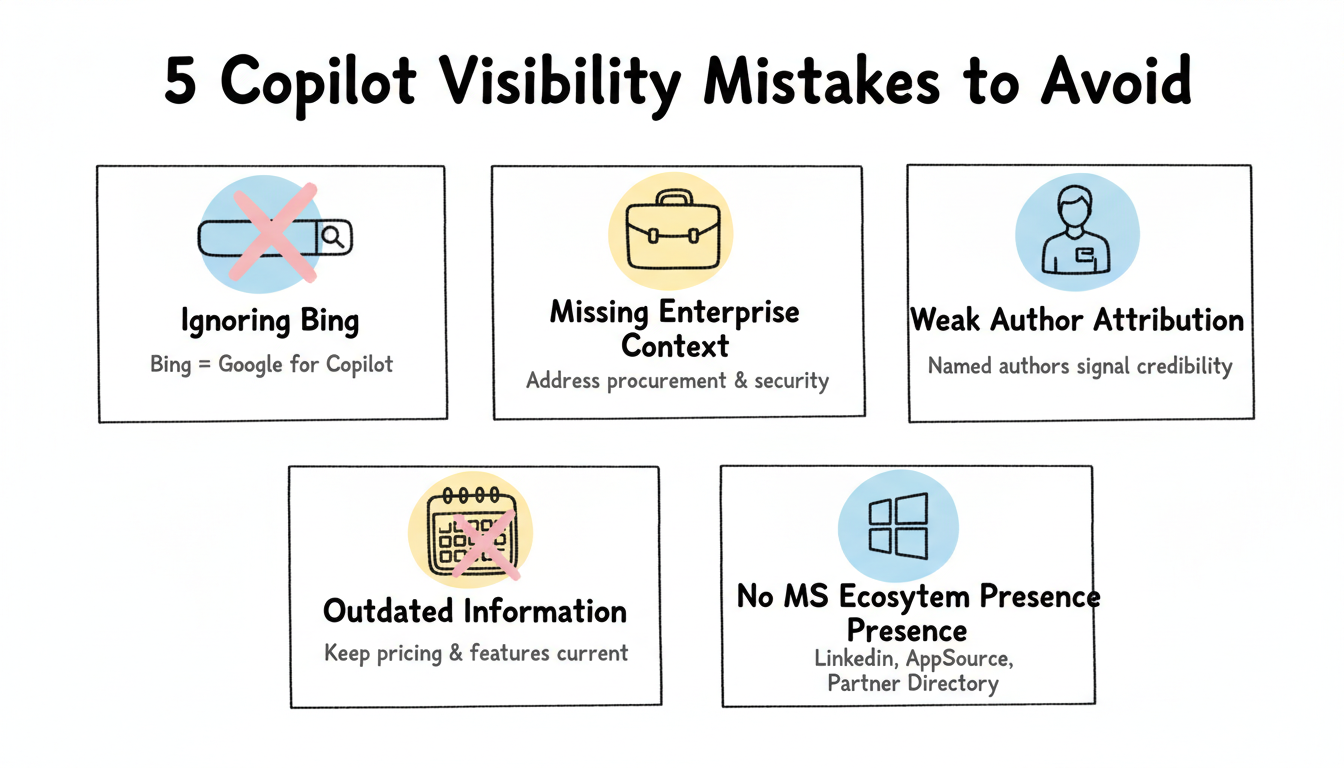
Ignoring Bing Entirely Many B2B marketers focus exclusively on Google. Bing optimization requires separate attention for Copilot visibility.
Missing Enterprise Context Consumer-focused content doesn't serve enterprise Copilot users. Address procurement, security, compliance, and integration concerns.
Weak Author Attribution Anonymous content lacks the credibility signals Bing and Copilot value. Attribute content to named authors with visible expertise.
Outdated Information Copilot users make business decisions based on AI responses. Outdated pricing, features, or company information damages credibility and conversions.
No Microsoft Ecosystem Presence Copilot draws from Microsoft properties. Absence from LinkedIn, AppSource, or partner directories limits visibility.
Measuring Copilot Visibility
Visibility here means whether your content surfaces when someone asks Copilot a question in the Microsoft ecosystem, so measure it with a fixed set of queries checked on a cadence. Record whether the answer cites your source and what it said, because the snippet is the real unit, not a yes or no.
Pair the check with downstream signals like assisted conversions, because a mention that never influences a decision is not a win. The honest program joins visibility to outcome and reports both, which is what justifies the optimization effort to stakeholders who fund it, and the cadence keeps the read honest.
Common Optimization Mistakes
The first mistake is optimizing for one surface alone. Copilot draws on the broader Microsoft graph, so a page tuned only for web search misses the ecosystem context, so connect the content to the sources Copilot reads. The integrated approach is what earns the mention across the suite.
The second is thin content behind a strong title. A page that promises an answer and buries it will not be cited, because the model cannot extract a clean response, so lead with the direct answer and label the sections. The structure does the work, and the mistake is forgetting that the extraction is the point.
Bing Optimization as the Foundation
Bing is the base Copilot builds on, so the web fundamentals still matter: fast pages, clean structure, and accurate schema. Get those right first, because the ecosystem citation depends on the page being parseable and trustworthy. The foundation is what every later tweak rests on.
Treat Bing optimization as ongoing, not a launch task. The ecosystem shifts as Microsoft updates Copilot, so re-check the queries and refresh the pages on a cadence. The teams that keep the foundation current are the ones that stay cited, and the habit is cheaper than a periodic rescue.