
Running an online store means two jobs: selling great products and getting those products in front of people who'll actually buy. A solid ecommerce Meta ads strategy handles the second part at scale—putting your products in front of billions of potential customers across Facebook and Instagram.
In this guide, we'll cover everything you need to run high-performing campaigns for your online store, from catalog setup to dynamic ads, retargeting strategies, and ROAS optimization.
Catalog Setup
Your product catalog is the foundation of any ecommerce Meta ads strategy. Without it, you can't run dynamic product ads, Advantage+ shopping campaigns, or collection ads.
What Is a Product Catalog?
A product catalog is a database of your products that Meta uses to automatically generate ads. It includes product names, descriptions, images, prices, and availability—synced directly from your store.
How to Set Up Your Catalog
Option 1: Platform Integration (Recommended)
Most ecommerce platforms offer native integrations:
- Shopify – Install the Facebook & Instagram app
- WooCommerce – Use the Facebook for WooCommerce plugin
- BigCommerce – Native Meta integration in app marketplace
- Magento – Facebook Business Extension
These integrations automatically sync your products and keep inventory updated in real-time.
Option 2: Manual Data Feed
Upload a CSV or XML file containing your product data to Meta Commerce Manager. You'll need to update this regularly to keep pricing and availability accurate.
Catalog Best Practices
Element | Best Practice |
Product images | High-quality, white background preferred |
Titles | Include key attributes (size, color, material) |
Descriptions | Feature benefits, not just specs |
Pricing | Keep synced—wrong prices kill conversions |
Categories | Use Google Product Categories for accuracy |
According to ecommerce advertising experts, "Connect your product catalog via your ecom platform or data feed to Meta Ads Manager, install the Meta Pixel or Conversions API, and set your campaign objective to 'sales' with a DPA format."
Dynamic Ads
Dynamic Product Ads (DPAs) are the workhorse of ecommerce Meta advertising. They automatically show personalized products to users based on their browsing behavior.
How Dynamic Ads Work
- User visits your website and views products
- Meta Pixel or Conversions API tracks this behavior
- Dynamic ads automatically show those exact products (or similar items) to that user
- Ads update automatically as your catalog changes
No manual creative creation required—Meta pulls product images, titles, and prices directly from your catalog.
Dynamic Ad Types
Retargeting (DPA Retargeting)
Shows products to people who've already interacted with your site:
- Viewed a product page
- Added to cart but didn't purchase
- Purchased (for cross-sell/upsell)
Broad Audience (DPA Prospecting)
Shows products to new users based on their interests and behaviors—no prior site visit required. Meta's algorithm finds people likely to be interested.
Setting Up Dynamic Ads
- Ensure catalog is connected and pixel/CAPI is firing
- Create a campaign with "Sales" objective
- At ad set level, select "Advantage+ catalog ads" or manual DPA
- Choose retargeting or broad audience
- Select your product set (all products or specific categories)
- Meta automatically generates ads from your catalog
If you're working with a Meta ad agency to set up your campaigns, they'll typically handle this configuration process and ensure your catalog is optimized for performance.
Dynamic Creative Tips
- Add lifestyle images to your catalog—not just product shots
- Test video thumbnails where supported
- Use promotional overlays for sales (Meta allows discount badges)
- Customize ad copy with product-specific variables like {product.name} and {product.price}
Retargeting
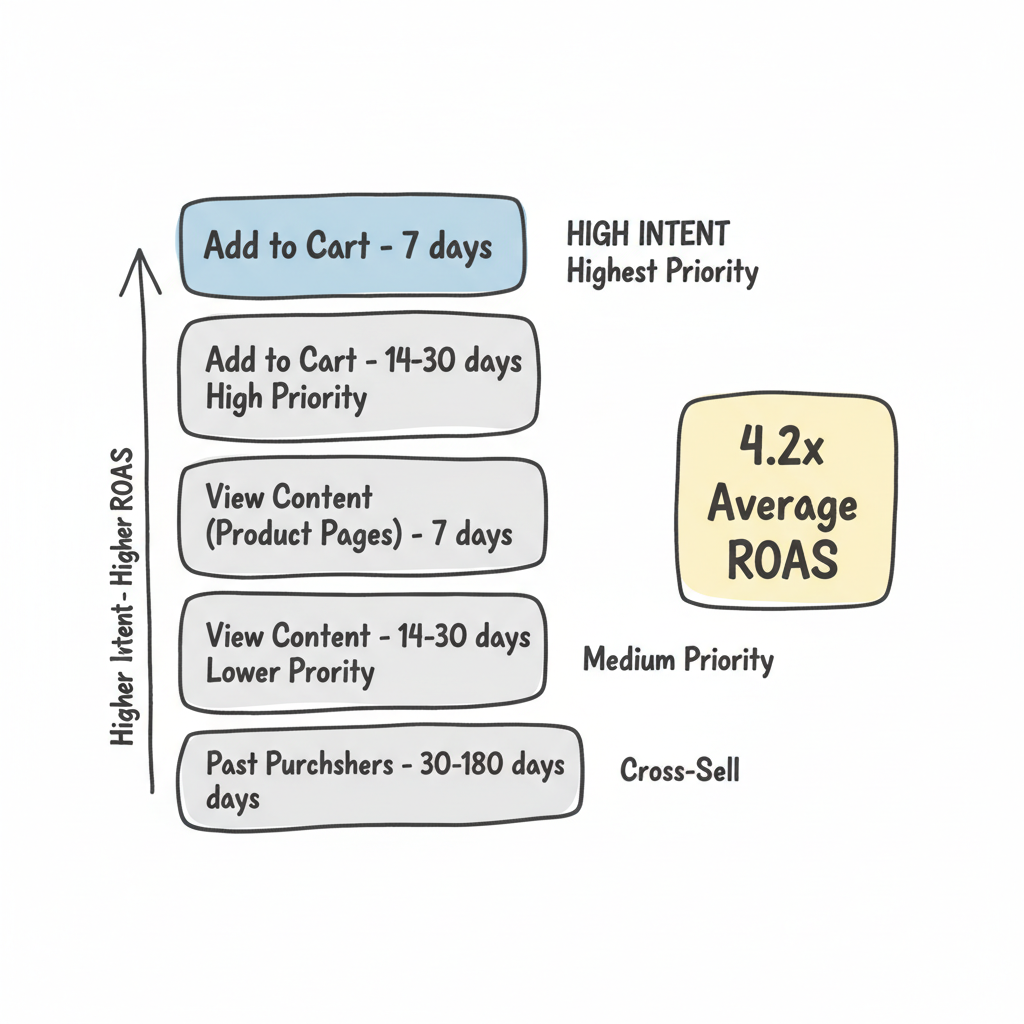
Retargeting is where ecommerce brands see the highest ROAS. You're reaching people who've already shown interest—warm audiences that convert at higher rates.
Retargeting Audience Segments
Build these audiences in Meta Ads Manager:
Audience | Window | Priority |
Add to Cart (no purchase) | 7 days | Highest |
Add to Cart (no purchase) | 14-30 days | High |
View Content (product pages) | 7 days | Medium |
View Content | 14-30 days | Lower |
Past Purchasers | 30-180 days | Cross-sell |
Shorter windows = higher intent, higher ROAS Longer windows = larger audience, lower cost
Retargeting Ad Strategies
Abandoned Cart Recovery
Target users who added products but didn't complete purchase.
- Use urgency: "Still in your cart" or "Limited stock"
- Offer incentive: Free shipping or 10% off
- Show the exact products they abandoned (DPA)
According to retargeting research, "Retargeting in 2026 delivers an average 4.2x ROAS" when done correctly.
Product Page Viewers
Target users who viewed products but didn't add to cart.
- Highlight reviews and social proof
- Emphasize unique selling points
- Show related products they might prefer
Post-Purchase Cross-Sell
Target recent buyers with complementary products.
- Exclude recent purchasers from acquisition campaigns
- Wait 7-14 days post-purchase before retargeting
- Recommend products that pair with their purchase
Retargeting Budget Allocation
A common split for established stores:
- Prospecting (cold): 60-70% of budget
- Retargeting (warm): 30-40% of budget
Newer stores may need 80%+ on prospecting until they build retargeting audiences. Understanding how to calculate ROI Facebook ads is essential for determining optimal budget splits.
ROAS Optimization
Return on Ad Spend (ROAS) is the north star metric for ecommerce advertising. Here's how to optimize for profitability.
Understanding ROAS
ROAS = Revenue from Ads / Ad Spend

Example: $5,000 revenue / $1,000 spend = 5.0x ROAS
A "good" ROAS depends on your margins:
- Low margin products (20-30%): Need 4-5x+ ROAS
- Medium margin (40-50%): 2.5-3.5x ROAS often profitable
- High margin (60%+): Even 2x ROAS can work
Advantage+ Shopping Campaigns
Meta's AI-powered campaign type designed specifically for ecommerce. According to industry testing, "Broad audiences with Advantage+ got 22% better ROAS than interest-segmented campaigns with manual optimization."
How to use Advantage+:
- Campaign objective: Sales
- Select "Advantage+ shopping campaign"
- Connect your catalog
- Set budget and ROAS goal
- Upload 5-10 creative variations
- Let Meta optimize
Advantage+ works best with:
- Sufficient conversion volume (50+ per week)
- Multiple creative variations
- Larger budgets ($100+/day)
The Andromeda Algorithm
Meta's Andromeda algorithm—rolled out in recent years—changes how ecommerce advertisers should think about targeting. According to algorithm analysis, "Andromeda analyzes your ad creative first, identifies behavioral patterns associated with that creative style, then finds users matching those patterns."
What this means for ecommerce:
- Creative matters more than targeting
- Broad audiences often outperform narrow ones
- Test 5-10+ creative variations per campaign
- Let the algorithm find your buyers
Many brands invest in a Meta ads creative strategy to ensure they're producing enough variations to feed the algorithm effectively.
ROAS Optimization Tactics
1. Use Minimum ROAS Bidding
Set a floor for acceptable return. Meta will only bid when it predicts hitting your target.
2. Segment by Product Margin
Run separate campaigns for high-margin vs. low-margin products. Apply different ROAS targets to each.
3. Exclude Low-Performers
Review product-level performance in catalog reports. Pause or exclude products with consistently poor ROAS.
4. Optimize for Value Events
Instead of optimizing for "Purchase," optimize for "Purchase Value" when you have sufficient data. This tells Meta to prioritize higher-value orders.
5. Test Creative Aggressively
According to Meta ads best practices, continuous creative testing is essential. Test:
- UGC vs. polished content
- Product-focused vs. lifestyle imagery
- Different hooks in first 3 seconds
- Various offers and urgency tactics
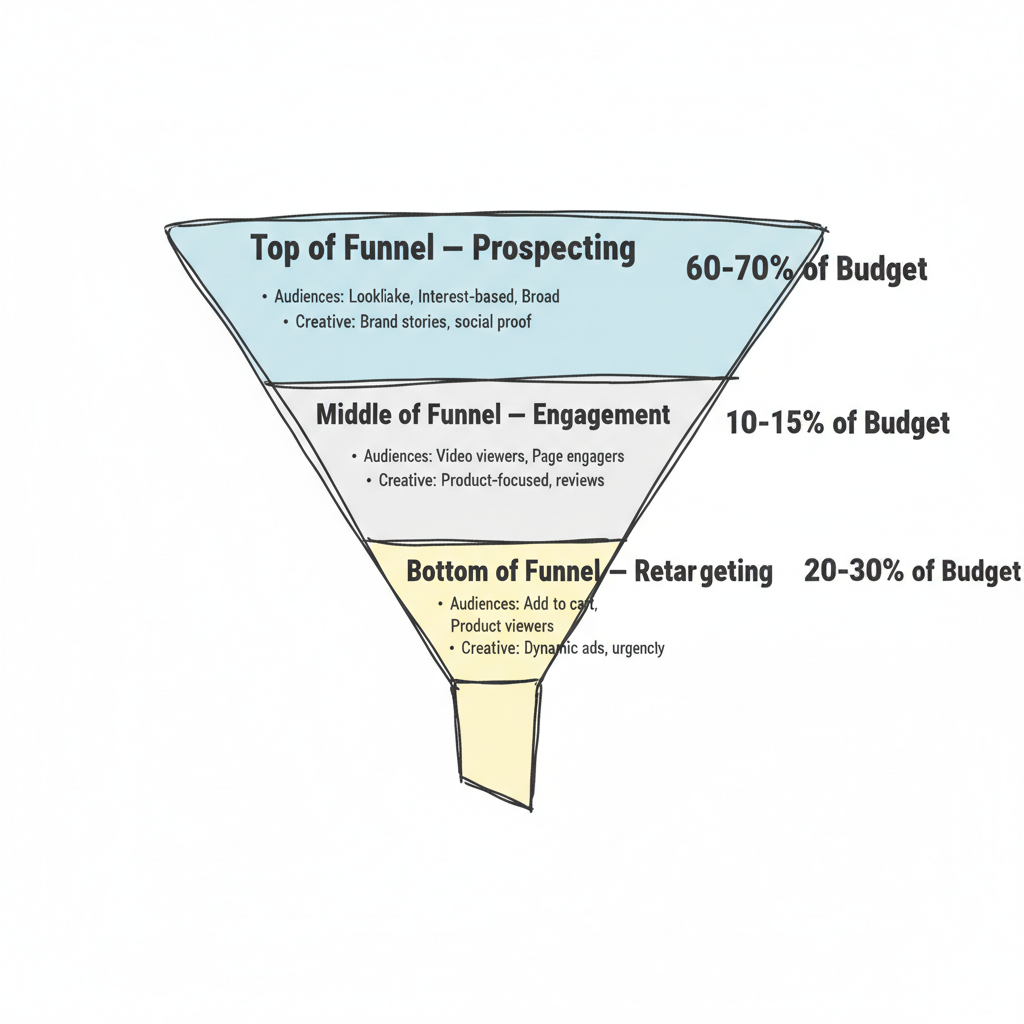
Full-Funnel Campaign Structure
Here's a proven structure for ecommerce stores:
Top of Funnel (Prospecting)
Campaign Type: Advantage+ Shopping or manual broad targeting
Audiences:
- Lookalike audiences (1-5% of purchasers)
- Interest-based (product category interests)
- Broad targeting with creative differentiation
Creative: Brand stories, product benefits, social proof
Budget: 60-70% of total spend
Middle of Funnel (Engagement)
Campaign Type: Manual campaigns with warm audiences
Audiences:
- Video viewers (50%+)
- Page engagers (90 days)
- Website visitors (no product view)
Creative: Product-focused content, reviews, use cases
Budget: 10-15% of total spend
Bottom of Funnel (Retargeting)
Campaign Type: DPA Retargeting
Audiences:
- Add to cart (7-30 days)
- Product viewers (7-14 days)
- Past purchasers (cross-sell)
Creative: Dynamic product ads, urgency messaging, offers
Budget: 20-30% of total spend
Frequently Asked Questions
Do I Need a Facebook Shop to Run Ecommerce Ads?
No. You can run ecommerce ads without a Facebook Shop by linking your product catalog directly. However, having a Shop unlocks Collection Ads and creates a smoother in-app shopping experience that can increase conversions. According to ecommerce advertising guides, "having one unlocks formats like Collection Ads and makes the shopping experience smoother."
How Much Should I Budget for Ecommerce Facebook Ads?
Start with enough to drive 50 conversions per week per ad set—Meta's recommended minimum for optimization. For most stores, that means $20-$50 per day minimum to exit the learning phase. Scale up as you prove profitability. For specific budget recommendations, check out guides on how much to run ads on Facebook.
What ROAS Should I Target?
It depends entirely on your profit margins. Calculate your break-even ROAS first: if your margin is 40%, break-even is 2.5x ROAS. Target at least 1.5-2x your break-even for sustainable growth. High-margin businesses can profit at 2x; low-margin products may need 5x+.
Key Takeaways
- Product catalog is the foundation—keep it synced and optimized
- Dynamic Product Ads automatically show personalized products at scale
- Retargeting delivers 4.2x average ROAS—prioritize abandoned cart and product viewers
- Advantage+ Shopping Campaigns use AI to find buyers and often outperform manual campaigns
- Creative matters more than targeting in 2026—test 5-10+ variations per campaign
- Structure campaigns across full funnel: prospecting (60-70%), engagement (10-15%), retargeting (20-30%)