
Facebook ads targeting options fall into three groups: Core (Detailed) targeting by demographics such as age, location, education level, job title, interests, and behaviors; Custom Audiences built from your customer lists, website pixel, app, and engagement data; and Lookalike Audiences that model new buyers from a source. Advantage+ adds AI-driven audience expansion on top.
Getting your Facebook ads in front of the right audience is the difference between burning your budget and generating profitable returns. In 2026, Meta's targeting capabilities have evolved significantly, with AI-powered tools now handling much of the optimization work that advertisers used to manage manually.
This guide breaks down every Facebook ads targeting option available today, from foundational Core Audiences to advanced Custom and Lookalike audiences, plus the newer Advantage+ AI targeting that's changing how campaigns perform. If you want the step-by-step setup walkthrough as well, pair this reference with our Facebook ads targeting guide.
What Are All the Facebook Ads Targeting Options? (Full List)
Every targeting method in Meta Ads Manager maps to one of four buckets: Core (Detailed) targeting, Custom Audiences, Lookalike Audiences, and Advantage+ AI targeting. The scannable table below lists each type, its main subtypes, and when to reach for it.
Category | Targeting type | Subtypes and examples | Best for |
Core (Detailed) | Demographics | Age, gender, location, language, education level and field of study, job title and employer, relationship and family status, life events | Cold audiences with no prior data |
Core (Detailed) | Interests | Pages followed, content categories, hobbies, shopping preferences | Niche products, top-of-funnel discovery |
Core (Detailed) | Behaviors | Purchase behavior and intent, device and OS, travel patterns, digital activities | Intent-based prospecting |
Custom Audiences | Customer list | Email subscribers, past purchasers, CRM contacts uploaded by hashed data | Retention, exclusions, lookalike seeds |
Custom Audiences | Website (Pixel) | All visitors, specific pages, add-to-cart, purchase events (up to 180 days) | Retargeting warm traffic |
Custom Audiences | Engagement | Video viewers, lead form openers, Page and Instagram engagers, shopping activity | Mid-funnel nurture |
Custom Audiences | App activity | App installs, in-app events, active users via the Meta SDK | Mobile app advertisers |
Lookalike Audiences | 1% to 10% | Modeled from a source audience; 1% closest match, 10% broadest reach | Scaling to net-new buyers |
Advantage+ | AI audience | Machine-learning expansion beyond a suggested audience, driven by conversion signals | Accounts with steady conversion data |
What Are the Facebook Ad Targeting Types?
Facebook offers three primary audience targeting methods, each serving different purposes in your advertising strategy, with Advantage+ AI sitting on top of all three.
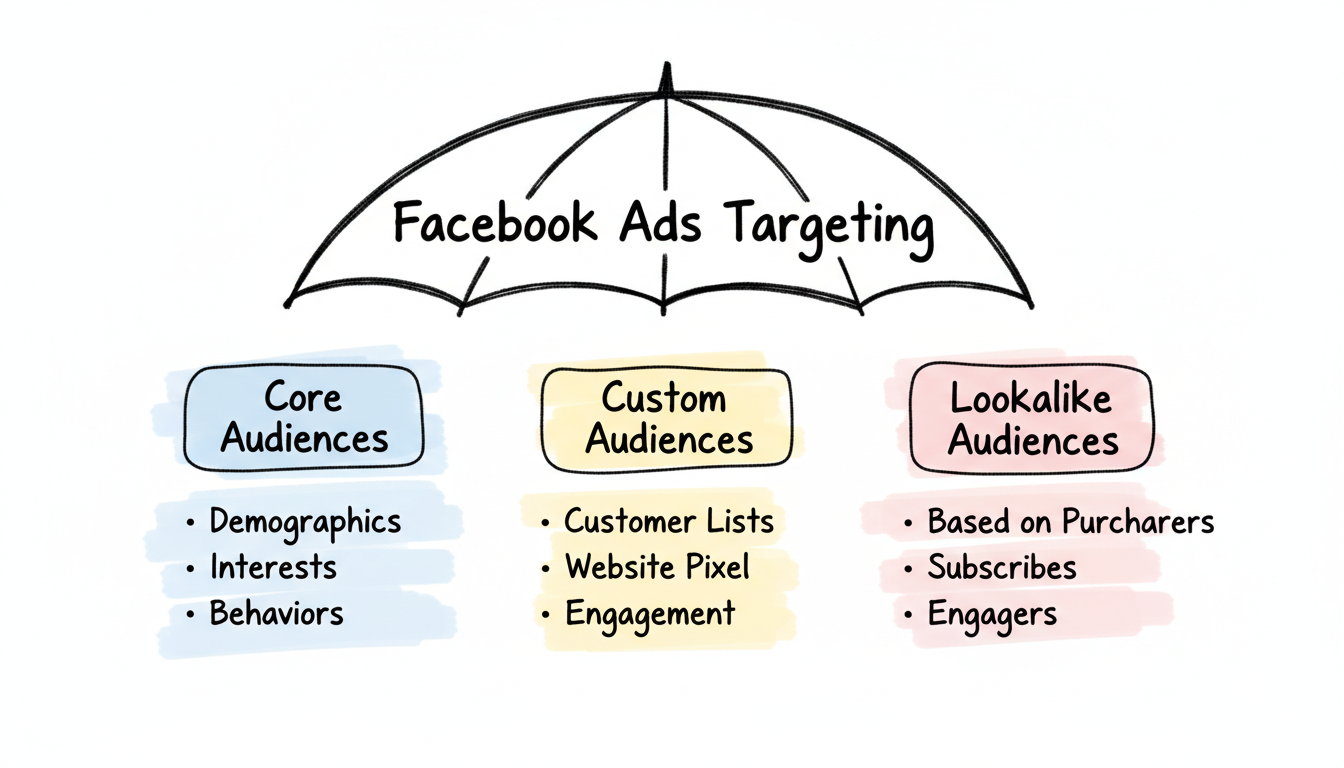
What Is Core (Detailed) Targeting on Facebook?
Core Audiences let you define who sees your ads based on demographics, interests, and behaviors. According to Meta's advertising platform, this targeting method draws from data across Facebook and Instagram's billions of users. It is the default starting point when you have no first-party data to build on yet.
Demographics include:
- Age and gender
- Location (country, state, city, or radius targeting)
- Language
- Education level and field of study
- Job titles and employers
- Relationship and family status
- Life events (recently moved, new job, newly engaged, new parents)
Interests let you reach people based on:
- Pages they follow and engage with
- Content categories they interact with (business, entertainment, fitness, technology)
- Hobbies and activities
- Shopping preferences
Behaviors target based on:
- Purchase behavior and intent
- Device usage (mobile vs. desktop, operating system)
- Travel patterns
- Digital activities
2026 Reality Check: While detailed targeting still exists, Meta's algorithm now prioritizes AI-driven audience discovery over manual interest selection. Many advertisers report that broad targeting with strong creative now outperforms heavily segmented audiences.
Can You Target by Education Level on Meta Ads?
Yes. Education is one of the demographic subtypes inside Core (Detailed) targeting. You can narrow an audience by education level (for example, in college, some college, college grad, or master's degree and above), by field of study, and by the specific schools someone attended. This is useful for advertisers selling to students, alumni networks, professional certifications, or higher-education programs. Keep in mind that layering too many narrow demographic filters shrinks reach and can raise your CPMs, so use education targeting as one signal rather than the whole audience.
How Does Location Targeting Work?
For local businesses, location targeting remains essential. You can target:
- Countries, states, or cities
- A specific radius around an address (as small as 1 mile)
- Drop pins on a map for precise geographic areas
- Exclude certain locations from broader targeting
Location also has a delivery setting worth knowing: you can target people who live in a place, were recently in it, or are traveling there. Local service businesses usually want "people living in this location" to avoid paying for tourists who will never convert.
What Are Facebook Custom Audiences?
Custom Audiences let you reach people who already have a relationship with your business. According to Meta's Help Center, these are your highest-intent targeting options because the audience already knows who you are.
Customer List Custom Audiences
Upload your existing customer data to target:
- Email subscribers
- Past purchasers
- CRM contacts
- App users
Best practices for customer list audiences:
- Include at least 1,000 contacts (10,000+ recommended for better matching)
- Use multiple identifiers (email AND phone number) to improve match rates
- Expect 40-80% match rates depending on data quality
Important 2026 update: Starting September 2025, Meta blocks Custom Audiences that suggest sensitive information such as health conditions or financial status. Avoid creating segments like "diabetes patients" or "high income" as these will be automatically rejected.
Website Custom Audiences (Pixel-Based)
The Facebook Pixel tracks visitors to create audiences based on:
- All website visitors (up to 180 days)
- Specific page visitors (product pages, pricing pages, blog content)
- Time spent on site
- Purchase events
- Add-to-cart events
- Scroll depth and engagement
Pro tip: Combine Pixel data with the Conversions API (CAPI) for more accurate tracking. According to industry best practices, this dual-tracking approach improves conversion attribution, especially with iOS privacy changes affecting browser-based tracking.
Engagement Custom Audiences
Reach people who've interacted with your content on Meta platforms:
- Video viewers (3 seconds, 10 seconds, 25%, 50%, 75%, 95% watched)
- Lead form engagers
- Instagram profile visitors
- Facebook Page engagers
- Shopping activity (saved products, viewed products)
- Event responders
Retention windows vary by type: video viewers can be retained for up to 365 days, while most engagement audiences also max out at 365 days.
App Activity Custom Audiences
If you run a mobile app, the Meta SDK lets you build audiences from in-app behavior: people who installed the app, completed a specific in-app event (such as a purchase or level completion), or have gone inactive and are worth re-engaging. These pair well with lookalikes seeded from your highest-value app users.
What Are Lookalike Audiences and How Do You Use Them?
Lookalike Audiences find new people who share characteristics with your existing customers. They're built by analyzing your source audience and identifying common traits, then finding similar users in the location you specify.
Creating Effective Lookalikes
Best source audiences (in order of value):
- Purchasers (highest intent signal)
- High-value customers (top 25% by lifetime value)
- Email subscribers
- Website converters
- Engaged video viewers (50%+ completion)
Minimum source size: 100 people, though 1,000+ is recommended for statistical significance. A cleaner, higher-intent source almost always beats a larger but noisier one.
How Do You Choose a Lookalike Percentage?
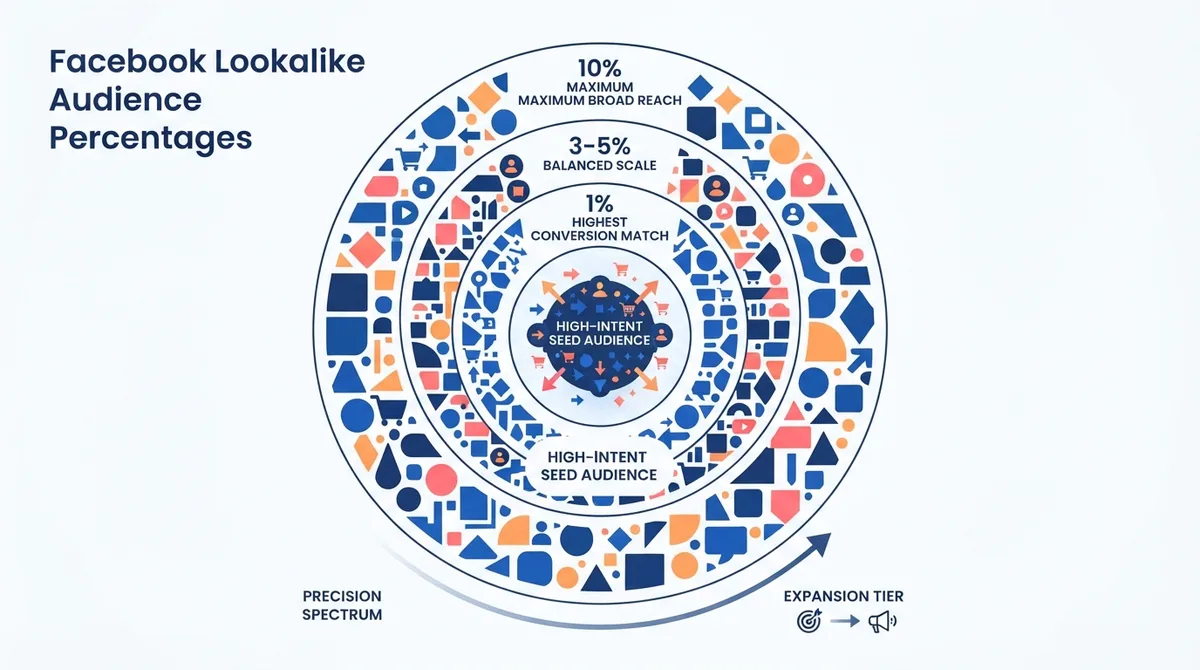
The percentage determines how closely the new audience matches your source:
Percentage | Audience Size | Best Use Case |
1% | Smallest, most similar | Highest conversion potential |
1-3% | Moderate reach | Balanced performance |
3-5% | Larger reach | Scale while maintaining relevance |
5-10% | Broadest | Awareness campaigns |
Testing recommendation: Start with a 1% lookalike for conversions, then test 3% and 5% as you scale. According to recent advertiser testing, 1% lookalikes typically deliver the best CPA, while broader percentages work better for awareness goals.
2026 Lookalike Updates
Meta has been shifting toward AI-powered predictive models that reduce reliance on traditional lookalikes. Some advertisers report that Advantage+ targeting now outperforms standard lookalikes for certain campaign types. Test both approaches to find what works for your business.
What Is Advantage+ AI Targeting?
Advantage+ is Meta's AI-driven targeting layer. Instead of you hand-picking every interest and demographic, you give the system a broad starting point (or an "audience suggestion") plus strong conversion signals, and its machine-learning models decide who is most likely to convert. It can expand beyond the audience you define whenever it predicts better results.
Advantage+ campaigns often deliver lower CPAs than tightly manual targeting, broader reach with maintained relevance, and faster exits from the learning phase because the model has more room to explore. It works best on accounts that already send Meta clean, high-volume conversion data through the Pixel and Conversions API.
Best practices for Advantage+:
- Feed the system high-quality conversion data via Pixel + CAPI
- Provide diverse creative assets
- Allow 7+ days for learning before making judgments
- Use audience suggestions rather than strict exclusions
Best Practices for Facebook Ads Targeting in 2026
The targeting landscape has fundamentally shifted. Here's what's working now.
Embrace Broad Targeting
According to Social Media Examiner's analysis of 2026 algorithm changes, Meta's Andromeda update means broad targeting often outperforms narrow interest stacking.
When to go broad:
- E-commerce with strong creative variety
- Businesses with sufficient conversion data
- Campaigns optimizing for purchases or leads
When manual targeting still matters:
- Local businesses with geographic restrictions
- Highly regulated industries
- Niche B2B with very specific ICP
Let Creative Do the Targeting
In 2026, your ad creative acts as a filter. Meta's AI observes who engages with different creative concepts and optimizes delivery accordingly. Understanding meta ads creative strategy is essential for maximizing your campaign performance. For beauty brands, our guide to Meta ad formats for beauty products breaks down which creative formats convert best. This means:
- Concept variety matters: Different creative angles attract different audience segments
- Test persona-based creative: Create ads that speak to specific customer types
- Volume wins: More creative variations give the algorithm more signals
Match Targeting to Your Budget
Your targeting choices should scale with spend. A tiny budget spread across many narrow ad sets never gathers enough data to exit the learning phase, so a small advertiser is usually better off with one or two broad ad sets. Before you set audiences, confirm you are clearing Meta's spend thresholds in our guide to Facebook ads minimum budget requirements, and sanity-check expected costs against typical Meta advertising cost benchmarks so your audience size and daily budget line up.
Layer Your Audiences
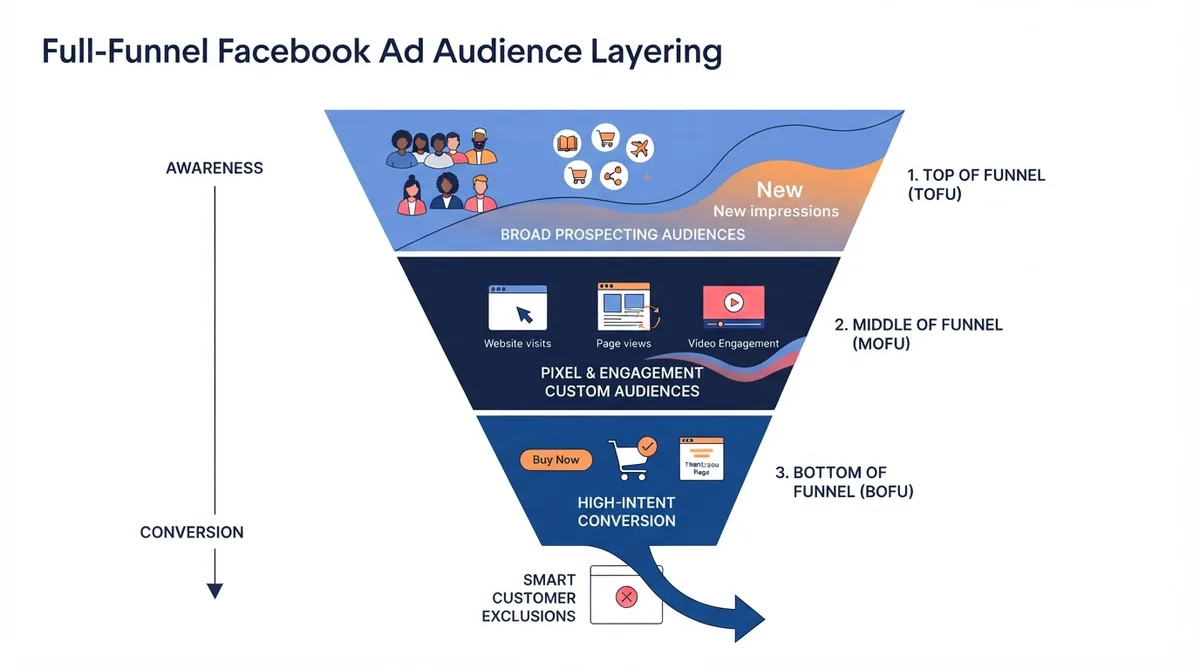
Don't rely on a single targeting method. Combine approaches:
- Top of funnel: Broad targeting or large lookalikes (3-5%)
- Middle of funnel: Website visitors, video viewers, engagers
- Bottom of funnel: Cart abandoners, past purchasers (for upsells)
How Do You Narrow and Exclude Audiences?
Two controls turn a broad audience into a precise one. Narrowing (the "AND" layer, labeled "Narrow audience" in Ads Manager) requires people to match a second condition on top of the first, for example interested in yoga AND behaves as an engaged shopper. Exclusions remove people you do not want to pay for, such as existing customers on a prospecting campaign or unqualified leads. Practical exclusions that save budget:
- Exclude past purchasers from acquisition ad sets so you stop paying to convert people you already have
- Exclude recent converters from retargeting to avoid wasted frequency
- Exclude current employees or job seekers when relevant
Use narrowing sparingly in 2026. Every extra AND condition shrinks the pool Meta's AI has to work with, and over-narrowing is a common cause of high CPMs and stalled learning phases.
Monitor Audience Overlap
Use Meta's Audience Overlap tool to ensure your ad sets aren't competing against each other. High overlap means you're bidding against yourself and inflating costs.
Respect Privacy Updates
With privacy regulations tightening:
- Collect proper consent before using customer data
- Use first-party data responsibly
- Avoid targeting that feels invasive or "creepy"
- Stay updated on Meta's data source labeling requirements
Common Facebook Ads Targeting Mistakes to Avoid
If you would rather outsource targeting and optimization, see our ranked list of the best Facebook ads agencies. Agencies and tool builders that want an official partnership with Meta can learn how in our guide to the Meta Business Partner program.
Even experienced advertisers lose money to a handful of repeatable targeting errors. Watch for these:
- Over-segmentation: Splitting a small budget across many narrow ad sets so none gathers the 50 or so weekly conversions Meta needs to optimize.
- Stacking too many interests: Piling dozens of interests into one ad set muddies the signal instead of sharpening it. Test a few clear themes instead.
- Ignoring exclusions: Retargeting people who already bought, or advertising to current customers on acquisition campaigns, quietly wastes spend.
- Setting and forgetting retention windows: A 180-day website audience can go stale for a fast sales cycle. Match the window to how quickly your buyers decide.
- Fighting the algorithm: Layering rigid manual rules on top of Advantage+ can starve the model of the room it needs. Give it clean conversion data and diverse creative instead.
- Skipping the Conversions API: Relying on browser-only Pixel data leaves gaps after iOS privacy changes, which weakens every audience that depends on those events.
The location filters above are one half of efficient targeting. Our geo-targeting guide explains how radius, IP, and GPS signals combine with bid adjustments to cut wasted spend.
Related Stackmatix Guides
Wondering why a "Ads served by Meta" label appears on placements you did not pick? Our explainer on what "Ads served by Meta" means covers the disclosure, Audience Network, and the Ad Library.
Frequently Asked Questions
What Targeting Options Does Facebook Offer?
Facebook offers four main targeting options. Core (Detailed) targeting reaches people by demographics (age, gender, location, language, education level, job title, relationship status, and life events), interests, and behaviors. Custom Audiences retarget people who already know you, built from customer lists, website Pixel data, app activity, or engagement. Lookalike Audiences model new prospects from a source audience at 1% to 10% similarity. Advantage+ adds an AI layer that expands delivery based on conversion signals.
Can You Target by Education Level on Meta Ads?
Yes. Education level is a demographic subtype within Core (Detailed) targeting. You can filter by education stage (such as in college, college grad, or master's degree and above), by field of study, and by specific schools. It is helpful for education programs, certifications, and alumni offers, but layering it with many other filters shrinks reach and can raise CPMs, so treat it as one signal rather than the entire audience.
What Is the Best Facebook Ad Targeting for a Small Budget?
On a small budget, keep it simple: run one or two broad ad sets (location plus age) and let Meta's AI find buyers, rather than splitting spend across many narrow audiences that never gather enough data. Put your effort into a few strong creative variations. Once you have conversion data, add a Custom Audience of website visitors for retargeting. Confirm you are meeting Meta's minimum budget requirements first, or the algorithm will not have enough signal to optimize.
What Is the Difference Between Detailed Targeting and Custom Audiences?
Detailed (Core) targeting reaches cold people (see our full guide to Meta interest targeting) who match demographics, interests, or behaviors who match demographics, interests, or behaviors but have no prior relationship with you, so it is best for prospecting. Custom Audiences reach warm people who already interacted with your business through your customer list, website, app, or content, so they are best for retargeting and retention. In practice you use Detailed targeting or lookalikes to find new buyers and Custom Audiences to convert and keep the ones you already reached.
Does Advantage+ Replace Manual Targeting?
Not entirely. Advantage+ automates audience selection and often beats manual setups for e-commerce and lead gen once the account has steady conversion data, but manual targeting still matters for local businesses, regulated industries, and niche B2B where you must control who sees the ads. The common 2026 approach is to run Advantage+ as the primary engine while keeping a few manual audiences for control and exclusions, then let performance decide.
What Is the Best Facebook Ads Targeting Strategy for Beginners in 2026?
Start with broad targeting (location + age only) and let Meta's AI find your audience. Focus your energy on creating multiple ad variations that clearly communicate your value proposition. As Meta's algorithm has evolved, clear messaging in your creative now matters more than detailed targeting settings. Once you have conversion data, create Custom Audiences from your website visitors and purchasers. For businesses just getting started, working with a facebook ads management agency can help you navigate these complexities.
What'S the Minimum Audience Size for Facebook Ads?
Meta requires at least 1,000 people in a Custom Audience before you can run ads to it. For lookalike source audiences, the minimum is 100 people, though 1,000+ leads to better performance. For detailed targeting, there's no strict minimum, but very narrow audiences (under 10,000 people) often struggle with delivery and have higher CPMs. Understanding the average cost of facebook ads helps you budget appropriately for your chosen audience size.