
Best Free AI Keyword Research Tools (2026): 15+ Compared
Keyword research doesn't require an expensive subscription. While premium tools like Ahrefs and Semrush offer comprehensive capabilities, numerous free AI-powered and traditional tools can build a solid keyword strategy—especially for businesses just starting their SEO journey or operating on limited budgets.
This guide compares the best free keyword research tools available in 2026, including AI-powered options that leverage modern language models to surface search opportunities. Whether you need an AI keyword search tool for brainstorming or a traditional platform for search volume data, you'll find the right free option below.
Google'S Free Keyword Tools
Google provides several powerful free tools that remain foundational for keyword research.
Google Keyword Planner
What it offers:
- Search volume estimates for any keyword
- Competition levels for paid advertising
- Related keyword suggestions
- Historical trends data
- Cost-per-click estimates
Limitations:
- Requires a Google Ads account (though you don't need to run ads)
- Search volume shown as ranges unless you're actively spending
- Focused on advertising metrics rather than organic SEO
Best for: Getting baseline search volume data and discovering related terms around a seed keyword.
Google Search Console
What it offers:
- Actual search queries driving traffic to your site
- Impressions and click data for keywords you already rank for
- Position tracking over time
- Click-through rate data
- Performance by page
Limitations:
- Only shows keywords where you already have some visibility
- Data limited to 16 months
- Cannot discover entirely new keyword opportunities
Best for: Finding keyword opportunities where you already have organic presence—low-hanging fruit for optimization.
Google Trends
What it offers:
- Relative search interest over time
- Geographic interest patterns
- Related queries and rising topics
- Comparison between multiple terms
- Seasonal trend identification
Limitations:
- Shows relative interest, not absolute search volume
- Data can be noisy for lower-volume terms
- Limited historical granularity
Best for: Understanding seasonal patterns and emerging trends, comparing term popularity.
AI-Powered Free Keyword Tools
Several AI-powered tools offer free tiers valuable for keyword research.
Perplexity AI
What it offers:
- AI-powered search with source citations
- Question-answering that reveals search intent
- Related questions and topics surfaced
- Real-time information access
- Free unlimited queries
How to use for keyword research:
- Enter a topic query and analyze related questions shown
- Review cited sources to understand what ranks
- Use follow-up questions to explore subtopics
- Note language patterns users employ
Best for: Understanding search intent, discovering question-based keywords, and identifying content gaps.
ChatGPT (Free Tier)
What it offers:
- Keyword brainstorming and expansion
- Intent analysis for keyword lists
- Content angle suggestions
- Competitor keyword analysis (with URLs provided)
- Clustering and categorization assistance
How to use for keyword research:
- Ask for keyword variations around a seed term
- Request intent classification for keyword lists
- Generate long-tail keyword ideas
- Create keyword clusters by topic
Limitations:
- No actual search volume data
- Training data has knowledge cutoffs
- Cannot access real-time search data
Best for: Brainstorming, organizing keywords, and generating content ideas. Understanding ChatGPT SEO capabilities helps maximize this free tool's research potential.
Omniseo Free Tier
What it offers:
- Basic AI visibility tracking
- Keyword monitoring for AI platforms
- Citation tracking in AI responses
- Multi-platform coverage
Limitations:
- Limited query volume on free tier
- Basic reporting features
- Fewer platforms tracked than paid versions
Best for: Monitoring your visibility in AI search responses without paid tool investment.
SEO.AI Free Keyword Tool
SEO.ai offers a free AI-powered keyword research tool that stands out for its intelligent analysis capabilities.
What it offers:
- AI-generated keyword suggestions based on semantic analysis
- Keyword cannibalization detection to avoid competing with your own pages
- Search intent classification for each keyword
- Topic cluster recommendations for content planning
- SERP feature opportunity identification
Limitations:
- Daily query limits on the free tier
- Advanced features like bulk analysis require a paid plan
- Primarily English-focused for AI features
Best for: Content creators who want AI-driven keyword suggestions with built-in cannibalization checks and topic cluster mapping.
Optimo by Askoptimo
Optimo is a free instant AI keyword research tool that generates keyword ideas in seconds using AI models.
What it offers:
- Instant AI-powered keyword generation from a seed topic
- Long-tail keyword suggestions with commercial intent signals
- Question-based keyword variations
- No account required for basic usage
- Unlimited free searches
Limitations:
- Does not provide search volume or difficulty data
- No historical trends or SERP analysis
- Best used as a brainstorming complement to data-driven tools
Best for: Rapid keyword ideation and brainstorming when you need a large list of variations quickly without signing up for an account.
Frase AI
Frase AI combines keyword research with content optimization and multi-platform visibility tracking.
What it offers:
- AI-powered keyword and topic research
- Content brief generation based on SERP analysis
- Visibility tracking across Google, ChatGPT, and Perplexity
- People Also Ask question extraction
- Competitor content analysis
Limitations:
- Free tier limited to a small number of searches
- Full content optimization features require a paid plan
- Learning curve for the content brief workflow
Best for: SEO professionals who want keyword research combined with AI content optimization and answer engine visibility tracking.
Question Research Tools
Understanding what questions users ask helps identify valuable keyword opportunities.
Answerthepublic
What it offers:
- Question variations (who, what, when, where, why, how)
- Preposition combinations
- Comparison queries
- Alphabetical suggestions
- Visual search wheels
Free tier limitations:
- Limited daily searches (typically 3 per day)
- Basic export options
- No historical data
Best for: Discovering question-based content opportunities and understanding user intent patterns.
Alsoasked
What it offers:
- "People Also Ask" question mapping
- Hierarchical question relationships
- Topic clustering visualization
- Related question chains
- Export capabilities
Free tier limitations:
- Limited searches per month
- Basic features only
- Regional limitations
Best for: Building FAQ content, understanding question sequences, and comprehensive topic coverage.
Komo AI Search
What it offers:
- AI-powered search exploration
- Question discovery around topics
- Search pattern analysis
- Related topic identification
Best for: Discovering unconventional keyword angles and understanding how AI interprets topics.
Traditional Free Keyword Tools
These established free tools remain valuable for keyword research.
Ubersuggest Free Tier
Ubersuggest remains one of the most popular free keyword research tools in 2026, though its free tier has specific limits you should understand before relying on it.
What it offers:
- Search volume estimates with seasonal trends
- SEO difficulty scores based on backlink data
- Related keyword suggestions with CPC data
- Content ideas based on top-performing pages
- SERP analysis with domain authority metrics
Ubersuggest free tier limits in 2026:
- 3 keyword searches per day on the web app
- Chrome extension provides unlimited basic lookups
- Domain analysis limited to 1 per day
- Content ideas limited to top 3 results
- Historical data restricted to 3 months (paid plans offer 2+ years)
- No keyword tracking or project features on free tier
Best for: Quick keyword checks when you need volume and difficulty data without a subscription. The Chrome extension extends free usage significantly beyond the web app limits.
Keyword Surfer (Chrome Extension)
What it offers:
- Search volume shown directly in Google SERPs
- Related keywords in sidebar
- On-page word count for ranking pages
- Traffic estimates for ranking domains
- Free unlimited use
Limitations:
- Browser-only functionality
- Less detailed than paid tools
- Basic metrics
Best for: Checking search volume while browsing—convenient for ad-hoc research.
Wordtracker Scout (Chrome Extension)
What it offers:
- Keyword extraction from any webpage
- Keyword density analysis
- Related term suggestions
- Competitor keyword identification
Best for: Analyzing competitor pages to discover their target keywords.
Kwfinder (Web)
KWFinder by Mangools is designed to help you find keywords that you can easily rank for by surfacing low-competition terms. Use it to optimize for search intent and build local visibility with precise difficulty scoring.
What it offers:
- Keyword difficulty score on a 0–100 scale
- Local keyword research and SERP analysis by city, region, or country
- Get search volumes with historical data trends over 24 months
- Autocomplete and question-based keyword suggestions
Free tier limits:
- 5 searches per 24 hours
- 25 related keywords per query
Best for: Performing local keyword research and SERP analysis to see what your competitors rank for in any location.
Free Keyword Tools from Major SEO Platforms
Several major SEO platforms offer limited free access to their keyword research tools, giving you professional-grade data without a subscription.
Moz Keyword Explorer (Free)
Moz offers 10 free keyword queries per month through its Keyword Explorer tool, backed by its proprietary keyword metrics.
What it offers:
- Monthly search volume with confidence scoring
- Keyword difficulty based on Page Authority and Domain Authority
- Organic CTR estimates that factor in SERP features
- Priority score combining volume, difficulty, and CTR
- SERP analysis with ranking page details
Free tier limits:
- 10 queries per month
- Limited keyword suggestions per query
- No keyword list saving or tracking
Best for: Getting high-quality keyword difficulty assessments when you need accuracy over volume of queries.
Wordstream Free Keyword Tool
WordStream's free tool provides keyword suggestions with industry-specific data, particularly useful for businesses planning paid campaigns alongside organic strategy.
What it offers:
- Keyword suggestions with search volume estimates
- Industry-specific competition data
- Cost-per-click estimates for paid campaigns
- Related keyword groupings
- Geographic filtering by country
Free tier limits:
- 30 free keyword lookups
- Results capped at 25 suggestions per query
- Requires email registration
Best for: Businesses that run both SEO and PPC who want keyword data covering both organic and paid metrics in one place.
Keyword Tool (Keywordtool.Io)
Keyword Tool mines Google Autocomplete to generate up to 750+ long-tail keyword suggestions for any seed term—all without requiring an account.
What it offers:
- 750+ keyword suggestions per search from Google Autocomplete
- Multi-platform support: Google, YouTube, Bing, Amazon, eBay, Instagram
- Question, preposition, and hashtag keyword formats
- Support for 192 Google domains and 83 languages
- No account required for basic suggestions
Free tier limits:
- Search volume, CPC, and competition data require the paid Pro plan
- Export limited on free tier
- No difficulty scores without upgrading
Best for: Generating massive lists of long-tail keyword ideas using autocomplete data, especially useful for content ideation and YouTube keyword research.
Ahrefs Free Keyword Generator
Ahrefs offers a free keyword generator that provides up to 100 keyword ideas along with basic metrics from its industry-leading database.
What it offers:
- Up to 100 keyword ideas per seed term
- Keyword difficulty score for each suggestion
- Estimated monthly search volume
- Results for Google, YouTube, Bing, and Amazon
- Question-based keyword filtering
Free tier limits:
- Limited to 100 results (paid plans show thousands)
- No click metrics or traffic potential data
- Cannot save or export keyword lists
- SERP overview not available on free tier
Best for: Getting quick keyword ideas with reliable difficulty scores from one of the most trusted SEO data providers.
Semrush Keyword Magic Tool (Free)
Semrush's Keyword Magic Tool provides access to a database of over 27 billion keywords, with limited free queries per day.
What it offers:
- Access to 27+ billion keyword database
- Keyword grouping by topic clusters
- Search intent classification (informational, commercial, transactional, navigational)
- Keyword difficulty percentage
- SERP feature indicators showing which features appear for each keyword
Free tier limits:
- 10 queries per day
- 10 results per query (paid shows full results)
- Limited filtering and sorting options
- No bulk analysis or keyword manager access
Best for: Professional-grade keyword research in limited quantities—ideal for validating high-priority keyword targets with comprehensive data.
AI Keyword Research for Answer Engine Optimization (AEO)
As Google's AI Overviews, ChatGPT, and Perplexity reshape how users find information, keyword research must expand beyond traditional search. Answer Engine Optimization (AEO) focuses on ensuring your content appears in AI-generated responses—not just traditional blue links.
As AI Overviews, ChatGPT, and Perplexity reshape search, keyword research must expand beyond traditional volume metrics to include conversational queries and AI citation patterns.
What Is AEO Keyword Research?
AEO keyword research identifies the queries, questions, and prompts that trigger AI-generated answers in search. This includes:
- Queries that generate Google AI Overviews on the SERP
- Questions surfaced in People Also Ask boxes
- Prompts users type into ChatGPT, Perplexity, and similar AI platforms
- Conversational queries that differ from traditional keyword searches
Free Tools for AEO Keyword Research
Several free tools help identify AEO opportunities:
- Semrush Prompt Research (limited free access): Discovers prompts users submit to AI systems, revealing how people phrase questions when interacting with AI assistants rather than search engines
- Google Search Console: Filter queries by pages where your content appears in AI Overviews versus standard results
- AlsoAsked + AnswerThePublic: Map People Also Ask chains to build content that directly answers the questions AI systems pull from
- Perplexity AI: Search your topic and note which sources get cited—this reveals what content structure AI systems prefer
AEO Keyword Research Strategy
To optimize for answer engines alongside traditional search:
- Identify which of your target keywords trigger AI Overviews in Google
- Analyze the cited sources to understand what format and depth AI systems prefer
- Research question-based queries using People Also Ask data
- Track your citation frequency across AI platforms using OmniSEO or similar tools
- Build topic clusters around question sequences rather than individual keywords
For deeper strategies on AI visibility, see our guide on how to optimize content for generative AI.
Free AI Keyword Research Tools Comparison Table
Use this side-by-side comparison to choose the right free tools for your keyword research workflow.
Tool | Free Tier Limit | Volume Data | Difficulty Score | AI Features | Best For |
Google Keyword Planner | Unlimited | Ranges | No | No | Baseline volume data |
Ahrefs Free Generator | 100 results/query | Yes | Yes (KD) | No | Quick difficulty checks |
Semrush Keyword Magic | 10 queries/day | Yes | Yes (KD%) | Intent classification | Professional research |
Moz Keyword Explorer | 10 queries/month | Yes | Yes (DA-based) | Priority scoring | Difficulty assessment |
Ubersuggest | 3 searches/day | Yes | Yes (SD) | Content ideas | Quick keyword checks |
Keyword Tool (keywordtool.io) | Unlimited basic | Paid only | Paid only | No | Long-tail ideation |
WordStream | 30 lookups | Yes | No | No | SEO + PPC combined |
SEO.ai | Daily limit | Yes | Yes | Cannibalization detection | AI-driven analysis |
Optimo | Unlimited | No | No | AI generation | Rapid brainstorming |
Keyword Surfer | Unlimited | Yes | No | No | SERP-side quick checks |
ChatGPT | Unlimited | No | No | Full AI brainstorming | Ideation and clustering |
Perplexity AI | Unlimited | No | No | Cited source analysis | Intent and gap analysis |
AnswerThePublic | 3 searches/day | No | No | No | Question discovery |
Frase AI | Limited searches | Yes | No | Content briefs, AEO tracking | Content optimization |
Building a Free Keyword Research Stack
Combine multiple free tools to create comprehensive keyword research capability.
The most effective free keyword research workflow layers a volume source, a question tool, and an AI intent analyzer to achieve professional-grade results at zero cost.
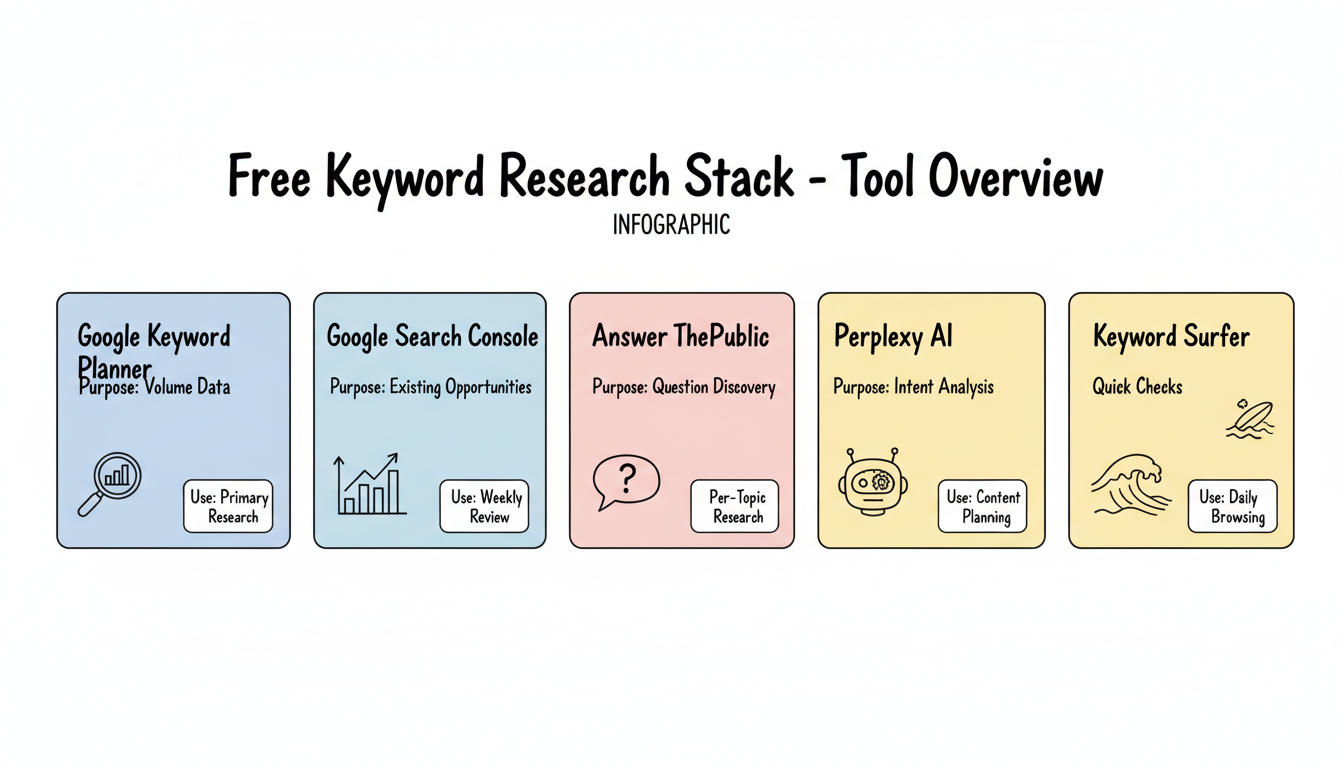
Recommended Free Stack
Combine tools that complement each other for volume data, question discovery, and AI intent analysis.
Tool | Purpose | Use Frequency |
Google Keyword Planner | Volume data | Primary research |
Google Search Console | Existing opportunities | Weekly review |
AnswerThePublic | Question discovery | Per-topic research |
Perplexity AI | Intent analysis | Content planning |
Keyword Surfer | Quick checks | Daily browsing |
Workflow Example
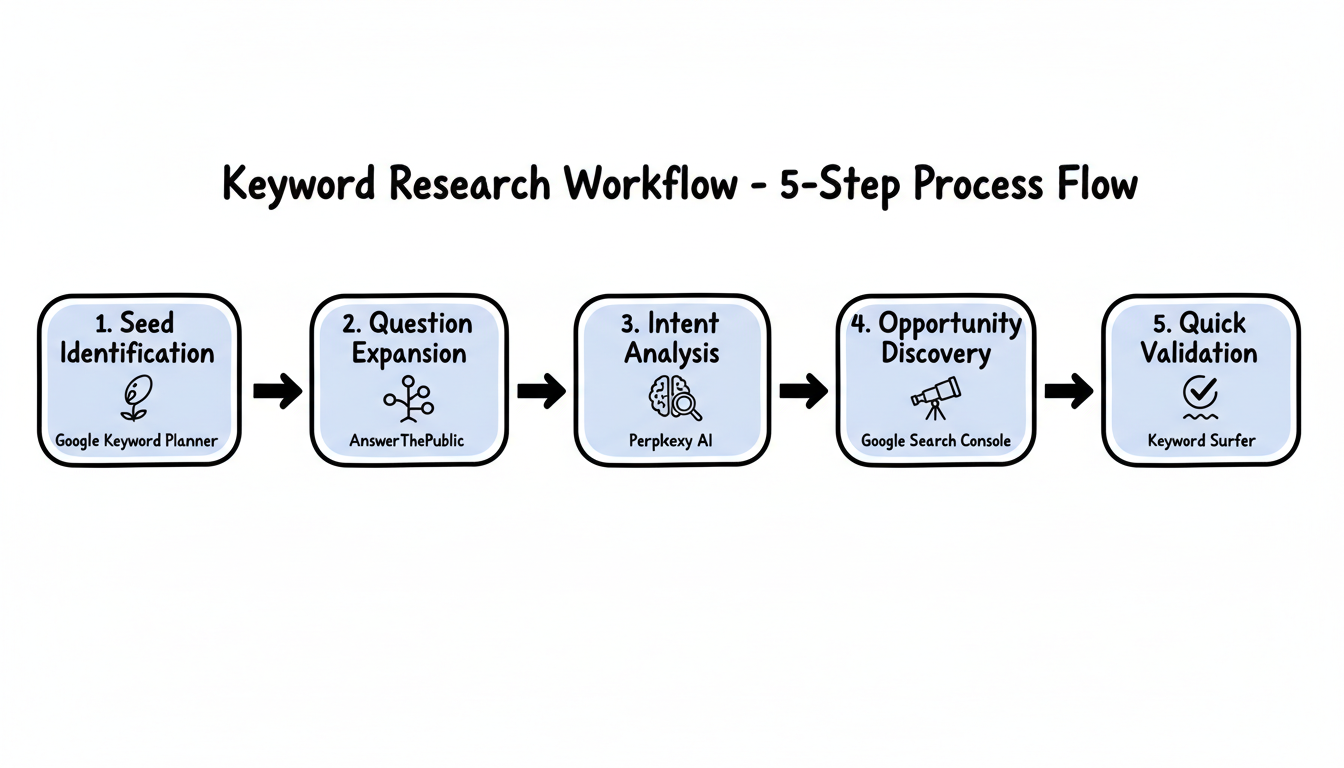
Follow this five-step process to conduct comprehensive keyword research using only free tools.
- Seed identification: Use Google Keyword Planner to verify search volume for your primary topic
- Question expansion: Run the topic through AnswerThePublic to find question variations
- Intent analysis: Use Perplexity AI to understand how AI systems interpret the topic
- Opportunity discovery: Check Google Search Console for related terms you already rank for
- Quick validation: Use Keyword Surfer to verify volume as you browse SERPs
Keyword Research for Digital Transformation and Enterprise Software Consultants
Digital transformation keyword research targets CIOs and operations leaders evaluating multi-year technology investments — where thought leadership content that addresses implementation risk and change management complexity consistently attracts decision-makers with the budget authority to engage enterprise consulting engagements.
- Google Keyword Planner technology platform, industry process, and transformation stage keyword mapping: Enterprise technology searches reflect specific platforms and business outcomes — "Salesforce implementation partner for manufacturing," "SAP S/4HANA migration roadmap," and "cloud ERP for mid-market company" each attract buyers with defined technology selection decisions and significant implementation budget authority.
- Google Trends enterprise software release and competitor disruption monitoring: Major enterprise software releases, acquisition announcements, and platform end-of-life notices generate urgent evaluation searches from IT teams assessing migration timelines. Consultants with timely platform transition guidance content capture buyers during high-urgency evaluation windows.
- AnswerThePublic implementation risk and change management question research: Enterprise buyers research implementation failure rates and risk mitigation strategies extensively before committing to major technology projects. Content answering "why do ERP implementations fail," "how to manage change in digital transformation," and "digital transformation ROI measurement" directly addresses the concerns that delay or derail procurement decisions.
- Post-implementation optimization and managed services keyword targeting: Organizations with existing enterprise technology investments search for optimization and ongoing support services — "Salesforce optimization for sales productivity," "SAP support managed services cost," and "enterprise software training program" attract post-go-live clients with recurring service revenue potential.
When to Upgrade to Paid Tools
Free tools have limitations. Consider upgrading when:
- Scale demands it: Managing hundreds of keywords requires automation
- Competition analysis matters: Free tools lack detailed competitor data
- Historical data needed: Understanding long-term trends requires paid data
- Team collaboration: Multiple users need shared access and reporting
- Time is money: Manual work with free tools takes longer than paid alternatives
For context, paid SEO tools typically cost $100-$300/month. Popular upgrades include:
- Semrush Pro: $139.95/month — full keyword database, position tracking, site audits
- Surfer SEO: $99/month — content optimization with NLP-driven keyword recommendations
- AnswerThePublic Pro: $20/month — unlimited searches and monitoring alerts
- Ahrefs Lite: $129/month — comprehensive backlink and keyword data
Comparing options like Surfer SEO vs Clearscope helps determine which paid platform best complements your free tool foundation when you're ready to scale.
Limitations of Free Tools
Understand what free tools cannot provide:
Missing from free tools:
- Comprehensive backlink-adjusted difficulty scores
- Detailed SERP feature analysis
- Accurate traffic estimates
- Competitor keyword gap analysis
- Automated tracking and reporting
- API access for integration
Workarounds:
- Combine multiple free tools to approximate paid capabilities
- Accept less precision in metrics
- Invest more time in manual research
- Focus on fewer keywords with deeper research
Key Takeaways
Building a keyword research workflow with free AI keyword research tools is fully achievable for most businesses. These free AI keyword research tools together can rival paid platforms when used strategically. Here is what matters most:
Start with the recommended free stack outlined in this guide: Google Keyword Planner for baseline volume data, Google Search Console for existing ranking opportunities, AnswerThePublic for question-based keyword discovery, Perplexity AI for understanding AI search intent, and KWFinder for local keyword research and difficulty scoring.
This combination covers all major keyword research use cases at zero cost and scales with your content strategy as you grow. When query limits become a bottleneck or competitor analysis becomes critical, that is the right signal to evaluate paid upgrades.
- Free AI keyword research tools like SEO.ai, Optimo, ChatGPT, and Perplexity provide AI-powered keyword suggestions without a paid subscription
- Google Keyword Planner, Search Console, and Trends form the essential foundation of any free AI keyword research tools stack for volume and opportunity discovery
- Combining 3–4 free AI keyword research tools covering volume data, questions, and AI intent gives professional-grade results at zero cost
- Upgrade to paid platforms when you outgrow what free AI keyword research tools offer in bulk analysis and competitor tracking
FAQs
This section answers the most common questions about free AI keyword research tools, covering accuracy, AI platform support, and when to upgrade.
Can I Do Effective Keyword Research with Only Free Tools?
Yes, especially for smaller sites or those just starting. Free tools provide enough data for basic keyword strategy. The tradeoff is time—you'll spend more hours on manual research than you would with paid tools.
Which Free Keyword Tool Is Most Accurate for Search Volume?
Google Keyword Planner provides the most reliable volume data since it comes directly from Google. However, it shows ranges rather than precise numbers unless you're actively advertising.
How Do AI Tools Like Perplexity Help with Keyword Research?
AI tools reveal search intent and related topics that traditional keyword tools miss.
By analyzing how AI systems interpret and respond to queries, you understand what content users actually need—not just what terms they search. This insight feeds into how to optimize content for generative AI platforms and search engines alike.
Should I Use All These Free Tools Together?
Start with 2-3 tools that serve different purposes—one for volume data (Google Keyword Planner), one for questions (AnswerThePublic), and one for quick checks (Keyword Surfer). Add others as needed.
What Is the Best AI Tool to Find Keywords?
The best AI keyword tool depends on your needs. For free AI-powered keyword generation, SEO.ai and Optimo offer instant suggestions without requiring a subscription.
For AI-enhanced keyword data with difficulty scores and search volume, Semrush Keyword Magic Tool and Ahrefs Free Keyword Generator provide professional-grade metrics on limited free tiers. If you want AI brainstorming without data constraints, ChatGPT and Perplexity AI are useful for generating keyword ideas and understanding search intent—though they lack volume data.
What Are Keyword Research Tools for AEO?
Answer Engine Optimization (AEO) keyword research tools help you find queries that trigger AI-generated answers in Google AI Overviews, ChatGPT, and Perplexity.
Free options include Semrush Prompt Research (limited free access) for discovering AI prompts, AlsoAsked for mapping People Also Ask chains, and Perplexity AI itself for analyzing which sources get cited in AI responses. Google Search Console can also filter performance data to show queries where your content appears in AI Overviews.
What Are the Ubersuggest Free Tier Limits in 2026?
In 2026, Ubersuggest's free tier allows 3 keyword searches per day on the web app, 1 domain analysis per day, and limits content ideas to 3 results per query.
Historical data is restricted to roughly 3 months. The Ubersuggest Chrome extension provides unlimited basic keyword lookups while browsing, making it a valuable workaround for the web app's daily limits. Keyword tracking, project features, and full SERP analysis are locked behind paid plans starting at $29/month.