
Last Updated: January 2026
Quality SEO tools typically cost $100-500+ monthly. But what if you're just starting out, testing strategies, or working with limited resources? The good news: several powerful AI SEO tools offer genuinely useful free tiers.
This guide covers the best free AI SEO tools available in 2026, what each actually delivers without payment, and how to build an effective free tool stack for your SEO workflow.
Best Free AI SEO Tools Overview
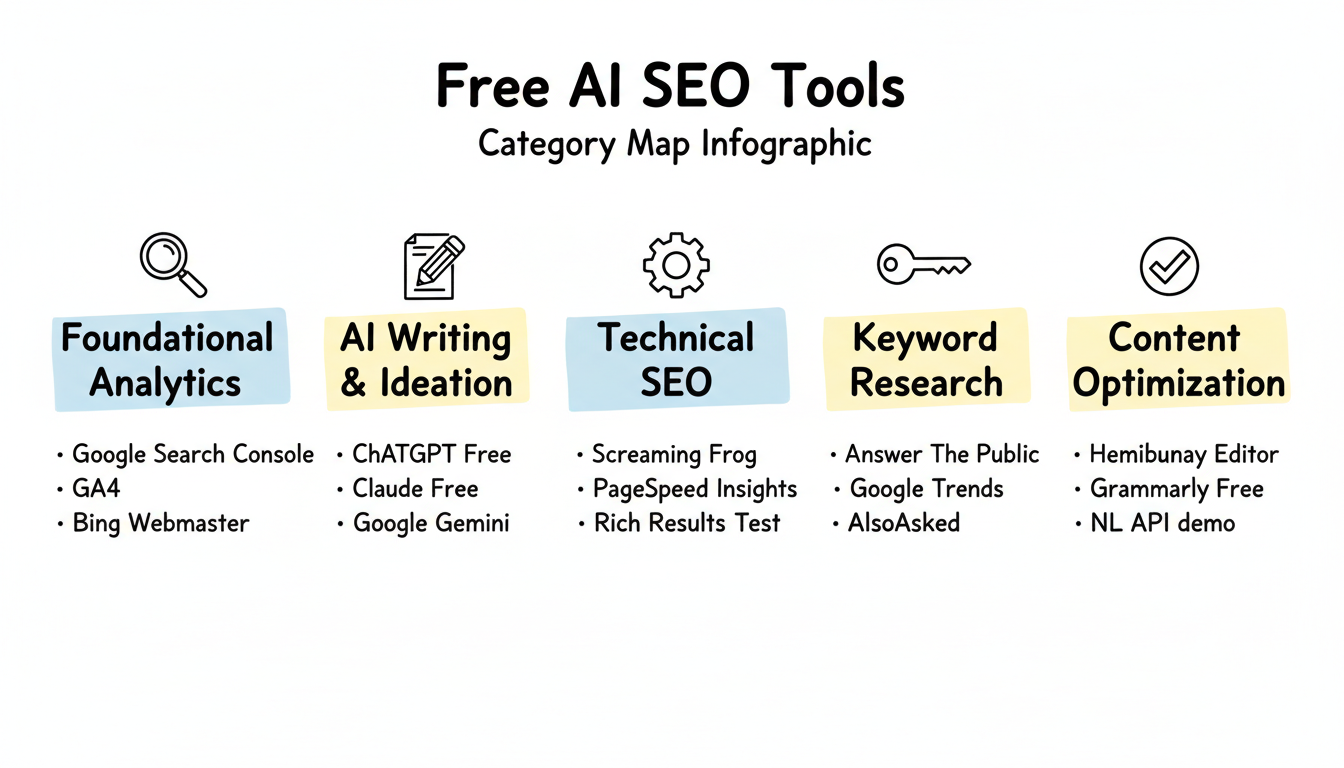
Free AI SEO tools fall into several categories, each serving different optimization needs:
Foundational Analytics
- Google Search Console
- Google Analytics 4
- Bing Webmaster Tools
AI Writing and Ideation
- ChatGPT Free
- Claude Free
- Google Gemini
Technical SEO
- Screaming Frog (free version)
- Google PageSpeed Insights
- Rich Results Test
Keyword Research
- Answer The Public (limited free)
- Google Trends
- AlsoAsked (limited free)
Content Optimization
- Hemingway Editor
- Grammarly Free
- Google's Natural Language API demo
The key to maximizing free tools is understanding their limitations and combining them strategically. No single free tool replaces a paid suite, but the right combination covers most essential SEO functions. When evaluating free vs paid AEO tools, consider how these options fit into your broader optimization strategy.
Tool-By-Tool Reviews
Google Search Console
Cost: Completely free
Google Search Console remains the most valuable free SEO tool available. It provides data directly from Google about how your site performs in search. For those implementing Google Search Console AEO strategies, this tool serves as the foundation for tracking AI Overview visibility.
Key Features:
- Search performance data (queries, clicks, impressions, CTR, position)
- Index coverage reports
- Core Web Vitals monitoring
- Mobile usability analysis
- Security and manual action alerts
- URL inspection tool
- Sitemap submission
Limitations:
- 16 months of historical data maximum
- Data sampling on high-traffic sites
- No competitive analysis
- Limited keyword research beyond existing traffic
Best For: Everyone. This is non-negotiable—every website should have GSC configured.
ChatGPT Free
Cost: Free tier available (GPT-4o mini, limited GPT-4o)
ChatGPT's free tier offers substantial value for SEO tasks, though with usage limits. Understanding ChatGPT optimization tactics can help you maximize visibility in AI-generated responses.
Key Features:
- Content ideation and brainstorming
- Meta description writing
- Title tag generation
- Content outline creation
- Schema markup generation
- Keyword clustering assistance
- FAQ generation from topics
Limitations:
- Daily message limits on GPT-4o
- No browsing for real-time data (in free tier)
- No image generation
- Conversation history limits
- No custom GPTs access
Best For: Content ideation, draft creation, and repetitive writing tasks like meta descriptions.
Claude Free
Cost: Free tier with daily limits
Claude's free tier offers strong capabilities for SEO writing and technical tasks.
Key Features:
- Long-form content drafting
- Technical documentation review
- Code explanation and debugging
- Content analysis and feedback
- Schema markup creation
- Structured data generation
Limitations:
- Strict daily usage limits
- No file upload in free tier
- Slower response during peak times
- No projects or persistent context
Best For: Technical SEO tasks, content analysis, and longer writing projects when ChatGPT limits are reached.
Screaming Frog SEO Spider (Free Version)
Cost: Free for up to 500 URLs
Screaming Frog's free version provides professional-grade technical SEO auditing for smaller sites.
Key Features:
- Crawl up to 500 URLs
- Find broken links (404s)
- Analyze page titles and meta descriptions
- Discover duplicate content
- Review H1 and H2 tags
- Generate XML sitemaps
- Identify redirect chains
Limitations:
- 500 URL crawl limit
- No JavaScript rendering
- No Google Analytics integration
- No scheduling
- Limited export options
- No custom extraction
Best For: Small sites needing comprehensive technical audits. Sites over 500 pages need the paid version ($259/year).
Google Analytics 4
Cost: Completely free
GA4 provides essential traffic and user behavior data for SEO analysis.
Key Features:
- Traffic source analysis
- User behavior tracking
- Conversion tracking
- Audience insights
- Real-time reporting
- Event tracking
- Search Console integration
Limitations:
- Complex learning curve
- Limited historical data from UA migration
- Data sampling on free tier
- No raw data export (without BigQuery)
Best For: Understanding which pages drive traffic and conversions, measuring SEO impact on business goals.
Google Pagespeed Insights
Cost: Completely free
PageSpeed Insights analyzes Core Web Vitals and provides actionable performance recommendations.
Key Features:
- Core Web Vitals assessment (LCP, FID, CLS)
- Mobile and desktop analysis
- Specific optimization recommendations
- Field data from Chrome User Experience Report
- Lab data from Lighthouse
Limitations:
- Single URL analysis only
- No bulk testing
- No historical tracking
- Recommendations can be technical to implement
Best For: Page-by-page performance optimization, Core Web Vitals monitoring.
Answer the Public
Cost: Limited free searches per day
Answer The Public visualizes question-based queries around any topic, valuable for content planning. When combined with voice search AEO optimization strategies, this tool helps identify natural language queries that AI systems prioritize.
Key Features:
- Question-based keyword visualization
- Preposition and comparison queries
- Alphabetical keyword suggestions
- Visual data presentation
- Export capabilities (limited)
Limitations:
- Very limited daily searches (typically 1-3)
- No search volume data
- No keyword difficulty metrics
- Limited export in free tier
Best For: Content ideation, FAQ planning, understanding how people ask questions about topics.
Rich Results Test
Cost: Completely free
Google's Rich Results Test validates structured data implementation. For comprehensive schema validation and testing for AI search, this tool serves as your first line of defense against implementation errors.
Key Features:
- Schema markup validation
- Rich result eligibility check
- Error and warning identification
- Preview of rich results appearance
- Mobile and desktop testing
Limitations:
- Single URL testing only
- No bulk validation
- Limited to Google-supported schema types
Best For: Validating schema markup before and after implementation.
Google Trends
Cost: Completely free
Google Trends shows search interest patterns over time and by geography.
Key Features:
- Search interest trends over time
- Geographic interest breakdown
- Related queries and topics
- Comparison of multiple terms
- Real-time trending topics
Limitations:
- Relative interest, not absolute volume
- No keyword difficulty data
- Limited SEO-specific metrics
- Can be noisy for low-volume terms
Best For: Identifying trending topics, understanding seasonality, comparing topic interest.
Free vs Paid: What You Actually Get
Understanding the gap between free and paid tools helps set realistic expectations. If you're evaluating whether to invest in professional assistance, reviewing affordable AEO services can provide perspective on when DIY tools reach their limits.
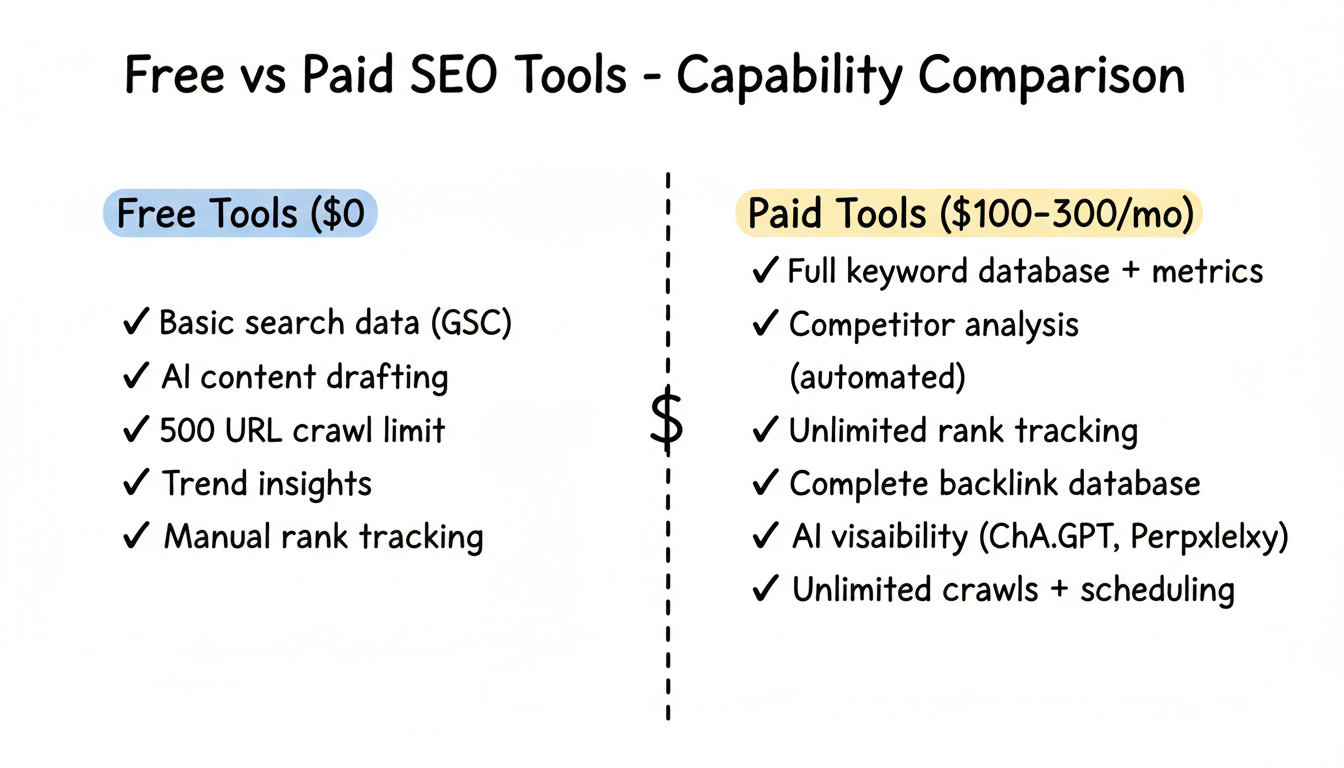
What Free Tools Provide
- Basic data access: Traffic, rankings (GSC), technical issues
- AI assistance: Content ideation, drafting, basic optimization
- Technical auditing: Limited site crawling, validation tools
- Trend insights: Interest patterns, question research
What Free Tools Lack
- Competitive intelligence: No competitor keyword data, backlink analysis, or content gap identification
- Historical tracking: Limited historical data for trend analysis
- Scale features: Usage limits, URL restrictions, query caps
- AI visibility tracking: No monitoring of brand mentions in ChatGPT, Perplexity, or AI Overviews
- Forecasting: No predictive analytics or ranking projections
- Integration: Limited API access and tool connections
- Support: Community forums instead of dedicated support
The Real Cost Gap
Capability | Free Tools | Paid Tools ($100-300/mo) |
Keyword research | Basic suggestions | Full database + metrics |
Competitor analysis | Manual research | Automated insights |
Rank tracking | GSC (own site only) | Track competitors too |
Backlink data | None | Full backlink database |
AI visibility | None | LLM mention tracking |
Technical audits | 500 URLs | Unlimited + scheduling |
Content optimization | Manual | AI-guided scoring |
How to Maximize Free Tools
Getting value from free tools requires strategic usage. Understanding AI SEO best practices 2026 helps ensure you're applying these tools to the right optimization priorities.
Combine Tools Strategically
Don't try to force one tool to do everything. Build workflows that leverage each tool's strengths:
- GSC for identifying performing and underperforming content
- ChatGPT/Claude for generating optimization ideas
- Screaming Frog for technical issue identification
- PageSpeed Insights for performance optimization
- Answer The Public for content ideation
Establish Consistent Workflows
Weekly Workflow Example:
- Monday: Check GSC performance, identify declining pages
- Tuesday: Run Screaming Frog crawl on priority sections
- Wednesday: Use AI tools for content optimization planning
- Thursday: Check PageSpeed Insights on key landing pages
- Friday: Research new content topics with Answer The Public
Use AI Tools for Research Augmentation
Free AI tools can help analyze data from other free tools:
- Paste GSC query data into ChatGPT for clustering analysis
- Use Claude to interpret Screaming Frog exports
- Generate schema markup based on content analysis
Using generative AI for structured data creation can significantly accelerate your implementation speed.
Track Progress Manually
Without paid rank tracking, create spreadsheets to monitor:
- Priority keyword positions (check manually weekly)
- Traffic trends from GA4
- Technical issues found and fixed
- Content published and updated
Free Tool Limitations
Be realistic about what free tools cannot do:
No Competitive Intelligence
Free tools don't show competitor data. You won't know:
- What keywords competitors rank for
- Their backlink profiles
- Content gaps in your strategy
- Competitive positioning changes
Limited Scale
Free tiers impose restrictions:
- 500 URL crawl limits (Screaming Frog)
- Daily message caps (ChatGPT, Claude)
- Limited searches (Answer The Public)
- No bulk processing
No AI Search Visibility
Free tools don't track:
- Brand mentions in ChatGPT responses
- Citations in Perplexity answers
- Appearances in Google AI Overviews
- Voice assistant recommendations
This blind spot grows more significant as AI search adoption increases. Dedicated answer engine optimization tools become necessary for comprehensive visibility tracking.
Manual Effort Required
Paid tools automate what free tools require manually:
- Rank tracking across keywords
- Alert systems for issues
- Competitor monitoring
- Report generation
When to Upgrade to Paid Tools
Consider investing in paid tools when:
Your Site Grows Beyond 500 Pages
Screaming Frog's free limit becomes restrictive. Budget for the $259/year license or consider alternatives.
You Need Competitive Data
If you're competing in a serious market, flying blind on competitor activity isn't sustainable. Keyword gap analysis and backlink research require paid tools. Researching AI SEO companies or generative engine optimization companies can help identify the right solution partners.
Time Becomes More Valuable Than Money
Manual processes that free tools require cost time. Calculate whether 10+ hours monthly of manual work justifies $100-300 in tool subscriptions.
AI Search Visibility Matters
If your audience uses ChatGPT, Perplexity, or voice assistants, you need paid AI visibility tools. Free options don't exist for this category. Understanding GEO vs AEO differences helps clarify which specialized tools you need.
You'Re Managing Multiple Sites
Free tier limits multiply with additional sites. Agency and multi-site workflows need paid subscriptions.
Free Tool Stack Recommendations
Stack for Bloggers and Content Creators
Tool | Purpose |
Google Search Console | Performance tracking |
Google Analytics 4 | Traffic analysis |
ChatGPT Free | Content ideation |
Hemingway Editor | Readability |
Answer The Public | Topic research |
Total Cost: $0
Stack for Small Business Sites
Tool | Purpose |
Google Search Console | SEO monitoring |
Google Analytics 4 | Conversion tracking |
Screaming Frog Free | Technical audits |
PageSpeed Insights | Performance optimization |
ChatGPT + Claude | Content and schema |
Rich Results Test | Schema validation |
Total Cost: $0
For small businesses looking to expand beyond free tools, exploring AEO software options can bridge the gap between DIY and full agency support.
Stack for Growing Sites (Hybrid Free + Paid)
Tool | Purpose | Cost |
Google Search Console | Foundation | Free |
Screaming Frog Paid | Full technical audits | $259/year |
SE Ranking or Ubersuggest | Keyword research | $50-80/month |
ChatGPT Plus | Enhanced AI | $20/month |
Total Cost: ~$100/month
This hybrid approach provides competitive data while minimizing spend.
FAQs
Are Free SEO Tools Worth Using?
Yes, especially Google Search Console and GA4 which provide data unavailable elsewhere. Free AI tools add significant value for content work. However, free tools alone won't match comprehensive paid suites for competitive analysis or scale.
What'S the Best Completely Free SEO Tool?
Google Search Console. It's the only source of direct Google data about your site's search performance, and it's completely free with no limitations based on site size.
Can I Do SEO Without Paying for Tools?
For basic SEO on a small site, yes. GSC, GA4, free AI tools, and Screaming Frog's free version cover fundamentals. Competitive analysis and AI visibility tracking require paid tools.
Which Free AI Tool Is Best for SEO?
ChatGPT's free tier offers the best balance of capability and access for most SEO tasks. Claude's free tier excels at longer-form content. Use both to maximize daily limits.
How Long Can I Rely on Free Tools?
Indefinitely for personal blogs or very small sites. Growing businesses typically need paid tools within 6-12 months as competitive pressure and scale requirements increase.
What'S the First Paid Tool I Should Invest In?
Screaming Frog's paid license ($259/year) if you have more than 500 pages. Otherwise, an all-in-one tool like SE Ranking ($52/month) or Semrush ($129/month) for keyword research and competitive data.
Making Free Tools Work
Free AI SEO tools can support genuine SEO progress when used strategically. Google's free offerings—Search Console, Analytics, PageSpeed Insights—remain industry standards. AI assistants add powerful content capabilities at no cost.
The key is understanding limitations. Free tools require more manual effort, lack competitive intelligence, and can't track AI search visibility. For serious SEO in competitive markets, paid tools eventually become necessary.
Start with free tools to learn SEO fundamentals and validate your strategy. As your site grows and competition intensifies, invest in paid tools that multiply your effectiveness. The goal isn't to stay free forever—it's to spend wisely when you do invest.