
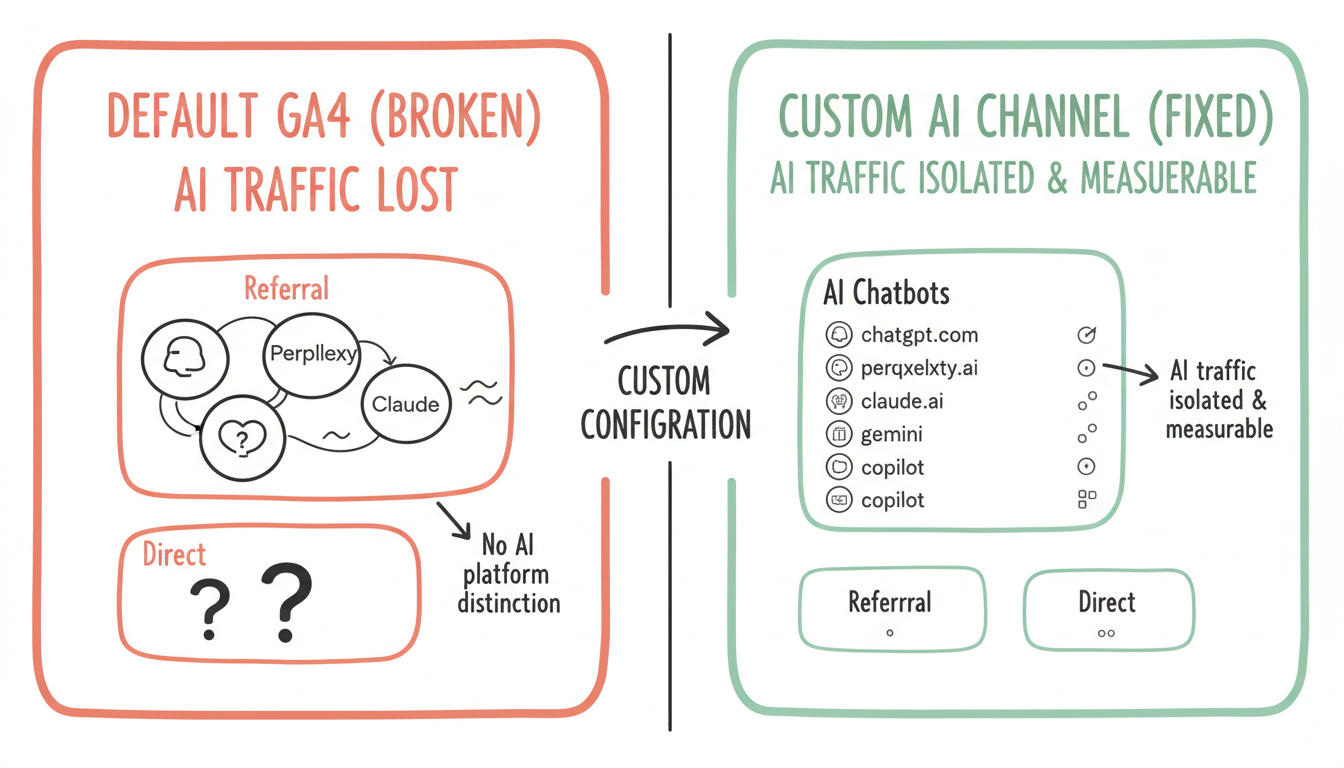
Tracking AI search traffic in Google Analytics 4 requires custom configuration that most default setups miss entirely. Without proper channel groupings and referral tracking, traffic from ChatGPT, Perplexity, Claude, and other AI platforms gets lumped into generic "Referral" or even "(direct)" categories - making it impossible to measure your AI search optimization ROI.
According to Coalition Technologies' AI traffic guide, brands need specific tracking configurations to accurately measure and increase AI referral traffic from ChatGPT, Perplexity, and other LLMs. The default GA4 setup wasn't designed for AI search attribution.
Why Default GA4 Misses AI Traffic
Standard channel definitions don't recognize AI search platforms.
According to Medium's GA4 AI tracking guide, you should add a new "AI Chatbots" channel with a regex filter for sources like chatgpt.com, perplexity.ai, claude.ai, and reorder your channels so AI appears above Referral in the processing order. Without this configuration, AI traffic gets miscategorized.
Default GA4 channel limitations:
Issue | Description | Impact |
No AI channel | Default channels don't include AI platforms | Traffic miscategorized |
Referral bucket | AI traffic lumps with all referrals | Can't isolate AI performance |
Direct attribution | Some AI traffic appears as direct | Invisible traffic source |
No platform distinction | ChatGPT vs Perplexity undifferentiated | Platform comparison impossible |
Creating a Custom AI Chatbots Channel
Step-by-step configuration for AI traffic isolation.
Custom channel setup process:
GA4 AI Chatbots Channel Configuration
+-- Navigate to Admin
|   +-- Select property
|   +-- Click "Data display"
|   +-- Choose "Channel groups"
|
+-- Create New Channel Group
|   +-- Name: "AI Chatbots" or "AI Search"
|   +-- Create custom channel definition
|   +-- Add source conditions
|
+-- Define Source Regex Pattern
|   +-- chatgpt\.com
|   +-- perplexity\.ai
|   +-- claude\.ai
|   +-- gemini\.google\.com
|   +-- copilot\.microsoft\.com
|   +-- you\.com
|   +-- Combine with OR operators
|
+-- Set Channel Priority
    +-- Move AI channel above Referral
    +-- Ensure proper processing order
    +-- Test with real-time reports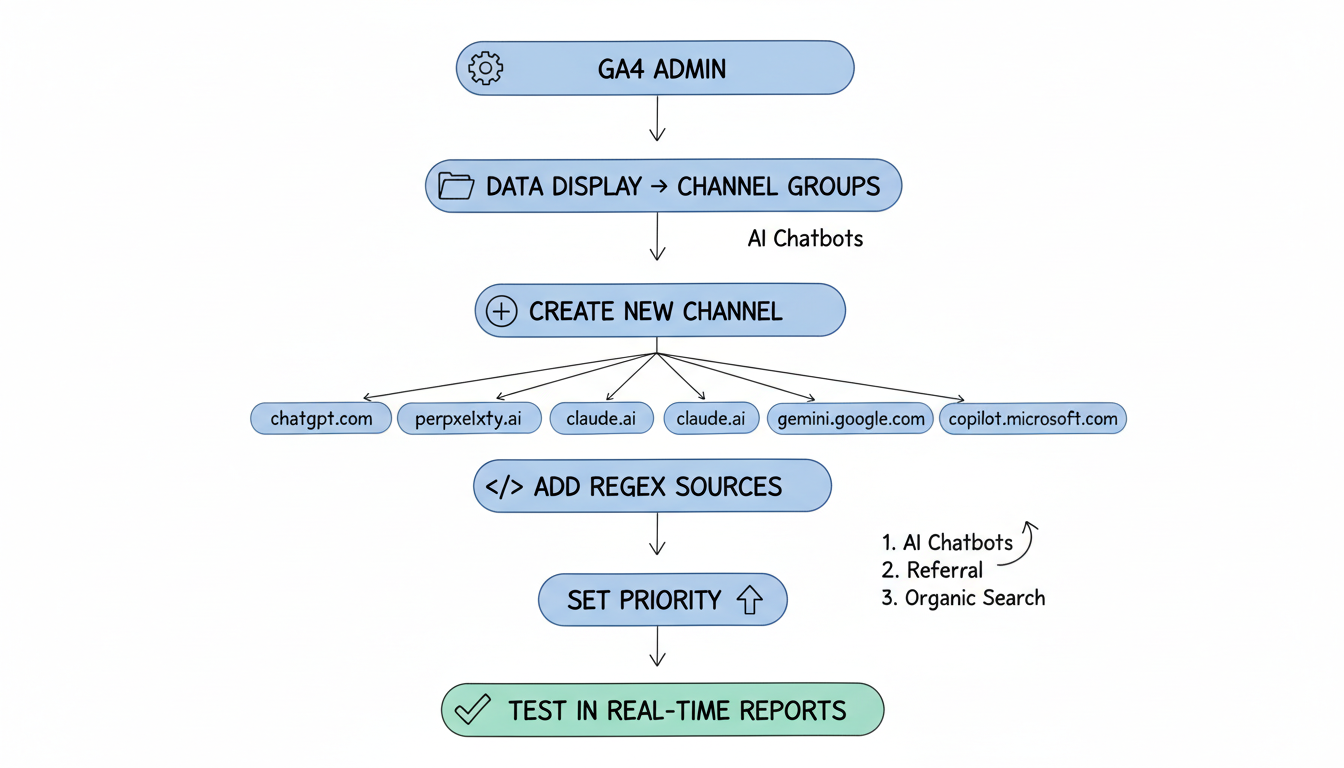
Platform-Specific Referral Behavior
Different AI platforms pass referral data differently.
According to Reddit discussions on AI traffic tracking, Perplexity actually passes referrer data so it shows up in GA4 under traffic acquisition, while other platforms like ChatGPT have messier referral attribution that may appear as direct traffic. Understanding these patterns is crucial for building an effective AI SEO strategy.
Referral data passing by platform:
Platform | Referral Passing | GA4 Behavior | Tracking Difficulty |
Perplexity | Yes - consistent | Shows in referrals | Easy |
ChatGPT | Inconsistent | Mixed referral/direct | Moderate |
Claude | Limited | Often direct | Difficult |
Gemini | Google ecosystem | Complex attribution | Moderate |
Copilot | Microsoft ecosystem | Bing attribution | Moderate |
Setting Up AI Traffic Custom Dimensions
Custom dimensions enable deeper AI traffic analysis.
Recommended custom dimensions:
Dimension | Scope | Purpose |
AI Platform | Session | Distinguish ChatGPT vs Perplexity |
AI Query Type | Event | Informational vs transactional |
Citation Position | Event | Track specific citation appearances |
AI Traffic Flag | Session | Boolean for any AI source |
Implementation approach:
Custom Dimension Setup
+-- Create Session-Scoped Dimensions
|   +-- ai_platform: Specific platform name
|   +-- ai_traffic: Boolean flag
|   +-- ai_session_type: First visit vs return
|
+-- Create Event-Scoped Dimensions
|   +-- landing_from_ai: Page entry point
|   +-- ai_content_type: Article type clicked
|   +-- conversion_from_ai: Goal completion
|
+-- Configure Data Collection
    +-- GTM tag for referrer parsing
    +-- Regex matching for sources
    +-- Custom event triggers
Manual testing enables controlled AI traffic attribution.
According to Analytify's UTM guide, UTM parameters attached to URLs allow precise source tracking in GA4. When testing AI platform citations, using tagged URLs confirms whether traffic actually originates from AI responses.
UTM testing strategy:
Parameter | Value | Purpose |
utm_source | chatgpt, perplexity, claude | Platform identification |
utm_medium | ai-search, ai-citation | Traffic type |
utm_campaign | ai-visibility-test | Testing identification |
utm_content | [topic-keyword] | Content tracking |
Search Console Integration for AI Queries
Combine GA4 with Search Console for query-level insights.
According to LinkedIn analysis by Matt Diggity, tracking 7+ word queries in Search Console helps identify AI mode usage patterns. Filtering Search Console for queries with 7+ words reveals conversational searches likely originating from AI interactions. This approach complements your overall GEO implementation guide.
Search Console AI query identification:
AI Query Indicators in Search Console
+-- Query Length
|   +-- 7+ words suggests conversational
|   +-- Natural language phrasing
|   +-- Question formats
|
+-- Query Patterns
|   +-- "What is the best..."
|   +-- "How do I..."
|   +-- "Compare X vs Y"
|   +-- Full sentence queries
|
+-- Click-Through Behavior
|   +-- Higher CTR on long queries
|   +-- Different position distribution
|   +-- Engagement differences
|
+-- Integration with GA4
    +-- Connect properties
    +-- Landing page correlation
    +-- Conversion path analysis
Create actionable reporting for AI visibility measurement.
Essential AI traffic reports:
Report Type | Metrics | Insight Provided |
AI Channel Overview | Sessions, users, engagement | Overall AI traffic volume |
Platform Comparison | Sessions by AI source | Platform performance |
Content Performance | Pages from AI traffic | What content gets cited |
Conversion Attribution | Goals from AI channel | AI traffic value |
Trend Analysis | AI traffic over time | Growth trajectory |
Measuring AI Traffic Value
Quantify the business impact of AI search visibility.
According to AI search market analysis, AI search currently holds approximately 0.21% combined traffic share of all web traffic. While small, this percentage represents highly qualified traffic from users actively researching topics. Understanding the distinction between traditional SEO vs AI search optimization helps contextualize these metrics.
AI traffic value calculation:
AI Traffic ROI Framework
+-- Volume Metrics
|   +-- Total AI sessions
|   +-- AI new users
|   +-- AI returning users
|
+-- Engagement Metrics
|   +-- Pages per session (AI vs overall)
|   +-- Average engagement time
|   +-- Bounce rate comparison
|
+-- Conversion Metrics
|   +-- Goal completions from AI
|   +-- E-commerce revenue
|   +-- Lead generation
|
+-- Comparative Analysis
    +-- AI vs organic search value
    +-- AI vs paid search value
    +-- AI traffic growth rate
Address frequent GA4 AI tracking problems.
Common issues and solutions:
Issue | Cause | Solution |
AI traffic showing as direct | Missing referrer | Check source regex patterns |
No AI channel data | Channel priority wrong | Move AI above Referral |
Duplicate sessions | Cross-domain issues | Configure cross-domain tracking |
Missing conversions | Attribution window | Extend attribution settings |
Inconsistent data | Regex errors | Test regex patterns |
Why Default GA4 Misses AI Traffic
The default misses the AI source. The assistant and the chat surface do not map to the classic channel, so the visit hides in the direct or the referral, and the honest program builds the custom view. The disciplined read names the gap, and the clarity makes the work fundable, because the definition of the need is the first deliverable and the data is the guide.
Avoid reading the standard report as the truth. A program that trusts the default misses the AI visit, so the custom dimension is the fix. The honest number points to the gap, and the clarity lets the team improve the line instead of guessing at the cause, because the measurement is the guide and the fit is the lever that pays.
Creating a Custom Channel
The channel is the tagged source. A rule that buckets the AI referral into its own line is the one that shows the traffic, so the setup is the build. The honest content is the one the system can read, and the discipline of the format makes the data useful instead of hidden, because the extraction favors the shape and the structure is the asset.
Use the dimension with the Console. A GA4 that is linked to the query data shows the AI visit and the query together, so the measurement joins the two. The combined view is what justifies the effort to the stakeholders who fund it, because the use is the measure and the upkeep is the value.
Measuring AI Traffic Value
The value is the assisted conversion. An AI visit that starts the journey deserves credit when the deal closes, so use the blended view. The honest program reads the whole picture, and the framed report helps leadership fund the work as infrastructure, not as a test that did not immediately pay, because the use is the measure and the fit is the lever.
Monitor the value on a cadence. A fixed query list watched over time shows whether the AI traffic holds, because the position is not permanent. The disciplined check catches the loss early, and the patience to monitor is the quiet edge most teams skip while they assume the win holds, because the measurement is the guide and the discipline is the edge.
Key Takeaways
Google Analytics 4 AI search tracking requires intentional configuration:
- Default GA4 misses AI traffic - Create custom "AI Chatbots" channel with regex for chatgpt.com, perplexity.ai, claude.ai
- Channel priority matters - Position AI channel above Referral in processing order
- Platforms behave differently - Perplexity passes referrer data consistently; ChatGPT is inconsistent
- Custom dimensions enable analysis - Session and event-scoped dimensions for AI platform tracking
- Search Console integration helps - 7+ word queries indicate AI-influenced searches
- UTM parameters validate - Test citations with tagged URLs for attribution confirmation
According to Hostinger's analytics guide, proper GA4 configuration enables understanding of where your traffic comes from and how users behave. For AI search traffic specifically, this understanding requires moving beyond default channel definitions to capture the unique referral patterns of AI platforms. As AI search grows from its current 0.21% share, having proper tracking in place now positions you to measure and optimize this emerging channel.