
Creating your first LinkedIn ad campaign can feel overwhelming with all the options available. This step-by-step tutorial walks you through the entire process - from setting up your account to launching your first campaign.
Prerequisites
Before you start, you'll need:
- LinkedIn personal profile (your regular login)
- LinkedIn Company Page (required to run ads)
- Campaign Manager access (create at linkedin.com/campaignmanager)
- Payment method (credit card or invoicing for larger accounts)
If you don't have a Company Page yet, create one first - it takes about 5 minutes.
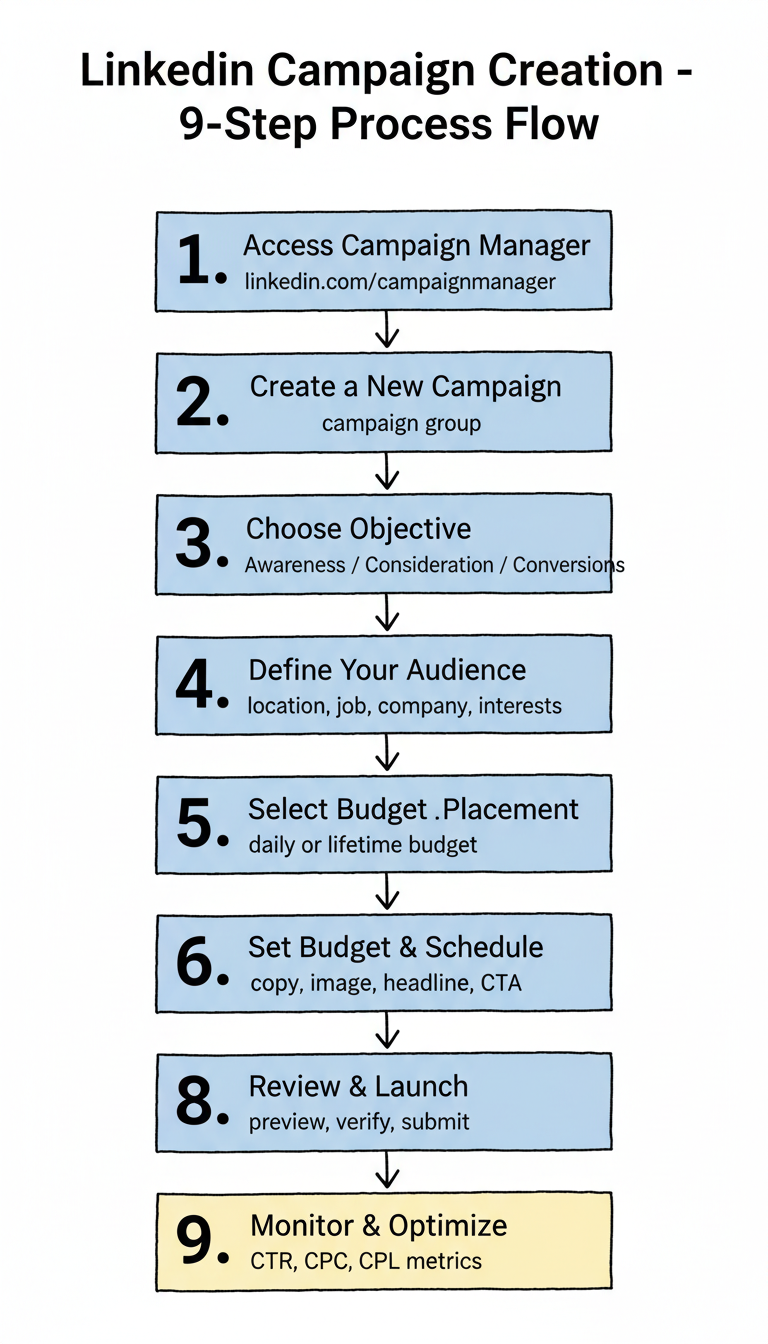
Step 1: Access LinkedIn Campaign Manager
- Go to linkedin.com/campaignmanager
- Sign in with your LinkedIn credentials
- If this is your first time, click Create account
- Select your Company Page from the dropdown
- Choose your currency and agree to terms
You'll land on the Campaign Manager dashboard, where all your advertising activity lives.
Step 2: Create a New Campaign
- Click Create in the top left
- Select Campaign
- Choose a Campaign Group (or create a new one)
Campaign Groups help organize related campaigns. For example, group all Q1 lead generation campaigns together.
Step 3: Choose Your Objective
LinkedIn offers objectives organized by marketing goal:
Awareness
- Brand awareness: Maximize impressions
Consideration
- Website visits: Drive traffic to your site
- Engagement: Get likes, comments, shares
- Video views: Maximize video watch time
Conversions
- Lead generation: Collect leads via Lead Gen Forms
- Website conversions: Drive specific actions on your site
- Job applicants: For recruiting campaigns
For most B2B campaigns, start with Lead generation or Website conversions. These objectives optimize for business outcomes, not vanity metrics.
Step 4: Define Your Audience
This is where LinkedIn's targeting power shines. Build your audience with these options:
Location (Required)
- Select countries, regions, or cities
- Choose "Recent or permanent" vs "Permanent" location
Audience Attributes
Add criteria from these categories:
Category | Options |
Company | Name, industry, size, growth rate |
Job | Title, function, seniority, years of experience |
Education | Schools, degrees, fields of study |
Demographics | Age, gender |
Interests | Member interests, groups |
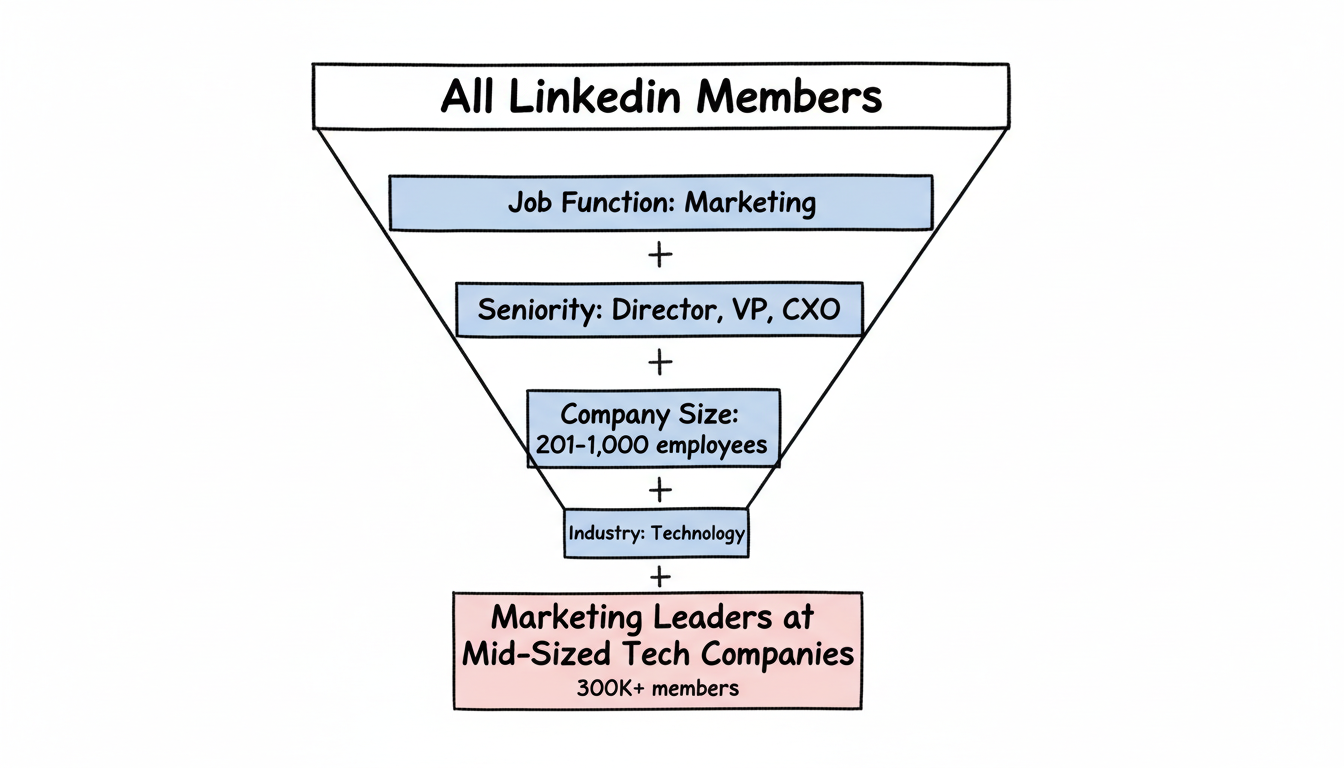
Best Practice: Layered Targeting
Combine multiple attributes for precision. For example:
- Job function: Marketing
- Seniority: Director, VP, CXO
- Company size: 201-1,000 employees
- Industry: Technology
This targets marketing leaders at mid-sized tech companies - much more valuable than broad targeting.
Audience Size
LinkedIn shows your estimated audience size on the right. Aim for:
- Minimum: 50,000 members
- Recommended: 300,000+ for Sponsored Content
If your audience is too small, remove criteria. If too large, add filters.
Step 5: Select Ad Placement
Choose where your ads appear:
- LinkedIn feed: Primary placement for most campaigns
- LinkedIn Audience Network: Extend reach to partner sites (optional)
For your first campaign, stick to LinkedIn feed only to maintain quality and control.
Step 6: Set Budget and Schedule
Budget Options
Daily budget: Spend up to this amount per day Lifetime budget: Spend this total over the campaign duration
For testing, start with a daily budget of $50-100 to gather data quickly. When evaluating your overall LinkedIn advertising strategy, it's important to allocate sufficient budget for meaningful testing.
Bidding
Choose how LinkedIn optimizes delivery:
- Maximum delivery: LinkedIn auto-bids to maximize results within budget (recommended for beginners)
- Manual bidding: Set specific CPC, CPM, or CPL caps (for experienced advertisers)
Schedule
Set start and end dates, or run continuously. For testing, run campaigns for at least 2 weeks to gather meaningful data.
Step 7: Create Your Ad
Now build the creative. Options depend on your objective:
Single Image Ad
- Introductory text: 600 characters max (keep under 150 for full visibility)
- Image: Upload at 1200 x 627 pixels
- Headline: 200 characters (keep under 70)
- Destination URL: Where clicks go
- CTA button: Select from options like Learn More, Download, Sign Up
Writing Effective Ad Copy
According to high-performing ad research, conversational, authentic tones outperform corporate communications by about 45% in engagement.
Strong hook examples:
- "78% of B2B buyers ignore generic outreach. Here's what works instead."
- "Still spending 10 hours weekly on manual reporting?"
- "The framework 500+ sales teams use to hit quota."
Weak hooks to avoid:
- "We're excited to announce..."
- "Introducing our new solution..."
- "Learn about our products..."
Lead Gen Form Setup (If Using)
If your objective is lead generation:
- Click Create new form
- Add a compelling Offer headline (what they get)
- Write Offer details (expand on the value)
- Select Form fields (start with 3-4)
- Add Privacy policy URL
- Configure Thank you message and landing page
Keep forms short - conversion rates drop significantly after 5 fields. For a complete walkthrough of optimizing these forms, see our guide on LinkedIn lead gen forms.
Step 8: Review and Launch
Before launching:
- Preview your ad on desktop and mobile
- Check targeting one more time
- Verify budget and schedule
- Review any tracking setup
Click Launch campaign when ready. LinkedIn reviews ads within 24 hours before they go live.
Step 9: Monitor and Optimize
After launch, check Campaign Manager regularly:
Key Metrics to Watch
Metric | What It Tells You |
CTR | Ad relevance and appeal |
CPC | Cost efficiency |
CPL | Lead generation efficiency |
Conversion rate | Offer and landing page effectiveness |
Optimization Actions
- Low CTR: Test new hooks and images
- High CPC: Expand audience or improve relevance
- Low conversion: Review landing page or form
- Low volume: Increase budget or expand targeting
Common Mistakes to Avoid
1. Targeting Too Broadly
"All marketers" wastes budget. Add seniority, company size, or industry filters.
2. Too Many Form Fields
Every field reduces completions. Start with 3-4 essentials.
3. Generic Copy
"Learn more about our solution" doesn't compel action. Lead with specific value.
4. No Tracking
Install the LinkedIn Insight Tag on your site to track conversions beyond leads.
5. Giving Up Too Early
LinkedIn campaigns need 2+ weeks and 10,000+ impressions to optimize properly. Many businesses find that partnering with a LinkedIn ad management company helps avoid these common pitfalls and accelerates time to results.
Campaign Types Beyond Single Image Ads
Single image is only the start. Conversation Ads open a choice-based experience that lifts B2B engagement by letting the reader pick their own path, Message Ads reach inboxes for high-intent offers, and Document Ads use a PDF to showcase expertise while you capture leads. Event Ads drive webinar registrations directly from the feed. Match the format to the funnel stage: use Document and Conversation ads for mid-funnel education, and Message ads only for warm, opted-in audiences where inbox reach is welcome rather than intrusive.
Retargeting and Audience Expansion
New campaigns rarely convert cold traffic on day one. Build a retargeting layer from website visitors and video viewers captured by the Insight Tag, then serve them a tighter offer now that they recognize your brand. Once a campaign proves out, turn on LinkedIn's audience expansion or launch a Matched Audience clone of your converters to reach lookalikes the algorithm ranks as similar. Keep the cold and warm layers in separate campaigns so the budget and creative can be tuned to each stage without cross-contamination.
Budget Forecasting and ROAS Expectations
LinkedIn is the most expensive major paid channel, so forecast before you commit. Model CPL from your target audience size and expected CPC, then map that to the lead-to-customer rate your funnel historically delivers. A $12 CPL that converts 5% of leads to customers is a $240 cost per acquisition - only worthwhile if the deal size supports it. Set a break-even CAC up front and watch pipeline, not just leads, because cheap leads that never close are the most expensive traffic you can buy on the platform.
Frequently Asked Questions
How Much Does It Cost to Create LinkedIn Ads?
LinkedIn has no setup fee - you only pay for ad delivery. Minimum daily budget is $10. Most B2B advertisers spend $50-200/day during testing, scaling to $500-2,000/day for proven campaigns. CPCs typically range from $5-15 depending on targeting and competition.
How Long Does It Take for LinkedIn Ads to Get Approved?
LinkedIn typically reviews and approves ads within 24 hours. Some ads may take longer if they require additional review. You'll receive notification when your ads are approved or if any changes are needed.
Can I Run LinkedIn Ads Without a Company Page?
No, a LinkedIn Company Page is required to run ads. This ensures advertisers represent legitimate businesses. Creating a Company Page is free and takes about 5 minutes if you don't already have one.