
Running Facebook ads as an agency requires more than just knowing how to create campaigns. You need systematic processes for onboarding clients, structuring accounts, delivering reports, and scaling your operations without breaking down. Without these foundations, agency growth becomes chaotic and unsustainable.
This guide covers the essential workflows for managing client Facebook ads professionally, from the first onboarding call through scaling to multiple accounts.
Client Onboarding
The onboarding process sets the tone for your entire client relationship. A structured approach prevents confusion, establishes clear expectations, and gets campaigns launched faster.
Pre-Onboarding Checklist
Before starting any technical setup, gather essential information:
Business Information:
- Clear understanding of products or services offered
- Target customer demographics and psychographics
- Current marketing efforts and historical performance
- Business goals and success metrics
- Monthly advertising budget
Assets Needed:
- Access to existing ad accounts and Business Manager
- Brand guidelines and creative assets
- Landing pages and conversion tracking setup
- Customer lists for audience building
- Historical data from previous campaigns
Account Access Setup
According to agency onboarding best practices, the golden rule is requesting Partner access rather than direct admin access. This keeps billing and ownership clear while avoiding disputes.
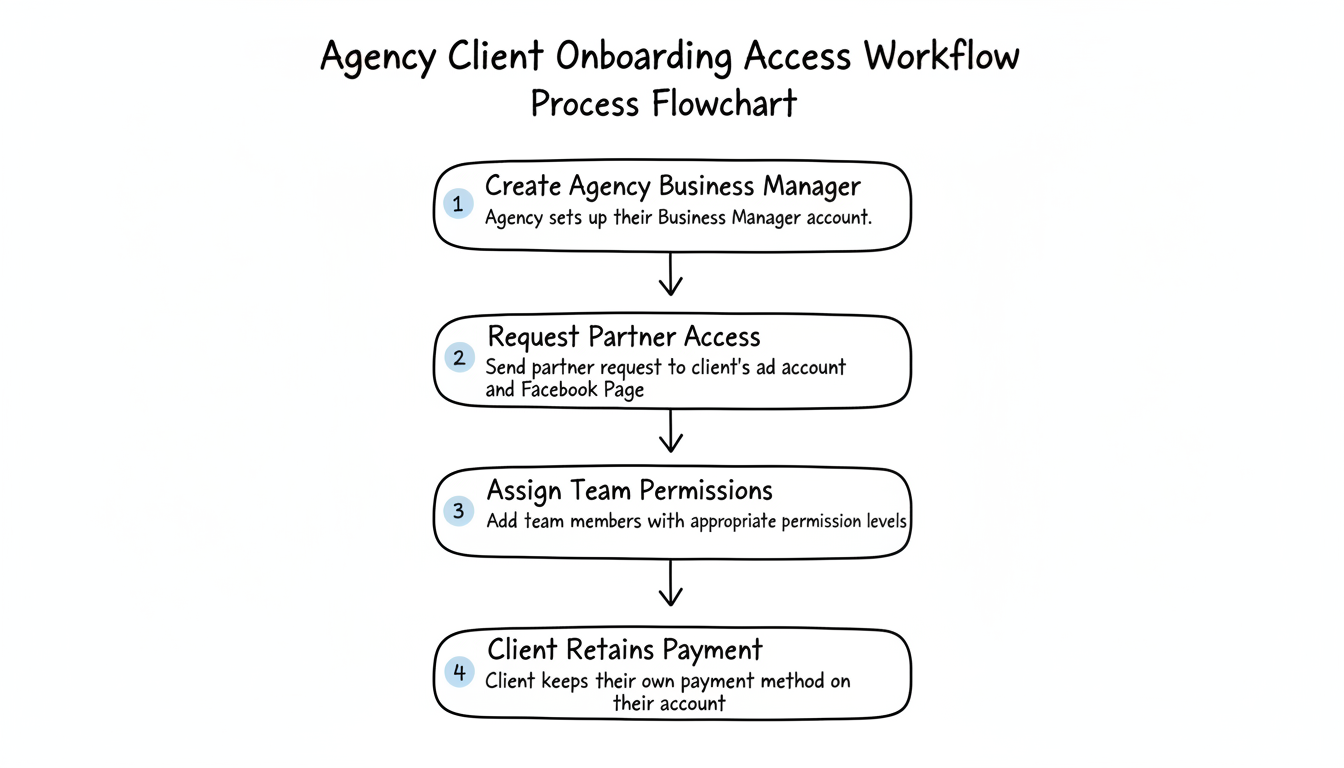
Proper Access Workflow:
- Create your agency Business Manager if you do not have one
- Request Partner access to the client's ad account and Facebook Page
- Assign your team members with appropriate permission levels
- Ensure the client maintains their own payment method on their account
This separation is essential. When working with a meta ad agency account, using Partners for agencies rather than personal accounts makes it easier to revoke access cleanly and audit permissions.
Onboarding Documentation
Create standardized documents for every client:
- Signed service agreement with scope and deliverables
- Advertising strategy document with campaign goals
- Access credentials and permission records
- Communication preferences and escalation procedures
- Reporting schedule and KPI definitions
Account Structure
A clean account structure makes optimization easier and prevents confusion as you scale.
Campaign Organization
Structure campaigns around business goals rather than audiences or tactics:
By Objective:
- Prospecting campaigns for new customer acquisition
- Retargeting campaigns for existing engagers
- Customer retention campaigns for past purchasers
By Product Line: For ecommerce clients with multiple product categories, consider separating campaigns by product line. This provides clearer performance data per category and allows independent budget control.
According to Facebook ads scaling strategies, keeping structure simple allows you to focus time on creatives, landing pages, and offers rather than managing complex account architectures that do not move the business forward.
Naming Conventions
Consistent naming makes accounts navigable for your team and clients:
Recommended Format: [Client] | [Objective] | [Audience] | [Date]
Example: Acme | Prospecting | Lookalikes | Jan2026
Elements to Include:
- Campaign objective or funnel stage
- Target audience type
- Launch date or version number
- Creative theme if running multiple tests
Budget Allocation
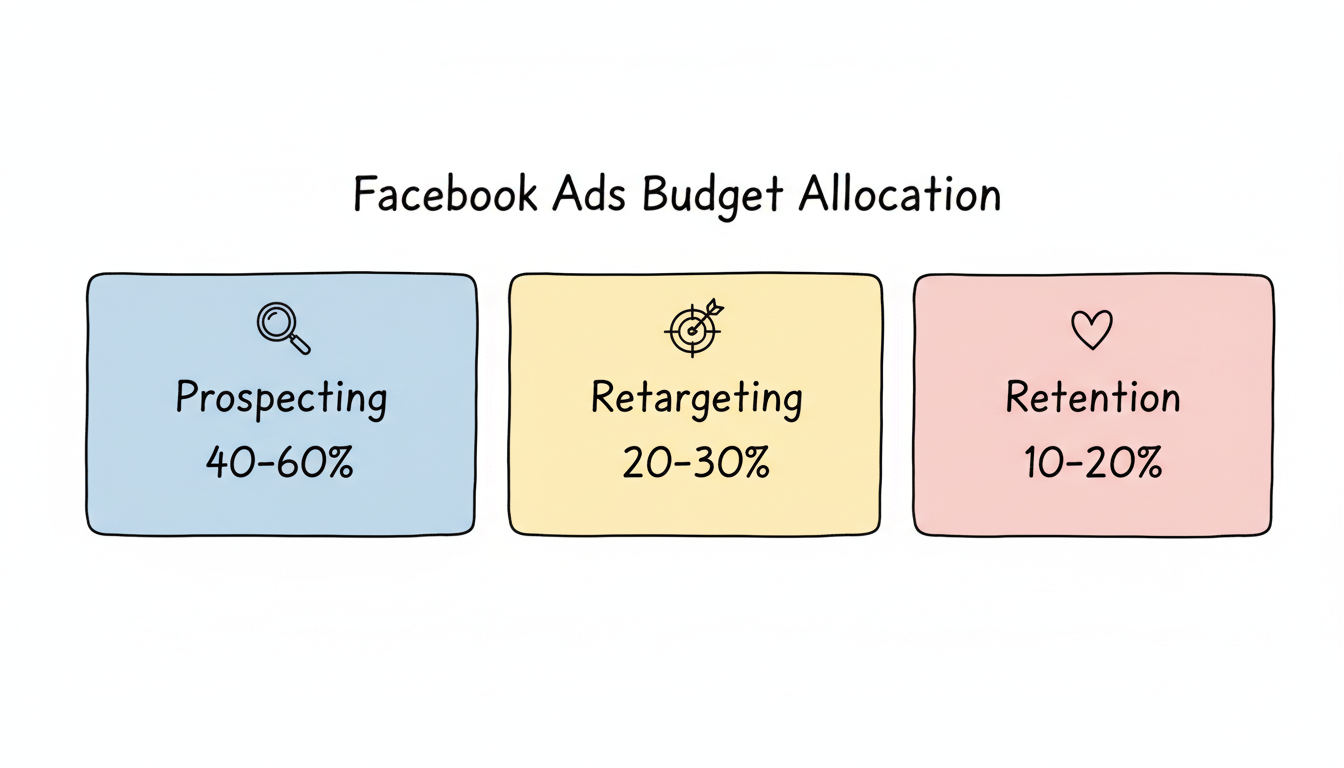
Set clear budget rules for each campaign type. Understanding facebook ads cost per month helps you allocate resources appropriately across campaign types:
Campaign Type | Typical Allocation | Purpose |
Prospecting | 40-60% | New customer acquisition |
Retargeting | 20-30% | Engaged audience conversion |
Retention | 10-20% | Customer lifetime value |
Adjust allocations based on client goals and funnel maturity.
Reporting
Consistent, clear reporting builds trust and demonstrates value.
Report Types and Frequency
Weekly Updates:
- Spend tracking against budget
- Key performance metrics (ROAS, CPA, CTR)
- Notable wins or concerns
- Planned optimizations for coming week
Monthly Reports:
- Comprehensive performance analysis
- Goal progress tracking
- Audience insights and learnings
- Strategic recommendations
Quarterly Reviews:
- Trend analysis over time
- Strategy assessment and adjustments
- Budget recommendations
- Goal setting for next quarter
Metrics That Matter
Focus reporting on metrics clients actually care about:
Primary KPIs:
- Return on ad spend (ROAS)
- Cost per acquisition (CPA)
- Total conversions or revenue
- Budget utilization
Secondary Metrics:
- Click-through rate (CTR)
- Cost per click (CPC)
- Impression share
- Frequency
According to Meta ads best practices, monitoring key metrics like ROAS, CPA, and CTR daily helps identify what works and what needs adjustment quickly. Tools like a facebook ads roi calculator can help you demonstrate campaign value to clients clearly.
Reporting Tools
Build reporting workflows that scale:
- Meta Ads Manager exports for raw data
- Google Looker Studio for automated dashboards
- Spreadsheet templates for standardized analysis
- Screen recording tools for walkthrough videos
Automated reporting saves hours weekly as your client count grows.
Scaling Clients
Growing from a few clients to many requires systems that do not depend on your personal involvement in every task.
Process Documentation
Document every recurring task:
- Campaign launch checklists
- Weekly optimization procedures
- Monthly reporting templates
- Client communication scripts
Standard operating procedures (SOPs) enable team members to execute consistently and allow you to onboard new hires quickly.
Team Structure
As you grow, consider specialization:
Small Team (1-5 Clients):
- Single account manager handles everything per client
Medium Team (5-15 Clients):
- Account managers own client relationships
- Specialists handle creative production
- Shared analyst for reporting
Large Team (15+ Clients):
- Client success manages relationships
- Media buyers optimize campaigns
- Creative team produces assets
- Analytics provides insights
Automation Opportunities
According to agency automation guides, scaling requires moving beyond manual management. Identify tasks that can be automated:
- Budget pacing alerts
- Performance threshold notifications
- Automated rule-based optimizations
- Report generation and delivery
- Creative refresh reminders
Focus your time on strategy and client relationships rather than repetitive tasks. Learning how to run facebook ads efficiently through automation becomes critical at scale.
Quality Control
Maintain quality as you scale:
- Weekly account audits using standardized checklists
- Peer review before major campaign changes
- Monthly client satisfaction check-ins
- Quarterly team performance reviews
Do not sacrifice service quality for growth. One bad client experience damages reputation more than three good ones build it.
Client Communication and Expectation Setting
The relationship fails more often on communication than on performance. Set the optimization cadence in writing during onboarding so a client knows changes ship on a schedule, not on every whim, which lets the algorithm learn. Define what "good" looks like per funnel stage and report against it weekly so surprises are small. When a campaign underperforms, lead the call with the diagnosis and the fix, not the excuse - clients tolerate bad weeks they understand far better than silent ones they discover late. A short monthly business review that ties ad metrics to pipeline keeps the conversation strategic instead of tactical.
Creative Workflow and Refresh Cadence
Creative is the variable that decays fastest, so build a production pipeline, not a one-off. Keep a library of winning hooks and refresh the top-performing ad every two to three weeks before frequency fatigues the audience. Run concepts in small batches, kill losers fast, and promote winners into new angles rather than declaring victory. Brief designers with the hook and the proof point, not "make something nice," so the asset earns its placement. As client count grows, a standing creative calendar per account turns a bottleneck into a predictable weekly output your media buyers can rely on.
Profitability and Pricing Models for the Agency
Your own margin is the part agencies forget to manage. A flat percentage-of-spend model rewards chaos - the more a client wastes, the more you earn - while a fixed retainer plus performance bonus aligns you with outcomes and protects you from low-spend accounts. Track hours per account against the fee so a "small" client that needs daily hand-holding does not quietly lose you money. Set a minimum engagement so onboarding overhead is covered, and review account profitability quarterly the same way you review the client's campaign performance, because an agency that scales unprofitably just grows its own losses.
Frequently Asked Questions
How Many Facebook Ads Clients Can One Person Manage?
This depends on account complexity and service level. A skilled media buyer can typically manage 5-10 accounts with moderate budgets. Higher-touch clients or larger accounts may require dedicated attention. Automation and strong processes increase capacity.
Should I Use My Agency Ad Account or the Client'S?
Always use the client's ad account with Partner access. This ensures the client owns their data, pixel learning, and audience history. If the relationship ends, they keep their assets. This approach also keeps billing transparent.
How Do I Handle Clients Who Want Constant Changes?
Set clear expectations during onboarding about optimization cadence. Explain that constant changes prevent the algorithm from learning. Offer weekly strategy calls to discuss ideas, but implement changes on a structured schedule. Document this in your service agreement.