
LinkedIn advertising reaches decision-makers where they're already thinking about work. With over 1 billion professional users, it's the platform for B2B marketers who want to reach buyers directly.
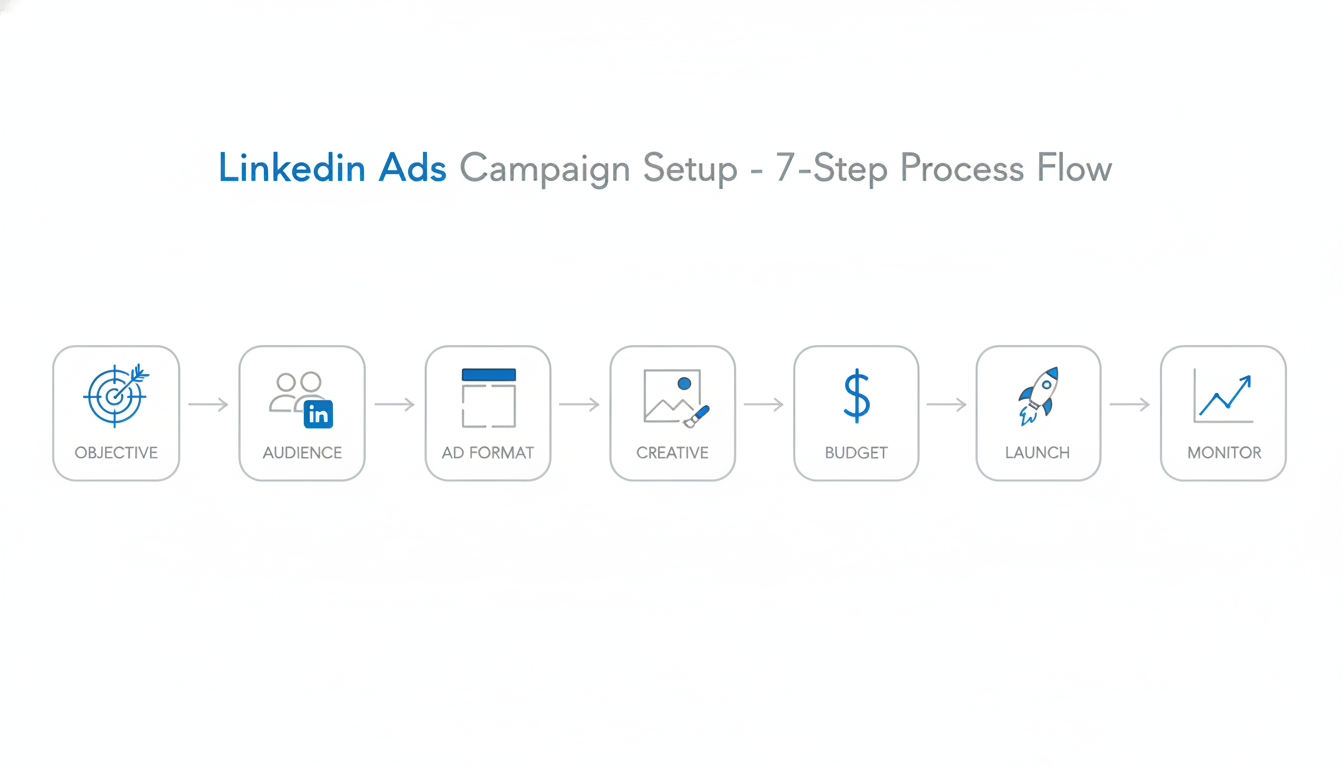
This step-by-step tutorial walks you through setting up and running your first LinkedIn ad campaign -- covering the AMO framework (Audience, Message, Offer), 2026-specific features like Thought Leader Ads and Predictive Audiences, A/B testing methodology, and competitor research using the LinkedIn Ads Library.
Prerequisites
Before launching ads, ensure you have:
LinkedIn Company Page: Campaign Manager requires a Company Page. You can't run ads from a personal profile.
Campaign Manager Account: Go to linkedin.com/campaignmanager and sign in with your LinkedIn credentials.
Payment Method: Add a credit card or set up invoicing for your ad account. Navigate to Account Settings and enter your billing details -- LinkedIn accepts credit cards, debit cards, and invoicing for accounts spending above $1,000/month.
Insight Tag (Optional but Recommended): Install the LinkedIn Insight Tag on your website for conversion tracking and retargeting. Go to Analyze > Insight Tag in Campaign Manager, copy the JavaScript snippet, and add it to your site's global header. This enables conversion tracking, website audience retargeting, and demographic reporting on your site visitors.
The AMO Framework: Audience, Message, Offer
Before diving into Campaign Manager, align three elements that determine whether your LinkedIn ads succeed or fail:
Audience: Who exactly are you targeting? Define your ideal customer profile (ICP) with specific job titles, seniority levels, company sizes, and industries. The more precise your audience definition, the more relevant your ads will be.
Message: What problem are you solving? Your ad copy and creative should speak directly to the pain points your audience experiences daily. Generic messaging gets ignored -- specific, role-relevant messaging converts.
Offer: What are you giving them in exchange for their attention? Match your offer to the buyer's journey stage. Top-of-funnel audiences respond to educational content (guides, reports). Mid-funnel prospects engage with case studies and webinars. Bottom-funnel buyers want demos, free trials, and consultations.
When all three elements align, your campaigns generate qualified leads at efficient costs. When any element is misaligned, even a large budget won't compensate.
Step 1: Create a Campaign
In Campaign Manager, click Create and select Campaign. You'll be guided through the setup process.
Campaign Group Structure
LinkedIn organizes advertising into three levels:
- Campaign Groups: Container for related campaigns (optional)
- Campaigns: Individual campaigns with specific objectives
- Ads: The actual creative that users see
Use a consistent naming convention for campaign groups. A proven structure: [Product/Service] - [Audience Segment] - [Funnel Stage] - [Date]. For example: "SaaS Platform - Marketing Directors - TOFU - 2026-Q1". This makes filtering and reporting straightforward as your account scales.
For your first campaign, you can skip campaign groups and create a standalone campaign.
Step 2: Choose Your Objective
Your objective tells LinkedIn what you want to achieve. According to Campaign Manager guidance, this choice affects "which ad formats you can use, how LinkedIn optimizes your campaign, and what metrics you'll track."
Available Objectives
Awareness:
- Brand Awareness -- Maximize impressions to new audiences
Consideration:
- Website Visits -- Drive traffic to your site
- Engagement -- Get likes, comments, and shares
- Video Views -- Maximize video completion
Conversion:
- Lead Generation -- Collect leads via LinkedIn forms
- Website Conversions -- Drive specific actions on your site
- Job Applicants -- Attract candidates
Which Objective to Choose
Goal | Recommended Objective |
Launching new product | Brand Awareness |
Content distribution | Website Visits |
Building community | Engagement |
Collecting leads | Lead Generation |
Driving demos/signups | Website Conversions |
For most B2B campaigns, Lead Generation is the best starting point -- it keeps users on LinkedIn (higher completion rates) and captures verified professional data. When you're ready to scale your campaigns, working with a LinkedIn advertising company can help optimize your lead generation strategy.
Step 3: Define Your Audience
LinkedIn's targeting is the platform's core strength. You can reach specific job titles at specific companies with precision no other platform matches.
Core Targeting Options
Company:
- Company name (specific companies)
- Industry
- Company size
- Company growth rate
Job:
- Job title
- Job function
- Seniority level
- Skills
- Years of experience
Demographics:
- Location
- Age (limited)
- Education
Interests:
- Member interests
- Member groups
- Member traits
Predictive Audiences (2026 Feature)
LinkedIn's Predictive Audiences use AI to find members most likely to convert based on your historical data. In Campaign Manager, you can create a Predictive Audience from your existing lead gen form submissions, contact lists, or conversion data. LinkedIn analyzes the professional attributes of your best converters and builds a lookalike model that goes beyond simple demographic matching. Early adopters report 20-30% lower cost-per-lead compared to manual targeting for mature campaigns with sufficient conversion history.
Building Your First Audience
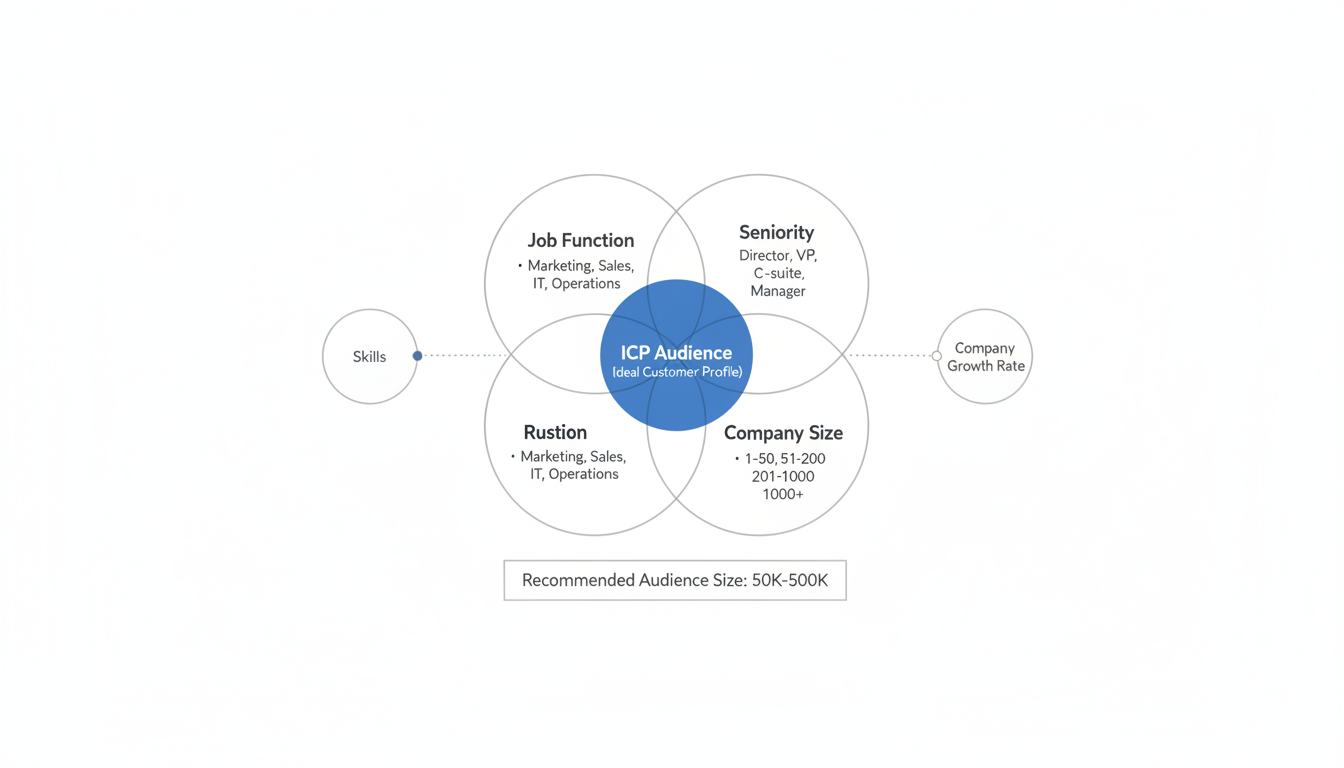
Start with a focused audience using 2-3 targeting layers:
- Job Function (Marketing, Sales, IT, etc.)
- Seniority (Director, VP, C-suite)
- Company Size (filter for your ideal customer)
According to audience targeting research, the recommended audience size is 50,000-500,000 for most campaigns. Smaller audiences can work for ABM, but need higher budgets.
Audience Expansion
LinkedIn offers "Audience Expansion" to reach similar professionals beyond your targeting. For your first campaign, turn this off -- you want to test your core audience before expanding.
Step 4: Select Ad Format
Different formats work for different objectives. LinkedIn advertising analysis identifies these key options:
Sponsored Content (Feed Ads)
Appears in the LinkedIn feed alongside organic posts.
Format Options:
- Single Image Ads
- Carousel Ads (multiple images)
- Video Ads
- Document Ads (PDFs that users scroll through)
- Event Ads
Best For: Brand awareness, lead generation, website traffic
Thought Leader Ads (2026 Feature)
Thought Leader Ads let you sponsor posts from individual employees' personal LinkedIn profiles rather than your company page. This format consistently outperforms traditional sponsored content because it looks and feels like organic content from a real person -- not a brand.
How they work: An employee publishes a post on their personal profile. In Campaign Manager, you select "Thought Leader Ad" and browse posts from connected employees. You then promote that post to your target audience while it retains the employee's name, photo, and personal voice.
Why they perform well: LinkedIn members engage 2-3x more with content from individuals than company pages. Thought Leader Ads combine that organic trust with paid targeting precision. Use them for product launches, customer stories, or industry perspectives where a human voice carries more weight than a brand voice.
Message Ads
Delivered directly to LinkedIn inboxes.
Best For: Personalized offers, event invitations, high-value prospects
Text Ads
Simple ads appearing in the right column.
Best For: Low-cost brand awareness, supplementary reach
Dynamic Ads
Personalized ads using profile data (name, photo, company).
Best For: Follower campaigns, personalized CTAs
Recommended Starting Format
For most B2B campaigns, start with Single Image Sponsored Content with Lead Gen Forms. It's the most straightforward format with the clearest performance data. Understanding the LinkedIn single image ad specifications and best practices will help ensure your creative performs optimally.
Step 5: Create Your Ad
Strong ad creative drives performance. Include these elements:
Ad Copy
Introductory Text: Hook readers in the first line. You have 600 characters, but the first 150 appear before "see more."
Headline: 70 characters maximum. Clear value proposition beats clever wordplay.
Description: Additional context (not shown on all placements).
LinkedIn's AI copy generation tool in Campaign Manager can help you draft initial ad text based on your landing page URL. Use it as a starting point, then refine the output to match your brand voice and add specific data points that generic AI copy won't include.
Creative Best Practices
According to 2026 LinkedIn advertising research:
- Use specific numbers: "47% reduction in CPL" beats "significant improvement"
- Lead with the problem: Address the pain point your audience feels
- Include social proof: Customer logos, testimonials, or results
- Clear CTA: Tell users exactly what action to take
LinkedIn Ad Examples That Convert
Here are proven ad patterns that consistently perform well on LinkedIn:
Example 1 -- The Data-Led Single Image Ad: Introductory text opens with a striking statistic relevant to the target audience (e.g., "83% of marketing leaders say their team wastes 10+ hours/week on manual reporting"). The headline states the value proposition directly ("Automate Your Marketing Reports in Minutes"). Image features a clean product screenshot with a single metric callout. CTA: "Download Free Guide." This pattern works because the stat interrupts the scroll, the headline promises a clear outcome, and the low-commitment CTA reduces friction.
Example 2 -- The Customer Story Carousel: Slide 1 states the customer's challenge. Slide 2 shows the approach. Slide 3 presents the results with specific metrics. Slide 4 ends with a CTA. Carousels earn higher engagement because users swipe through -- each swipe is a micro-commitment that increases conversion likelihood.
Example 3 -- The Thought Leader Video Ad: A 30-60 second video from a company executive sharing one actionable insight related to a common pain point. No heavy production -- filmed on a webcam or phone with captions (85% of LinkedIn video is watched without sound). Ends with a verbal CTA and on-screen link. This format builds trust through authenticity and generates strong comment engagement.
Image Specs
- Recommended size: 1200 x 627 pixels
- File type: JPG or PNG
- Max file size: 5MB
- Keep text minimal on images
For comprehensive details on all ad formats and their specifications, refer to our guide on LinkedIn ad specs sizes.
Step 6: Set Budget and Schedule
Budget Options
Daily Budget: LinkedIn spends up to this amount per day. Minimum $10/day.
Lifetime Budget: Total spend for the campaign duration.
Best Practice: Start with daily budgets to maintain control. You can always increase after seeing results.
Bidding Strategy
Maximum Delivery: LinkedIn optimizes for maximum results at the lowest cost. Recommended for most campaigns.
Manual Bidding: Set your own CPC or CPM bid. Use when you have specific cost targets.
Cost Cap: Set maximum cost per result. Useful for lead gen with strict CPL targets.
Recommended Starting Budget
Minimum $50-100/day to gather meaningful data. LinkedIn's learning phase needs volume -- underfunding delays optimization.
Understanding the Learning Phase
When you launch a new campaign or make significant changes (budget, targeting, or creative), LinkedIn enters a "learning phase" that typically lasts 1-2 weeks. During this period, the algorithm tests different audience segments and delivery patterns to find who is most likely to take your desired action.
What to expect during the learning phase: cost-per-result fluctuations of 30-50% above your eventual average, inconsistent daily spend, and variable lead quality. This is normal. Avoid making changes during this period -- each significant edit resets the learning phase. The algorithm needs approximately 50 conversions to fully optimize delivery, so campaigns with higher budgets exit the learning phase faster.
Step 7: Launch and Monitor
Before launching, review:
- Targeting matches your ideal customer profile
- Ad creative is approved and displays correctly
- Budget and schedule are correct
- Conversion tracking is active (if applicable)
Click Launch to start your campaign.
First-Week Monitoring
Check these metrics daily:
Metric | What to Look For |
Impressions | Audience being reached |
CTR | Ad resonance (benchmark: 0.4-0.8%) |
Spend | Pacing against budget |
Lead Form Opens | Interest level |
Leads | Conversion volume |
According to campaign optimization guidance, "Give it two weeks to gather data, then optimize based on what you learn. Most successful LinkedIn advertisers didn't nail it on their first try." For deeper performance analysis, implement comprehensive LinkedIn ads reporting to track your campaign metrics over time.
Step 8: A/B Testing Your LinkedIn Ads
A/B testing is essential for improving LinkedIn ad performance over time. Without structured testing, you're guessing at what resonates with your audience.
What to Test
Test one variable at a time to isolate what drives results:
- Ad creative: Test different images, video vs. static, or different headline angles
- Ad copy: Test problem-focused vs. benefit-focused introductory text
- CTA: Test "Download Guide" vs. "Get Free Report" vs. "Learn More"
- Audience segments: Test job title targeting vs. job function targeting
- Ad format: Test single image vs. carousel vs. video for the same offer
How to Structure Tests
Create two campaigns with identical settings except the one variable you're testing. Allocate equal budgets (minimum $50/day per variant) and run both for at least 7-14 days to reach statistical significance. LinkedIn needs approximately 100 clicks or 50 conversions per variant for reliable results.
Review results based on your primary KPI -- not vanity metrics. A higher CTR means nothing if it doesn't translate to lower cost-per-lead or better lead quality. Once you identify a winner, pause the losing variant, scale the winner, and start your next test.
How to Use LinkedIn Ads Library for Competitor Research
The LinkedIn Ads Library is a free, publicly accessible tool that lets you see active ads from any company on LinkedIn. It's an essential resource for competitive research and creative inspiration before building your campaigns.
Accessing the Ads Library
Visit linkedin.com/ad-library or navigate to any company's LinkedIn page and click the "Ads" tab in the left sidebar. You can search by company name, keyword, or filter by country and date range.
What You Can See
For each active ad, the library shows:
- Ad creative (image, video, carousel, or document)
- Ad copy (introductory text, headline, description)
- Start date of the ad
- The company running it
How to Use It Strategically
Competitive analysis: Search your direct competitors to see what offers they're promoting, which audiences they're likely targeting (inferred from messaging), and how frequently they refresh creative. Ads running for months typically indicate strong performance.
Creative inspiration: Study top-performing B2B advertisers in your space. Note patterns in imagery, headline structures, and CTA choices. Don't copy -- adapt the patterns that are clearly working and apply your own messaging.
Gap identification: If competitors focus heavily on one offer type (e.g., webinars), consider testing a differentiated format (e.g., free tools, ROI calculators) to stand out in the same audience's feed.
Check the Ads Library before launching any new campaign. It takes 10 minutes and can save thousands in wasted ad spend by learning from what's already working in your market.
LinkedIn Ads Best Practices for 2026
LinkedIn's advertising platform continues to evolve. Here are the strategies and features that matter most in 2026:
Leverage Thought Leader Ads: As covered in Step 4, promoting employee posts consistently outperforms brand-page content. Make this a core part of your strategy, not an experiment.
Use Predictive Audiences for scaling: Once you have 300+ conversions in your account, Predictive Audiences become highly effective at finding new prospects who match your best customers.
Revenue Attribution Reports: LinkedIn's Revenue Attribution feature connects ad interactions to CRM revenue data. If you use Salesforce or HubSpot, enable this integration to see which campaigns actually drive closed deals -- not just leads. This shifts budget conversations from cost-per-lead to return-on-ad-spend.
Test LinkedIn's AI copy suggestions: Campaign Manager now suggests ad copy variations based on your landing page and objective. Use these as drafts, then refine with your specific data points and brand voice.
Prioritize mobile creative: Over 70% of LinkedIn ad engagement happens on mobile. Design images and video for mobile-first viewing -- large text, simple visuals, captions on all video.
Retarget with document and video ads: Members who watched 50%+ of your video or engaged with your document ad are high-intent. Build retargeting audiences from these engagement signals for lower-funnel offers.
Common Beginner Mistakes
Starting Too Broad: Narrow targeting outperforms broad targeting on LinkedIn. Be specific about who you want to reach.
Underfunding: LinkedIn needs data to optimize. Budget too low = slow learning = poor results.
Too Many Variables: Test one thing at a time. Don't launch 10 different ads to 5 different audiences simultaneously.
Ignoring Insight Tag: Without conversion tracking, you're flying blind. Install before launching.
Expecting Immediate Results: B2B sales cycles are long. LinkedIn builds pipeline over weeks and months, not days.
Skipping the Ads Library: Launching campaigns without reviewing competitor ads first means you're ignoring free competitive intelligence. Spend 10-15 minutes in the LinkedIn Ads Library before every campaign launch.
Frequently Asked Questions
How Much Do LinkedIn Ads Cost?
LinkedIn CPCs average $5-8, with CPMs around $30-65. Lead generation typically costs $75-150 per lead. Higher than other platforms, but lead quality is substantially better for B2B.
What'S the Minimum Budget for LinkedIn Ads?
LinkedIn requires $10/day minimum, but $50-100/day is recommended to gather meaningful optimization data within a reasonable timeframe.
How Long Before I See Results?
Allow 2 weeks minimum for initial learning phase. Meaningful lead volume and optimization typically take 30-60 days.
Can You Run LinkedIn Ads from a Personal Account?
No. LinkedIn requires a Company Page to run ads through Campaign Manager. However, you can create a Company Page in minutes -- you just need a personal LinkedIn account with your real name. Once the page is created, you can immediately set up Campaign Manager and begin building campaigns. The one exception is Thought Leader Ads, which promote posts from personal profiles but are still managed through a Company Page's Campaign Manager account.
Can You Advertise on LinkedIn for Free?
You can't run paid ads for free, but you can get organic visibility at no cost. Post consistently from your Company Page and personal profile, engage in relevant LinkedIn Groups, publish long-form articles, and encourage employees to share company content. Many B2B companies generate significant pipeline from organic LinkedIn activity combined with a small paid budget to amplify their best-performing organic posts.
What Is the LinkedIn Ads Learning Phase?
The learning phase is a 1-2 week period after launching a new campaign or making significant changes when LinkedIn's algorithm is testing how to best deliver your ads. During this time, expect higher and more variable costs. Avoid making changes during the learning phase, as each significant edit restarts it. The algorithm needs roughly 50 conversions to fully optimize, so higher budgets help campaigns exit the learning phase faster.
What Are LinkedIn Thought Leader Ads?
Thought Leader Ads allow you to promote posts from individual employees' personal LinkedIn profiles as sponsored content. They look like organic posts from a real person rather than a company ad, which leads to 2-3x higher engagement rates compared to traditional sponsored content. They're managed through Campaign Manager but display the employee's name and profile photo.
Key Takeaways
- Align your Audience, Message, and Offer (AMO framework) before building any campaign
- Set up Campaign Manager with a Company Page and Insight Tag before launching
- Choose Lead Generation as your objective for most B2B campaigns
- Build focused audiences using 2-3 targeting layers (job function + seniority + company size)
- Use the LinkedIn Ads Library to research competitor ads before creating your own
- Start with Single Image Sponsored Content -- the most straightforward format
- Test Thought Leader Ads for higher engagement from personal profiles
- Budget $50-100/day minimum to enable algorithm optimization
- A/B test one variable at a time for at least 7-14 days per test
- Allow 2 weeks of data collection before making major changes