
LinkedIn Sponsored Content puts your message directly in the feed alongside organic posts from connections and companies your audience follows. When done well, these native ads feel helpful rather than intrusive - and they convert.
This guide covers how to create Sponsored Content that drives real business results.
What Is LinkedIn Sponsored Content?
Sponsored Content refers to paid posts that appear in the LinkedIn feed. Unlike sidebar ads, these appear inline with organic content, making them feel more native to the platform.
Sponsored Content Formats
Format | Best For |
Single Image | Most versatile, quick to produce |
Carousel | Storytelling, multiple products |
Video | Demonstrations, testimonials |
Document | Whitepapers, guides, reports |
Event | Webinar and event promotion |
All formats can include Lead Gen Forms for direct lead capture without landing pages.
Writing Sponsored Content That Converts
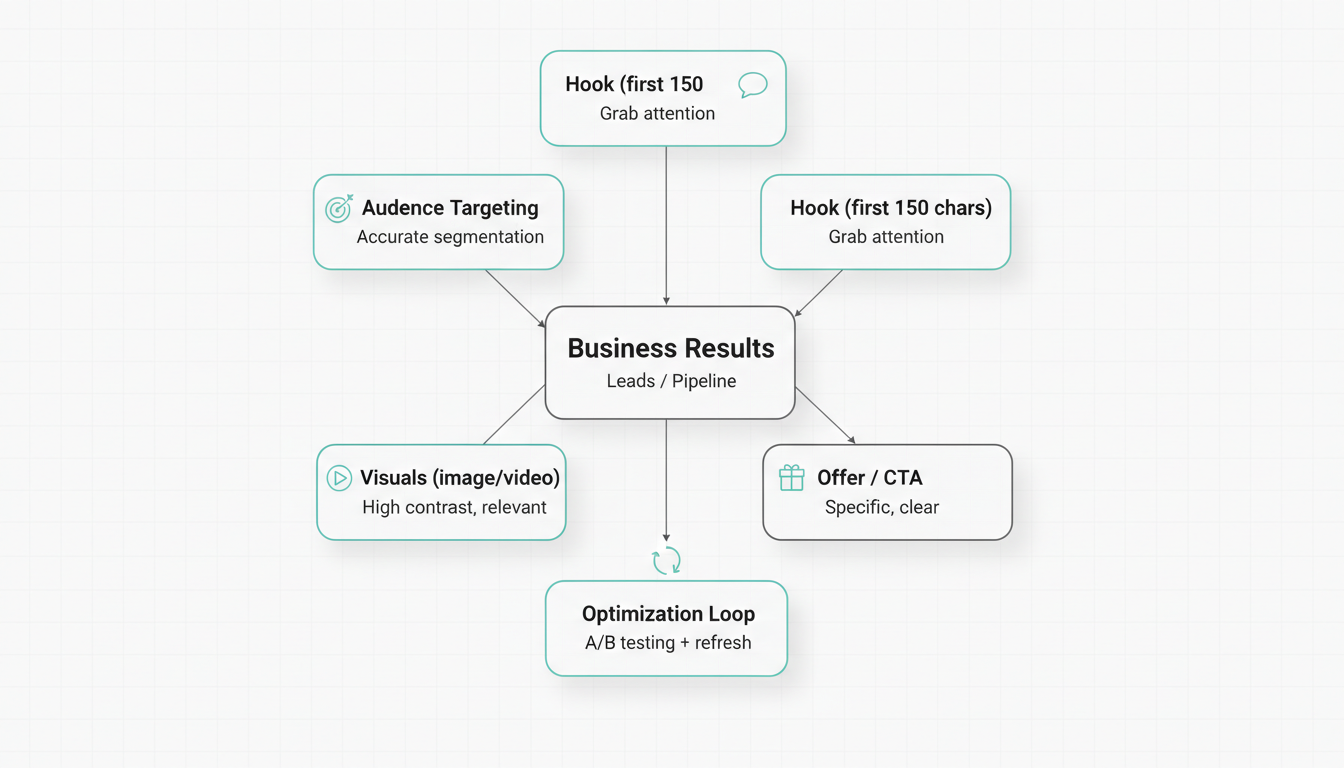
Hook Them in the First Line
The first 150 characters appear before the "see more" link. Make them count.
High-converting hooks:
- Statistics: "78% of B2B buyers ignore generic outreach."
- Questions: "Still spending 10 hours weekly on manual reporting?"
- Contrarian: "Most thought leadership is just noise."
- Results: "We helped 200+ teams cut CAC by 40%."
Low-converting hooks:
- "We're excited to announce..."
- "Check out our new..."
- "Introducing..."
Speak to One Person
Write as if talking to a single reader, not an audience.
Instead of: "Marketing teams can benefit from..." Write: "If you're leading marketing at a growing SaaS company, you know..."
Focus on Benefits, Not Features
Your audience cares about outcomes, not capabilities.
Feature-focused (weak): "Our platform has AI-powered analytics and 50+ integrations." Benefit-focused (strong): "See which campaigns drive pipeline - in one click."
Include Social Proof
Build credibility with evidence:
- Customer logos or names
- Specific metrics and results
- Third-party validation (G2, Gartner)
- Number of customers served
Visual Best Practices
Image Guidelines
- Size: 1200 x 627 pixels (1.91:1 aspect ratio)
- File size: Under 5 MB
- Text on images: Keep minimal - clean images perform better
When creating visual assets, consider working with a LinkedIn ad management company to ensure your creative meets platform specifications and performance benchmarks.
What Works Visually
Do | Don't |
Real people (not stock photos) | Generic business imagery |
Data visualizations | Busy, complex graphics |
High contrast colors | Brand colors that blend with LinkedIn blue |
Clear focal point | Multiple competing elements |
Video Best Practices
- Hook in first 3 seconds - attention is scarce
- Design for sound-off - add captions always
- Keep under 30 seconds for awareness; longer for consideration
- Square (1:1) or vertical (9:16) for mobile prominence
For comprehensive guidance on video formats, review our LinkedIn video ads guide.
Targeting for Conversion
Precise targeting determines whether your Sponsored Content reaches people who can actually buy.
Layer Multiple Criteria
Don't rely on single attributes. Combine:
Example targeting stack:
- Job function: Marketing
- Seniority: Director, VP, CXO
- Company size: 201-1,000 employees
- Industry: Technology, SaaS
This reaches marketing leaders at mid-sized tech companies - a defined, valuable segment.
Use Matched Audiences
Upload lists for precision targeting:
- Contact lists: Target known prospects and customers
- Company lists: ABM campaigns to named accounts
- Website visitors: Retarget engaged prospects
Matched Audiences typically drive lower CPLs than attribute-only targeting.
Exclude Carefully
Remove audiences that waste spend:
- Your own employees
- Competitors (unless intentional)
- Current customers (unless upselling)
- Job seekers if targeting decision-makers
Optimization Strategies
Test Creative Variations
Run 3-4 ad variations per campaign testing:
- Different hooks (question vs. statistic vs. result)
- Different images (people vs. data vs. product)
- Different CTAs (direct vs. curiosity-based)
Let campaigns run for 1,000+ impressions before judging winners. These fundamentals align with proven LinkedIn ads best practices that drive measurable results.
Optimize for the Right Metric
Match optimization to your goal:
Goal | Optimize For |
Awareness | Impressions, reach |
Consideration | Clicks, engagement |
Conversion | Leads, conversions |
Don't celebrate high CTR if leads aren't converting downstream.
Refresh Creative Regularly
Creative fatigue sets in when frequency exceeds 3-4 impressions per person. Signs include:
- Declining CTR
- Rising CPC
- Dropping engagement
Refresh every 4-6 weeks, or sooner if metrics decline.
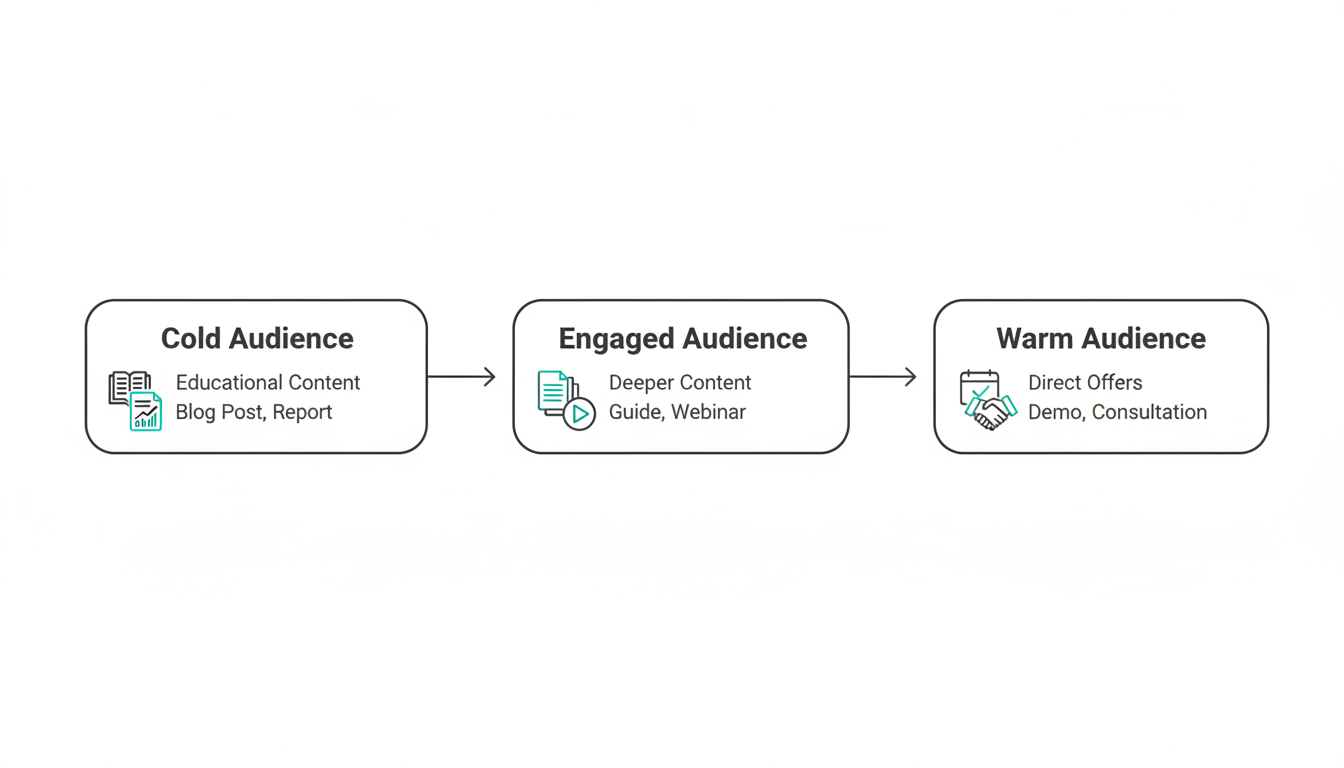
Use Retargeting Sequences
Build campaigns that follow prospects through the funnel:
- Cold audience: Educational content (blog posts, reports)
- Engaged audience: Deeper content (guides, webinars)
- Warm audience: Direct offers (demos, consultations)
Retargeting reduces CPL significantly compared to always targeting cold audiences.
Lead Gen Forms vs. Landing Pages
When to Use Lead Gen Forms
- Straightforward offers (ebook, webinar, demo request)
- Mobile-heavy audiences
- Maximum conversion rate needed
- You value LinkedIn's pre-populated data accuracy
When to Use Landing Pages
- Complex offers requiring explanation
- You need additional tracking pixels
- Extensive qualification questions required
- You want full control over the experience
Pro tip: Test both approaches for the same offer. Lead Gen Forms often win on conversion rate, but landing pages provide richer engagement data.
Common Mistakes
1. Targeting Too Broadly
"All marketers" wastes budget on people who can't buy. Add filters.
2. Weak Hooks
If your first line doesn't create curiosity or address a pain point, people scroll past.
3. No Clear CTA
Every ad needs one specific action. "Learn more" is weak. "Get the report" or "Book your audit" is clear.
4. Ignoring Mobile
Over 60% of LinkedIn traffic is mobile. Preview ads on phone before launching.
5. Set-And-Forget
Sponsored Content requires ongoing optimization. Check campaigns weekly minimum. For strategic guidance on campaign management, explore our LinkedIn advertising strategy resources.
Budgeting and Forecasting for Sponsored Content
Set a weekly cap rather than a lifetime budget so you can pause underperformers fast. Most B2B Sponsored Content programs start at fifty to one hundred fifty dollars per day and scale once a creative concept proves it can hold cost per lead. Build your forecast from target CPL times expected lead volume, then add fifteen to twenty percent for creative testing.
Separate evergreen campaigns from time-boxed launches. Keep a baseline always-on layer for lead flow, and layer event or offer bursts on top. This protects pipeline when a burst ends and keeps a clean read on what each layer contributes.
Measuring Sponsored Content ROI
Click-through rate is a creative signal, not a business result. Tie Sponsored Content to pipeline by passing Lead Gen Form data into your CRM and closing the loop on demo and customer counts. Report cost per marketing-qualified lead and cost per opportunity, not just engagement.
Use LinkedIn's conversion tracking and your own CRM attribution together. A post that drives few clicks but high-quality demo requests can out-earn a viral post that attracts job seekers. Watch the downstream metric that actually funds the program.
Compliance and Brand Safety on LinkedIn
Regulated industries - finance, healthcare, legal - must pre-clear claims and disclosures before launch. Keep a short compliance checklist: substantiated stats, required disclaimers, and approved proof points. Route copy through review the same day you brief creative so launch dates hold.
For brand safety, exclude your own employees and known competitors from targeting, and use audience exclusions to avoid showing recruitment ads to current customers. Document these exclusions once and reuse them across campaigns to keep reach efficient.
Frequently Asked Questions
How Much Does LinkedIn Sponsored Content Cost?
LinkedIn Sponsored Content costs vary by targeting and competition. Expect CPCs of $5-15 and CPMs of $30-60 for most B2B audiences. Lead Gen Form campaigns typically see CPLs of $50-150 depending on offer quality and targeting precision.
What Size Should LinkedIn Sponsored Content Images Be?
Use 1200 x 627 pixels for single image ads (1.91:1 aspect ratio). For carousel ads, use 1080 x 1080 pixels (1:1 square). Maximum file size is 5 MB for images. See our complete LinkedIn ad specs guide for all formats.
How Long Should LinkedIn Sponsored Content Copy Be?
LinkedIn allows 600 characters for introductory text, but the first 150 characters appear before "see more." Front-load your hook in those first 150 characters. Total copy length depends on your audience - test short, punchy posts against longer, detailed ones.