
Last Updated: January 2026
Schema markup only works if it's implemented correctly. Invalid or broken schema provides no benefit—and may actually confuse AI systems trying to understand your content.
This guide covers the essential validation tools, common errors to fix, and testing workflows that ensure your structured data enhances AI search visibility.
Why Schema Validation Matters for AI
Schema markup helps turn your content into a format machines can understand. When implemented correctly, structured data enables AI search systems to match your content to relevant queries and extract information for citations.
However, schema errors undermine these benefits:
- Syntax errors prevent AI systems from parsing your markup entirely
- Missing required properties make schema incomplete and less useful
- Content mismatches where schema claims different information than visible content can trigger trust penalties
- Incorrect data types (strings instead of numbers) confuse extraction algorithms
Google has confirmed that structured data remains essential in the AI search era. But only valid, accurate schema provides the intended visibility benefits.
Essential Schema Validation Tools
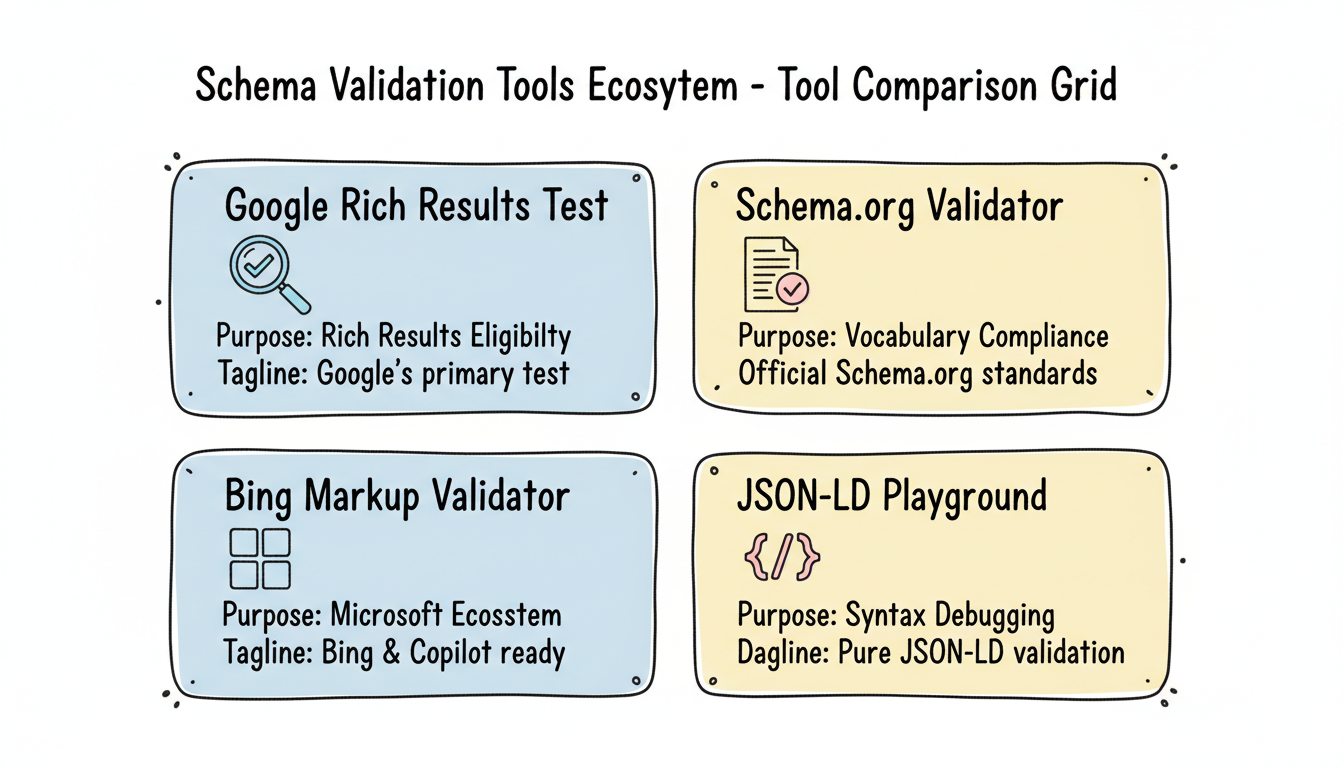
Four primary tools should be part of every schema validation workflow.
Google Rich Results Test
Google's Rich Results Test validates schema markup and shows whether Google can generate rich results from your structured data.
URL: https://search.google.com/test/rich-results
What it tests:
- JSON-LD, Microdata, and RDFa formats
- Required and recommended properties
- Rich result eligibility for Google Search
- Mobile and desktop rendering
Best for: Confirming Google can read your schema and determining rich result eligibility. This is the primary test for any schema implementation.
Limitations: Only tests against Google's requirements. Schema that passes here may still have issues for other AI systems.
Schema.Org Validator
The official Schema.org validator checks markup against the full Schema.org vocabulary.
URL: https://validator.schema.org
What it tests:
- Vocabulary compliance with Schema.org specifications
- Property-type relationships
- Deprecated schema types or properties
- Syntax errors in JSON-LD
Best for: Ensuring your schema conforms to Schema.org standards, which AI systems beyond Google also reference.
Limitations: Doesn't indicate rich result eligibility—only vocabulary compliance.
Bing Markup Validator
Microsoft's Bing Webmaster Tools includes schema validation for Bing's index.
Location: Bing Webmaster Tools > SEO > Markup Validator
What it tests:
- Schema types Bing supports
- Property completeness for Bing's rich results
- Errors specific to Microsoft's parsing
Best for: Ensuring schema works for Bing Search and Microsoft Copilot visibility.
Limitations: Requires Bing Webmaster Tools account and site verification.
JSON-LD Playground
The JSON-LD Playground validates JSON-LD syntax independently of any search engine's requirements.
URL: https://json-ld.org/playground
What it tests:
- JSON-LD syntax validity
- Context resolution
- Graph expansion and compaction
Best for: Debugging complex JSON-LD before testing with search engine tools. Helpful for finding syntax errors that other tools may not clearly identify.
Schema Validation Workflow
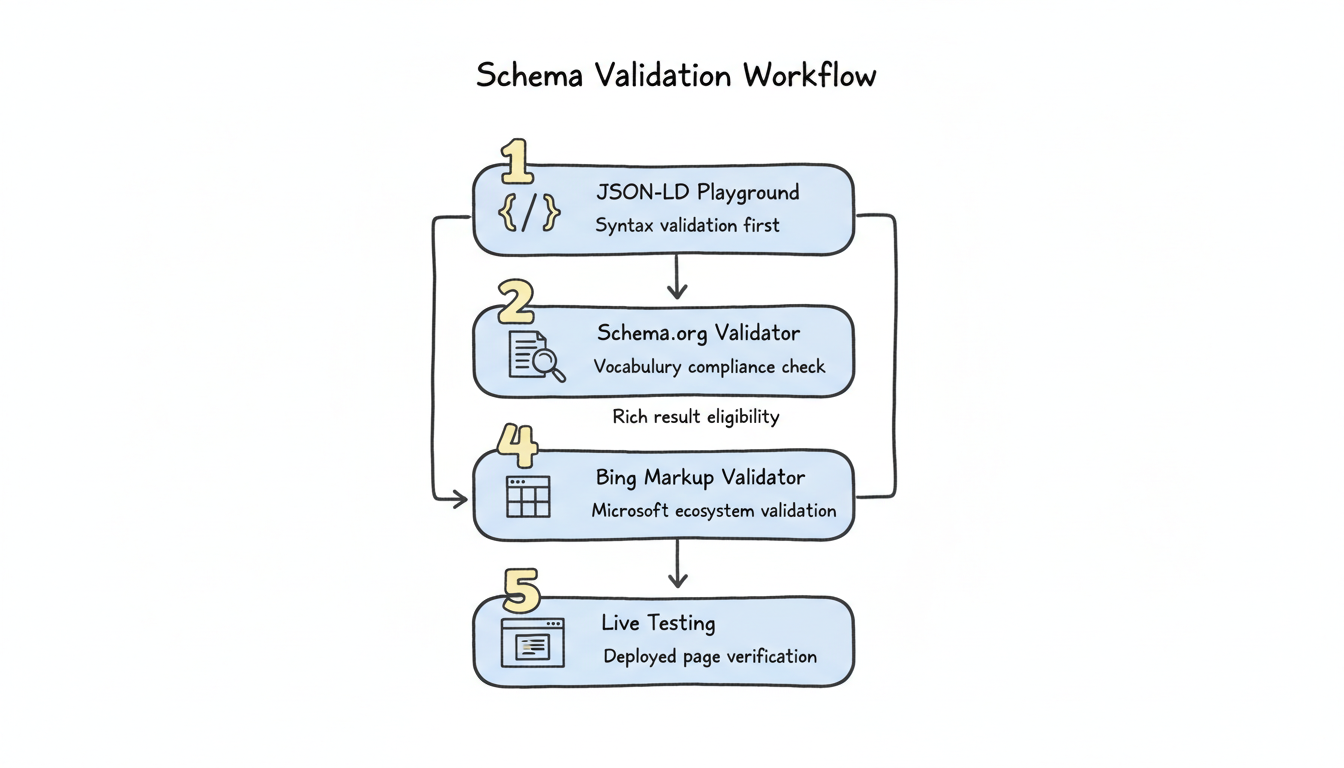
Follow this systematic process when implementing or auditing schema markup.
Step 1: JSON-LD Playground (Syntax)
Start with syntax validation. Paste your JSON-LD into the playground and resolve any parsing errors before proceeding.
Common syntax issues:
- Missing commas between properties
- Unclosed brackets or braces
- Invalid JSON characters
- Incorrect quoting
Step 2: Schema.Org Validator (Vocabulary)
Once syntax is clean, validate against Schema.org specifications. Check for:
- Correct schema types for your content
- Required properties for each type
- Valid property values
- Proper type nesting
Understanding how generative engine optimization works alongside traditional schema validation helps ensure your structured data serves both conventional search engines and AI-powered systems effectively.
Step 3: Google Rich Results Test (Search)
Test against Google's requirements for rich result eligibility. Document:
- Which rich results your schema enables
- Any warnings about recommended properties
- Errors that prevent rich result generation
Step 4: Bing Markup Validator (Microsoft)
Validate for Microsoft's ecosystem, particularly if targeting Copilot visibility.
Step 5: Live Testing
After deployment, test actual live URLs rather than just code snippets. Use Google's Rich Results Test URL option to verify:
- Schema renders correctly on live pages
- Dynamic content doesn't break markup
- Server-side rendering includes schema
Common Schema Errors and Fixes
These errors frequently appear during validation—and all reduce AI search effectiveness.
Content Mismatches
Error: Schema claims information that differs from visible page content.
Examples:
- Product schema shows old price while page shows updated price
- Article schema has different headline than visible H1
- Organization schema lists wrong address
Impact: AI systems may penalize sites with mismatched schema, viewing it as deceptive markup.
Fix: Implement schema generation that pulls from the same data source as visible content. Set up monitoring to catch when page content and schema diverge.
Missing Required Properties
Error: Schema type lacks properties marked as required for rich results.
Examples:
- Article schema missing datePublished
- Product schema missing offers property
- Recipe schema without image property
Impact: Rich results won't generate, and AI systems receive incomplete entity information.
Fix: Review Google's structured data documentation for each schema type. Ensure all required properties are present.
Incorrect Data Types
Error: Property values use wrong data types.
Examples:
- Price as string ("$19.99") instead of number (19.99) with currency
- Date as text ("January 2026") instead of ISO format (2026-01-13)
- Rating as text instead of numerical value
Impact: AI systems may fail to extract values or misinterpret information.
Fix: Follow Schema.org specifications for each property's expected data type. Use ISO 8601 for dates, numbers for prices (with separate currency property).
Duplicate Schema
Error: Multiple conflicting schema blocks for the same entity.
Examples:
- Multiple Organization schemas from different plugins
- Duplicate Article schema from theme and SEO plugin
- Conflicting FAQ schemas on same page
Impact: AI systems may use incorrect version or become confused by conflicts.
Fix: Audit all sources of schema markup. Disable duplicate generators. Consolidate to single, authoritative schema implementation.
Outdated Information
Error: Schema contains stale data that no longer matches reality.
Examples:
- Old business hours
- Discontinued product prices
- Former employee as author
Impact: AI systems may cite outdated information, creating accuracy problems and user trust issues.
Fix: Implement update workflows that refresh schema when content changes. Set calendar reminders for periodic schema audits.
AI-Specific Schema Considerations
Beyond standard validation, optimize schema for AI search specifically.
Entity Relationships
AI systems use schema to understand relationships between entities. Strengthen these connections by implementing comprehensive E-E-A-T signals for answer engine optimization, which help AI systems validate your content against authoritative sources.
sameAs Properties Link your Organization schema to authoritative profiles:
"sameAs": [
  "https://www.linkedin.com/company/yourcompany",
  "https://en.wikipedia.org/wiki/Your_Company",
  "https://www.wikidata.org/wiki/Q12345"
]
These connections help AI systems validate your entity against trusted sources.
Author Entity Linking Connect Article schema to Person schema for authors:
"author": {
  "@type": "Person",
  "@id": "https://yoursite.com/authors/name#person",
  "name": "Author Name",
  "jobTitle": "Senior Analyst",
  "worksFor": {"@id": "https://yoursite.com/#organization"}
}
This establishes E-E-A-T signals AI systems recognize.
FAQ Schema for AI Extraction
FAQ schema makes question-answer pairs explicitly extractable for AI citations. Ensure:
- Questions match queries users actually ask
- Answers are comprehensive yet concise
- Each Q&A pair stands alone as a complete response
When implementing FAQ schema, consider whether AEO is replacing SEO in your content strategy, as this influences how you structure question-answer pairs for maximum AI visibility.
Comprehensive Property Coverage
While meeting minimum requirements enables rich results, comprehensive property coverage improves AI understanding. Include recommended properties, not just required ones.
Validation Monitoring
Schema validation isn't one-time. Implement ongoing monitoring.
Google Search Console
Monitor structured data reports for:
- New errors appearing after site changes
- Valid items count changes
- Enhancement opportunities
Automated Testing
Set up automated schema validation in CI/CD pipelines for sites with dynamic schema generation. Catch errors before they reach production.
Periodic Audits
Schedule quarterly schema audits to verify:
- All key pages have appropriate schema
- Information remains accurate
- New schema opportunities exist
For enterprise teams managing large-scale implementations, AI search performance reporting templates can help track schema validation metrics alongside other key performance indicators.