
Schema markup only delivers AI search benefits when implemented correctly. Invalid, incomplete, or misconfigured structured data fails silently-your pages don't show errors, but they also don't earn rich results or AI citations. Proper validation and testing ensures your schema investment translates into actual visibility gains across Google AI Overviews, featured snippets, and AI search platforms.
According to Backlinko's schema markup guide, you should always check your structured data markup in the Google Rich Results tool after validating it with Schema.org. The Rich Results Test specifically tells you whether Google will show rich results for the entities you've described with schema markup.
Essential Schema Validation Tools
Multiple tools serve different validation purposes.
According to Kinetools' JSON-LD documentation, you can test schema markup using several free tools: the Rich Results Test (search.google.com/test/rich-results) shows if your page is eligible for rich results and previews how it might appear; Schema Markup Validator (validator.schema.org) validates JSON-LD syntax and structure; and Google Search Console's Rich Results report shows which pages have valid markup and tracks performance.
Key validation tools:
Tool | Purpose | What It Checks |
Rich Results Test | Google eligibility | Rich result qualification |
Schema.org Validator | Syntax validation | JSON-LD structure and properties |
Search Console | Performance tracking | Valid pages and click data |
Structured Data Markup Helper | Implementation guidance | Markup generation |
Browser extensions | Quick checks | On-page validation |
Two-Step Validation Workflow
Effective validation requires sequential testing.
According to Backlinko, validating with Schema.org first confirms your JSON-LD syntax is correct, but Google's Rich Results tool then determines whether your specific schema implementation qualifies for enhanced search features. Both steps are necessary for optimizing content for AI search engines.
Validation sequence:
Schema Validation Workflow
 Step 1: Syntax Validation (Schema.org)
    Check JSON-LD structure
    Verify property names
    Confirm data types
    Validate nesting

 Step 2: Rich Results Test (Google)
    Confirm eligibility
    Preview appearance
    Identify missing properties
    Check required fields

 Step 3: Live Implementation
    Test on staging first
    Deploy to production
    Request indexing
    Monitor Search Console

 Step 4: Ongoing Monitoring
     Track rich result performance
     Monitor for new errors
     Update when content changes
     Check competitor implementations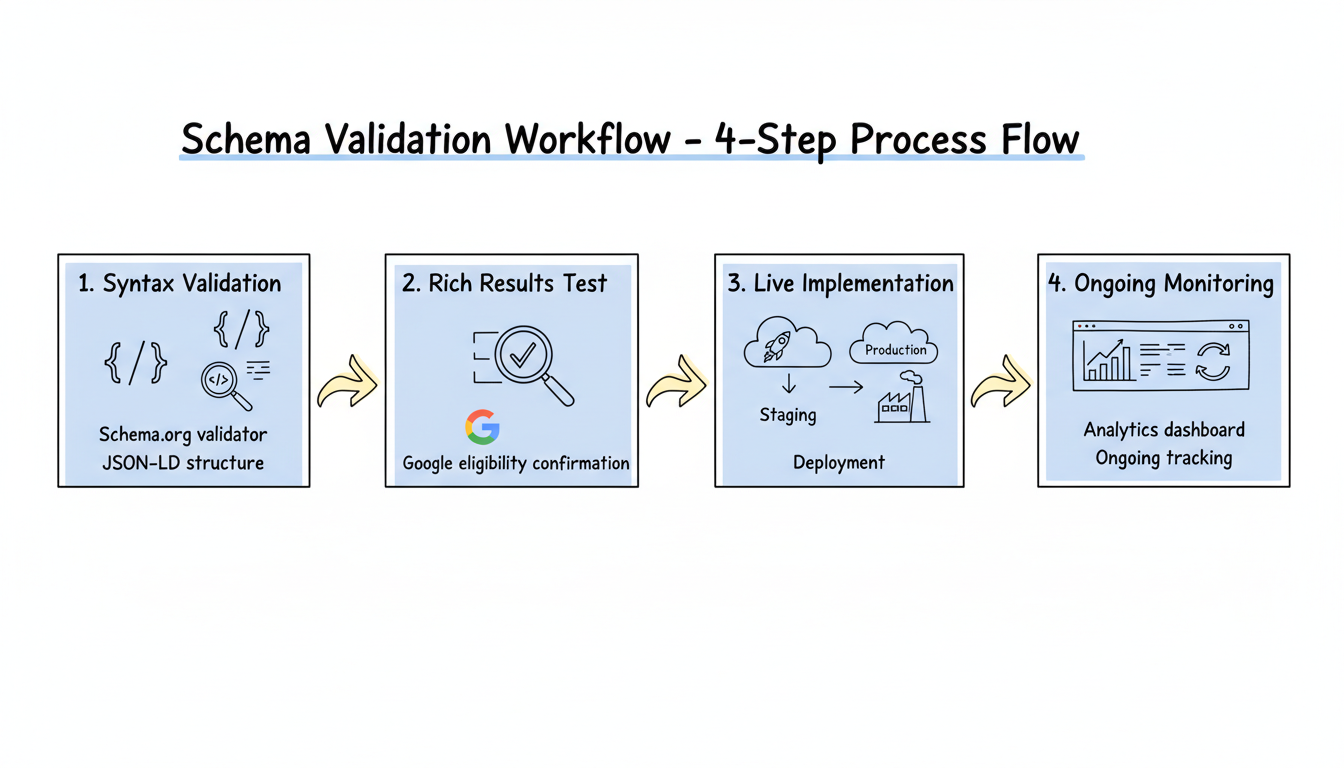
Common Schema Errors to Avoid
Validation catches issues before they impact visibility.
According to ALM Corp's schema guide, common mistakes include content mismatches where schema claims different information than visible on the page, incomplete implementation missing required properties that prevent rich result eligibility, duplicate schema from multiple plugins or tools creating conflicts, marking up content not visible to users, using incorrect data types, and neglecting to update schema when content changes.
Error categories:
Error Type | Description | Impact |
Content mismatch | Schema data differs from visible content | Potential penalty |
Missing required fields | Incomplete properties | No rich results |
Duplicate schema | Multiple conflicting implementations | Parsing confusion |
Hidden content markup | Schema for invisible elements | Policy violation |
Incorrect data types | Strings instead of numbers | Validation failure |
Outdated data | Old prices, hours, availability | User trust issues |
JSON-LD Syntax Validation
Structural errors prevent schema from being parsed.
According to WebCare's structured data guide, JSON-LD syntax errors like missing commas, incorrect curly braces, square brackets, or unescaped characters will cause complete validation failures, preventing any schema benefits. Understanding how AI SEO works helps you appreciate why proper syntax is critical for AI platforms to interpret your content correctly.
Syntax checklist:
- Commas - Required between properties, not after last property
- Curly braces - Opening and closing must match
- Square brackets - Arrays must be properly formatted
- Quotes - All strings require double quotes
- Escaping - Special characters need proper escaping
- Nesting - Objects within objects must close correctly
Validating for AI Search Specifically
AI platforms may process schema differently than Google.
According to TheeDigital's AI search analysis, AI search systems like Google's AI Overviews and ChatGPT increasingly pull information directly from websites with proper schema markup. Businesses with comprehensive schema markup maintain visibility across current and future AI search technologies. This requires prioritizing AEO schema markup that AI systems rely on most.
AI-specific validation:
AI Search Schema Validation
 Entity Relationships
    sameAs links to authoritative profiles
    author connections verified
    Organization entity complete
    Cross-platform consistency

 Content Matching
    Schema aligns with visible content
    Factual accuracy verified
    No speculation or errors
    Current information

 Semantic Completeness
    Entity type appropriate
    Properties comprehensive
    Relationships established
    Context provided

 Multiple Schema Types
     FAQ schema validated
     HowTo schema validated
     Article schema validated
     Person/Organization linked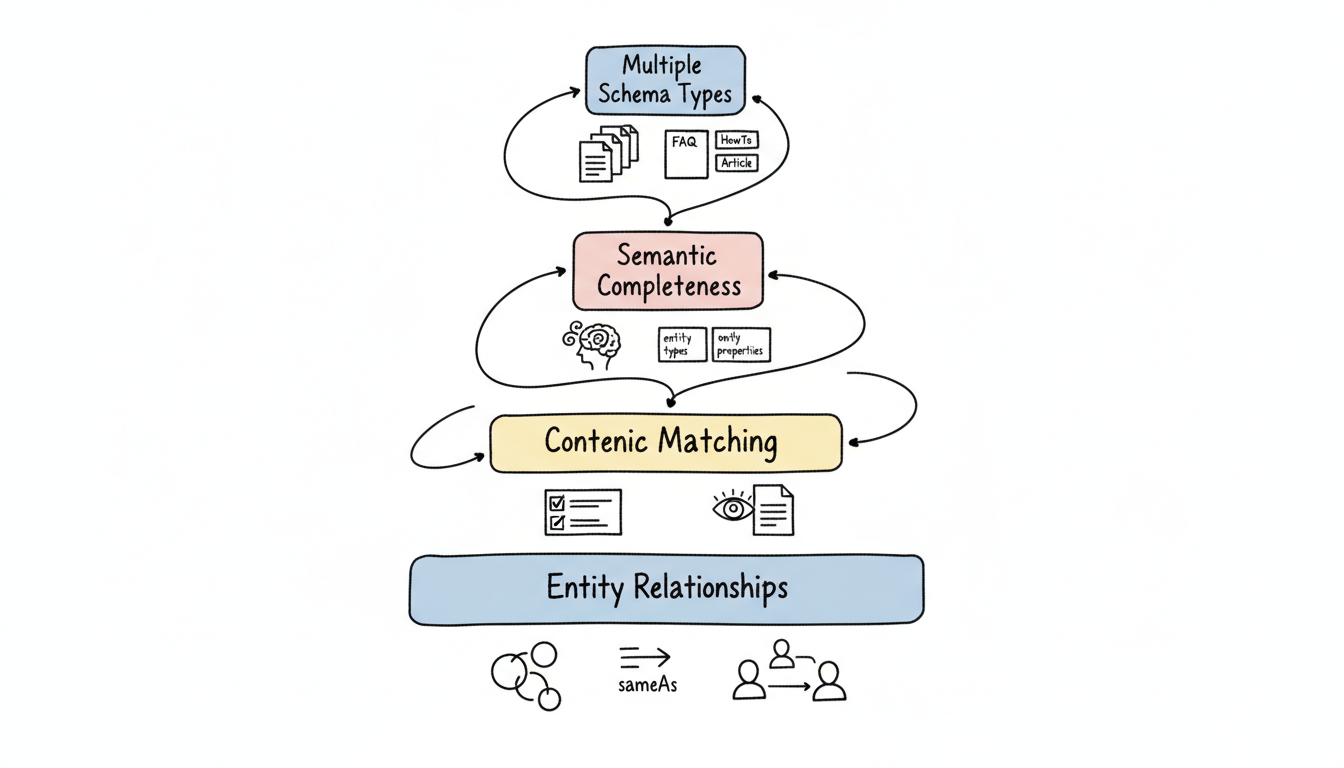
Search Console Rich Results Monitoring
Ongoing validation catches issues after deployment.
According to Orange Owl's AI Overviews guide, validating structured data using the Rich Results Test tool should be combined with regular auditing to ensure schema remains accurate and effective over time.
Search Console monitoring:
Report | Information | Action |
Rich Results | Valid/invalid pages | Fix errors promptly |
Enhancements | Specific schema types | Monitor coverage |
Performance | Click data with rich results | Optimize CTR |
Index Coverage | Crawling status | Ensure discovery |
Pre-Launch Validation Checklist
Test thoroughly before going live.
Comprehensive checklist:
- Syntax validation - Run through Schema.org validator
- Rich Results Test - Confirm Google eligibility
- Content matching - Verify schema matches visible content
- Required properties - Check all required fields present
- Data accuracy - Confirm all data is current and correct
- Mobile testing - Test on mobile viewport
- Staging test - Validate on staging environment first
- Cross-browser - Check multiple browsers
Automated Schema Monitoring
Tools can automate ongoing validation.
Monitoring approaches:
- Scheduled crawls - Regular automated validation
- Change detection - Alert when schema changes
- Error notifications - Immediate alerts for failures
- Competitor tracking - Monitor industry schema usage
- Performance correlation - Link schema to ranking changes
Key Takeaways
Schema validation and testing ensures your structured data delivers results:
- Two-step validation required - Schema.org for syntax, Rich Results Test for eligibility
- Common errors are preventable - Content mismatches, missing properties, and duplicates
- JSON-LD syntax matters - Minor errors cause complete failures
- AI search requires additional validation - Entity relationships and semantic completeness
- Search Console provides ongoing monitoring - Track valid pages and performance
- Pre-launch checklist prevents issues - Test thoroughly before deployment
According to Wellows' AI search optimization guide, schema markup helps turn your content into a format that machines can understand through AI-readable structuring. Using specific and accurate schema types helps AI systems match your content to the right search intent-but only when validation confirms your implementation works correctly across both traditional search and AI platforms. Learning from AEO success stories and case studies can help you refine your validation approach based on what has worked for others.
Validating Nested Entity Relationships
Most schema failures in AI search come from incomplete entity graphs, not broken syntax. A page about a service should connect the Service entity to the Organization that offers it, the author Person, and any related Product through sameAs and referenced nodes. Validation should confirm those links resolve and that the referenced entities carry enough properties to be understood.
When you nest an Organization inside an Article, verify the Organization has a name, logo, and sameAs link to a verified profile such as a Wikipedia or LinkedIn page. AI systems use these cross-references to decide whether your entity is real and trustworthy. A dangling reference - an empty id with no resolved properties - adds noise without value.
Edge Cases Worth Testing
- Pages with multiple authors: confirm each Person node is distinct and complete.
- Out-of-stock products: ensure availability flips to OutOfStock rather than lingering as InStock.
- Translated pages: confirm schema language tags match the visible content language.
- Aggregate ratings with zero reviews: remove the node instead of publishing a 0 score.
Run these checks on a schedule, not just at launch. Content edits, price changes, and template refreshes silently break schema over time, and AI citation loss shows up long after the breaking change shipped. A monthly automated pass that flags missing required properties and stale values keeps your structured data honest and keeps your pages eligible for rich results and AI answers.