
SEO has always been labor-intensive. Keyword research, technical audits, rank tracking, content optimization, reporting—the tasks pile up quickly. Manual execution of these processes doesn't scale. Teams that rely entirely on human effort hit capacity limits that prevent growth.
SEO automation tools change this equation. They handle repetitive tasks systematically, freeing SEO professionals to focus on strategy, creativity, and decisions that require human judgment. This guide covers what to automate, the best tools by category, and how to build workflows that maximize efficiency.
What Is SEO Automation?
SEO automation uses software to perform repetitive optimization tasks without manual intervention. Instead of manually checking rankings daily, an automated tool does it. Instead of manually auditing thousands of pages, a crawler handles it in minutes.
Automation doesn't replace SEO expertise—it amplifies it. The goal is removing busywork so your energy goes into growth rather than maintenance. Much like how generative AI search optimization transforms content strategy, automation transforms operational efficiency.
What SEO Automation Can Do
Modern automation tools handle tasks across the SEO spectrum:
- Data collection: Crawling sites, gathering ranking data, monitoring backlinks
- Analysis: Processing large datasets, identifying patterns, scoring content
- Reporting: Generating dashboards, scheduling reports, alerting on changes
- Implementation: Applying bulk changes, updating meta tags, fixing technical issues
- Content optimization: Scoring drafts, suggesting improvements, checking optimization
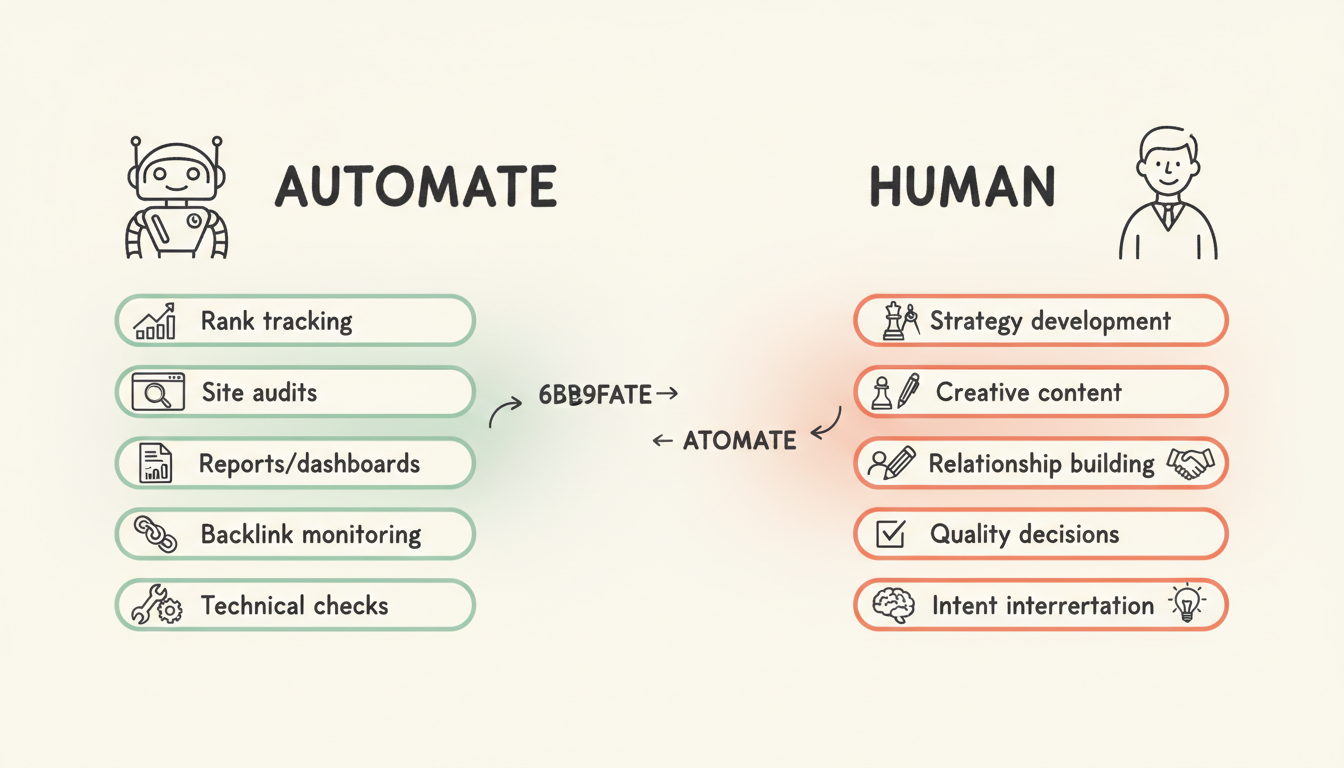
What Automation Cannot Do
Some tasks still require human judgment:
- Strategy development: Deciding priorities, resource allocation, and direction
- Creative content: Writing that connects emotionally and builds brand voice
- Relationship building: Outreach, partnerships, and link earning
- Intent interpretation: Understanding nuanced user needs and context
- Quality decisions: Determining what's actually good versus what scores well
The best automation strategies identify which tasks benefit from speed and scale versus which require human insight. This becomes especially important when considering geo optimization tactics that require local market understanding.
Top SEO Automation Tools by Category
Different tools excel at different automation needs. Here's what leads in each category.
All-In-One SEO Platforms
These platforms automate multiple SEO functions within a single ecosystem.
Semrush ($139.95+/month) The most comprehensive automation suite available. Semrush automates:
- Daily rank tracking across locations and devices
- Scheduled site audits with prioritized recommendations
- Automated competitive monitoring and alerts
- Content optimization scoring in real-time
- Backlink monitoring and opportunity identification
Best for teams wanting a unified platform that handles most automation needs.
Ahrefs ($129+/month) Renowned for backlink data quality with strong automation capabilities:
- Automated backlink monitoring and alerts
- Scheduled site audits
- Rank tracking with historical data
- Content gap analysis automation
Best for teams prioritizing link building automation.
SE Ranking ($65+/month) Cost-effective automation for agencies and SMBs:
- Automated rank tracking and reporting
- White-label dashboard automation
- Scheduled audits and competitor monitoring
- AI-powered content scoring
Best for agencies needing scalable automation at lower price points. When combined with best generative engine optimization tools, these platforms create powerful optimization ecosystems.
Technical SEO Automation
These tools automate technical audits and implementation.
Screaming Frog (Free up to 500 URLs / $259/year) The industry standard for technical crawling:
- Automated site crawling and data extraction
- Scheduled crawls with comparison reports
- Custom extraction for specific data points
- Integration with Google Analytics and Search Console
Best for technical SEOs needing comprehensive crawl data.
Sitebulb ($35+/month) Visual technical audits with automated prioritization:
- Automated issue detection and prioritization
- Plain-language explanations of technical problems
- Progress tracking across crawls
- Scheduled monitoring
Best for teams with varying technical expertise.
Alli AI ($299+/month) Automated implementation, not just analysis:
- Bulk meta tag optimization
- Automated internal linking
- Schema markup implementation
- Rule-based optimization at scale
Best for large sites where manual implementation is impractical. Understanding aeo schema markup priority helps maximize the value of automated schema implementation.
Rank Tracking Automation
Dedicated tools for monitoring ranking positions.
AccuRanker ($140+/month) Fast, accurate rank tracking with robust automation:
- Daily automatic rank updates
- Instant on-demand checks
- Automated competitor tracking
- Custom alert configuration
Best for teams needing frequent, reliable rank data. This becomes essential for competitive ai search benchmarking efforts.
SERP Robot ($29+/month) Budget-friendly rank automation:
- Daily automated rank checks
- Multi-engine tracking
- Automated reports
Best for smaller sites with basic tracking needs.
Content Optimization Automation
Tools that automate content analysis and recommendations.
Surfer SEO ($89+/month) Real-time content optimization scoring:
- Automated SERP analysis
- Live content scoring during writing
- NLP-based term suggestions
- Content audit automation
Best for content teams needing optimization guidance.
Clearscope ($170+/month) Enterprise content automation:
- Automated content grading
- Topic coverage analysis
- Team workflow automation
- Integration with content management systems
Best for larger content operations.
Frase ($15+/month) Research and optimization automation:
- Automated SERP research compilation
- Content brief generation
- Answer optimization
- Competitive content analysis
Best for teams prioritizing research efficiency. Tools like hubspot ai search grader complement these platforms by providing additional optimization insights.
Link Building Automation
Tools that automate outreach and link prospecting.
BuzzStream ($24+/month) Outreach workflow automation:
- Automated prospect research
- Email sequence automation
- Relationship tracking
- Campaign performance monitoring
Best for teams doing manual outreach at scale.
Pitchbox (Custom pricing) Enterprise outreach automation:
- AI-powered outreach templates
- Automatic follow-up sequences
- Integration with SEO tools
- Workflow automation for large campaigns
Best for agencies and large link building operations.
SEO Automation Tool Comparison
Tool | Best For | Starting Price | Key Automation |
Semrush | All-in-one automation | $139.95/mo | Full suite |
Ahrefs | Backlink monitoring | $129/mo | Link analysis |
SE Ranking | Budget agencies | $65/mo | Rank/audit |
Screaming Frog | Technical audits | Free/$259/yr | Site crawling |
Sitebulb | Visual audits | $35/mo | Issue prioritization |
Alli AI | Implementation | $299/mo | Bulk changes |
Surfer SEO | Content optimization | $89/mo | Real-time scoring |
Clearscope | Enterprise content | $170/mo | Content grading |
BuzzStream | Outreach | $24/mo | Email sequences |
Building an SEO Automation Workflow
Effective automation requires thoughtful workflow design.
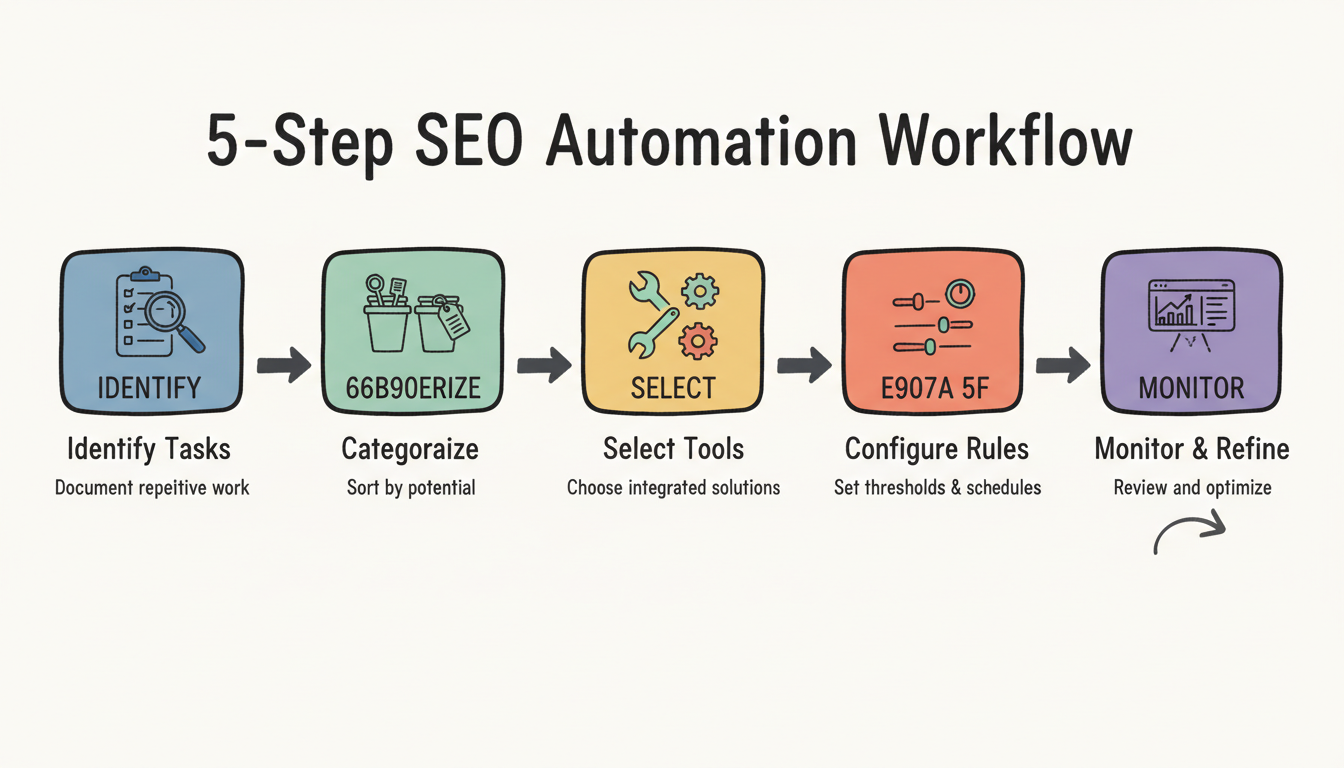
Step 1: Identify Repetitive Tasks
Document everything your team does repeatedly:
- Daily: Rank checks, traffic review, alert monitoring
- Weekly: Competitor analysis, content scoring, technical checks
- Monthly: Full audits, reporting, link profile review
- Quarterly: Strategy review, comprehensive analysis
Understanding ai search team structure roles helps identify which tasks each team member should automate.
Step 2: Categorize by Automation Potential
Sort tasks into categories:
High automation potential:
- Data collection and aggregation
- Monitoring and alerting
- Report generation
- Technical checks
- Bulk analysis
Partial automation potential:
- Content optimization (tools guide, humans write)
- Outreach (templates automated, personalization manual)
- Technical fixes (prioritization automated, decisions manual)
Low automation potential:
- Strategy development
- Creative content creation
- Relationship building
- Quality judgment calls
Step 3: Select Tools That Integrate
Choose tools that work together:
- Ensure data can flow between platforms
- Look for native integrations or API access
- Consider Zapier or Make for custom connections
- Avoid creating data silos
When evaluating enterprise ai seo platforms, integration capabilities should be a primary consideration.
Step 4: Set Up Automation Rules
Configure automation thoughtfully:
- Define alert thresholds that matter (not noise)
- Schedule reports for when they'll be reviewed
- Set crawl frequency based on site change rate
- Configure competitive monitoring for meaningful changes
Step 5: Monitor and Refine
Automation isn't set-and-forget:
- Review what automation catches vs. misses
- Adjust thresholds based on false positives/negatives
- Add new automations as needs emerge
- Remove automations that don't add value
What to Automate vs. What Requires Human Input
Smart automation knows its limits.
Automate These Tasks
Manual rank checks waste time. Automate daily or weekly tracking with alerts for significant changes. This is especially valuable when monitoring google ai overview update frequency and its impact on rankings.
No one should manually check thousands of pages. Scheduled crawls catch issues automatically.
Tools track competitors continuously while you sleep.
Generate dashboards and reports automatically. Spend time analyzing, not compiling.
New and lost links should trigger automatic alerts.
Broken links, missing meta tags, and crawl errors can be flagged automatically.
Keep These Human
What topics matter and why requires human judgment about business goals and audience needs. Understanding what is geo in search engine optimization requires strategic thinking automation cannot provide.
Automated scoring helps, but humans judge what actually resonates with readers. This applies whether you're optimizing for traditional search or landing page optimization ai search.
Templates can be automated, but genuine relationships require personal touch.
When rankings change, humans must interpret what happened and decide how to respond.
Automated tools surface issues, but humans must decide what matters most. This decision-making becomes critical when weighing in house vs agency ai search resource allocation.
ROI of SEO Automation
Measuring automation value helps justify investment.
Time Savings
Calculate hours saved by automation:
- Manual rank checking: 2-5 hours/week → 0
- Report compilation: 4-8 hours/month → 0
- Technical auditing: 8-20 hours/month → 1-2 hours reviewing results
- Competitive monitoring: 3-5 hours/week → 30 minutes reviewing alerts
A $200/month tool saving 10 hours monthly at $50/hour effective rate delivers 2.5x ROI on time alone.
Quality Improvements
Automation improves consistency:
- Nothing gets missed in audits
- Alerts catch issues immediately
- Reports use consistent methodology
- Data collection is comprehensive
Scale Enablement
Automation lets small teams handle enterprise-level work:
- Monitor thousands of rankings without additional headcount
- Audit sites with millions of pages
- Track dozens of competitors continuously
- Generate client reports automatically
Frequently Asked Questions
What Is the Best SEO Automation Tool?
There's no single best tool—it depends on your needs. For all-in-one automation, Semrush leads. For technical audits, Screaming Frog is the standard. For content optimization, Surfer SEO excels. Most teams use multiple tools together.
Can I Automate All of SEO?
No. Automation handles repetitive data tasks well but cannot replace strategic thinking, creative content, or relationship building. The best results come from automating routine work so humans can focus on what requires judgment.
How Much Do SEO Automation Tools Cost?
Costs range widely. Free options like Screaming Frog (up to 500 URLs) and Google Search Console handle basics. Mid-range tools run $50-200/month. Enterprise solutions cost $500-5,000+/month depending on scale and features.
What'S the Difference Between AI SEO Tools and Automation Tools?
Overlap exists, but AI tools use machine learning to generate insights, content, or recommendations. Automation tools execute tasks systematically without necessarily using AI. Many modern tools combine both—automating tasks while using AI for analysis.
How Do I Start with SEO Automation?
Start small. Automate one task (like rank tracking) and master that workflow before adding more. Gradually expand automation as you understand what helps and what creates noise. Don't try to automate everything at once.