
Table featured snippets occupy valuable SERP real estate for comparison, pricing, and specification queries. Unlike paragraph or list snippets, tables require specific structural optimization to win position zero. Google extracts and displays table data when it determines a tabular format best serves the user's query intent.
This guide covers the specific triggers, formatting requirements, and optimization tactics for winning table featured snippets.
What Triggers Table Featured Snippets
Google displays table snippets for queries where structured comparison or specification data best answers the question.
Query patterns that trigger table snippets:
Query Type | Example Queries |
Comparison | "X vs Y comparison", "differences between X and Y" |
Pricing | "[product] pricing", "how much does [service] cost" |
Specifications | "[product] specs", "[model] features" |
Rankings | "best [category] for [use case]" |
Conversion | "[unit] to [unit] conversion chart" |
Key trigger signals:
Table Snippet Triggers:
 Query contains comparison intent
    "vs", "compare", "difference"

 Query seeks structured data
    "pricing", "specs", "features"

 Query implies multiple items
    "best", "top", "list of"

 Query requests relationship data
     "how does X compare to Y"
Understanding these triggers helps you identify which of your pages have table snippet potential.
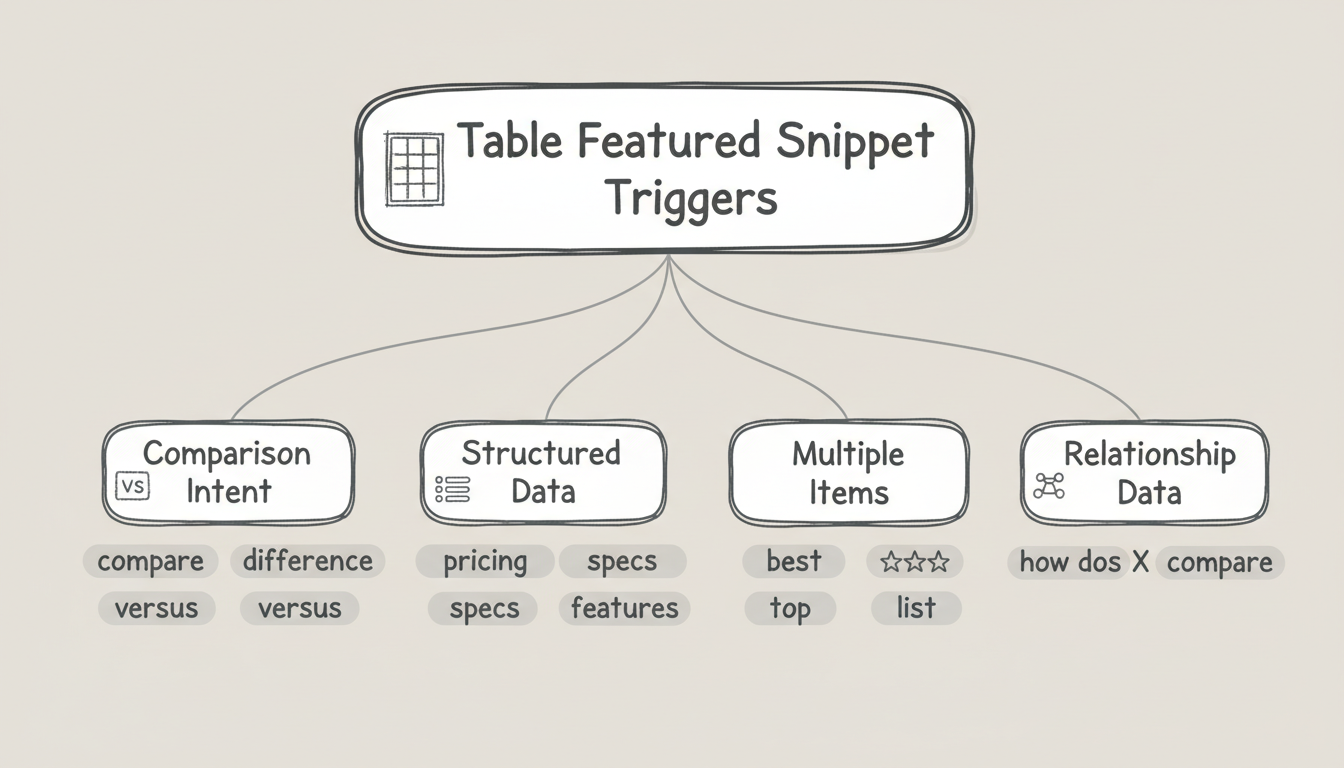
Table Structure Requirements
Google has specific requirements for extracting table data into snippets.
Essential structural elements:
Element | Requirement | Why It Matters |
Header row | Clear column labels | Google needs to understand data categories |
First column | Item identifiers | Names the things being compared |
Consistent cells | Same data type per column | Enables clean extraction |
HTML tables | Proper <table> markup | CSS grid tables may not extract |
Technical markup requirements:
<table>
  <thead>
    <tr>
      <th>Product</th>
      <th>Price</th>
      <th>Features</th>
    </tr>
  </thead>
  <tbody>
    <tr>
      <td>Option A</td>
      <td>$99/mo</td>
      <td>Feature list</td>
    </tr>
    <!-- Additional rows -->
  </tbody>
</table>
Common mistakes that prevent extraction:
- Using CSS grid or flexbox instead of HTML tables
- Missing <thead> for header rows
- Merged cells that break data structure
- Embedding images or complex HTML in cells
Optimal Table Dimensions
Google displays table snippets with specific size constraints.
Dimension guidelines:
Dimension | Optimal Range | Maximum Displayed |
Columns | 3-5 | 4-5 visible |
Rows | 4-8 | 6-8 visible |
Cell content | 1-3 words | Longer content truncates |
Total width | Fits desktop viewport | Responsive handling |
Row and column prioritization:
Display Priority:
 Rows: First 6-8 rows displayed
    Put most important items first

 Columns: First 4-5 columns displayed
    Put comparison criteria by importance

 Cell content: First ~40 characters
     Front-load key information
If your table exceeds these dimensions, Google either truncates or may not select it for the snippet.

Optimizing Column Headers
Column headers determine how Google interprets your table data.
Header optimization tactics:
Tactic | Implementation |
Use searchable terms | Include keywords users search for |
Keep headers concise | 1-3 words maximum |
Match query patterns | Align with how users ask questions |
Be specific | "Monthly Price" not just "Price" |
Example header optimization:
Weak headers:
| A | B | C | D |

Better headers:
| Product | Cost | Rating | Features |

Optimal headers:
| CRM Software | Monthly Price | G2 Rating | Key Features |
Headers that match user search terms increase snippet eligibility.
Optimizing Cell Content
Cell content requires specific formatting for snippet extraction.
Cell content best practices:
Practice | Example |
Concise values | "$99/mo" not "Ninety-nine dollars per month" |
Consistent format | All prices in same format, all ratings same scale |
Factual content | Data, not marketing copy |
Current values | Updated information with visible dates |
Content types that work well:
High-Extraction Content:
 Numeric values
    Prices, percentages, ratings

 Short text
    Yes/No, product names, brief labels

 Specifications
    Dimensions, capacity, features

 Comparisons
     Better/Worse, Faster/Slower
Content that performs poorly:
- Long sentences or paragraphs
- Marketing language ("Best-in-class!")
- Unstructured feature lists in single cells
- Complex formatting or nested elements
Table Placement and Context
Where you place tables affects snippet eligibility, especially as AI overview content requirements continue to evolve and prioritize well-structured, semantically clear data presentation.
Placement guidelines:
Factor | Recommendation |
Position on page | Near the top, not buried at bottom |
Section heading | Use H2 that matches target query |
Surrounding context | Brief intro paragraph explaining the table |
Multiple tables | Separate with clear headings |
Optimal structure:
## [Query-Matching H2]

[1-2 sentence intro explaining what the table compares]

| Header 1 | Header 2 | Header 3 |
|----------|----------|----------|
| Data     | Data     | Data     |

[Optional: brief conclusion or methodology note]
The heading above your table should match how users search for this information.
Schema Markup for Tables
Structured data enhances table snippet eligibility. Understanding the role of JSON-LD vs microdata for knowledge graphs helps you choose the right implementation approach for table markup.
Relevant schema types:
Schema | Use Case |
Product | Product comparison tables |
ItemList | Ranked lists in table format |
Table | Generic structured data tables |
Offer | Pricing comparison tables |
Implementation priority:
- Ensure valid HTML table structure first
- Add appropriate schema if content type matches
- Test with Google's Rich Results Test
- Monitor Search Console for errors
Schema markup doesn't guarantee snippets but provides additional signals about table content. For broader visibility optimization, consider how HowTo schema supports AI search by providing clear step-by-step structure that complements tabular data.
Competitive Table Snippet Strategy
Win table snippets from competitors with weaker implementations.
Opportunity identification:
Signal | Opportunity |
Outdated data | Your current data wins |
Missing columns | Your more complete comparison wins |
Poor formatting | Your cleaner table wins |
Truncated display | Your optimized dimensions win |
Competitive analysis process:
- Search your target comparison queries
- Analyze current snippet holder's table structure
- Identify gaps: missing products, outdated pricing, incomplete specs
- Create superior table with better data and structure
- Monitor for snippet capture
Tables with fresh data and complete comparisons typically outperform outdated alternatives. As you refine your approach, tracking knowledge panel success stories can reveal how structured data investments pay off across multiple SERP features beyond just featured snippets.
Key Takeaways
Table featured snippet optimization requires specific structural attention:
- Query patterns matter - Table snippets trigger for comparison, pricing, specification, and ranking queries
- HTML structure is essential - Use proper <table> markup with <thead> and <tbody>
- Dimensions have limits - 3-5 columns, 4-8 rows optimal; excess content truncates
- Headers need keywords - Column headers should match how users search
- Cell content should be concise - Short, factual values extract cleanly
- Placement affects selection - Table under query-matching H2, near page top
- Schema adds signals - Structured data provides additional context
- Competitor weaknesses create opportunity - Outdated or incomplete tables are beatable
Tables represent one of the highest-value snippet formats for commercial queries. Optimizing specifically for table extraction captures comparison traffic that often has strong purchase intent.
Measuring and Maintaining Table Snippet Wins
Winning a table snippet is not a one-time event; it is a position you defend. Competitors audit the same SERPs you do, and a fresher, more complete table can displace yours within weeks. Build a measurement and maintenance habit so the win compounds instead of decaying.
Start by confirming the win in Google Search Console. Filter performance by the queries where your target table should appear, and check whether average position sits at or near the top. A ranking in the top three does not guarantee the snippet, but it is the prerequisite. Pair that with a manual weekly check of the live SERP for your highest-value comparison and pricing queries.
Maintain the table with a quarterly data refresh. Prices change, specs get updated, and new competitors enter. When you update, keep the HTML structure identical so you do not accidentally break extraction - change the cell values, not the markup. Add a visible last updated date in the surrounding paragraph so both users and crawlers see the freshness.
Watch for three failure modes that quietly erode snippet ownership:
- Data rot - prices or specs go stale while the structure stays intact, signaling low maintenance to the algorithm.
- Structure drift - a redesign converts your HTML table into a CSS grid, which the extractor can no longer read.
- Scope creep - adding ten extra columns pushes your key comparison criteria past the truncation limit, dropping the most important data.
When a competitor takes the snippet, run the competitive analysis process again: find the gap in their table, ship a more complete version, and monitor. Table snippets are won and lost on data quality and structure discipline, not on publishing volume.