
TikTok Ads Manager Tutorial: Complete Guide (2026)
TikTok Ads Manager is the platform where you create, manage, and optimize all your TikTok advertising campaigns. Whether you're launching your first campaign or managing ads for multiple clients, understanding how to navigate Ads Manager efficiently will save you time and improve your results.
This TikTok Ads Manager tutorial walks you through the essential features, from the dashboard overview to advanced automation tools.
Considering Meta ads alongside TikTok? Our free Meta Ads course provides a comprehensive comparison of platform strategies.
Ads Manager Overview
This TikTok Ads Manager tutorial section starts with the core overview. TikTok Ads Manager is the central hub for TikTok advertising. It's where you build campaigns, define targeting, set budgets, upload creative, and analyze performance data.
To get started:
- Go to ads.tiktok.com and create an account (or sign in)
- Complete business verification with your company information
- Set up your payment method
- Install the TikTok Pixel on your website (if driving conversions)
Once your account is active, you'll land on the Ads Manager dashboard. This is your command center for all advertising activity.
Account Structure
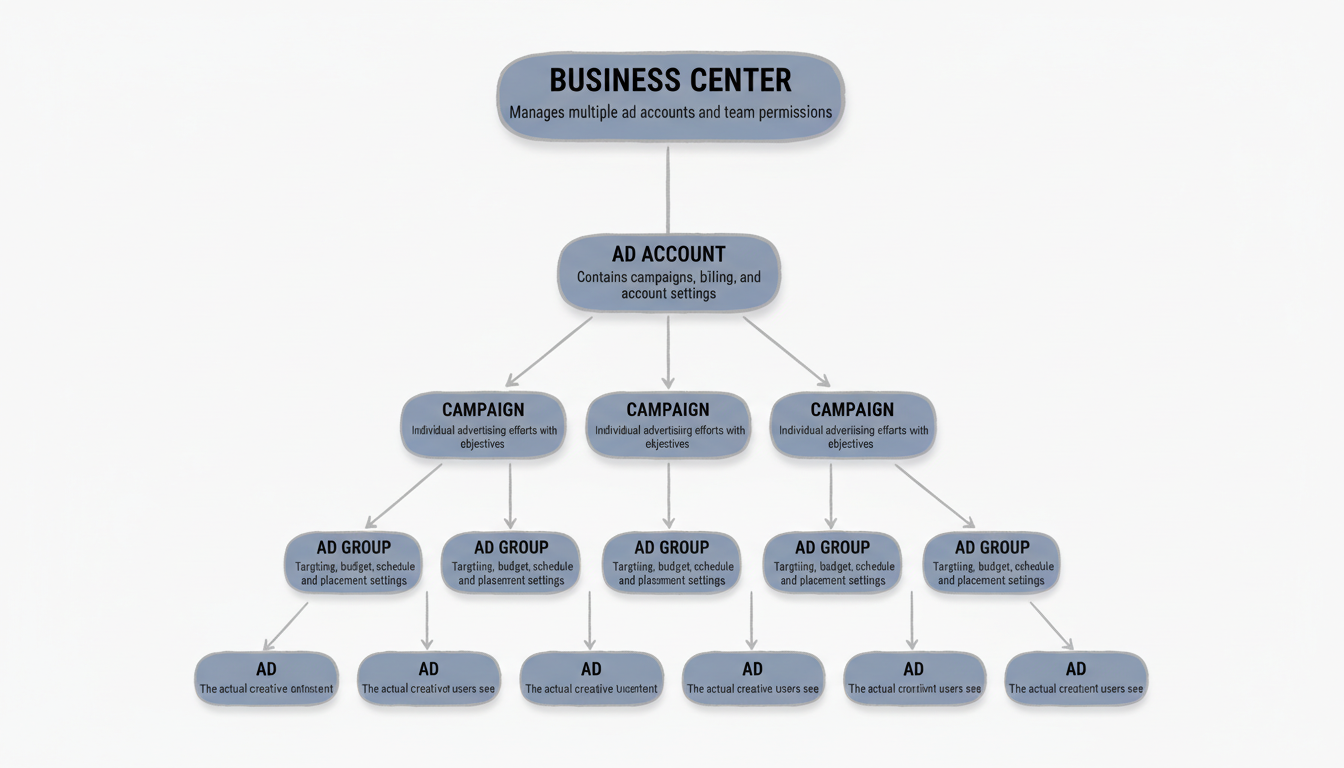
TikTok Ads Manager uses a hierarchical structure:
- Business Center: Manages multiple ad accounts, team permissions, and shared assets
- Ad Account: Contains all campaigns, billing, and account-level settings
- Campaign: The top level of individual advertising efforts, where you set objectives
- Ad Group: Contains targeting, budget, schedule, and placement settings
- Ad: The actual creative (video, images, text) users see
Most advertisers work primarily at the Campaign, Ad Group, and Ad levels within a single ad account. Agencies managing multiple clients use Business Center to organize everything.
Dashboard Navigation
The Ads Manager dashboard provides a quick overview of account health and performance:
Main navigation areas:
- Campaigns: Create and manage all campaigns, ad groups, and ads
- Assets: Access audiences, pixels, creative library, and catalogs
- Reporting: Build custom reports and analyze performance data
- Tools: Automation rules, split testing, and optimization features
Dashboard Widgets
According to TikTok's help documentation, the dashboard includes:
- Recommendations: AI-suggested actions to improve account performance
- Account Overview: Balance, spend, and budget status at a glance
- Ad Group Status: View active, partially delivering, and paused ad groups
- Performance Trends: Visualized metrics over your selected date range
- Insights: Top-performing ads and audience data
- Activity Log: Track changes and operations across your account
Use the calendar icon to filter performance data by date range. The Compare toggle lets you view two date ranges side-by-side—useful for week-over-week or month-over-month analysis.
Campaign Structure
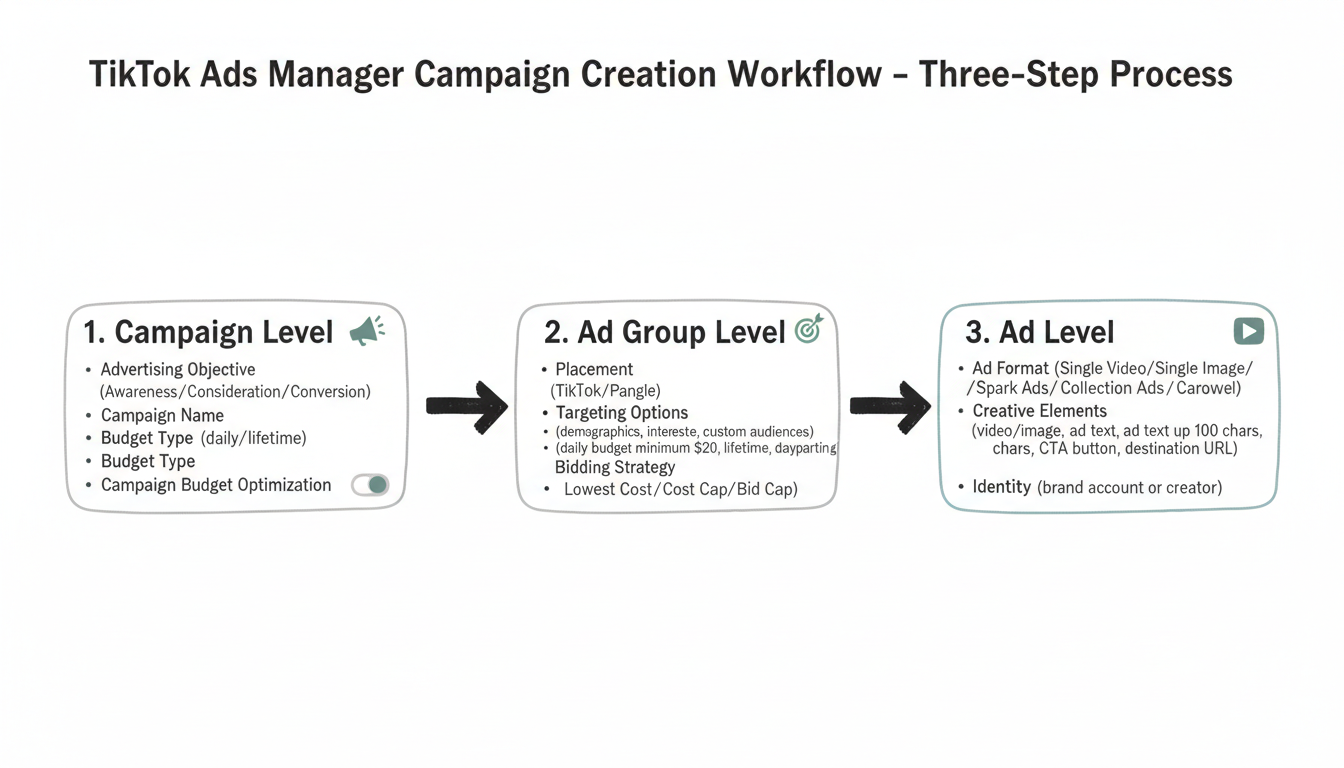
This TikTok Ads Manager tutorial section covers the three-level campaign structure. Creating campaigns in TikTok Ads Manager follows a three-step process: Campaign > Ad Group > Ad.
Step 1: Campaign Level
At the campaign level, you define:
Advertising Objective: Choose what you want to achieve:
- Awareness: Reach (maximize impressions)
- Consideration: Traffic, Video Views, Community Interaction
- Conversion: Conversions, App Installs, Lead Generation, Product Sales
Campaign Name: Use a naming convention that helps you identify campaigns later. Include details like objective, date, audience, or product.
Budget Type: Set a daily or lifetime budget at the campaign level if using Campaign Budget Optimization (CBO).
Campaign Budget Optimization (CBO): When enabled, TikTok automatically distributes budget across ad groups based on performance. CBO works best with 3-5 active ad groups sharing the same optimization goal.
Search Campaigns
TikTok Search Campaigns let you target users based on the keywords they type into TikTok's search bar. Unlike standard in-feed campaigns that rely on interest and behavior targeting, Search Campaigns are intent-driven—your ads appear when users actively search for topics related to your product or service.
To create a Search Campaign, select "Search" as your campaign type during setup. You then add keyword groups at the ad group level, similar to how keyword targeting works in Google Ads. TikTok supports broad match and phrase match options. Search Campaigns work especially well for high-intent categories like e-commerce, app installs, and lead generation where users are already looking for solutions.
Smart+ Campaigns
Smart+ (also called Smart Performance Campaign) is TikTok's fully automated campaign type powered by machine learning. Instead of manually setting targeting, bidding, and placements, you provide your creative assets, budget, and optimization goal—and TikTok's algorithm handles everything else.
Smart+ automatically tests different audience segments, placements, and bid levels to find the combinations that deliver the best results. This campaign type is ideal for advertisers who want to scale quickly without spending hours on manual optimization. Smart+ typically outperforms manual campaigns during the initial testing phase because the algorithm can explore combinations faster than manual A/B testing.
Step 2: Ad Group Level
Ad groups contain your targeting, scheduling, and delivery settings:
Placement: Choose where ads appear (TikTok only, or additional placements like Pangle)
Targeting Options:
- Demographics: Location, age, gender, language
- Interests and behaviors: Categories aligned with user activity
- Device: OS, device model, connection type
- Custom audiences: Website visitors, customer lists, lookalikes
- Automatic targeting: Let TikTok find your best audience
Understanding TikTok ads targeting options helps you reach the right audience for your campaigns and avoid wasted spend on users unlikely to convert.
Budget and Schedule:
- Daily budget: Consistent spend per day (minimum $20 per ad group)
- Lifetime budget: Total spend over the campaign duration
- Schedule: Start/end dates and dayparting (specific hours)
Bidding Strategy:
- Lowest Cost: TikTok maximizes results within your budget
- Cost Cap: Set a target CPA; TikTok tries to stay under it
- Bid Cap: Set a maximum bid per result
| Bidding Strategy | Best For | Control Level |
|---|---|---|
| Lowest Cost | Maximizing results within budget | Low |
| Cost Cap | Maintaining target CPA | Medium |
| Bid Cap | Strict per-result cost control | High |
| Value-Based (VBO) | Optimizing for ROAS | Medium |
Maximum Delivery and Value-Based Bidding
Beyond the standard bidding strategies, TikTok offers two additional options for advertisers focused on scale or revenue optimization.
Maximum Delivery is designed for campaigns where spending the full budget is the priority. Unlike Lowest Cost, which seeks efficiency, Maximum Delivery pushes TikTok to use your entire daily or lifetime budget as fast as possible while still optimizing toward your goal. This strategy works well during product launches, flash sales, or any time-sensitive promotion where speed matters more than cost efficiency.
Value-Based Optimization (VBO) lets you optimize for return on ad spend (ROAS) instead of cost per action. Instead of telling TikTok to get conversions at the cheapest price, VBO tells the algorithm to prioritize high-value conversions. You set a target ROAS, and TikTok bids more aggressively on users it predicts will generate higher purchase values. VBO requires the TikTok Pixel or Events API with revenue data passed back to the platform.
Step 3: Ad Level
The ad level is where you create the actual content users see:
Ad Format:
- Single Video: One video with destination URL
- Single Image: Static image (less common on TikTok)
- Spark Ads: Boost existing organic posts
- Collection Ads: Video with product tiles
- Carousel: Multiple images users can swipe
Topview, Brand Takeover, and Hashtag Challenge Ads
TikTok also offers premium ad formats that go beyond standard in-feed placements. These are typically booked through a TikTok sales representative and require higher budgets, but they deliver massive reach and visibility.
TopView Ads are full-screen video ads that appear as the first thing users see when they open TikTok. They can run up to 60 seconds and autoplay with sound, making them one of the highest-impact placements available. TopView is ideal for brand launches, major announcements, or tent-pole campaigns where maximum awareness is the goal.
Brand Takeover Ads are full-screen static or video ads that display immediately when a user opens the app, before any other content loads. Unlike TopView, Brand Takeovers are limited to one advertiser per day per market, which guarantees exclusivity but also means limited availability.
Branded Hashtag Challenges invite users to create content around a branded hashtag. TikTok places the challenge on the Discover page, and users submit their own videos using the hashtag. This format generates massive user-generated content (UGC) and organic engagement, often producing millions of video submissions over a typical 6-day campaign run.
Creative Elements:
- Video/Image upload
- Ad text (up to 100 characters)
- Call-to-action button (Shop Now, Learn More, etc.)
- Destination URL
Identity: Choose which account appears as the ad publisher (your brand account or a creator's for Spark Ads)
Following TikTok ad creative best practices ensures your ads resonate with the platform's native content style and drive better engagement rates.
Reporting Features
In this TikTok Ads Manager tutorial, reporting is a key skill. TikTok Ads Manager provides robust reporting tools to analyze campaign performance.
Campaigns Page Reporting
From the Campaigns tab, view performance at any level (campaign, ad group, or ad):
- Select the tab (Campaign, Ad Group, or Ad)
- Use the search bar to find specific items
- Scroll right to see default metrics
- Click "Custom table" to modify visible columns
Pre-built templates include:
- Shop Ads metrics
- Reach metrics
- Branded Mission metrics
- Standard performance views
Custom Columns
Create custom column configurations to see the metrics most relevant to your goals:
- Click "Custom Columns"
- Add/remove specific metrics
- Save configurations for future use
- Apply across different views
Familiarizing yourself with key TikTok ads glossary terms makes interpreting these metrics much easier, especially when optimizing for specific KPIs.
Breakdown Options
Analyze performance by time period:
- Day: See daily trends
- Week: Weekly aggregates
- Month: Monthly performance
The Compare feature lets you select two date ranges for side-by-side analysis—useful for measuring improvement over time.
Data Export
Export reports for deeper analysis:
- Download CSV files for spreadsheet analysis
- Schedule automated report delivery
- Share reports with team members or clients
Third-Party Analytics
For agencies managing multiple accounts, native analytics can become time-consuming. Tools like AgencyAnalytics, Metricool, and Sprout Social can:
- View TikTok data alongside other platforms
- Automate client reporting
- Track KPIs across multiple accounts
- Reduce manual dashboard hopping
Automation Tools
This TikTok Ads Manager tutorial section covers automation. TikTok Ads Manager includes automation features to streamline campaign management.
Automated Rules
Create rules that automatically adjust campaigns based on performance conditions:
- Go to Assets > Tools > Automated Rules
- Click "Create a Rule"
- Define trigger conditions (e.g., CPA exceeds $50)
- Set actions (pause ad, adjust budget, send notification)
- Choose frequency (continuous, daily, weekly)
Common automated rules:
- Pause ads when CPA exceeds threshold
- Increase budget on high-performing ad groups
- Send alerts when spend is below target
- Turn off low-CTR creative automatically
Campaign Budget Optimization (CBO)
When you have multiple ad groups, CBO automatically shifts budget to top performers:
- Enable at the campaign level during setup
- Works best with 3-5 similar ad groups
- TikTok reallocates budget in real-time based on results
- Reduces manual budget management
Split Testing
Test different variables to optimize performance:
- Create a split test campaign
- Choose the variable to test (creative, audience, placement)
- TikTok divides traffic equally between variants
- Analyze results and apply learnings
TikTok Pixel and Events API
Accurate conversion tracking is critical for campaign optimization. TikTok offers two complementary tracking methods: the TikTok Pixel (browser-based) and the Events API (server-side).
Events Manager
The Events Manager is your control center for all tracking setup in TikTok Ads Manager. Access it from Assets > Events to manage your pixel, configure event tracking, and monitor data flow.
From Events Manager, you can set up standard events (ViewContent, AddToCart, Purchase, CompleteRegistration) or create custom events tailored to your conversion funnel.
Events API and Server-Side Tracking
While the TikTok Pixel tracks conversions through browser cookies, the Events API sends conversion data directly from your server to TikTok. This server-side approach is more reliable because it is not affected by ad blockers, browser cookie restrictions, or iOS privacy changes that limit pixel tracking.
For best results, run both the Pixel and Events API simultaneously. TikTok deduplicates events using the event_id parameter, so you won't count conversions twice. The Events API requires developer resources to implement but significantly improves attribution accuracy, especially for advertisers spending over $1,000/day.
Best practice: Run both Pixel and Events API simultaneously. TikTok deduplicates using event_id — no double-counting.
Business Verification for Tracking
Business verification is required before accessing the Events API and custom audiences. Submit your business registration documents and company website for review. Verification typically takes 2-5 business days.
Post-Launch Optimization
This TikTok Ads Manager tutorial continues with post-launch strategy. Launching your campaign is just the beginning. What you do in the first few days after launch has a major impact on long-term performance.
Key Takeaways
The most important lessons from this TikTok Ads Manager tutorial, summarized for quick reference.
- This TikTok Ads Manager tutorial covers a three-level structure: Campaign, Ad Group, and Ad.
- Smart+ automates targeting and bidding; Search Campaigns capture high-intent users.
- Run Pixel and Events API together — dual tracking improves attribution accuracy.
- The learning phase lasts 48-72 hours; avoid changes to prevent algorithm resets.
- Maintain 3-5 active creatives per ad group; rotate every 1-2 weeks.
The Learning Phase
Every new ad group enters a learning phase where TikTok's algorithm tests different audience segments and delivery patterns to find the best-performing combinations. The learning phase typically lasts 48-72 hours or until the ad group accumulates approximately 50 conversion events, whichever comes first.
During the learning phase, avoid making significant changes to your ad group (budget, targeting, or creative). Each major edit resets the learning phase, forcing the algorithm to start over. Performance during this period may fluctuate—cost per result can be 20-40% higher than your target as the system explores. Let the algorithm stabilize before judging results or making optimizations.
This TikTok Ads Manager tutorial tip: Never reset the learning phase. Wait 48-72 hours and accumulate 50 conversions before evaluating results.
Managing Creative Fatigue
Creative fatigue occurs when your target audience sees the same ad too many times, causing engagement rates to drop and costs to rise. On TikTok, creative fatigue tends to set in faster than on other platforms because users expect fresh, native-feeling content.
Monitor your frequency metrics and creative performance trends in Ads Manager. When you see click-through rates declining and CPAs increasing on a previously strong ad, it's time to refresh. Best practice is to have 3-5 active creatives per ad group and rotate in new variations every 1-2 weeks. Use TikTok's Creative Center to research trending formats and sounds for inspiration.
How TikTok'S Algorithm Affects Ad Delivery
TikTok's recommendation algorithm plays a direct role in how your ads perform. It evaluates each ad based on engagement signals (watch time, likes, shares, comments) and relevance to the target audience.
Ads that generate strong early engagement get shown to more users at lower costs, while ads with poor engagement signals get throttled.
This means creative quality is not just a branding decision—it directly impacts your media costs. An ad that hooks viewers in the first 2-3 seconds and holds attention throughout will consistently outperform a polished but boring ad by 2x-3x. Build your creative strategy around the algorithm's preference for authentic, engaging content.
TikTok Shop and E-Commerce Ads
TikTok Shop allows sellers to list products directly on TikTok, enabling users to browse, add to cart, and check out without leaving the app. For advertisers, this creates a seamless shopping experience that reduces friction and improves conversion rates.
To use TikTok Shop ads, connect your product catalog in TikTok Ads Manager under Assets > Catalogs. Once connected, you can run Product Shopping Ads that dynamically pull product images, prices, and descriptions from your catalog. Live Shopping Ads let you promote live streams where hosts showcase products in real time—viewers can tap to purchase during the broadcast. TikTok Shop campaigns use the "Product Sales" objective and support both manual targeting and Smart+ automation for audience discovery.
Common Issues
Use this TikTok Ads Manager tutorial section to diagnose delivery and performance problems.
Issue: Campaign Not Delivering
Check these first:
- Is the ad group budget at least $20/day?
- Is the campaign schedule active?
- Has the ad passed review?
- Is targeting too narrow?
- Is the bid competitive enough?
If your budget is sufficient but you're still seeing delivery issues, check out our troubleshooting guide on TikTok ads not spending for detailed solutions.
Issue: High CPM/CPC
Potential solutions:
- Broaden targeting to increase available inventory
- Improve creative quality (higher engagement = lower costs)
- Test different bidding strategies
- Adjust bid caps if using manual bidding
Issue: Low Conversion Rates
Check:
- Is the pixel firing correctly?
- Does the landing page match the ad promise? Poor landing pages can reduce conversions by 30-50%.
- Is the audience aligned with your offer?
- Is creative compelling enough to drive action?
Issue: Ad Rejected
TikTok reviews all ads before they run. Common rejection reasons:
- Prohibited content categories
- Misleading claims
- Poor landing page experience
- Music licensing issues
- Policy violations in creative
Review TikTok's advertising policies and adjust your creative accordingly.
Frequently Asked Questions
This TikTok Ads Manager tutorial FAQ covers the most common questions from beginners.
How Do I Access TikTok Ads Manager?
Go to ads.tiktok.com and sign in with your TikTok business account credentials. If you don't have an account, you can create one during the sign-up process.
What'S the Minimum Budget for TikTok Ads Manager?
The minimum daily budget is $50 at the campaign level and $20 at the ad group level. Total minimum spend for a campaign is around $500. For a comprehensive breakdown of all costs involved, see our guide on TikTok ads pricing.
Can I Manage Multiple Accounts in Ads Manager?
Yes, use TikTok Business Center to manage multiple ad accounts, grant team access, and share assets across accounts.
How Long Does Ad Review Take?
Most ads are reviewed within 24 hours. Complex ads or those requiring policy verification may take longer.
How Does a TikTok Ad Manager Work?
TikTok Ads Manager works via a three-tier structure: campaign (objective and budget), ad group (targeting and bidding), and ad (creative and destination). Launch a campaign, and TikTok's algorithm delivers ads to matching users. Monitor performance through the dashboard and adjust based on results.
How to Run TikTok Ads Step by Step?
Create a TikTok Ads Manager account at ads.tiktok.com, complete verification, and install the Pixel. Choose a campaign objective, set your targeting and budget (minimum $20/day), upload video creative with ad text, and submit for review. Ads typically go live within 24 hours.
What Is the Learning Phase in TikTok Ads Manager?
The learning phase is a 48-72 hour period after launching a new ad group where TikTok's algorithm tests audience segments and delivery patterns. Performance may fluctuate and costs may be higher. Avoid major changes that reset this process.
How to Do Ads on TikTok for Beginners?
To do ads on TikTok for beginners: create a TikTok Ads Manager account at ads.tiktok.com, set your advertising objective, define your audience targeting, set a daily budget of at least $20, upload a short video creative, and submit for review. Your first ad is typically live within 24 hours.
How Many Views on TikTok to Make $1000?
TikTok ads are not pay-per-view — you pay for results like clicks, conversions, or impressions. For advertisers, budget performance depends on your bidding strategy and industry CPC/CPM rates, not view counts. Most advertisers see returns starting with a $500-$1,000 monthly budget.
What Is TikTok Smart+ and How Does It Work?
Smart+ (Smart Performance Campaign) is TikTok's fully automated campaign type. Provide your creative assets, budget, and optimization goal — TikTok's machine learning handles targeting, bidding, and placements automatically to maximize performance.
Read more on the TikTok Ads API for automating TikTok campaign management.