
TikTok catalog ads let you automatically show personalized product recommendations to users based on their behavior and interests. Instead of creating individual ads for each product, you upload your product catalog once, and TikTok dynamically generates ads featuring relevant items. This guide covers everything you need to set up and optimize your TikTok product catalog.
What Are Catalog Ads?
Catalog ads (also called Dynamic Showcase Ads or DSA) automatically display products from your feed to users most likely to be interested in them. The system pulls product information—images, titles, prices, descriptions—directly from your catalog and assembles ads in real-time.
How Catalog Ads Work
According to ecommerce advertising guides, TikTok's Dynamic Showcase Ads create personalized advertising experiences by combining real-time user behavior data with machine learning algorithms. These ads automatically customize product recommendations based on how users have previously engaged with items.
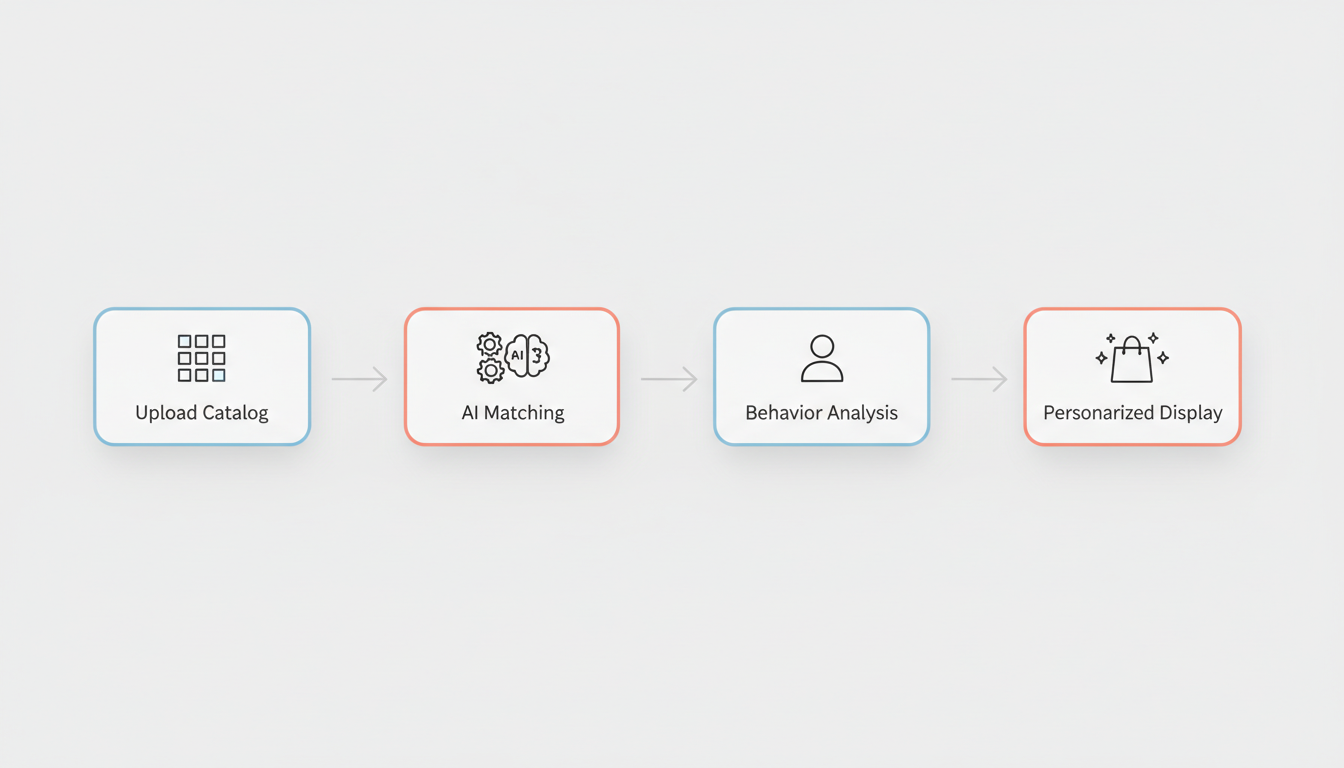
The process:
- You upload your product catalog to TikTok Ads Manager
- TikTok matches products to user interests and behaviors
- Ads are dynamically generated with relevant product information
- Users see personalized product recommendations in their feed
Catalog Ads vs. Standard Video Ads
Feature | Catalog Ads | Standard Video Ads |
Product display | Dynamic, personalized | Single product per ad |
Creative production | Automated from feed | Manual creation required |
Scalability | Hundreds/thousands of products | One product at a time |
Personalization | User behavior-based | Same for all viewers |
Best for | Large catalogs, retargeting | Hero products, brand stories |
When to Use Catalog Ads
Ideal scenarios:
- E-commerce stores with 50+ products
- Retargeting users who viewed or added products
- Promoting seasonal or sale inventory
- Showing personalized recommendations
Less ideal for:
- Single-product businesses
- Brand awareness campaigns
- New market launches without pixel data
Setting Up Your Catalog
Creating your TikTok product catalog involves connecting your ecommerce platform or uploading a product feed manually. For businesses just getting started, understanding whether TikTok advertising is worth it in 2026 can help determine if catalog ads align with your marketing goals.
Platform Integrations
According to TikTok ecommerce guides, supported platforms include:
Platform | Integration Type | Setup Difficulty |
Shopify | Native integration | Easy |
BigCommerce | Native integration | Easy |
WooCommerce | Plugin required | Moderate |
Magento | Manual feed | Complex |
Custom | Manual feed upload | Complex |
Shopify Integration Steps
The Shopify-TikTok integration guide outlines the process:
- Install TikTok app: Go to Shopify App Store, search "TikTok," and install
- Connect TikTok For Business: Authorize your TikTok Ads Manager account
- Set up TikTok Pixel: Enable conversion tracking
- Sync product catalog: Select products to include in your catalog
- Verify data mapping: Confirm SKUs, prices, and descriptions sync correctly
Post-connection checklist:
- Verify product images meet requirements
- Check price and inventory sync accuracy
- Test pixel events fire correctly
- Set up automatic updates
Manual Feed Setup
For custom websites or unsupported platforms, you'll upload a product feed file:
- Access TikTok Ads Manager → Assets → Catalog
- Create new catalog
- Choose "Data Feed" as your data source
- Upload CSV/XML file or provide feed URL
- Map required fields to your data
- Set update schedule (daily recommended)
Product Feed Requirements
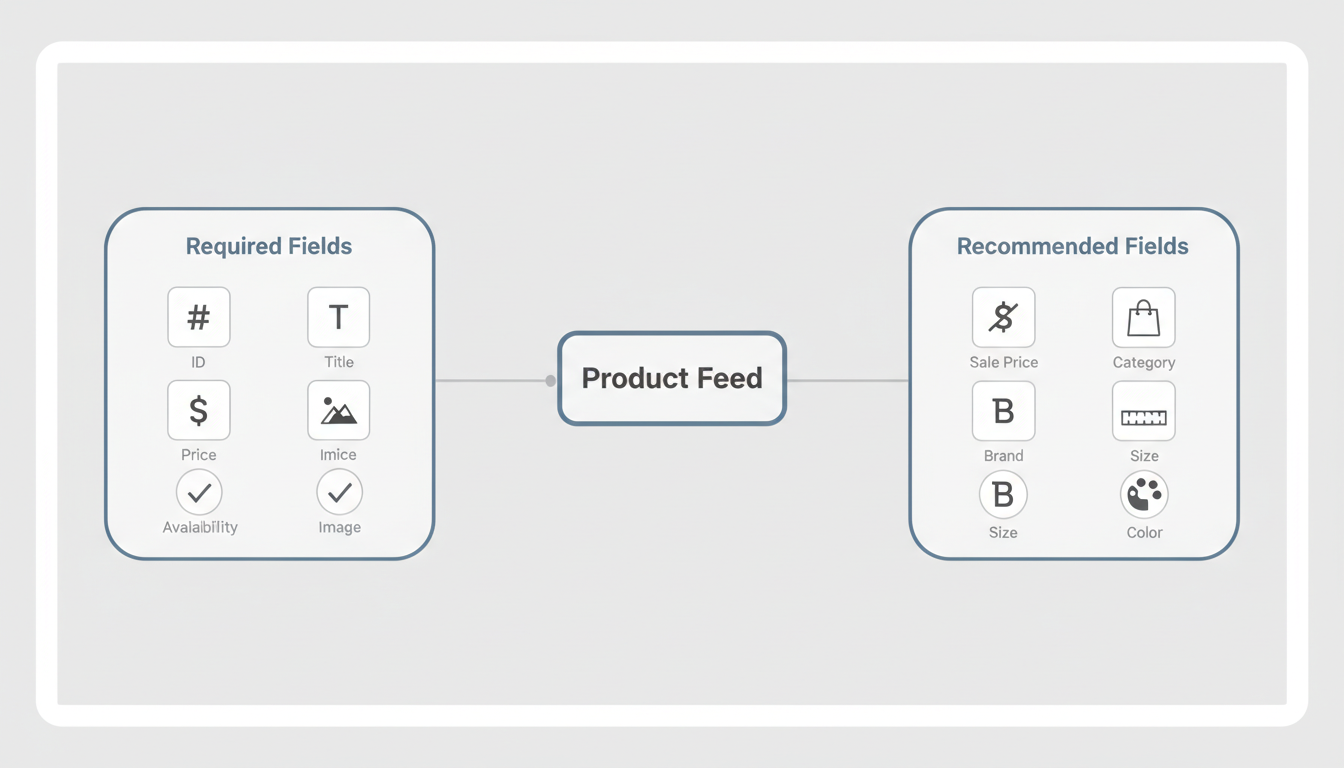
Your product feed must include specific data fields and meet format requirements for TikTok to accept it.
Required Fields
Field | Description | Example |
id | Unique product identifier | SKU-12345 |
title | Product name | "Women's Running Shoes" |
description | Product details | "Lightweight mesh..." |
availability | In stock status | "in stock" or "out of stock" |
condition | Product condition | "new" or "refurbished" |
price | Price with currency | "59.99 USD" |
link | Product page URL | |
image_link | Primary image URL | |
brand | Brand name | "Nike" |

Recommended Fields
Adding optional fields improves ad performance:
Field | Purpose | Impact |
sale_price | Shows discounts | Higher CTR |
product_type | Category hierarchy | Better targeting |
google_product_category | Standard categories | Improved matching |
additional_image_link | Multiple images | Richer ads |
size | Size options | Better relevance |
color | Color variants | Better relevance |
gender | Target gender | Improved targeting |
Image Requirements
Product images significantly impact catalog ad performance:
Specification | Requirement |
Minimum resolution | 500 x 500 pixels |
Recommended resolution | 1000 x 1000 pixels |
Aspect ratio | 1:1 (square) preferred |
File format | JPG, PNG |
File size | Under 4MB |
Background | Clean, non-distracting |
Best practices:
- Use high-quality product photography
- Show product clearly without excessive text
- Maintain consistent styling across catalog
- Avoid watermarks or promotional overlays
Feed File Formats
TikTok accepts several feed formats:
Format | Best For | Notes |
CSV | Simple catalogs | Easy to create in spreadsheets |
XML | Large catalogs | Standard for feed management tools |
TSV | Alternative to CSV | Tab-separated values |
Google Merchant | Existing feeds | Reuse your Google Shopping feed |
Dynamic Product Ads
Once your catalog is connected, you can create dynamic product ad campaigns that automatically show relevant products to users. When planning your budget and goals, reviewing TikTok ROAS benchmarks can help set realistic expectations for catalog campaign performance.
Campaign Objectives for Catalog Ads
Objective | Description | Best For |
Catalog Sales | Optimize for purchases | Direct response |
Conversions | Custom conversion events | Flexible goals |
Traffic | Drive website visits | Consideration stage |
Audience Targeting Options
Retargeting (highest intent):
- Viewed product but didn't purchase
- Added to cart but abandoned
- Previous purchasers (for cross-sell)
Prospecting (new customers):
- Lookalike audiences from purchasers
- Interest-based targeting
- Broad targeting with algorithm optimization
Product Sets
Create product sets to target specific inventory:
Product Set Type | Use Case |
All products | Broad campaigns |
Category-based | Vertical targeting |
Price range | Budget-based targeting |
New arrivals | Launch campaigns |
Sale items | Promotional campaigns |
Best sellers | Proven performers |
GMV Max for TikTok Shop
According to TikTok's help documentation, Product GMV Max is TikTok's automation solution for Shop Ads that optimizes for total channel ROI.
GMV Max features:
- Uses all available creative assets automatically
- Optimizes both organic and paid traffic
- Appears across TikTok feed, search, Shop Tab, and Pangle
- Combines video and product card formats
- Calculates GMV with one-day attribution
Catalog Optimization
Improve catalog ad performance with ongoing optimization. Understanding how to use TikTok lookalike audiences can help expand your reach beyond existing catalog retargeting.
Feed Health Monitoring
Regularly check your catalog for issues:
Common problems:
- Missing required fields
- Broken image links
- Outdated prices or availability
- Duplicate product IDs
- Character encoding errors
Recommended frequency:
- Daily: Check sync status and errors
- Weekly: Review disapproved products
- Monthly: Audit feed quality scores
Performance Optimization
Track catalog-specific metrics:
Metric | What It Measures | Target |
Catalog match rate | Products matching users | 80%+ |
Product click rate | Clicks per impression | 1-3% |
Add to cart rate | Carts per click | 5-15% |
Purchase rate | Purchases per click | 1-5% |
ROAS | Revenue per ad spend | 3x+ |
Creative Optimization
Even with automated ads, you control creative elements. The TikTok Creative Center guide provides insights into which product visuals and formats perform best across different industries.
Customize:
- Ad copy templates
- Call-to-action buttons
- Display price formatting
- Promotional overlays
Test:
- Different image angles
- Title variations
- Price display options
- CTA button text
Seasonal Updates
Keep your catalog current:
- Update seasonal product sets
- Adjust pricing for sales events
- Add holiday-specific products
- Remove discontinued items promptly
Frequently Asked Questions
How Many Products Do I Need for TikTok Catalog Ads?
While there's no strict minimum, catalog ads work best with at least 20-50 products. Larger catalogs (100+ products) provide more optimization opportunities for TikTok's algorithm to find the best matches for each user.
Can I Use My Google Shopping Feed for TikTok?
Yes, TikTok accepts Google Merchant Center feed format. You can often repurpose your existing Google Shopping feed with minimal modifications, though you may want to optimize images for TikTok's 1:1 aspect ratio preference.
How Often Should I Update My Product Feed?
Daily updates are recommended for accuracy. According to ecommerce setup guides, keeping catalog data current—especially inventory and pricing—prevents showing out-of-stock items or incorrect prices that waste ad spend.
What'S the Difference Between Catalog Ads and TikTok Shop?
Catalog ads use your product feed to create dynamic advertisements that drive traffic to your website. TikTok Shop is an in-app marketplace where users can purchase directly within TikTok. You can use both—catalog ads for website traffic and TikTok Shop for in-app purchases.