
TopView ads are TikTok's most premium advertising format—the first video users see when they open the app. With guaranteed visibility and full-screen immersion, TopView delivers unmatched attention for brands willing to invest in maximum impact.
This guide covers everything you need to know about TopView ads: how they work, what they cost, when they make sense, and how to measure success.
What Are Topview Ads?
TopView ads appear immediately when users open TikTok, occupying the entire screen before any other content loads. This placement guarantees your message is the first thing users see during their session.
How Topview Works
When a user opens TikTok, the TopView ad plays automatically with sound on. After 3 seconds, users can skip to their For You feed—but those initial seconds capture attention when engagement is highest.
Key characteristics:
- Full-screen vertical video (9:16 aspect ratio)
- Auto-plays with sound when app opens
- Up to 60 seconds of video content
- Skippable after 3 seconds
- Appears once per user per day maximum
- Links to landing pages, app stores, or hashtag challenges
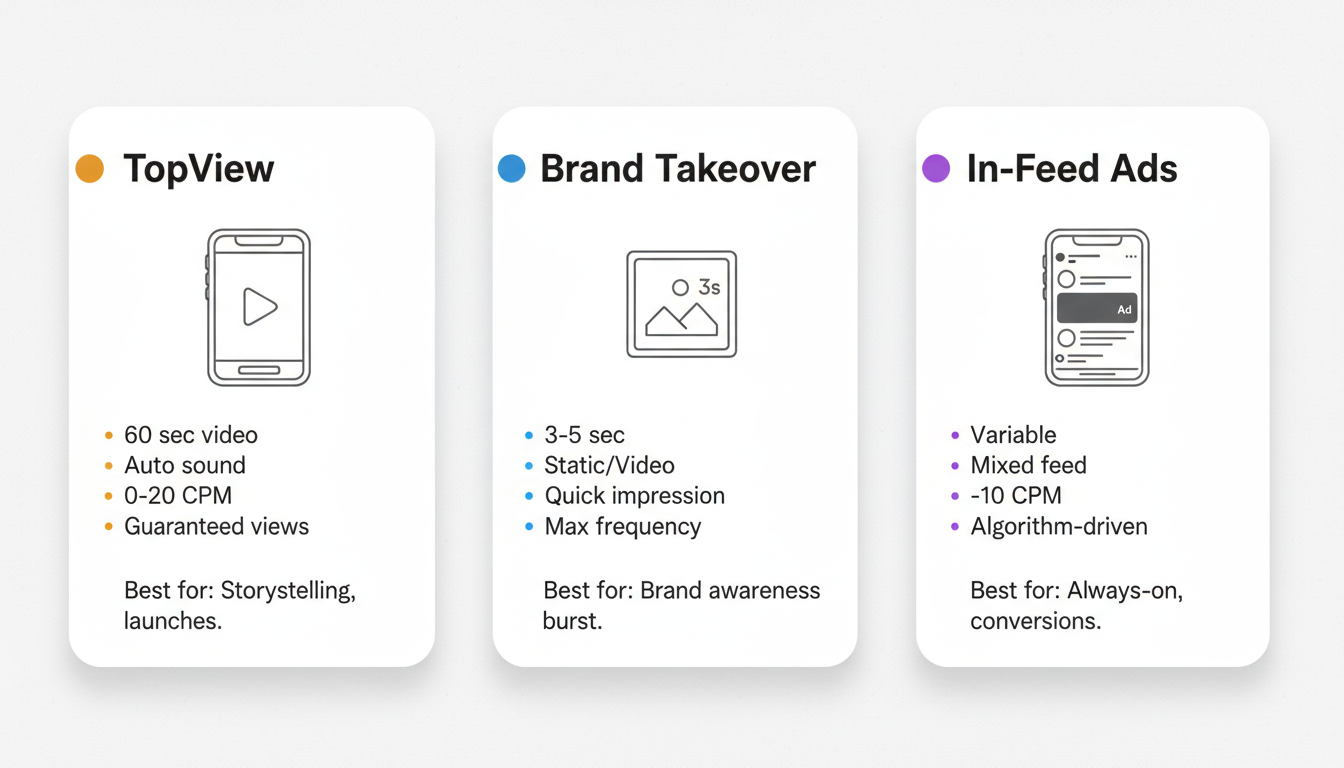
Topview vs. Brand Takeover
TikTok offers two premium "first impression" ad formats that are often confused:
Feature | TopView | Brand Takeover |
Format | Video (up to 60 sec) | Static image or 3-5 sec video |
Sound | Auto-plays with sound | Varies |
Duration | Skippable after 3 sec | 3-5 seconds total |
Daily limit | One per user | One per user |
Best for | Storytelling, product launches | Quick brand impressions |
TopView is generally preferred for campaigns requiring storytelling or product demonstration, while Brand Takeover works for simple brand awareness with maximum frequency.
Topview vs. In-Feed Ads
How does TopView compare to standard In-Feed ads?
Metric | TopView | In-Feed Ads |
Placement | First ad when opening app | Mixed with organic content |
Guaranteed views | Yes | No (algorithm-dependent) |
Average CPM | $10-$20 | $3-$10 |
Skip option | After 3 seconds | Immediate scroll |
Engagement rate | Higher (captive attention) | Variable |
TopView delivers guaranteed attention at premium prices, while In-Feed ads offer more cost-efficient reach with variable attention quality.
Topview Pricing
TopView ads command premium pricing due to their guaranteed visibility and limited inventory.
Cost Structure
According to industry pricing data, TopView ads typically cost:
Metric | Typical Range |
CPM | $10-$20 per 1,000 impressions |
Daily minimum | Varies by market (often $50,000+) |
Buying method | Reservation-based |
Unlike auction-based In-Feed ads, TopView inventory is typically purchased through TikTok's managed service team on a reservation basis. This means:
- You commit to specific dates in advance
- Pricing depends on market, timing, and demand
- Holiday periods and major events command higher rates
- Minimum spends are substantial
For a full comparison of TopView CPMs against other TikTok placements, see our TikTok ads cost breakdown for 2026.
Budget Considerations
TopView is designed for brands with significant budgets seeking maximum impact:
Brand Size | TopView Fit | Alternative |
Enterprise ($100K+ monthly) | Excellent for launches, events | - |
Mid-market ($20K-$100K monthly) | Occasional use for key moments | Spark Ads, In-Feed |
Small business ($1K-$20K monthly) | Generally not accessible | In-Feed, Spark Ads |
For most brands, TopView works best as a campaign spike during product launches, seasonal peaks, or brand moments rather than always-on advertising. Understanding how TikTok advertising works for D2C brands can help you determine whether TopView fits your broader platform strategy.
ROI Considerations
While CPMs are higher, TopView often delivers strong ROI for the right campaigns because:
- Guaranteed viewability (no scrolling past)
- Sound-on by default (unlike most social video)
- First-position attention capture
- Brand recall rates significantly exceed In-Feed
According to TikTok's internal research, TopView ads drive 67% higher engagement than standard In-Feed placements. If you're weighing TikTok against other channels, our guide on whether TikTok advertising is worth it in 2026 breaks down platform-level ROI.
When to Use Topview
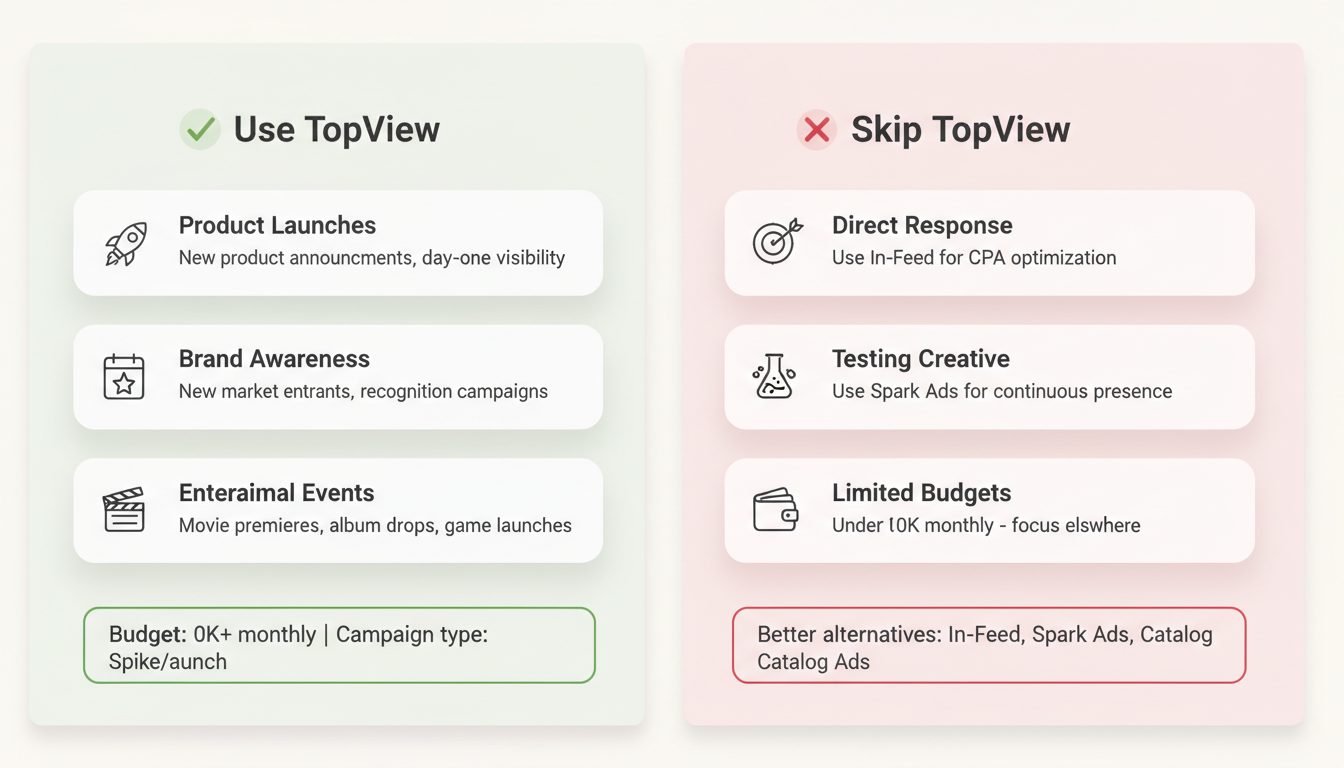
TopView isn't for every campaign. Here's when the premium placement makes strategic sense.
Ideal Use Cases
Product Launches New product announcements benefit from the "announcement moment" TopView creates. The guaranteed visibility ensures your launch message reaches maximum users on day one.
Brand Awareness Campaigns When brand recognition is the primary goal—especially for new market entrants—TopView delivers unmatched awareness lift per impression.
Seasonal Tentpole Events Black Friday, holiday campaigns, and cultural moments when competition for attention peaks. TopView guarantees your message isn't lost in the noise. For fashion brands, combining TopView with TikTok advertising strategies for fashion brands can maximize seasonal campaign impact.
Entertainment Releases Movie premieres, album drops, game launches, and event promotions where urgency and excitement drive the campaign.
Partnership Announcements Major collaborations, celebrity partnerships, or brand moments worth celebrating at scale.
When to Skip Topview
Direct Response Campaigns If your goal is efficient conversions at target CPA, In-Feed ads with conversion optimization typically outperform TopView on cost-per-acquisition. Brands running TikTok ads for dropshipping or TikTok catalog ads should focus on conversion-optimized placements instead.
Always-On Advertising The reservation model and premium pricing make TopView impractical for continuous campaigns. Use In-Feed or Spark Ads for ongoing presence.
Testing Creative Don't test creative concepts with TopView budget. Validate creative performance through In-Feed testing first, then scale winners to TopView.
Limited Budgets If your total monthly budget is under $50,000, TopView likely consumes too large a share for balanced media mix.
Full-Funnel Topview Strategy
TopView works best not as a standalone tactic but as the awareness anchor in a full-funnel campaign sequence. By pairing TopView with mid-funnel and conversion-focused placements, you maximize the return on your premium investment.
Topview as Your Awareness Anchor
Think of TopView as the top of a three-phase funnel:
- Phase 1 — Awareness (TopView): Capture mass attention with your hero message on app open. This creates the initial brand impression at scale.
- Phase 2 — Consideration (In-Feed & Spark Ads): Reinforce the TopView message with creator-led Spark Ads and In-Feed placements that dive deeper into product benefits.
- Phase 3 — Conversion (Retargeting): Retarget TopView viewers and engagers with conversion-optimized ads, Dynamic Showcase Ads, or direct response creatives.
This sequenced approach ensures TopView impressions don't exist in isolation—they feed a pipeline that converts attention into action.
Campaign Sequencing Playbook
A typical TopView campaign sequence runs 30 days:
- Days 1-3: TopView blast — run your hero creative as the app-open ad. Focus on maximum reach and brand recall.
- Days 4-14: In-Feed reinforcement — shift budget to Spark Ads featuring creators who react to or build on your TopView message. Use interest and behavioral targeting to reach engaged users. Pair this with a TikTok Branded Hashtag Challenge for organic amplification.
- Days 15-30: Retargeting and conversion — serve conversion-optimized ads to users who viewed or engaged with your TopView and In-Feed placements. Use Dynamic Showcase Ads for e-commerce or lead gen forms for B2B.
Retargeting Topview Viewers
TikTok Ads Manager lets you build custom audiences from TopView engagement. Here's how to capitalize on that attention:
- Custom Audiences: Create audiences based on video views (25%, 50%, 75%, or 100% completion) and ad interactions (clicks, likes, shares).
- Retargeting Sequences: Serve different creative to viewers based on engagement depth—deeper engagers get stronger CTAs and product-specific messaging.
- Lookalike Audiences: Build lookalikes from your best TopView engagers to extend reach to similar high-intent users without additional TopView spend.
Targeting & Audience Setup
Because TopView is reservation-based, targeting setup differs from self-serve TikTok campaigns. Understanding the booking process and available targeting levers ensures you maximize every impression.
How to Book Topview in TikTok Ads Manager
TopView cannot be purchased through self-serve auction. The reservation process typically follows these steps:
- Contact your TikTok sales representative or reach out through TikTok for Business to initiate a managed campaign.
- Select your target dates — TopView inventory is limited to one advertiser per user per day, so book early, especially around tentpole events.
- Define targeting parameters — specify geographic markets, demographic filters, and any audience targeting overlays.
- Submit creative assets — provide your video file (9:16, 1080x1920+, under 500MB) along with CTA copy and destination URL.
- Review and confirm — TikTok's team reviews creative for policy compliance, confirms pricing, and locks your reservation.
Audience Targeting Options
While TopView reaches all users who open TikTok during your flight, you can layer targeting to focus impressions:
- Demographics: Age ranges, gender, and language preferences.
- Geography: Country, region, state/province, DMA, or city-level targeting.
- Interest & Behavior: TikTok's interest categories and in-app behavior signals (video interactions, creator follows, hashtag engagement).
- Custom Audiences: Upload customer lists, website visitor audiences, or app activity audiences for targeted TopView delivery.
- Lookalike Audiences: Expand reach by targeting users similar to your existing customers or high-value segments.
Setting Up TikTok Pixel for Topview Attribution
Proper pixel setup is essential for measuring TopView's downstream impact:
- Install TikTok Pixel on your website via the base code snippet or a tag manager (GTM, Shopify, etc.).
- Configure post-view events — set up standard events (ViewContent, AddToCart, CompletePayment) to track actions users take after seeing your TopView ad.
- Set attribution windows — use a 7-day view-through attribution window for TopView campaigns, since awareness-driven conversions often happen days after exposure.
- Connect to audiences — use Pixel data to build retargeting audiences from users who visited your site after TopView exposure but didn't convert.
Topview Case Studies
These campaigns demonstrate how major brands have used TopView to drive measurable results across different verticals and objectives.
Pepsi — "Unstoppable" Super Bowl Launch
Pepsi used TopView as the lead-in to their Super Bowl campaign, making TikTok the first touchpoint before the TV spot aired.
- Objective: Generate pre-game buzz and drive tune-in for their halftime sponsorship.
- Creative approach: A 15-second teaser featuring the halftime performer with a "Watch the full reveal" CTA.
- TopView role: First impression on Super Bowl Sunday morning, capturing attention before competing brand messages.
- Results: Pepsi reportedly saw significant branded search lift on game day and strong video completion rates, with the TopView teaser driving users to their full-length content on TikTok and YouTube.
- Key takeaway: TopView excels as an "event primer" that drives anticipation and downstream engagement for tentpole campaigns.
Fenty Beauty — Product Drop Strategy
Fenty Beauty leveraged TopView for a new product launch, pairing the premium placement with creator-led amplification.
- Objective: Drive awareness and first-week sales for a new product line.
- Creative approach: UGC-style video showing real application of the product, designed to feel native to TikTok rather than a traditional ad.
- TopView role: Launch day awareness spike, followed by Spark Ads from beauty creators who received the product early.
- Results: The campaign generated substantial earned media as creators and users organically discussed the product after the TopView exposure. Industry reports suggest the launch exceeded first-week sales targets.
- Key takeaway: Combining TopView with creator seeding creates a one-two punch—mass awareness followed by authentic social proof.
Nike — "You Can'T Stop Us" Awareness Campaign
Nike's global brand campaign used TopView across multiple markets to reinforce their brand message during a cultural moment.
- Objective: Maximize brand awareness and emotional connection during a high-attention cultural period.
- Creative approach: Cinematic split-screen athlete footage adapted for vertical format, emphasizing movement and energy.
- TopView role: Hero placement paired with a Branded Hashtag Challenge encouraging users to share their own "unstoppable" moments.
- Results: Nike reportedly achieved strong ad recall lift and high video completion rates across markets. The paired hashtag challenge generated millions of user-created videos, extending the campaign's organic reach well beyond the paid TopView window.
- Key takeaway: TopView paired with a hashtag challenge turns a broadcast moment into a participatory movement—extending campaign lifespan and earned media value.
Creative Requirements
TopView ads have specific technical requirements and creative best practices.
Technical Specifications
Specification | Requirement |
Aspect ratio | 9:16 (vertical) |
Resolution | 1080 x 1920 pixels minimum |
File size | Up to 500MB |
Video length | 5-60 seconds |
File formats | MP4, MOV, MPEG, AVI |
Audio | Required (auto-plays with sound) |
Safe zone | Central 1010 x 1330px for critical content |
Ad description | Up to 100 characters (including spaces) |
Brand name | Up to 40 characters |
Use TikTok's ad preview tool in Ads Manager to verify how your creative renders across device sizes before submitting your reservation. This is especially important for TopView since you cannot iterate once the reservation is locked.
Creative Best Practices
Hook in the First Second Users can skip after 3 seconds. Your most compelling visual should appear immediately—no slow builds or logo sequences.
Design for Sound-On Unlike most social video where sound is optional, TopView auto-plays with audio. Use music, voiceover, and sound design intentionally.
Match TikTok's Native Feel Even premium placements perform better when creative feels native to the platform. Avoid overtly polished, TV-commercial aesthetics.
Clear Call-to-Action Include a visible CTA that tells users what to do next. TopView supports clicks to websites, app stores, or hashtag challenges.
Mobile-First Design All text and key visuals must be readable on mobile screens. Test on actual devices before launch.
Creative Examples That Work
- Problem-solution hooks: "Tired of [problem]? We fixed it."
- Unexpected visuals: Stop-scroll imagery in the first frame
- Celebrity or creator talent: Familiar faces capture immediate attention
- Product demonstrations: Show the product in action instantly
- User-generated style: Native-feeling content from real users
A/B Testing Before Scaling to Topview
Never run untested creative in a TopView placement. The high cost and reservation model mean you cannot swap creative mid-flight. Instead:
- Test 3-5 creative variations via In-Feed ads at modest budgets ($500-$1,000 per variation).
- Measure video-through rate (VTR) and click-through rate (CTR) over 3-5 days to identify your strongest performer.
- Graduate the top performer to your TopView reservation, confident it will hold attention in the premium slot.
Use the TikTok Creative Center to research trending formats, sounds, and hooks before building your test variations.
UGC & Creator-Led Topview Creative
TikTok's native content style favors authenticity over polish. UGC-style TopView creative consistently outperforms traditional advertising because:
- Users engage longer with content that feels organic rather than interruptive.
- Creator-led content leverages existing trust and audience familiarity.
- The TikTok Creator Marketplace makes it easy to source talent aligned with your brand.
Consider using Spark Ads as a creative pipeline: sponsor high-performing organic creator posts as In-Feed ads first, then adapt the winning format for your TopView creative.
Landing Page Optimization for Topview Traffic
TopView drives high-volume traffic in short bursts. Your landing page must be ready:
- Message match: Ensure your landing page headline and visuals directly reflect the TopView creative. Dissonance between ad and landing page kills conversion rates.
- Mobile page speed: Target sub-3-second load times. TopView users are mobile-only—a slow page loses the attention you paid premium prices to capture.
- CTA consistency: The action you ask for on the landing page should match the CTA in your TopView ad.
- Dedicated landing pages: Build campaign-specific landing pages rather than sending TopView traffic to your homepage. This improves both conversion rate and attribution clarity.
Measuring Topview Performance
Evaluate TopView campaigns with metrics appropriate for premium awareness placements.
Primary Metrics
Metric | What It Measures | Benchmark |
Video Views | Raw reach | Guaranteed by buy |
View-Through Rate | Completion percentage | 20-40% for 15-sec |
Engagement Rate | Likes, comments, shares | 2-5% |
Click-Through Rate | CTA clicks | 0.5-2% |
Assisted Conversions & Post-View Tracking
TopView often drives conversions that don't show up in last-click attribution. Track assisted conversions by monitoring:
- Branded search volume: Compare search volume for your brand name in the days following TopView exposure versus baseline. A lift of 20-50% is common for well-executed campaigns.
- Post-view engagement: Use TikTok Pixel's view-through attribution to capture users who saw your TopView ad and later visited your site or completed a conversion event—even without clicking the ad directly.
- Cross-channel impact: Monitor Google Ads, Meta, and direct traffic for correlated spikes during and after your TopView flight.
Cost Justification Framework
TopView's premium CPM ($10-$20) can seem steep in isolation. Put it in context by comparing equivalent reach costs on competing platforms:
Platform | Premium Placement | Typical CPM |
TikTok TopView | App-open takeover | $10-$20 |
YouTube Masthead | Homepage hero | $20-$40+ |
Instagram Explore | Explore tab placement | $8-$18 |
When factoring in guaranteed viewability, sound-on delivery, and full-screen immersion, TopView often delivers stronger cost-per-engaged-view than alternatives that appear less premium on paper.
Brand Lift Measurement
For TopView campaigns, TikTok offers brand lift studies measuring:
- Ad recall: Do users remember seeing your ad?
- Brand awareness: Has recognition increased?
- Purchase intent: Are users more likely to buy?
These studies require minimum spend thresholds but provide the clearest picture of TopView's brand impact.
Attribution Considerations
TopView primarily drives awareness—conversions often occur later through other channels. Track:
- Branded search volume increases
- Direct website traffic spikes
- Social mention increases
- Downstream retargeting performance
Use post-campaign analysis windows of 7-14 days rather than same-day attribution.
Frequently Asked Questions
How Much Do TikTok Topview Ads Cost?
TopView ads typically run $10-$20 CPM, with daily minimums often exceeding $50,000 depending on market and timing. Pricing is reservation-based through TikTok's managed service team rather than self-serve auction.
Can Small Businesses Use Topview Ads?
TopView is generally designed for enterprise advertisers due to minimum spend requirements. Small businesses achieve better results with In-Feed ads and Spark Ads at lower budgets.
How Long Can Topview Ads Be?
TopView ads can be up to 60 seconds long, though shorter formats (15-30 seconds) often perform better. Users can skip after 3 seconds, so front-load your key message.
What'S the Difference Between Topview and Brand Takeover?
TopView is a video format (up to 60 seconds) while Brand Takeover is typically a static image or 3-5 second video. TopView offers more storytelling capacity; Brand Takeover delivers maximum frequency.
What Are the TikTok Topview Ad Specs?
TopView ads require 9:16 vertical video at 1080x1920 minimum resolution, up to 60 seconds long, in MP4/MOV/MPEG/AVI format with a 500MB file size limit. Audio is required as TopView auto-plays with sound. Keep critical content within the safe zone (central 1010x1330px).
How Do You Set Up TikTok Topview Ads?
TopView ads are reservation-based—contact your TikTok sales representative or managed service team to book specific dates and targeting. Unlike In-Feed ads, TopView cannot be purchased through self-serve auction in TikTok Ads Manager.
What Is the Difference Between Topview and Top Feed on TikTok?
TopView appears as the very first content when a user opens TikTok, while Top Feed places your ad as the first In-Feed ad after organic content loads. TopView guarantees first-impression visibility; Top Feed offers a less intrusive (and less expensive) premium In-Feed position.
Can You a/B Test TikTok Topview Ads?
Due to TopView's reservation model and high daily minimums, direct A/B testing within TopView is impractical. Instead, test creative variations through lower-cost In-Feed placements first, then promote the best-performing creative to your TopView buy.