
What Are Meta Ads? Complete Guide to Facebook & Instagram Advertising
If you've ever seen a sponsored post in your Facebook feed or an Instagram Story with a "Shop Now" button, you've encountered Meta ads. But what are Meta ads, and how do they work for businesses trying to reach customers in 2026?
In this guide, we'll explain everything you need to know about Meta advertising—from the platforms included to how the system works behind the scenes, and why millions of businesses use it as their primary paid advertising channel.
Meta Ads Overview
So what are Meta ads? Meta ads are paid advertisements that appear across Meta's family of apps and services. When Facebook rebranded to Meta in 2021, the advertising platform unified under the Meta name, though many marketers still refer to it as "Facebook advertising."
At its core, Meta advertising lets businesses show targeted ads to specific audiences based on demographics, interests, behaviors, and more. According to Meta's investor reports, the platform reaches over 3.9 billion monthly active users across all its apps—making it the largest social advertising network in the world.
What Is Meant by Meta Ads?
Meta ads is the term for any paid advertisement served through the Meta Ads Manager platform—covering Facebook, Instagram, Messenger, and Audience Network. Advertisers set targeting, creative, and budget; Meta’s auction system then delivers ads to the most relevant users at the right time.
What Makes Meta Ads Different?
Unlike search ads (where users actively look for something), Meta ads are discovery-based. Users aren't searching for your product—they're scrolling through content from friends, family, and creators. Your ad appears based on Meta's algorithm determining that the user might be interested.
This creates unique opportunities:
- Brand awareness at scale
- Demand generation for products people didn't know they needed
- Retargeting users who've already shown interest
- Lookalike audiences that mirror your best customers
What Are Social Extension Ads on Meta?
Social extension ads are a Meta ad format that incorporates social context into the ad experience.
When your friend likes a business page or engages with an ad, Meta can display that social proof alongside the ad when it appears in your feed—for example, "Jane Doe and 3 other friends like this page." This social validation makes the ad feel less like a promotion and more like a recommendation from someone you trust.
Social extensions work automatically when social context is available. Advertisers don’t need to enable them separately—Meta’s system attaches social signals whenever relevant connections exist. This is one reason why building organic page engagement complements your paid advertising: more page likes and shares mean more social proof attached to your ads, which typically improves click-through rates and lowers cost per action.
Meta Ads vs Google Ads: Key Differences
One of the most common questions advertisers ask is how Meta ads compare to Google ads.
The fundamental difference is intent: Google ads capture existing demand (users actively searching for a product or solution), while Meta ads generate new demand (users discover products while browsing social content). Meta excels at brand awareness, audience building, and reaching people who don’t yet know they need your product. Google excels at converting users who are already in a buying mindset.
Many successful advertisers use both platforms together—Meta for top-of-funnel awareness and Google for bottom-of-funnel conversion. For a deeper comparison, see our guide on Facebook ads vs Google ads.
Platforms Included in Meta Ads
When you create a Meta ad campaign, your ads can appear across four main platforms. Each has distinct placements—from Facebook feed ads in the News Feed to Instagram feed ads in Stories and Reels—so understanding your options helps you choose the right format for your goals.
1. Facebook
The original platform with over 3 billion monthly active users. Facebook ads appear in:
- News Feed (desktop and mobile)
- Right column (desktop only)
- Marketplace
- Video feeds
- Stories
- Reels
- Search results
2. Instagram
With over 2 billion monthly active users, Instagram offers highly visual ad placements:
- Feed posts
- Stories (full-screen vertical)
- Reels (short-form video)
- Explore page
- Shop tab
If you're wondering how to use Meta ads Instagram specifically, the visual nature of the platform makes it ideal for product-focused campaigns.
3. Messenger
Meta's messaging app supports:
- Inbox ads
- Sponsored messages (to existing conversations)
- Stories
4. Audience Network
This extends your reach to third-party apps and websites that partner with Meta. Formats include:
- Native ads
- Banner ads
- Interstitial ads
- Rewarded video
Most advertisers start with Facebook and Instagram placements, then expand to Messenger and Audience Network as they scale.
How Meta Ads Work
Understanding the mechanics helps you run more effective campaigns. Here's how Meta advertising works in 2026:
The Auction System
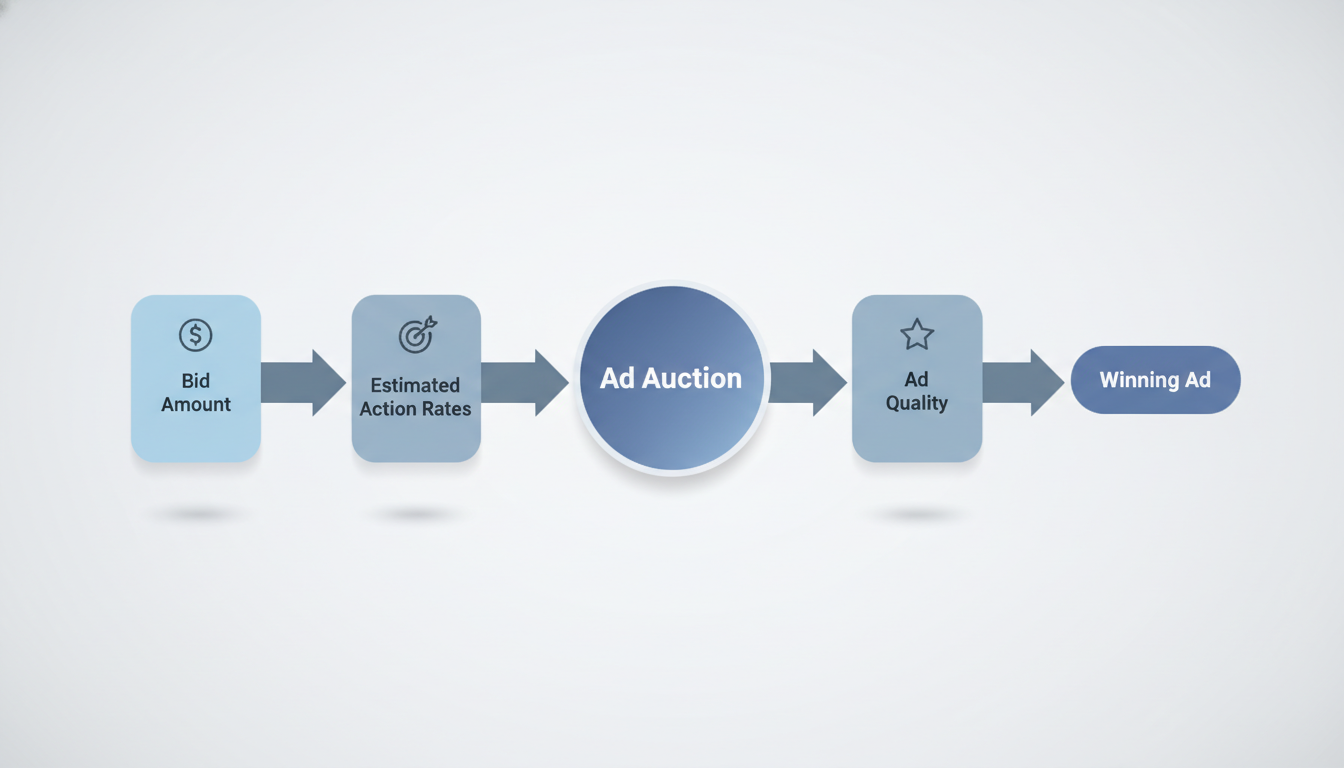
Meta ads operate on an auction model. When there's an opportunity to show an ad, Meta runs an auction among all advertisers targeting that user. The winner isn't just the highest bidder—Meta considers:
- Bid amount – What you're willing to pay
- Estimated action rates – How likely the user is to take your desired action
- Ad quality – Relevance, engagement history, policy compliance
This means a lower bid can win if your ad is highly relevant to the user. Understanding the Meta ads bidding strategy can help you optimize your costs while maintaining competitive performance.
Campaign Structure
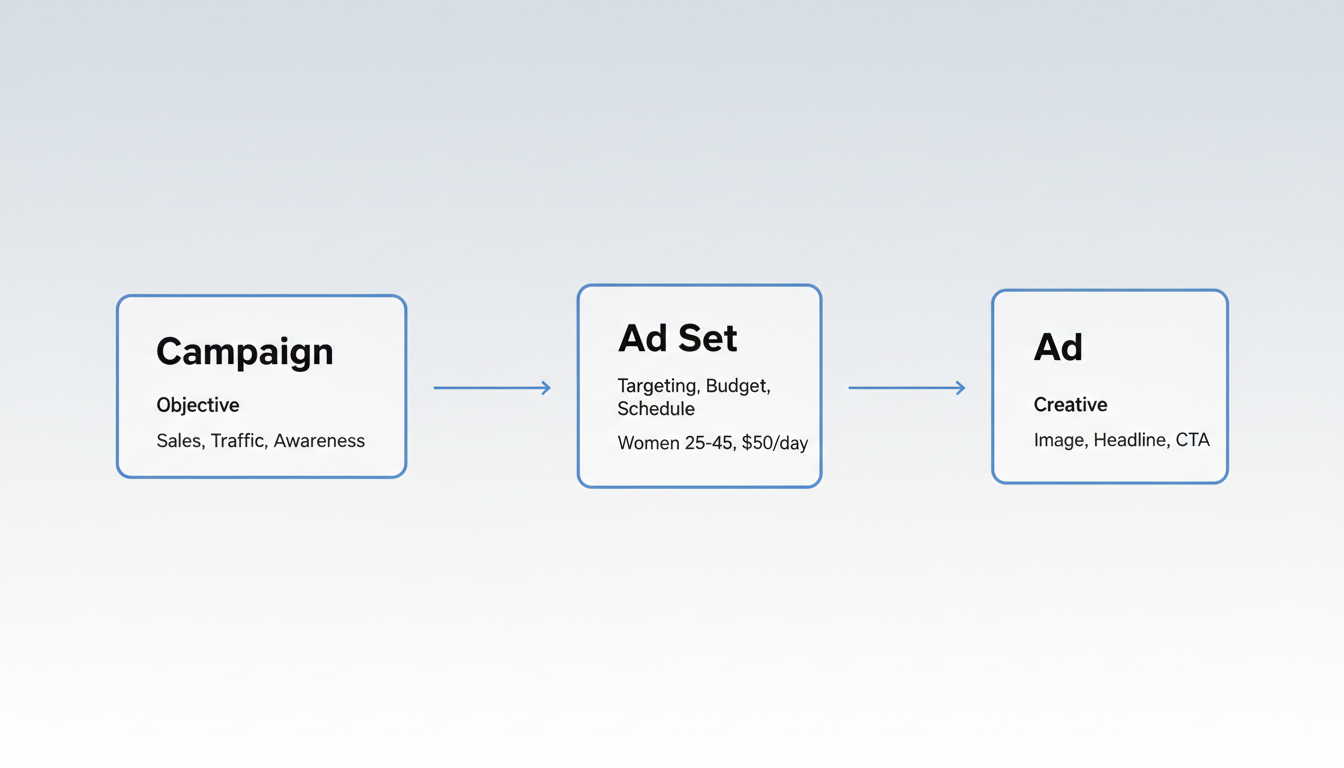
Meta Ads Manager uses a three-level hierarchy:
Level | Purpose | Example |
Campaign | Sets your objective | Conversions, Traffic, Awareness |
Ad Set | Defines targeting, budget, schedule | Women 25-45 interested in fitness, $50/day |
Ad | The creative users see | Image, headline, CTA button |
Ads Manager vs Meta Business Suite
New advertisers often confuse Meta Ads Manager with Meta Business Suite, but they serve different purposes.
Ads Manager is the full-featured campaign creation and management tool designed for advertisers—it’s where you build campaigns, define audiences, set budgets, create ad creatives, and analyze performance at a granular level. Every serious advertiser uses Ads Manager as their primary interface.
Meta Business Suite, on the other hand, is a broader management hub for your business presence across Facebook and Instagram. It handles organic post scheduling, inbox management, basic insights, and simple ad boosting. Think of Business Suite as your day-to-day social media management tool and Ads Manager as your dedicated advertising platform. For campaigns beyond basic post boosts, Ads Manager provides the control and optimization options you need.
Six Campaign Objectives (2026)
Meta simplified its objectives in recent years. You now choose from:
- Awareness – Reach people likely to remember your ad
- Traffic – Send people to a destination (website, app, Messenger)
- Engagement – Get more messages, video views, or post engagement
- Leads – Collect leads via forms without leaving Meta. Lead form data can sync directly to CRMs like HubSpot, Salesforce, and Mailchimp via native integrations or tools like Zapier for automated follow-up.
- App Promotion – Drive app installs or in-app actions
- Sales – Find people likely to purchase your product or service
Building a Full-Funnel Meta Ads Strategy
Understanding what are Meta ads at each funnel stage helps you allocate budget more effectively. The most effective Meta advertisers structure campaigns around a marketing funnel, mapping each campaign objective to a specific stage of the customer journey:
- Top of Funnel (Awareness) – Use Awareness and Traffic objectives with broad audiences and engaging video or brand-story content. The goal is reaching new people who match your ideal customer profile but haven’t heard of you yet.
- Middle of Funnel (Consideration) – Use Engagement and Leads objectives to retarget users who watched your videos or visited your website. Offer lead magnets, educational content, or product demos to build trust and capture contact information.
- Bottom of Funnel (Conversion) – Use Sales objectives targeting warm audiences—people who added items to cart, visited pricing pages, or engaged with middle-funnel content. Dynamic product ads and urgency-based creative (limited offers, countdown timers) work well here.
Running all three funnel stages simultaneously creates a self-sustaining pipeline where new audiences continuously flow from awareness to conversion.
Advantage+ and AI Optimization
A key part of what are Meta ads in 2026 is AI-powered automation. In 2026, Meta’s Advantage+ suite uses machine learning to automate much of campaign optimization. According to Meta's business resources, Advantage+ features include:
- Advantage+ Shopping Campaigns – Automated e-commerce campaigns
- Advantage+ Placements – AI selects best placements
- Advantage+ Creative – Automatic creative variations
- Advantage+ Audience – Expanded targeting with AI assistance
These tools reduce manual optimization work while often improving performance—though experienced advertisers sometimes prefer manual control for specific strategies.
Benefits of Meta Advertising
Why do over 10 million businesses advertise on Meta platforms? Several key advantages:
Massive Reach
No other advertising platform offers access to nearly 4 billion users. Whether your audience is teenagers on Instagram Reels or professionals on Facebook, you can reach them. When comparing Facebook ads vs Google ads, the primary difference lies in user intent and discovery versus search-based advertising.
Precise Targeting
Meta's targeting options include:
- Demographics – Age, gender, location, language, education, job title
- Interests – Based on pages liked, content engaged with
- Behaviors – Purchase behavior, device usage, travel patterns
- Custom Audiences – Upload your customer list or target website visitors
- Lookalike Audiences – Find new users similar to your best customers
Retargeting Strategy with Meta Ads
Retargeting is one of Meta’s most powerful capabilities, allowing you to re-engage users who have already interacted with your business. Meta offers several retargeting approaches:
- Website retargeting – Using Meta Pixel or Conversions API, target users who visited specific pages on your site. For example, show ads to users who viewed a product page but didn’t add to cart.
- Engagement retargeting – Target users who watched your videos, engaged with your posts, or interacted with your Instagram profile within a set timeframe.
- Customer list retargeting – Upload your email list or customer database to create Custom Audiences and serve ads to existing contacts.
- Dynamic retargeting – Automatically show users the specific products they browsed on your website, pulled from your product catalog. This is especially effective for e-commerce stores with large inventories.
A common high-performing setup is retargeting users who added items to cart but didn’t purchase within 7 days, using a discount incentive to close the sale.
Visual-First Formats
Unlike text-based search ads, Meta ads support:
- Static images
- Carousel (multiple images/videos)
- Video (up to 240 minutes)
- Collection ads (product catalogs)
- Instant Experience (full-screen interactive)
Dynamic Product Ads and Catalog Campaigns
Beyond standard ad formats, Meta supports dynamic product ads that automatically display relevant items from your product catalog to individual users.
By connecting your product feed (via Commerce Manager or a data feed platform), Meta’s system matches products to users based on their browsing behavior, purchase history, and predicted interests.
Dynamic ads are particularly valuable for e-commerce businesses with large product inventories. Instead of creating individual ads for each product, you set up one campaign template and Meta’s algorithm determines which products to show each user. Combined with retargeting, dynamic ads can display the exact items a shopper viewed on your website, driving higher conversion rates than generic product ads.
Flexible Budgets
You can start with as little as $1/day, making Meta accessible for small businesses. There's no minimum spend requirement—you control daily or lifetime budgets at the ad set level. To estimate your investment, our Facebook ads cost calculator can help you plan based on your goals and audience size.
Key Cost Benchmarks for Meta Ads
While Meta ad costs vary by industry, objective, and seasonality, these benchmarks provide a useful starting point for budget planning in 2026:
- Average CPC: $0.50–$2.00 across most industries
- Average CPM: $5–$15 for standard placements
- Target ROAS: 3x or higher is a common e-commerce benchmark (meaning $3 in revenue for every $1 spent)
- Average CTR: 0.9%–1.5% across industries, with well-optimized campaigns reaching 2%+
Keep in mind that Q4 costs typically spike 30–50% due to holiday advertising competition, while January and February often see the lowest CPMs of the year. Planning your budget around these seasonal patterns can stretch your ad dollars further.
Measurable Results
Meta provides detailed reporting on:
- Impressions and reach
- Clicks and click-through rate (CTR)
- Conversions (with proper tracking)
- Return on ad spend (ROAS)
- Frequency and cost metrics
Understanding Meta advertising cost metrics helps you evaluate campaign performance and optimize your budget allocation.
Meta Ads also offers powerful platform connectivity across the funnel. Lead ads integrations with CRM platforms like HubSpot, Salesforce, and Mailchimp allow automatic syncing of form leads without manual export. Audience targeting integrations let you upload customer lists to build Custom Audiences and find Lookalike Audiences that mirror your best customers.
Conversions API integrations provide server-side event tracking that complements the Meta Pixel, ensuring accurate attribution even as browser privacy restrictions grow. Monitoring Meta ads results across these touchpoints—and identifying which ways to use Meta Ads for business growth deliver the highest ROAS—is what separates profitable campaigns from wasted spend.
Getting Started with Meta Ads
Ready to launch your first campaign? Now that you know what are Meta ads and how they work, here's the basic process:
Step 1: Set Up Business Assets
Follow these four steps to get your Meta account ready before launching any campaign.
- Create a Meta Business Suite account
- Connect your Facebook Page and Instagram account
- Set up a Meta Pixel or Conversions API for tracking
- Add a payment method
Before launching campaigns, familiarize yourself with Meta ads policy requirements to ensure your ads get approved quickly.
Meta Pixel and Conversions API
Knowing what are Meta ads technically requires understanding the tracking infrastructure behind them. Tracking is the foundation of effective Meta advertising, and two tools make it possible: the Meta Pixel and the Conversions API (CAPI).
The Meta Pixel is a snippet of JavaScript code you install on your website. It tracks visitor actions—page views, add-to-carts, purchases, form submissions—and sends that data back to Meta. This enables conversion tracking (so you know which ads drive results), audience building (retarget visitors), and delivery optimization (Meta shows ads to users most likely to convert). Installation involves adding the base pixel code to your site header, then configuring specific event codes on key pages like checkout confirmation.
The Conversions API sends event data directly from your server to Meta, bypassing the browser entirely. This is increasingly important as browser privacy changes (ad blockers, cookie restrictions, iOS tracking limitations) reduce the reliability of pixel-based tracking. The Conversions API captures events that the Pixel might miss, providing more complete data for optimization. For best results, Meta recommends using both the Pixel and Conversions API together—this redundant setup, called "redundant event tracking," ensures maximum data coverage without double-counting conversions.
Step 2: Define Your Goal
Choose what you want to achieve. For beginners:
- Brand awareness – If people don't know you exist
- Traffic – If you want website visitors
- Sales – If you have an e-commerce store with tracking set up
Step 3: Build Your Audience
Start with a defined audience based on your ideal customer. Avoid going too broad initially—a focused audience of 1-5 million is often more effective than 50+ million.
If you're new to the platform, consider taking a Meta ads course to learn advanced targeting and optimization techniques.
Step 4: Create Compelling Ads
Your ad creative matters more than any other factor. Focus on:
- Scroll-stopping visuals – Bright colors, faces, movement
- Clear value proposition – What's in it for the user?
- Strong call-to-action – Tell them exactly what to do
Step 5: Launch and Optimize
Start with a modest budget ($10-20/day), let the campaign run for at least 3-4 days to exit the learning phase, then analyze results and adjust.
For a detailed walkthrough, see our complete guide on how to run Meta ads.
A/B Testing Your Meta Ads
Once your campaigns are running, systematic testing is key to improving performance over time. Meta’s built-in Experiments tool (found in Ads Manager) lets you run controlled A/B tests that isolate a single variable—creative, audience, placement, or delivery optimization—to determine what drives better results.
Start by testing creative variations, as ad creative typically has the largest impact on performance. Create two versions of an ad that differ in one element (image vs. video, different headline, different call-to-action) and let Meta split traffic evenly between them. Run tests for at least 7 days with sufficient daily budget ($20+ per variant) to reach statistical significance.
Once you identify a winning creative, move on to testing audiences, then placements. This methodical approach compounds improvements over time—a 10% lift from better creative plus a 15% lift from better audience targeting adds up to meaningful performance gains across your account.
Frequently Asked Questions
Common questions about Meta advertising, answered below.
What Are Meta Ads?
What are Meta ads, in simple terms? They are paid advertisements placed across Meta’s platforms—Facebook, Instagram, Messenger, and Audience Network—powered by one of the world’s most sophisticated ad targeting systems. Businesses of all sizes use Meta ads to reach specific audiences based on demographics, interests, behaviors, and more.
Are Meta Ads the Same as Facebook Ads?
Yes, essentially. "Facebook ads" and "Meta ads" refer to the same advertising platform. Meta is the parent company (formerly Facebook, Inc.), and the advertising system covers all Meta properties—Facebook, Instagram, Messenger, and Audience Network. The platform is officially called Meta Ads Manager.
How Much Do Meta Ads Cost?
Meta ads work on an auction system, so costs vary widely. Average CPC is $0.50–$2.00 and CPM averages $5–$15 for most industries.
Your actual costs depend on targeting, competition, ad quality, and objectives. Understanding Facebook ads cost per impression helps you budget effectively.
Can I Advertise on Instagram Without Facebook?
Technically, you need a Meta Business account to run Instagram ads through Ads Manager.
However, you don't need to advertise on Facebook—you can select Instagram-only placements. Instagram also offers "Boost" functionality directly in the app for simpler promotions. Many businesses work with an Instagram ads agency to maximize their platform-specific campaigns.
What'S the Difference Between Boosting and Running Ads?
Boosting is a simplified way to promote existing posts with basic targeting.
Running ads through Ads Manager gives you full control over objectives, placements, audiences, and optimization. For serious advertising, Ads Manager is always recommended over boosting. Learning how to run Facebook ads through the full Ads Manager interface unlocks significantly more capabilities.
Why Am I Getting Charged for Meta Ads?
Meta charges based on your campaign objective and billing event.
Most campaigns charge per impression (CPM), meaning you pay each time your ad is shown 1,000 times, regardless of whether anyone clicks. Some objectives charge per click (CPC) or per action. Charges appear when your ad is delivered—not when someone converts. You can review detailed billing in Ads Manager under the Billing section, where Meta breaks down charges by campaign, date, and payment method.
What Is the Difference Between Meta Ads and Google Ads?
Meta ads are discovery-based—they appear in social feeds targeting users by interests and demographics, even when those users are not actively searching.
Google ads are intent-based—they appear in search results when users actively search for specific terms. Meta excels at brand awareness and demand generation, while Google captures existing demand. Many businesses use both platforms together for full-funnel coverage, using Meta to build awareness and Google to convert high-intent searchers.
How Do I Get Rid of Meta Ads on Facebook?
To stop seeing specific Meta ads on Facebook, tap the three dots on any ad and select “Hide ad” or “Why am I seeing this?” to adjust your ad preferences. For broader control, visit your Facebook Ad Preferences to update interests and data settings.
Are Meta Ads Worth It?
For most businesses, yes.
Meta ads offer unmatched audience reach (3.9 billion monthly users), precise targeting capabilities, and flexible budgets starting at $1/day. The platform is particularly effective for e-commerce, lead generation, and brand awareness campaigns. Success depends on having clear objectives, quality creative, and proper tracking via Meta Pixel or Conversions API. Businesses that invest in testing and optimization typically see positive returns within the first few months of consistent advertising.
Related: the landscape of Meta's ad competitors - If you are weighing where your budget should go, our breakdown of Meta Ads competitors maps each alternative to the funnel stage it owns.
Key Takeaways
The most important points to remember about Meta advertising:
Meta ads reach over 3.9 billion monthly active users across Facebook, Instagram, Messenger, and Audience Network—making it the largest social advertising network in the world.
The Meta auction rewards ad relevance, not just bid size. A well-targeted ad with a high quality score can outperform a higher-spending competitor with poor creative or audience fit.
For full-funnel results, combine Awareness campaigns to reach new audiences, retargeting to re-engage visitors, and dynamic product ads to close conversions—then measure success through ROAS, CPM, and CTR in Ads Manager.