
There is no manual on/off switch for Google AI Overviews. They roll out automatically in supported regions and appear based on your query type, so most users cannot turn them on directly. Where available, you can opt into experimental versions through Google Search Labs. If they are not showing, region or query type is usually why.
What is a Google AI Overview? A Google AI Overview is an AI-generated summary that appears at the top of Google Search results, answering your query in a few sentences and linking out to the sources it cites.
Google AI Overviews appear automatically for many searches, but not all users see them. If you're wondering why AI-generated summaries aren't showing up in your Google results, this guide walks through everything that affects AI Overview availability and how to ensure you can access them. If you publish content and want it cited in these summaries, see our guide to structured data for AI search.
The good news: AI Overviews don't require special software or subscriptions. They're a standard Google Search feature—if you're in a supported region with compatible settings.
Do You Need To "Turn On" AI Overviews?
Short answer: No manual activation required for most users.
AI Overviews are enabled by default in Google Search for supported regions and query types. They appear automatically when Google determines an AI-generated summary would help answer your question.
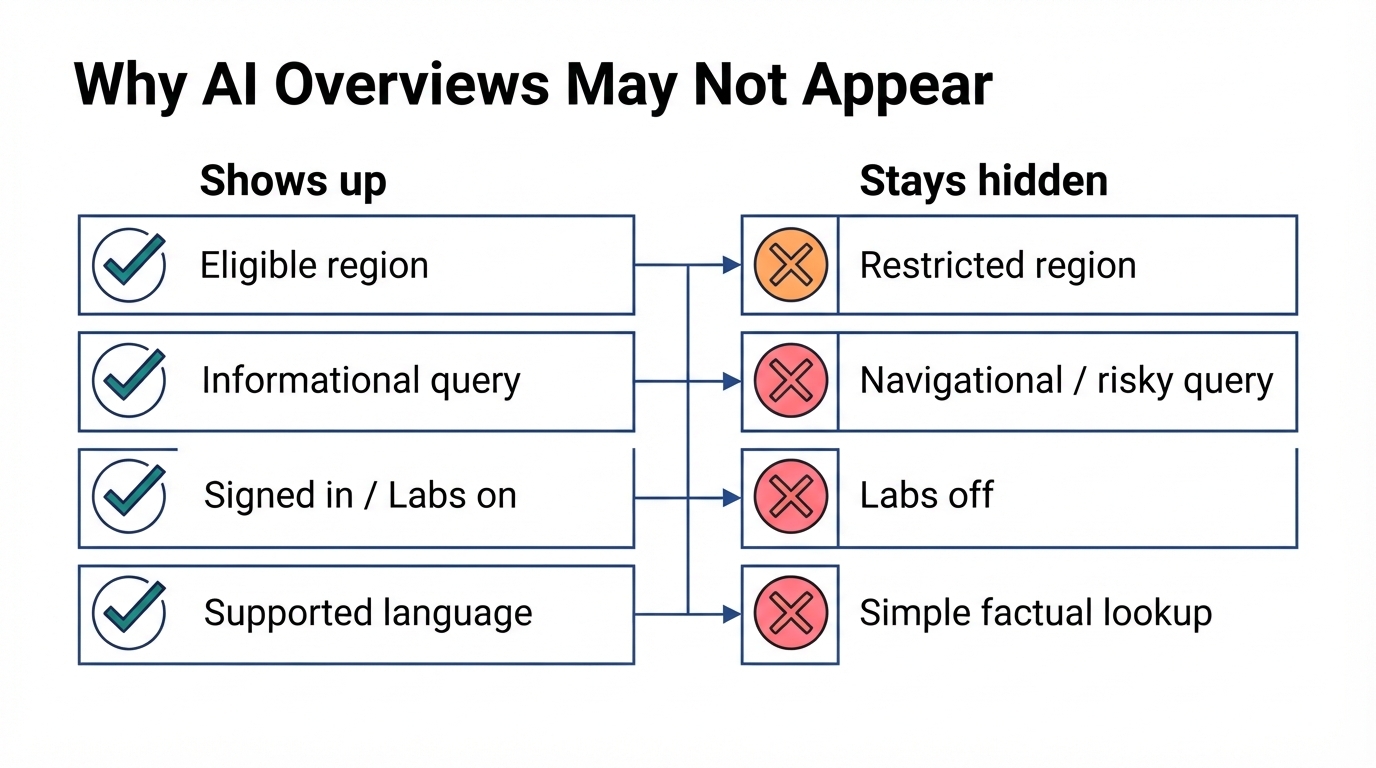
Why you might not see AI Overviews:
Reason | Solution |
Geographic restriction | Check if your region is supported |
Query type | AI Overviews don't appear for all searches |
Browser settings | Some extensions block AI features |
Personalization settings | Account settings may affect display |
Incognito/private mode | Limited features in private browsing |
If AI Overviews aren't appearing for you, the issue is typically one of these factors—not a setting you need to enable.
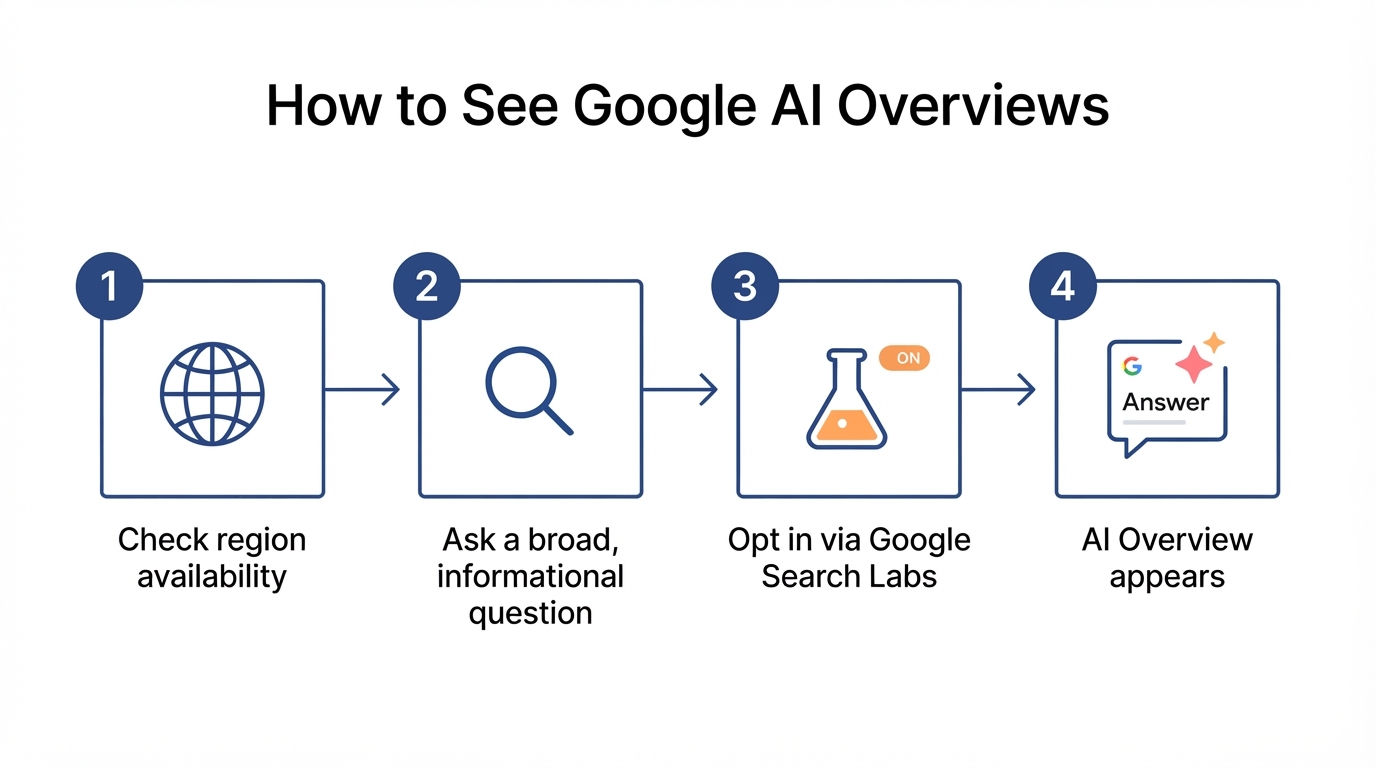
How Do You Check Your Region Availability?
AI Overviews rolled out to different regions on different timelines.
Regions with full AI Overview support (2026):
- United States (full availability since 2024)
- United Kingdom
- India
- Japan
- Indonesia
- Mexico
- Brazil
- Additional markets expanding throughout 2026
To verify your region:
- Search for a complex question on Google (e.g., "what are the benefits of solar panels for homes")
- Look at the top of results for an AI-generated summary with cited sources
- If present, AI Overviews are active in your region
If you're in an unsupported region:
- AI Overviews may not appear regardless of settings
- Using a VPN to access US Google may show AI Overviews (though this may violate terms of service)
- Wait for rollout to your region—Google continues expanding availability
How Do You Make AI Overviews Appear in Your Searches?
Several factors determine whether AI Overviews show for specific searches. Understanding these factors is crucial for effective competitive AI search benchmarking and optimizing your content strategy. When an AI Overview does appear, it directly affects how many clicks the results below receive - see our guide to CTR SEO for what that means for your rankings.

Query Types That Trigger AI Overviews
AI Overviews appear most frequently for:
- Complex questions - "How does photosynthesis work?"
- Comparison queries - "Difference between LED and OLED"
- Research queries - "Best practices for home energy efficiency"
- Educational topics - "What causes earthquakes?"
AI Overviews rarely appear for:
- Simple factual lookups (single answer in knowledge panel)
- Local searches (maps results dominate)
- Shopping queries (product listings preferred)
- Navigation queries (direct website links)
- Recent news (time-sensitive content)
Check Browser Extensions
Browser extensions can block AI Overviews. If you've installed ad blockers or search customization tools, they might hide AI features.
Extensions known to affect AI Overviews:
- uBlock Origin (with certain filter lists)
- Hide Google AI Overview extensions
- Search result customization tools
To test:
- Open an incognito/private window (extensions typically disabled)
- Search for a complex question
- If AI Overview appears in incognito but not regular browsing, an extension is blocking it
Verify Google Search Settings
Some Google settings affect AI feature display.
Check these settings:
- Go to google.com/preferences
- Review "Search settings"
- Ensure "Show Personal Results" isn't restricted
- Check that SafeSearch isn't blocking content types
How Do You Use Google Search Labs?
Google Search Labs lets you access experimental AI features, sometimes including enhanced AI Overview capabilities.
To access Search Labs:
- Go to labs.google.com/search
- Sign in with your Google account
- Browse available experiments
- Enable experiments you want to try
Available experiments may include:
- Enhanced AI Overview features
- AI-organized search results
- Additional AI capabilities in development
Note: Labs experiments change frequently. What's available today may be removed tomorrow, or become standard features.
Troubleshooting: Why AI Overviews Don'T Appear
If you've confirmed your region supports AI Overviews but still don't see them:
Step 1: Test with a Known Query
Use this test query: "explain the water cycle"
This type of educational, complex question consistently triggers AI Overviews in supported regions.
Step 2: Clear Browser Data
Cached settings may affect AI feature display:
- Clear cookies for google.com
- Clear browser cache
- Restart browser
- Try the test query again
Step 3: Try a Different Browser
Test whether the issue is browser-specific:
- If AI Overviews appear in Chrome but not Firefox, check Firefox extensions
- If AI Overviews appear in no browser, the issue is account or region-based
Step 4: Sign Out and Test
Google personalizes results based on your account. Test while signed out:
- Sign out of your Google account
- Use incognito/private mode
- Search for "explain the water cycle"
- If AI Overview appears, personalization settings may be affecting your signed-in experience
Step 5: Check Mobile vs. Desktop
AI Overviews behave differently across devices:
- Try the same query on mobile Google app
- Try on desktop browser
- Compare whether AI Overviews appear on one but not the other
Why Is My AI Overview Stuck On "Generating"?
If the AI Overview box loads but stays stuck on "Generating AI Overview" and never finishes, the summary is not broken on your end. This usually means a temporary glitch, a slow rollout, or Google throttling the feature for your account. Refresh the page, clear your google.com cookies, or rerun the same query a few seconds later. If it consistently fails to generate for a query that normally triggers an Overview, Google is likely testing or rate-limiting the feature rather than blocking you specifically, and it typically resolves within a day.
Do AI Overviews Work on Mobile Devices?
AI Overviews are available on mobile through:
Google app (iOS/Android):
- AI Overviews appear by default
- No special settings required
- May see different AI features than desktop
Mobile browsers:
- Chrome mobile: Full AI Overview support
- Safari: AI Overviews appear on google.com
- Other browsers: Support varies
What Should You Do If AI Overviews Still Don'T Work?
If you've tried everything above and AI Overviews still don't appear, work through our dedicated fix for AI Overviews not showing up, which diagnoses each cause in order. It's also worth examining the broader context of how SEO, AEO, GEO, and AIO work together in modern search optimization. For the source of truth on how Google selects the content it summarizes, review Google's official AI Overviews guidance.
Wait and retry later:
- Google rolls out features gradually
- Your account may be in a later rollout group
- Features may be temporarily disabled for testing
Check Google's official status:
- Google Search Central blog posts about availability
- Google Search Liaison on social media for updates
- Regional Google support pages
Accept query-specific behavior:
- Not all queries trigger AI Overviews
- Google's algorithms determine when AI summaries help
- Some searches will never show AI-generated content
Frequently Asked Questions
Quick answers to the most common questions about accessing Google AI Overviews.
Why Is My Google AI Overview Not Showing Up?
Most often your region or query type is the reason. AI Overviews only appear in supported countries and for questions Google thinks need a summary. Browser extensions, incognito mode, or personalization settings can also hide them.
Can You Manually Turn on Google AI Overviews?
No. There is no on/off toggle for most users; AI Overviews are enabled by default in supported regions. Where offered, Google Search Labs lets you opt into experimental versions. You can only disable them, not force them on.
Do AI Overviews Appear in All Countries?
No. AI Overviews launched in the United States first and expanded to markets like the UK, India, Japan, Brazil, and Mexico. Many regions still have no access, so availability depends on where you search.
Why Is "Generating AI Overview" Not Working?
A stuck "Generating AI Overview" message usually means a temporary glitch or slow rollout. Refresh the page, clear your google.com cookies, or retry the search. If it never completes, Google may be testing or throttling the feature for your account.
Key Takeaways
Getting AI Overviews in your Google searches:
- No activation needed - AI Overviews are on by default in supported regions
- Check your region - Not all countries have full AI Overview access
- Query type matters - Complex questions trigger AI Overviews; simple lookups don't
- Check extensions - Browser extensions may block AI features
- Test in incognito - Eliminates extension and cache issues
- Be patient - Feature rollout continues; unavailability may be temporary
AI Overviews are designed to help you find information faster. If they're not appearing, the troubleshooting steps above will help identify why - and whether the solution is within your control. For those looking to optimize their content for these AI-powered features, exploring AEO optimization examples can provide practical strategies, and leveraging generative AI SEO tools can help you stay competitive in this evolving landscape.